Quick Summary: AI in application development is no longer confined to experiments and simple chatbots tacked to existing processes. Companies are employing it to accelerate the development process, run agents that perform business tasks inside the app, and make decisions using real-time data. This guide will cover the following topics: Where does AI play in the process of app development? How much does it cost at each level? Which option makes sense—building in-house, outsourcing, or using no-code platforms? What exactly is necessary when AI makes decisions using your users’ data?
Most enterprise apps nowadays have some form of AI in them, whether that’s a recommendation engine, a support chatbot, or a predictive model quietly running in the background. According to Gartner research, 40% of all enterprise applications will include AI-powered task agents by 2026, while in 2025 only about 5% of applications will contain such components. This indicates how quickly it went from novelty to necessity. What has changed recently is not only the presence of AI in enterprise software but also the way AI is implemented there. Previously, AI was a part of application functionality; now it becomes an integral component of application development itself.
Most enterprises adopting AI in app development are doing it bit by bit. A team adds a chatbot here, an AI-assisted testing tool there, without a strategy connecting the two or a plan for what happens when a model needs retraining, a compliance auditor asks how a decision was made, or the pilot that worked with 50 users has to hold up under 50,000. This guide is built for the leaders who want to skip that trial-and-error phase and go in with a working strategy from day one.
What Is AI in App Development?
AI in app development covers two distinct things, and enterprises need to be clear on which one they’re solving for, because the skills, tools, and budgets differ.
- AI-powered features inside the app itself — recommendation systems, natural language search, computer vision, predictive analytics, conversational interfaces. This is what most people mean when they say “AI app.”
- AI is used as a development accelerator — code generation assistants, automated test writing, AI-assisted code review, and agentic coding tools that can carry out multi-step development tasks with light supervision. This doesn’t change what the app does for the end user, but it changes how fast and how cheaply it gets built.
Enterprise strategy has to account for both, because a team that only thinks about AI features and ignores AI-assisted development is leaving speed and cost savings on the table, and a team that only optimizes the build process without adding AI capability to the product itself is shipping a faster version of an app that’s already behind on features competitors are launching.
Why AI in App Development Matters for Enterprises Today
Recent mobile app development statistics indicate that AI penetration in app development has reached 63%, setting a new baseline for enterprise investments. That’s no longer early-adopter territory. It’s close to becoming the default expectation for any new enterprise build.
A few forces are driving the shift at once:
- Delivery pressure — teams are expected to ship faster without growing headcount, and AI-assisted coding tools are one of the few levers that genuinely move that needle
- Shifting user expectations — consumer apps trained users to expect personalization, instant answers, and predictive suggestions, and enterprise software is now held to the same bar internally
- Visible downside risk — a chatbot giving bad answers or a model making an unexplainable decision has become visible enough that leadership is paying closer attention, which is part of why governance now gets budgeted alongside development instead of bolted on after launch
None of this is static. What counts as table stakes today is different from eighteen months ago, and enterprises that want to stay current need to track the latest trends in AI rather than build a strategy around last year’s capabilities.
See a project estimate scoped to the features your users actually need.
AI in App Development Lifecycle: Where It Fits at Every Stage
AI touches nearly every stage of building an enterprise app now, not just the finished product. Here’s how that breaks down stage by stage.
| Lifecycle Stage | How AI Is Used |
| Planning & Requirements | AI-assisted market and competitor analysis, requirement summarization from stakeholder input |
| Design & UX | AI-generated wireframes, layout suggestions, and usability pattern recommendations |
| Development | Code generation, autocomplete, and agentic coding tools that write and refactor code with supervision |
| Testing & QA | AI-generated test cases, automated regression testing, anomaly detection in test results |
| Deployment | Predictive rollout risk scoring, automated deployment pipelines with AI-flagged anomalies |
| Maintenance & Monitoring | Predictive maintenance, automated bug triage, performance anomalies |
Getting this right depends on having a clearly defined mobile app development process to begin with. AI accelerates whatever process you already have. If that process is disorganized, AI just helps you make mistakes faster.
Design deserves a specific mention here, since it’s often the most overlooked stage for AI adoption. Enterprises are increasingly using AI tools for UX design to test layout variations and flag usability issues before a single line of code is written, which reduces the expensive rework that occurs when usability problems surface late in development.
Key AI Capabilities to Build Into Enterprise Apps
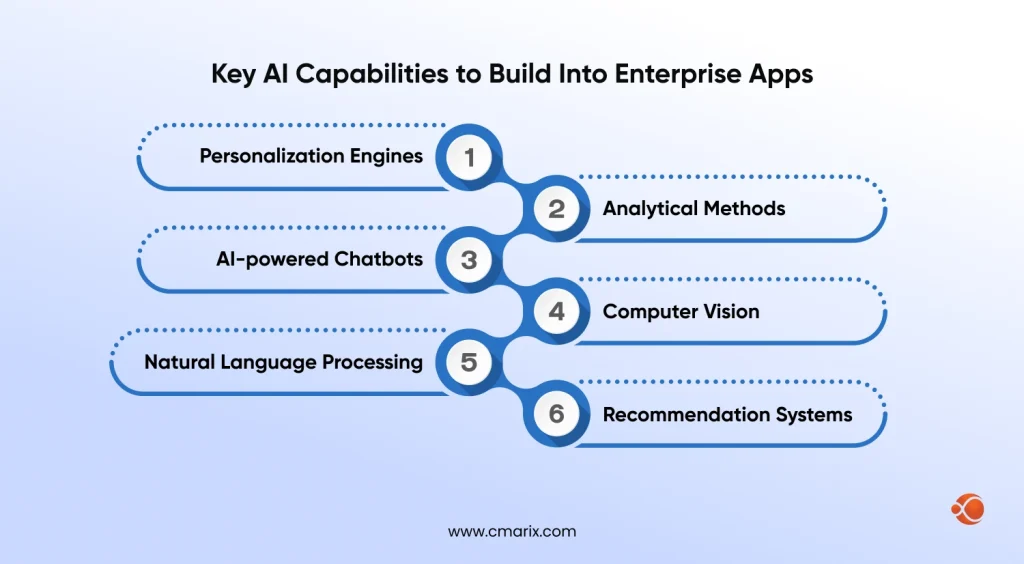
Beyond the build process, these are the AI capabilities enterprises are actually shipping inside their apps today.
- Personalization engines that adjust content, offers, and navigation based on individual user behavior rather than broad segments
- Analytical methods that indicate the likelihood of customer churn, estimate future demands, or provide information on the next best thing to do.
- AI-powered chatbots and copilots that provide first-line customer service, help users navigate through complicated processes, or help internal users with data queries.
- Computer vision for quality inspection, document processing or image-based search
- Natural language processing for search, summarization, and sentiment analysis on unstructured data like support tickets or reviews
- Recommendation systems that suggest products, content, or actions based on behavioral and contextual data
Strong enterprise user experience increasingly depends on these capabilities working together rather than as isolated features. A chatbot that can’t access the same personalization data as the recommendation engine ends up giving generic answers, which undercuts the exact experience the AI investment was supposed to deliver.
AI in App Development Across Industries
The capabilities that are most important depend highly on the industry the application was designed to serve. Here are some consistent themes:
- Fintech – predictive scoring and fraud detection and explainable AI for decision-making around lending and risk assessment
- Healthcare – diagnostics assistance, risk scoring of patients, and AI-based appointment or triage assistance
- Retail and eCommerce – recommendations, dynamic pricing and demand forecasting
- Logistics and Supply Chain – prediction of delays, route optimization and dispatch agents
- Manufacturing – predictive maintenance and computer vision for quality control
However, a common thread between all of these cases is the fact that the AI works well within the framework of industry-specific data and concepts and not as a general model.
AI Agents and Agentic Workflows in App Development
The most significant shift in enterprise app development over the last year isn’t a new feature category. It’s the move from AI that answers questions to AI that completes tasks.
Enterprise AI agents can now execute multi-step workflows with limited human oversight.
A typical agent workflow looks like this:
- Pull data from multiple connected systems (CRM, ERP, internal databases)
- Reconcile and validate that data against business rules
- Take an action, like approving a routine expense report, or escalate to a human reviewer when something falls outside its confidence threshold
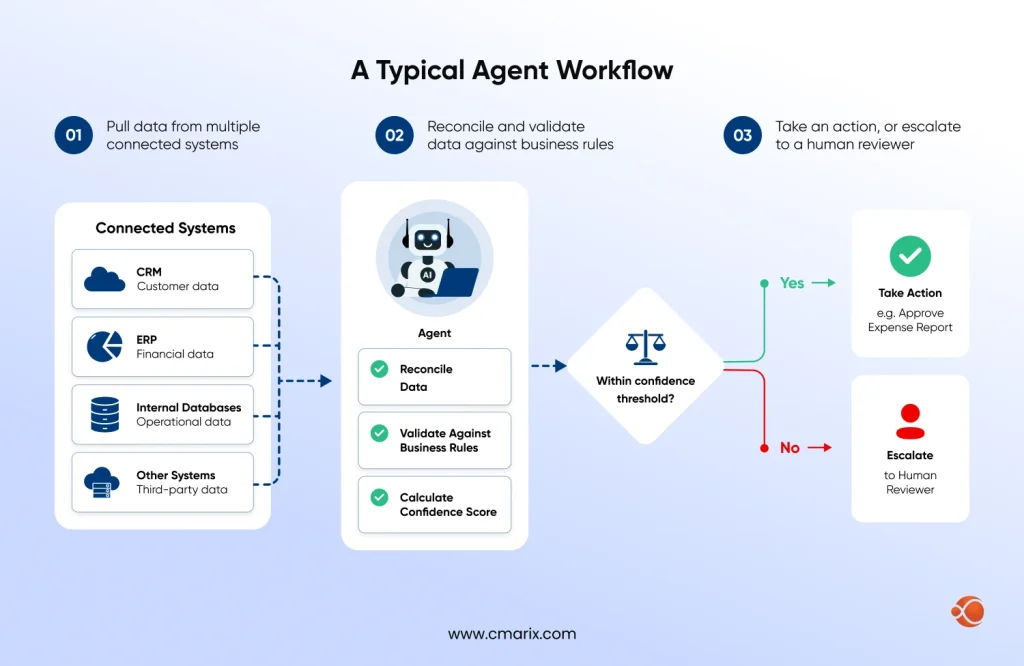
This matters for app development strategy because agents change what “a feature” even means. Rather than building a single-purpose tool, teams are developing agents that can be pointed at different problems with different instructions.
Most agentic systems that actually work in production rely on some form of RAG architecture for business to ground their responses and actions in the company’s own data rather than a model’s general training. Without that grounding, an agent making decisions in a regulated industry is a liability, not an asset. Enterprises evaluating agentic AI should treat retrieval and data grounding as a prerequisite, not an optional add-on to bolt on after the agent is already live.
What’s the difference between an AI chatbot and an AI agent?
A chatbot answers questions. An agent takes action. A chatbot might tell a user their invoice is overdue; an agent can pull the invoice, verify the amount, and send the payment reminder on its own, escalating to a human only when something falls outside its rules.
Build vs Partner vs No-Code: Choosing Your AI App Development Approach
It is often at this juncture that strategy and budgeting come face-to-face. There are three options open to any firm, and each has its pros and cons.
| Approach | Cost | Speed | Control | Best Fit For |
| In-house team | Highest ongoing cost, requires specialized hiring | Slowest to start, faster once team is established | Full control over roadmap and IP | Companies where AI is core to the product long-term |
| Outsourced / partner build | Mid-range, project or retainer based | Fastest time to launch, existing expertise on day one | Shared control, defined by contract scope | Companies that need speed and don’t want to build an AI team from scratch |
| No-code / low-code AI platform | Lowest upfront cost, subscription-based | Fastest for simple use cases | Limited control, constrained by platform capabilities | Internal tools or narrow use cases without heavy customization needs |
For most companies developing anything other than a simple internal tool, getting AI application development services from an experienced partner achieves the optimal combination of speed and quality without the years of effort required to develop a complete internal AI team from scratch. This being said, the best choice highly depends on whether it’s about creating something unique that will provide the company an ongoing competitive advantage, or just a feature that must be deployed.
Companies leaning toward the partner route should look closely at how an enterprise app development company handles handoff, documentation, and long-term maintenance, since a fast build that nobody in-house can maintain afterward just moves the cost problem down the road.
How long does it take to build an AI-powered enterprise app?
An AI-enabled MVP typically takes 8 to 12 weeks. A mid-market RAG-based platform runs 4 to 6 months, and a full enterprise multi-agent system can take 6 to 12 months depending on integrations and compliance requirements.
How Much Does AI App Development Cost? (Cost Breakdown by Tier)
Cost is the question every enterprise stakeholder asks first, and the honest answer is that it depends heavily on scope. Industry pricing in 2026 generally sorts into three tiers.
| Tier | Typical Cost Range | What’s Included |
| AI-Enabled MVP | $40,000 – $90,000 | Single core AI feature (chatbot, basic recommendation engine), pre-trained models, limited integrations |
| Mid-Market / RAG-Based Platform | $90,000 – $250,000 | Custom retrieval-augmented generation, multiple integrations, moderate compliance requirements |
| Enterprise Multi-Agent System | $250,000 – $600,000+ | Multi-agent orchestration, private infrastructure, advanced governance, heavy compliance (HIPAA, GDPR, SOC 2) |
A few factors move a project between tiers fast:
- Regulated industries like healthcare and finance will typically see an increase of 25% to 35% in cost due to compliance, data governance, and audit requirements, which unregulated applications do not incur at all
- The creation of a custom training model, instead of working with pre-trained models which are built on your dataset, will further increase the cost, with the project typically running into six or seven figures
- The cost of going from a proof of concept to production is generally underestimated. The transition from a proof of concept to a production-level solution typically costs three to six times the cost of the proof of concept stage, and this is why organizations face challenges with planning PoCs without budgeting for production
If you’re scoping a project and wantto know the cost to develop an AI app specific to your feature set, get a detailed estimate rather than relying on industry averages, since the range between tiers is wide enough that a generic number isn’t useful for actual budget planning.
AI App Security, Compliance, and Governance: What Enterprises Need to Know
Once AI is making decisions inside an enterprise app, security and compliance stop being a checkbox at the end of the project and become a design constraint from day one.
- Data privacy is the first concern, particularly for apps handling customer financial or health information. Every model that touches sensitive data needs a clear answer to where that data is stored, whether it’s used for further model training, and who can access it. Regulated industries add specific frameworks to this list, including HIPAA for healthcare, GDPR for anything touching EU users, and SOC 2 as a general enterprise trust baseline that most B2B buyers will ask for regardless of industry.
- Explainability is the second, slightly more subtle requirement. For instance, when an enterprise’s AI system rejects someone’s loan application, identifies a transaction, or even makes a recommendation regarding hiring someone, saying “the model decided” is never going to cut it. The enterprise needs to have a trail of data used by the model to make its decision – which is a different engineering problem from making the model accurate.
- On the governance side, there is the issue of operation. This includes deciding who needs to approve an AI use case before the implementation process begins; monitoring the performance of the model post-deployment; and having a rollback mechanism for cases when the model starts acting weird. Enterprises that skip this step usually learn about their mistake later – either during an audit or a customer complaint.
Do all AI apps need to comply with HIPAA or GDPR?
Only if they handle the data those frameworks cover. HIPAA applies to apps touching protected health information, and GDPR applies to any app processing EU residents’ personal data, regardless of where the company is based. Apps outside those categories still benefit from SOC 2-level practices even when they’re not legally required.
Partnering with a team experienced in AI software development solutions that already builds compliance and monitoring into the architecture, rather than retrofitting it later, tends to be considerably cheaper than fixing a governance gap after launch.
Common Challenges in AI App Development (and How to Solve Them)
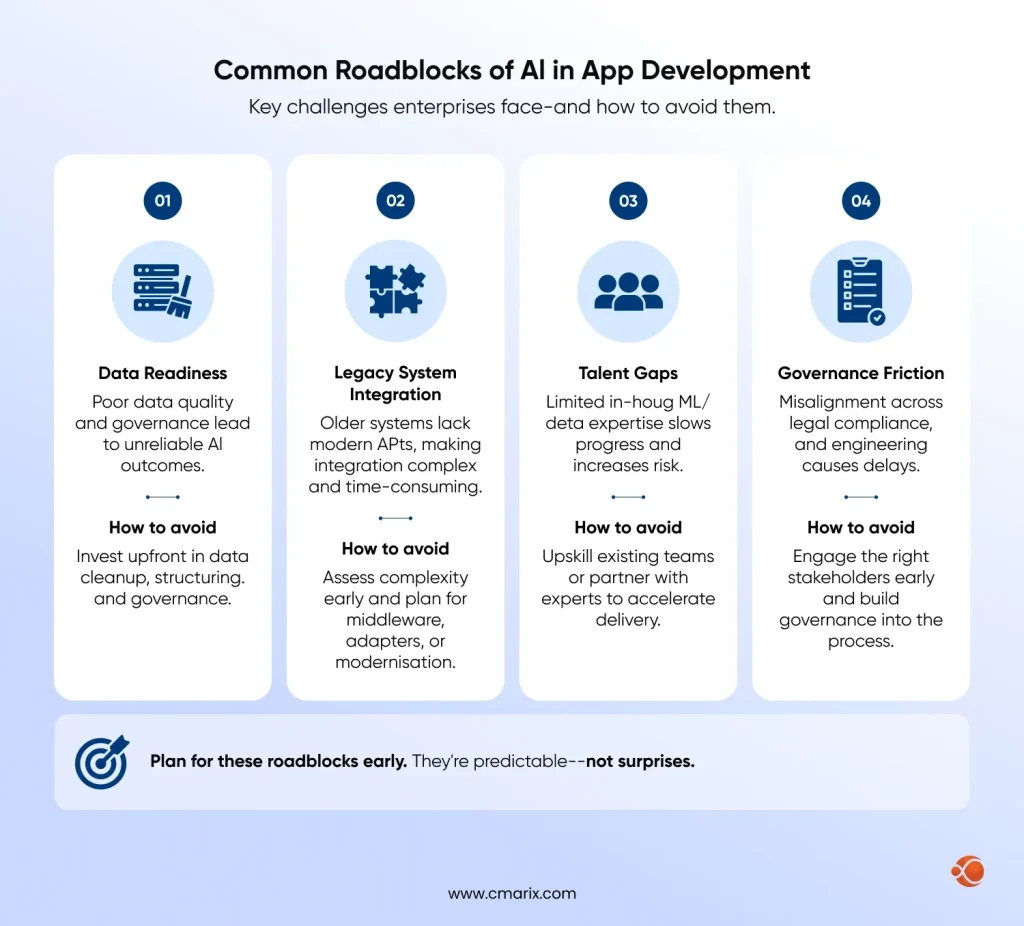
A few obstacles show up repeatedly once enterprises move past the planning stage.
- Data readiness is the most common one. AI features are only as good as the data feeding them, and most enterprises underestimate how much cleanup, structuring, and governance their existing data needs before a model can use it reliably. Budget time for this explicitly rather than discovering it mid-build.
- Legacy system integration trips up more projects than the AI itself does. Older enterprise systems weren’t built with API-first access in mind, and connecting a modern AI feature to a twenty-year-old backend often takes more engineering effort than the AI component.
- Talent gaps are a real constraint, specifically for teams trying to build AI capability in-house without existing ML or data engineering expertise. This is often the deciding factor that pushes companies toward a partner build rather than hiring a team from scratch.
- Governance friction occurs due to a lack of alignment between legal, compliance, and engineering. The situation where an idea is technically ready for implementation but has not undergone compliance will lead to delays in the project, which can be avoided by involving the right stakeholders from the onset.
Enterprises that stay current on the future of mobile app development tend to plan for these roadblocks earlier, since most of them are now well-documented patterns rather than surprises.
Bring CMARIX in to get a stalled AI project back on track.
Real-World Example: AI App Development in Action
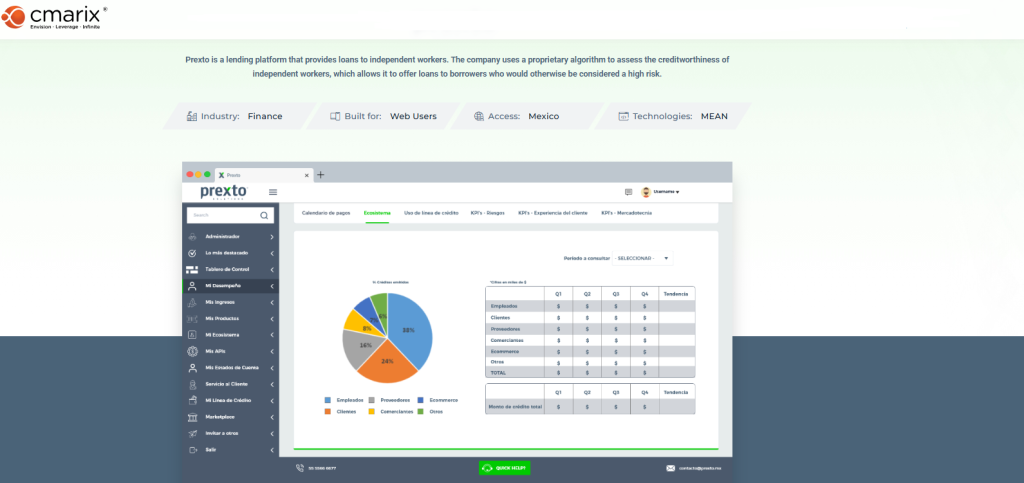
CMARIX built Prexto, an explainable AI platform for financial decision-making, to solve exactly the transparency problem enterprises run into once AI starts making consequential calls. Rather than treating explainability as an afterthought, the system was designed so every prediction comes with a traceable reasoning path, which matters enormously in finance, where a black-box decision isn’t something a compliance team can sign off on.
The takeaway: this is what the security and governance section above looks like when it’s built into the architecture from the start rather than added after the fact.
Why Choose CMARIX for Enterprise AI App Development
CMARIX is a custom mobile app development company with its own dedicated teams for AI & ML engineering, which gives you access to both halves of this guide – AI functionality and AI-enabled development – from a single vendor.
From fintech, healthcare, and other regulated industries, projects that CMARIX develops have built-in compliance and governance considerations from the get-go and are not added to the budget at the last minute. The team has experience building agentic AI systems, RAG-driven platforms, and explainable AI solutions.
Conclusion
The adoption of AI in the development of applications is not a one-off decision made by the enterprise but a strategy that will affect various factors, including how the application will be developed, capabilities of the application after it is released, and the amount of governance required to ensure its safety when it is running at scale. Enterprises that are realizing gains from AI applications are those that adopt the technology as a part of the infrastructure, and this includes adopting an attitude towards build versus partner, adequate budgeting, and governance from day one.
FAQ for AI App Development
What is AI app development?
AI application development refers to the development of apps that employ the use of artificial intelligence through methods such as machine learning, computer vision, and natural language processing(NLP) in order to carry out activities that would otherwise require human input. It includes both AI aspects within the application and AI tools used to develop the application.
How do you build an app with AI?
Define the problem that AI should be able to solve before you think of AI in general. At this stage, determine if pre-built or custom-built AI should be employed by taking into account the budget and nature of the data available. In addition, determine whether AI development is done internally or externally and factor in testing and governance.
What are the benefits of using AI in applications?
The main benefits are personalized user experiences, faster and more accurate decision-making, automation of repetitive tasks, and the ability to surface insights from data that would take a human far longer to find manually. For the development process itself, AI also cuts build time through code generation and automated testing.
What is Retrieval-Augmented Generation (RAG) in AI app development?
RAG is a technique that grounds an AI model’s responses in your own data rather than relying solely on its general training. Instead of the model guessing based on what it learned during training, it retrieves relevant information from your company’s documents or databases first, then generates a response based on that specific data, which significantly reduces inaccurate or made-up answers.
How is data used in AI app development?
Data trains and informs the AI models running the application’s capabilities, whether past data used in predictive models, product data for recommendation algorithms, or corporate documents for RAG-based search and chat. The quality of data directly impacts the reliability of the outputs produced by AI, hence the reason why data readiness is typically the first bottleneck encountered by organizations.
What are the latest trends in no-code and AI app development?
No-code AI platforms are getting better at developing internal applications and customer-facing light applications without a need for a full development team, bringing down initial costs to just a subscription fee in easy use cases. In enterprises, the new wave is agency-based AI, wherein AI takes care of multiple steps instead of responding to questions, and multimodal AI, which can take care of text, pictures, and voice.
How do you test an AI-powered application?
The testing process for an AI-based application will include two main types of testing. It will involve not only traditional software testing related to its functionality but also specialized AI model testing, which involves model accuracy, model bias, and model testing on edge cases, as well as adversarial testing and drift detection after deployment of the model.
Can AI build an app for me?
AI tools may generate much of the application’s source code, especially for routine functionality, and no-code AI-based services may create simple applications with virtually no manual coding. Nevertheless, for anything more complicated than a prototype application or an internal tool, human guidance is still required for decisions regarding the application architecture and other elements not reliably judged by AI yet.
What are some examples of AI app features?
Some of the popular uses of AI include customer support chatbots, product recommendations based on user preferences, demand or churn prediction using predictive analytics, document scanning or quality assurance using computer vision, and intelligent searches with an understanding of users’ intent.
How do you integrate AI into an existing app?
It all begins with finding the actual problem that AI can solve for the app instead of just integrating AI into the app in general. Next, almost all integrations occur via API calls to either an existing AI model or one specifically trained, but in both cases, the bulk of engineering work goes into preparing the data and making connections rather than training the AI model itself.