Quick Summary: How to integrate AI into an app comes down to seven steps, from setting one clear goal to monitoring the feature after launch. Most teams do not need to rebuild anything. A focused AI feature on an existing app typically costs $10,000 to $300,000+ and takes 4 weeks to 9 months. This guide covers the approach, steps, costs and risks.
Adding AI to an app has moved from a nice extra to something users simply expect. People want search that understands them, recommendations that fit, and assistants that answer in seconds, and product teams feel that pressure every sprint. Businesses are responding. KPMG’s Q3 2026 AI Pulse survey found that 62% of organizations are now building, deploying, or developing AI agents, up from 53% the previous quarter. For anyone running a live product, the real question is no longer whether to add AI, but how to integrate AI into an app without breaking what already works.

Many apps weren’t built with AI in mind, so the work goes beyond a single feature. You have to decide which problem AI should solve, whether your data is ready, which model route fits, how it connects to your backend, and how you keep user data safe. Projects stall on messy data, vague goals, the wrong tooling choice, and security gaps.
Treating AI as a bolt-on also misses the bigger picture, because it is part of the wider shift behind AI in digital transformation, and it touches your architecture, your data, and your team. This guide shows how to integrate AI into an app step by step, from the first goal to the post-launch checks, so you choose the right approach before anyone writes code.
What Is AI Integration in an App?
AI integration means connecting an AI capability, such as a language model, image recognition, speech, recommendations, or prediction, to your app so it works inside your existing screens and workflows. A chat or voice helper is one familiar example, and here is how to create an AI assistant for a web/mobile app. You are not building an AI company. You are adding one smart layer to a product that already exists.
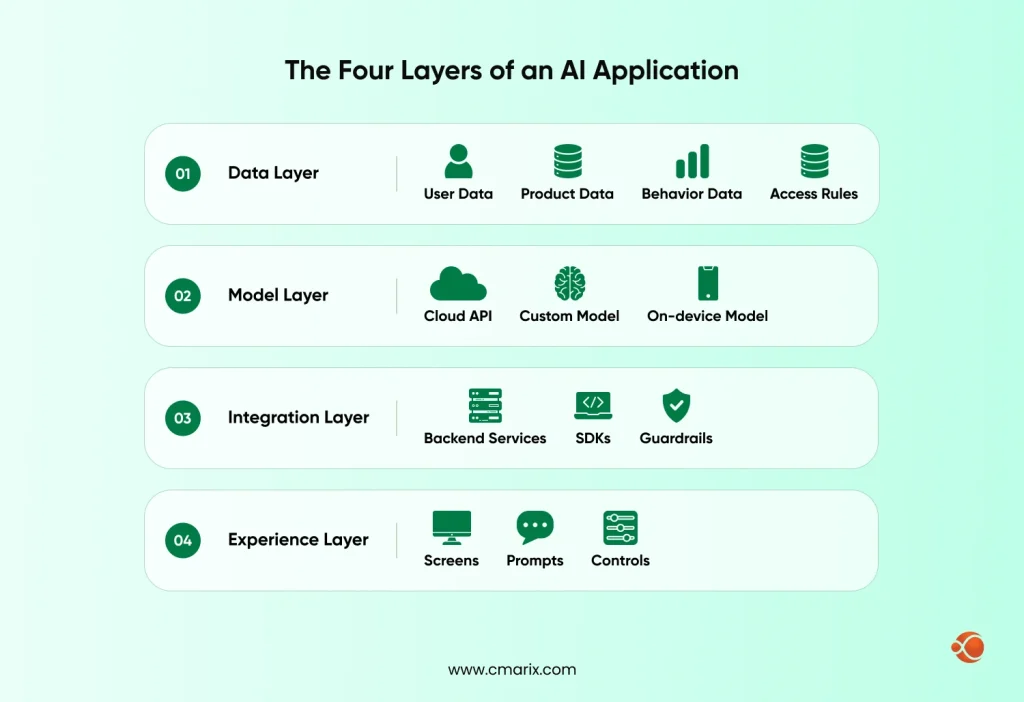
If you want the model and method basics before you start, our AI Ecosystem Guide walks through how AI models learn and how to choose between them. Once you know what each layer does, the rest of this guide gets easier to follow.
Why Integrate AI into an App?
Let’s break down why teams bother. AI earns its place when it removes friction users feel or work your team repeats. These are the five payoffs we see most.
| Benefit | What it looks like in your app | Typical use |
| Automation | AI handles data entry, document extraction and routine requests | Back-office and finance apps |
| Personalization | Content, products and offers adapt to each user’s behavior | Streaming, retail and learning apps |
| Conversational support | Chat and voice assistants answer questions around the clock | Support, banking and healthcare apps |
| Prediction and fraud detection | Models flag unusual activity and forecast demand | Fintech and logistics apps |
| Faster decisions | Dashboards summarize data and suggest next actions | Enterprise and analytics apps |
For many categories, AI has moved from differentiator to expectation. It now appears across the enterprise software trends buyers compare, so an app without it starts to look behind. The gain only shows up when the feature solves a real problem, which is why step one below starts with goals, not models.
How to Integrate AI into an App in 7 Steps
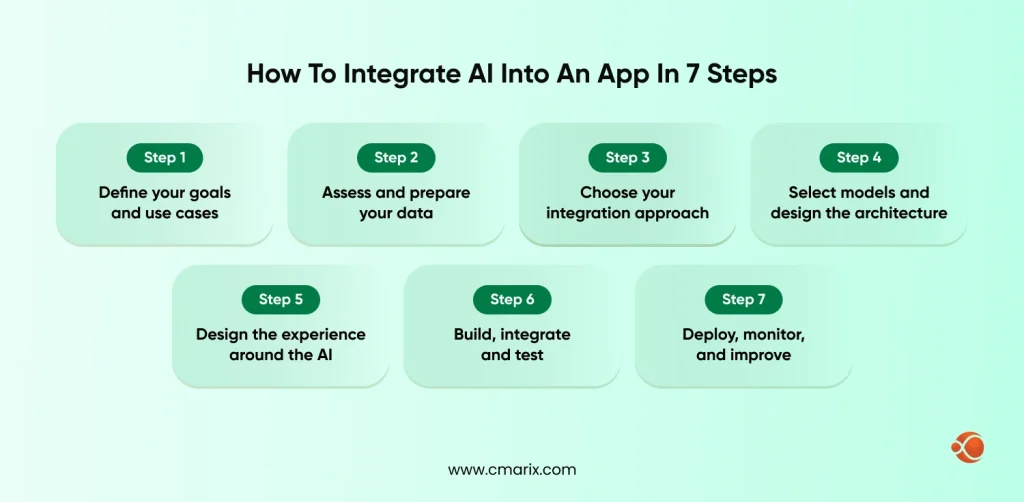
Here’s the sequence we follow to implement AI into an app that is already live. Each step answers one question, and skipping one usually shows up as a bug or a budget problem later.
Step 1: Define your goals and use cases
Start with one problem and one metric. Like, are you looking for fewer support cases, faster onboarding, better recommendations, or reduced fraud? Pick an application where you have the data and can easily spot a wrong answer. The lesson from a focused initial deployment is greater than the lesson from one that isn’t.
Step 2: Assess and prepare your data
Any model is only as useful as the data behind it. Check four things before you build:
- Coverage- Do you have enough examples of the situations the feature must handle?
- Quality- Is the data clean, labeled where needed, and free of duplicates?
- Access- Can your backend reach it securely, with the right permissions?
- Consent- Do users know how their data is used, and does your policy allow it?
If the answer to any of these is no, fix that first. It is cheaper than retraining later.
Step 3: Choose your integration approach
To add AI to a mobile app, you have three main routes: call a pre-built cloud AI API, train or fine-tune a custom model, or run a model on the device, plus one additional route: hybrid. Most teams start with an API and move to custom models only when accuracy, privacy or cost demand it. The next section compares all three side by side, so settle this before you design anything else.
Step 4: Select models and design the architecture
Match the selected model to the job. A language model suits chat and summaries, a classic machine learning model often beats both for pure prediction, and a vision model suits image checks. If that is your case, machine learning app development services can help you train and ship one.
When answers must come from your own documents, add retrieval-augmented generation (RAG) so the model reads your content instead of simply guessing. When a task needs several actions in a row, look at AI agents. Keep every AI call behind your own backend. That keeps API keys out of the app, lets you cache repeated requests, and gives you one place to add limits, logging, and a fallback when the model is slow or down.
Step 5: Design the experience around the AI
AI features fail when users cannot tell what is happening. Show a clear loading state, label AI-generated content, let people edit or undo a result, and add a thumbs up or down button for feedback. Your business analysts and UI/UX team should wireframe these states before development starts, including what the user sees when the model returns nothing useful.
Step 6: Build, integrate and test
This is where you link the dots together. The mobile app development process involves all the steps that you follow while creating mobile applications, but there will be additional tests performed, namely: responsiveness in poor connection situations, correctness based on actual cases from your dataset, cost per request, and abuse cases, such as prompt injection. Make a static dataset with questions and expected answers and run it each time you update anything.
Step 7: Deploy, monitor and improve
Release to a small group first, behind a feature flag. Track answer quality, latency, cost and user feedback from day one. Models and user behavior drift, so plan regular updates to prompts, data and models. This is the step teams forget, and it decides whether the feature still works in six months
Our engineers can scope the right AI integration for your app.
Choosing Your Approach: Cloud API, Custom Model or On-Device AI
The hardest part of incorporating AI into an app is rarely the code. It is choosing the route. Here is how the options compare.
| Approach | Best for | Speed to launch | Control and privacy | Watch out for |
| Pre-built cloud AI APIs | Chat, summaries, vision, speech, search | Fastest | Data leaves your servers, so vendor terms matter | Per-request fees and vendor lock-in |
| Managed custom model platforms | Models trained or fine-tuned on your own data | Medium | Strong control over data and model behavior | Needs ML skills and ongoing tuning |
| On-device AI | Offline features, privacy-sensitive tasks, low latency | Medium | Data stays on the phone | Smaller models and limited device support |
| Hybrid | Simple tasks on the device, hard tasks in the cloud | Slowest | Balanced | More moving parts to test |
Cloud platforms already sell AI in layers, which lets you mix and match. AWS describes its machine learning stack in three layers: AI services for teams that do not want to build models, ML services such as Amazon SageMaker AI for data scientists and developers, and frameworks and infrastructure for ML experts. Packaged APIs get you moving quickly, managed platforms handle custom models, and raw infrastructure is for teams that want full control.
On-device AI deserves a closer look. Running a model locally cuts round trips to your servers and keeps working without a connection. Apple says its foundation models framework, available with iOS 26, allows developers to use the on-device model behind Apple Intelligence offline and with free inference. The trade-off is capability: smaller models handle summaries, classification, and short rewrites well, and struggle with long, complex reasoning.
Custom model integration or pre-built cloud APIs?
Use this as a rule of thumb: Begin with a cloud API if you need speed and your data is not highly sensitive; that is where most generative AI solution providers help. Move to a custom model when accuracy on your own data matters most, when regulation limits where data can go, or when API fees would outgrow the cost of running your own model.
Using an AI app builder or connecting third-party tools
AI app builders speed up prototypes, but real products still need to connect to other systems. When you need to integrate with a CRM, payment gateway, or help desk, follow the same pattern each time:
- Connect via the builder’s native connector or your own backend, but never by embedding keys in your code.
- Use credentials specific to each connection and grant access that is just enough for them to do their job.
- Manage rate limits and failure handling through retries and fallback messages.
- Use sample data to test each of your connections before activating them.
Effective use of AI tools still requires clear ownership. Have a quick cheat sheet for new joiners, which should detail the responsibilities within the workspace, where the prompts and settings are stored, how to test the test set, and who to approve changes. This saves weeks of guessing.
Cost and Timeline to Integrate AI into an App
Typical costs for an integration are in the range of $10,000 to $300,000+, with a time period of 4 weeks to 9 months. The price will depend on the integration depth, and these are just budgeting numbers; your final quote will depend on your data and platform requirements.
| Tier | What you get | Cost range | Timeline |
| Basic | One feature through a pre-built cloud API, such as a chatbot, smart search, or recommendations | $10,000 to $40,000 | 4 to 8 weeks |
| Mid-level | RAG over your own data, several integrations, analytics, and a monitored rollout | $40,000 to $120,000 | 2 to 4 months |
| Advanced | Custom or fine-tuned models, hybrid on-device and cloud, strict compliance | $120,000 to $300,000+ | 4 to 9 months |
Four things move you between tiers:
- Data work- Cleaning, labeling and connecting data is often the largest hidden cost.
- Model route- APIs cost less to launch, while custom models cost more upfront and may cost less at scale.
- Integrations- Every extra system adds build and test time.
- Compliance- Healthcare, finance, and other regulated apps need more security work and review.
The post-launch cost matters too. Yearly maintenance typically amounts to 15% to 25% of the development budget, plus usage costs if you call any model API. For more details about the full budget picture, which includes platform and design expenses, please refer to our guide to app development cost.
Security, Privacy and Compliance for AI Integration
Knowing how to use AI in a mobile app safely matters as much as knowing how to build it. AI features introduce new attack surfaces and regulatory concerns and new questions for regulators, so build safeguards in from the start.
- Protect keys and endpoints- keep API keys on your server and authenticate every request.
- Minimize data- Send only what the model needs, and mask personal details before calling an outside service.
- Read vendor terms- Check where data is stored, how long it is kept and whether it is used to train models.
- Match regulations- Map the feature to GDPR, CCPA, HIPAA or sector rules that apply to your users, and get consent where required.
- Defend against prompt injection- Treat user and document text as untrusted input, and limit what the model is allowed to do.
- Keep humans in the loop- route high-stakes outputs, such as credit or medical decisions, to a person for review.
Log requests and responses in a way your security team can audit, and run a review before each major model or vendor change.
AI Integration Common Challenges and How to Avoid Them
Anyone learning how to integrate AI in app development runs into the same handful of problems. Here they are, with the fix for each.
| Challenge | Why it happens | How to avoid it |
| Poor data quality | Records are incomplete, duplicated or scattered across systems | Audit and clean data in step 2 before any build |
| Unclear goals | The team adds AI because competitors did | Tie each feature to one metric before you start |
| Wrong approach | An API is used where privacy needs on-device AI, or the reverse | Use the approach table, then prototype both on one use case |
| Slow or costly responses | Every request calls a large model | Cache repeated answers and use smaller models for simple tasks |
| Wrong or invented answers | The model guesses when it lacks facts | Ground answers with RAG, show sources and review high-stakes tasks |
| Skills gap | Teams lack ML and integration experience | Pair with specialists or an experienced partner |

Real-World Examples of AI-Enabled Apps
These apps show what integrated AI looks like when it works:
- Grammarly- Suggests corrections, tone changes, and rewrites as you type.
- Duolingo- Adapts lesson difficulty and practice to how each learner performs.
- Waze- Combines driver reports and traffic data to reroute you around delays.
- Canva- Adds AI writing and image editing tools inside its design workflow.
- Adobe Sensei- Powers features across Adobe apps, such as Content-Aware Fill for removing objects from photos.
- Netflix- Learns from viewing behavior to recommend what to watch next.
Notice the pattern. Each one embeds AI inside a task users already do, instead of adding a separate AI screen.
Why Choose CMARIX for AI Integration
Adding AI to a live app is delicate work, and it goes better with a team that has done it before. CMARIX brings AI engineers, mobile app developers, and cloud specialists together, so the model, the backend, and the app experience get planned as one piece.
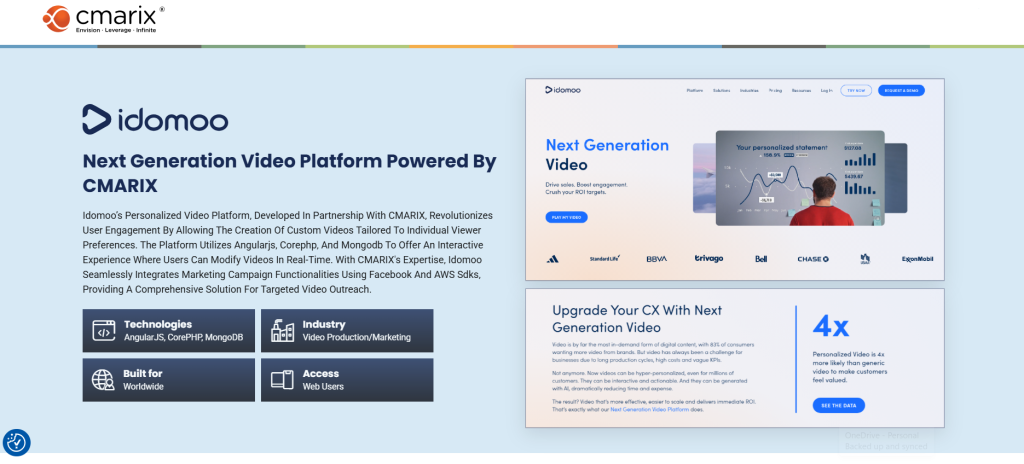
Our AI integration services cover scoping, data readiness, model selection, integration, testing, and post-launch support. A good example is Idomoo, where our team integrated AI-driven dynamic personalization, real-time video rendering, and CRM and marketing SDK integrations into its next-generation personalized video platform. Whether you want one focused feature or a bigger change to how your app works, we start with your goal and pick the approach that fits it.
Conclusion
Knowing how to integrate AI into an app is mostly about order. Set one clear goal, get your data ready, choose the right route, protect your users, and test before you scale. Most apps do not need a rebuild. A focused feature typically costs $10,000 to $300,000+ depending on depth and takes 4 weeks to 9 months. Start small, measure the result, and expand from there. If you want a second opinion on your plan, our team is ready to help.
FAQs on Integrating AI into an App
How to integrate AI into an app without rebuilding from scratch?
Add AI as a service layer next to your existing app. Pick one use case, call a cloud AI API or managed model from your backend, and expose the result through a new screen or component. Your core code stays as it is, and only the parts that touch the new feature change.
What options do I have for integrating AI into my app development process to save time and resources?
Use pre-built cloud APIs for common tasks like chat, vision and speech instead of training models. Start with one narrow feature, reuse your current backend and authentication, and use an AI app builder only for prototypes. Add custom models later if accuracy or cost demands it.
How do I add third-party integrations to an app built with an AI app builder?
Use the builder’s native connector when one exists, or route calls through your own backend with a dedicated credential. Give each integration the least access it needs, handle rate limits with retries, and test with sample data before going live. Never place secret keys in client code.
What is the standard AI implementation process for mobile software?
The process runs in seven steps: define goals, prepare data, choose an approach, select models and architecture, design the experience, build and test, then deploy and monitor. Teams that skip data preparation or monitoring tend to face the most rework. Our mobile app development services follow the same sequence.
How can I integrate AI technology to streamline development for both web and mobile applications?
Build the AI logic once in a shared backend or API layer, then let your web and mobile clients call it. Prompts, models and guardrails stay in one place, so a fix or upgrade reaches both. Use on-device options on mobile only where offline use or privacy requires it.
How do you successfully integrate a third-party AI detection API into an app?
Choose a provider, read its limits and accuracy notes, and keep its key on your server. Send content from your backend, then act on the confidence score using thresholds you set, with human review for borderline cases. Plan for false positives, rate limits and downtime, and tell users how flagged content is handled.
What are the core benefits of deploying AI-powered application integrations?
AI integration services help teams add AI-powered application integrations that automate repeat work, personalize each user’s experience, answer questions around the clock and flag fraud or demand shifts earlier. They also help teams decide faster by summarizing data. The gains show up when each feature is tied to one measurable goal.
Should I choose custom AI model integration or pre-built cloud APIs?
Choose pre-built cloud APIs when you need speed and your data is not highly sensitive. Choose a custom model when accuracy on your own data matters most, when rules limit where data can go, or when API fees would grow too large. Many teams start with an API and move specific features to custom models later.
How do I onboard new team members to an app built with an AI app builder?
Keep one short guide covering workspace roles, where prompts, data sources and settings live, how to run the test set, and who approves changes. Pair each new member with an owner for their first release. Document every connected integration and how its credentials are managed, so nobody has to guess.
What are the costs associated with hiring professional artificial intelligence app development services?
Costs depend on how deep the feature goes. A basic integration typically runs $10,000 to $40,000, a mid-level build $40,000 to $120,000, and an advanced custom model project $120,000 to $300,000+. Team location and seniority shift the final quote, and annual maintenance typically adds 15% to 25% of the build cost.