

Quick summary
- Choose app development tools based on team skills, performance needs, and security requirements, not hype.
- Flutter and React Native lead cross-platform builds. Native tools still win on deep hardware access.
- Low-code and AI builders speed up MVPs but hit limits at enterprise scale.
- Costs scale per seat, per build, and per user. Model twelve months ahead.
Choosing the right mobile app development tools is essential to your timeline, costs, and scalability. Using the wrong development stack at the start of the week can lead to rework, launch delays, and cost overruns.
The market is growing. Today, engineers must choose between IDEs, native technologies, cross-platform frameworks, low-code platforms, and even AI applications. Although all of these solutions promise quick development, few meet enterprise criteria.
The guide will help you see the strengths and weaknesses of each tool. These criteria will help you evaluate software based on your team’s skills, security policy, and budget.
What Are App Development Tools?
App development tools are software solutions that let developers create, develop, test, and deploy mobile applications. They include integrated development environments, frameworks, SDKs, low-code platforms, and test automation.
An integrated development environment puts the editor, compiler, and debugger in one window. Frameworks add ready-made components. Testing and delivery services then move the build to the app stores.
Good app development tools work like a well-run assembly line. Each stage hands clean work to the next one.
Why App Development Tools Matter More in 2027
Tooling choices made in week one shape your budget and timeline for years. The market data shows why teams take this seriously.
The global mobile application development platform market was worth USD 327.52 billion in 2025, according to Fortune Business Insights. The firm projects it will reach USD 375.18 billion in 2026 and USD 1,112.36 billion by 2034. That equals a 14.55% CAGR. The report also flags a clear move toward low-code and no-code environments.
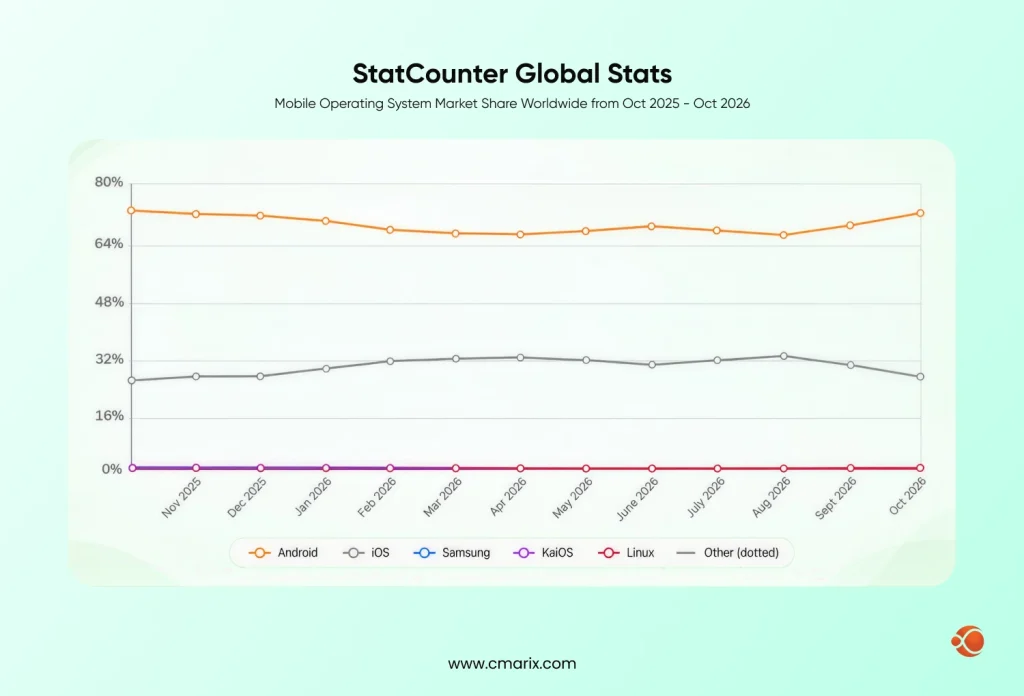
Your audience splits across two ecosystems. StatCounter’s mobile OS data shows Android at nearly 69% and iOS at nearly 30% worldwide in September 2026. In the United States, iOS leads with roughly 58% as of June 2026. Your tools must serve both groups.
AI now sits inside many of these tools too. Our guide to AI in app development shows where it helps and where people still lead.
Types of App Development Tools Every Team Should Know
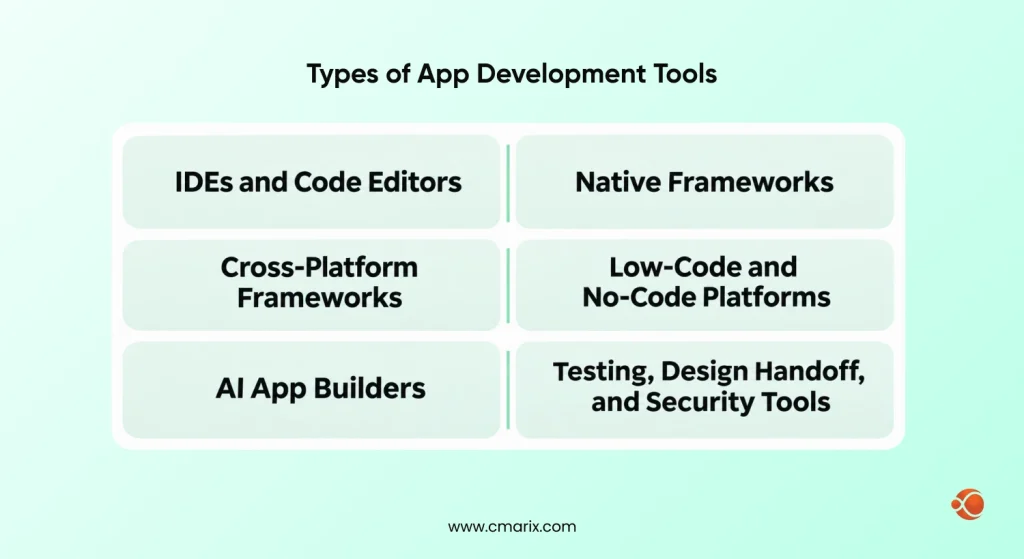
Most enterprise stacks mix several categories. Here is a quick map before we go deeper.
| Category | Examples | Best for |
| IDEs and code editors | Xcode, Android Studio, Visual Studio Code | Daily coding and debugging |
| Native UI frameworks | SwiftUI, Jetpack Compose | Platform-specific performance |
| Cross-platform frameworks | Flutter, React Native, Kotlin Multiplatform | One team serving two platforms |
| Low-code and no-code platforms | FlutterFlow, Bubble, WeWeb | Prototypes and internal tools |
| AI app builders | Prompt-to-app generators | Early drafts and idea tests |
| Testing and delivery | Appium, Fastlane, GitHub Actions, Firebase | QA and release automation |
IDEs and Code Editors
Xcode is Apple’s official IDE for macOS. Android Studio is Google’s official IDE for Android. Both are available for free. Visual Studio Code is a lightweight editor that many Flutter and React Native developers like for its extension support.
Native Frameworks
SwiftUI and Jetpack Compose represent declarative UI frameworks for iOS and Android. The reason why you should select them is that they provide you with access to device APIs from day one.
Cross-Platform Frameworks
Flutter uses Dart and draws its own interface. React Native uses JavaScript or TypeScript and renders native components. Kotlin Multiplatform shares business logic and keeps screens native.
According to the Stack Overflow Developer Survey, Flutter and React Native are among the most widely adopted cross-platform technologies. This makes it easier to hire dedicated React Native or Flutter developers.
Low-Code and No-Code Platforms
Low-code development platforms let non-developers build applications using drag-and-drop tools. They work well for dashboards, approvals, and internal apps, but they fall short on customization and can lead to vendor lock-in.
AI App Builders
Some of the newest app development tools turn a text prompt into working screens. They are great for first drafts. Read our breakdown of AI app builders and AI tools for software development before you trust one with production code.
Testing, Design Handoff, and Security Tools
Figma manages design handoff. Jira manages projects. GitHub Actions & Fastlane automate builds. Firebase Crashlytics identifies crashes after release. Shortened design cycles also matter, as we discuss in our piece on AI tools in UI/UX design.
Security tooling matters as much as speed. The OWASP Mobile Application Security Verification Standard gives your QA team a clear checklist to test against.
What Are the Best App Development Tools for Cross-Platform Mobile Engineering?
Both Flutter and React Native are reliable options for developing cross-platform applications for businesses. Flutter excels at custom, animated user interfaces. React Native is great for teams that use JavaScript.
| Tool | Language | Strength | Watch out for |
| Flutter | Dart | Consistent UI on every device | Smaller Dart talent pool |
| React Native | JavaScript, TypeScript | Large talent pool and Expo ecosystem | Native module upkeep |
| Kotlin Multiplatform | Kotlin | Shared logic with native UI | UI is written twice |
At CMARIX, our teams ship with both Flutter and React Native. We pick based on the product, not on habit.
Get expert guidance on Flutter, React Native, and native technologies for your project.
How Should You Choose App Development Tools for an Enterprise?
A tool that works for a startup demo can fail in a regulated company. Score every option against these six checks.
- Team skills. Can you recruit and retain developers for that stack?
- Performance needs. Are a lot of animations, maps, or offline functionality needed?
- Security and compliance. Does the tool support audits, encryption, and your regulators?
- Integration. Will it connect to your ERP, CRM, and APIs? If ERP is in scope, read our ERP software development guide first.
- Vendor lock-in. Can you export clean source code if you leave?
- Total cost. Count licenses, build minutes, testing devices, and salaries.
Teams that skip this scorecard often rebuild within two years. The scorecard takes one week. A rebuild takes months.
What Performance Metrics Separate Standard Tools from Enterprise-Grade Software?
Standard compilers turn code into apps. Enterprise-grade app development software also proves the app runs well and stays controlled.
Track these numbers in every pilot:
- Cold start time and consistency of frame rates
- Memory usage and application size
- Crash-free session rate
- Build and release time
- Audit logs, single sign-on, and role-based access
The last item is the real divider. Enterprise teams need governance, not just speed.
What Are the Limits of Automated App Making Software?
Automated builders save weeks on a first version. They also carry hard limits.
- Custom logic hits a ceiling quickly.
- Deep device features, such as Bluetooth or background tasks, may be missing.
- Offline sync is often weak.
- You do not control the generated code, so security reviews get harder.
- Moving off the platform can mean a full rebuild.
Use these tools to test an idea. Then hand the proven concept to an engineering team. Many founders pair a quick prototype with MVP software development services to reach a stable first release.
What Deployment Pipeline Should Your App Development Tools Support?
A strong pipeline keeps every release secure. Ensure that your app development tooling provides these features:
- Git-based branching with pull request reviews
- Automated testing for each commit
- Code signing using secure vaulted secrets
- Secure code signing with secrets kept in a vault
- Staged rollouts through TestFlight and Google Play testing tracks
- Crash and performance monitoring
- A tested rollback plan
Not sure where this fits in your project plan? See what are the steps in the mobile app development process are for the full sequence.
How Do Costs Scale with Premium App Development Tools?
The core tools cost little. Xcode, Android Studio, and Flutter are free. Apple charges 99 USD per year for its developer program. Google Play charges a one-time 25 USD fee. Check each vendor page for current rates.
But that’s when it gets real. Low-code licenses, cloud builds, device farms, and analytics scale with team members and releases. Plan for a year in advance. For a complete budget picture, consider how much it will cost to build an app.
How Do Industries Match App Development Tools to Their Needs?
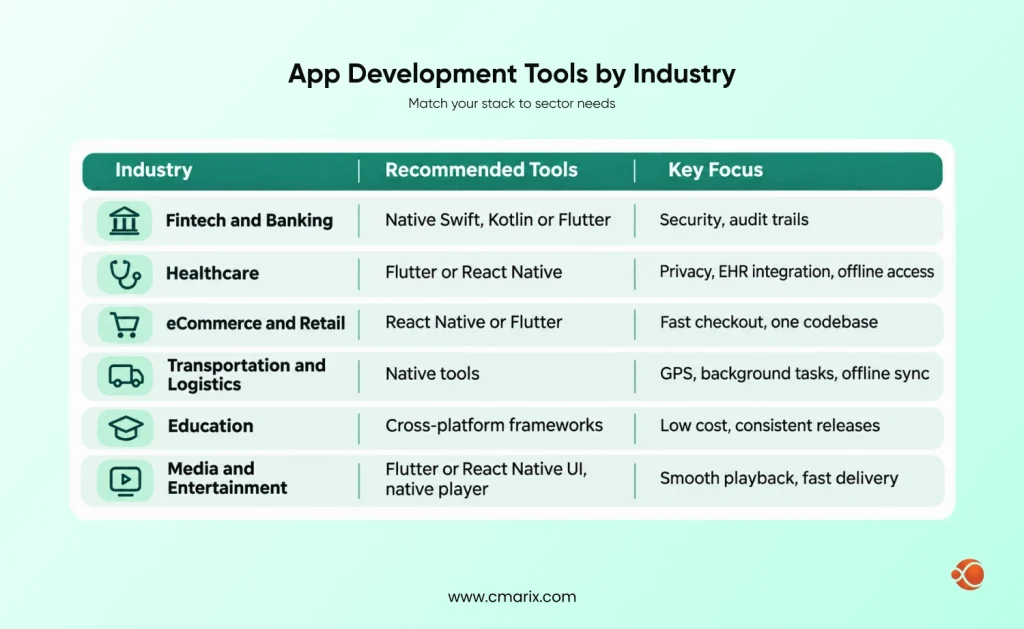
The best stack changes with the sector. CMARIX serves 40+ industries, and each one puts different pressure on your app development tools. These six show how those choices play out.
Fintech and Banking
Payments, lending, and trading apps need tight security and clear audit trails. Teams here lean on native Swift and Kotlin, or Flutter with strict code review. Automated tests mapped to OWASP checks are a must. CMARIX built Nest Bank, a licensed online banking platform, with a mobile-first process. Explore our fintech app development approach for similar builds.
Healthcare
Privacy rules and clinical workflows drive every decision. Apps often need EHR integration, telemedicine, and offline access. Choose tools with secure local storage, encryption, and detailed logs. Flutter and React Native both work well for patient portals. Our healthcare software development team builds compliant, reliable mobile tools for providers.
eCommerce and Retail
Shoppers expect fast checkout and frequent updates. A shared codebase lets you release to both stores at once. React Native and Flutter meet this need and connect cleanly to Magento, Shopify, and WooCommerce APIs. Our eCommerce development team builds storefronts, marketplaces, and custom checkout flows.
Transportation and Logistics
Fleet and delivery apps depend on GPS, background tasks, and barcode scanners. Native tools handle these device features best. Offline sync matters too, because drivers lose signal on the road. CMARIX builds route-optimization, shipment-tracking, and warehouse apps. Pair native modules with a cross-platform layer when speed to market counts.
Education
Learning apps serve students on any device. Cross-platform frameworks keep costs low and releases consistent. Low-code tools work for quick pilots and content portals. CMARIX develops LMS platforms, virtual classrooms, and student portals, often with gamified features that keep learners engaged.
Media and Entertainment
Streaming apps demand smooth video playback and fast content delivery. Native players and strong CDN tooling give the best results. Teams often build the interface in Flutter or React Native and keep the player native. CMARIX delivers OTT and live streaming platforms, content management systems, and ad delivery tools.
Build secure, scalable apps with CMARIX’s experienced engineering team.
Turn the Right App Development Tools into a Live App with CMARIX
Picking tools is only half the job. The other half is a team that ships on real deadlines. That is where CMARIX comes in.
Since 2009, CMARIX has delivered 2,000+ projects for startups, mid-size firms, and Fortune 500 companies. Our 240+ in-house developers work under ISO 27001 and CMMI Level 3 standards. You talk directly to the engineers building your app, with no middlemen.
Here is what you get when you partner with us:
- Stack advice you can trust. We compare Flutter, React Native, and native options against your goals before we write a line of code.
- One clear path to launch. Every project follows the same flow: discovery, architecture, UI/UX, development, QA, DevOps, launch, and support.
- Flexible engagement. Choose a dedicated team, fixed price, or time and materials.
- Industry depth. We have built for 40+ industries, from banking to logistics.
Talk to a leading enterprise app development company about your roadmap. Prefer to see the full range first? Explore our mobile app development solutions for iOS, Android, and cross-platform builds.
Conclusion
The best mobile app development platforms are the ones your company can afford, protect, and scale. Begin by identifying your users, your regulations, and your budget. Then select each platform element based on those criteria. Before settling, test them with a feature to ensure they’re the right fit. Native, cross-platform, or low-code—an unbiased scorecard and a dependable development partner will keep costs low and releases on schedule.
FAQs on Best App Development Tools
What are the best app development tools for cross-platform mobile engineering?
Flutter and React Native are the best-supported choices for most enterprise teams. Flutter gives you a consistent, custom interface from a single Dart codebase. React Native lets JavaScript teams reuse their skills. Kotlin Multiplatform suits teams that want shared logic with fully native screens.
What is the structural difference between an IDE and no-code app building software?
An IDE is the development environment where coders write, compile, and debug source code. No-code app builders hide the code behind visual blocks and templates. IDEs give you full control and portability. No-code app builders offer speed but lock you into the vendor’s runtime.
What are the top-tier mobile app creation tools for beginners?
For visual programming, a beginner can use FlutterFlow, Bubble, or Adalo. To learn how to code, use Android Studio or Flutter. Start with visual apps to see if your idea makes sense. Switch to code when you need custom features.
How does native mobile framework architecture compare to hybrid app execution engines?
In native application frameworks, the app compiles once and calls device APIs directly. Hybrid and cross-platform applications use an execution engine, such as WebView in Ionic or a custom renderer in Flutter. This adds some overhead. It helps avoid writing a second codebase.
What performance metrics separate standard compilers from enterprise app development software?
Measure cold start time, frame rate consistency, memory consumption, application size, build time, and crash-free sessions. Enterprise-grade applications go further, offering auditing, single sign-on, role-based access control, and service-level agreements. Standard compilers don’t meet these requirements.
How should engineering teams evaluate collaborative, cloud-based app creation platforms?
Check real-time collaboration, version control links, role permissions, data residency, and export options. Ask whether you can export clean source code. Run a two-week pilot with a real feature before you sign a contract.
Which tech stacks are the best tools for mobile app development in enterprise teams?
Common enterprise stacks pair Swift and Kotlin for native apps, or Flutter or React Native for shared code. Teams add Node.js, Python, or .NET backends, plus cloud services and CI/CD. Pick the stack you can hire for and maintain.
What are the core performance limitations of using automated app-making software?
Automated builders limit customization of logic, deep hardware integration, and offline synchronization. They lock you into a single provider. The security assessment process becomes more complicated since you have no control over the generated code.
What deployment protocols should you implement in an active app development tools pipeline?
Use Git branches, automate testing for each commit, sign code, and roll out via TestFlight and Google Play. Include crash reporting and rollbacks as part of your release strategy.
How do monthly subscription costs scale when purchasing premium native app development tools?
Xcode, Android Studio, and Flutter are free. Apple charges 99 USD per year, and Google Play charges 25 USD once. Premium costs come from low-code seats, cloud build minutes, device farms, and monitoring. These grow with team size and build volume.