Quick Summary: Progressive web app development cost typically ranges from $8,000 to $100,000+. A basic PWA with core offline functionality lands at the low end. An enterprise build includes payment processing, compliance requirements, and deep integrations. The biggest swing factor isn’t features; it’s where your team is based. This guide estimates development costs for different levels, features, stages, and locations of your development process.
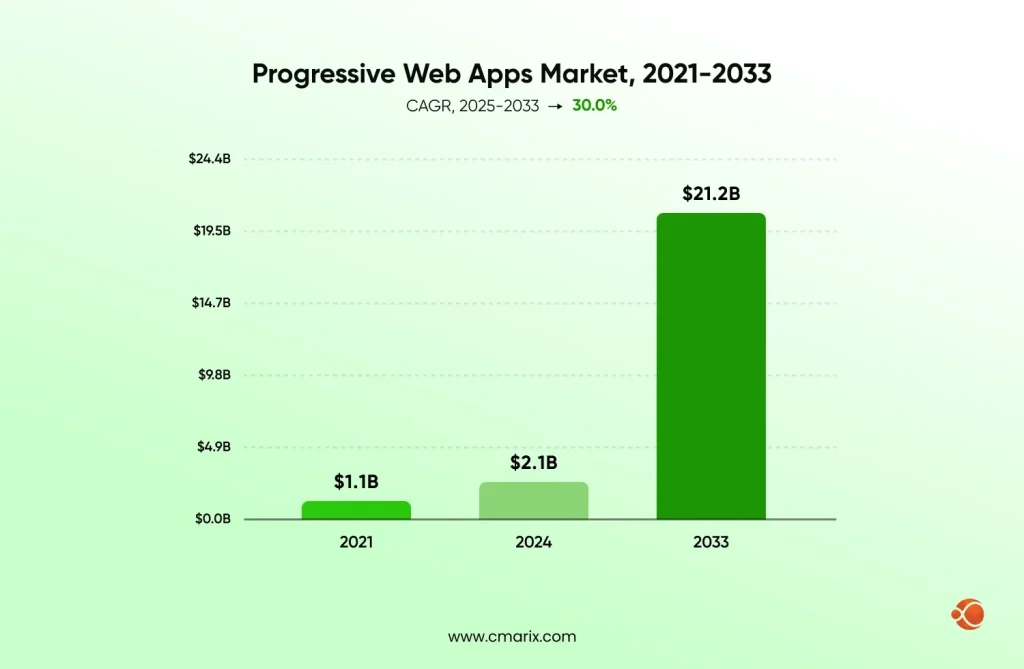
At some point, any business creating a digital product has to choose: go native or build something lighter with a native feel. PWAs exist because not every business needs two separate native codebases to get a fast, installable, offline-capable app. The global progressive web apps market was valued at USD 2.08 billion in 2024 and is expected to reach USD 21.24 billion by 2033, rising at a CAGR of 30% from 2025 to 2033.
There is not one single price for PWA app development. Rather, it varies depending on the features, degree of offline functionality, extent of integration, and, most importantly, where your development team is located. Two companies may describe virtually identical apps and get very different quotes that differ by $60,000. This is what this guide explores level by level.
What Is a Progressive Web App (PWA)?
A Progressive Web App is a website built to behave like a native app, without asking the user to visit an app store first. It uses a handful of modern web capabilities to deliver offline access, home screen installation, push notifications, and load times closer to native than a usual mobile site.
Three technical pieces make that possible:
- Service worker integration – A background script that sits between your app and the network, intercepting requests and deciding what gets served from cache versus what needs a live connection. This is what makes offline functionality possible in the first place.
- HTTPS security implementation – Browsers need a secure connection before they’ll even register a service worker. Security isn’t an additional feature for a PWA; it’s a prerequisite baked into the architecture from day one.
- Web manifest configuration – A small JSON file that shows the browser how the app should look and behave when installed: icon, splash screen, display mode. This is what triggers the “Add to Home Screen” prompt.
PWA vs Native App vs Hybrid App: Cost Comparison
This is usually the first question that comes up once a business has decided it needs some kind of app, before anyone has scoped features or picked a framework: which build type actually makes financial sense here? Let’s put the three side by side.
| Factor | PWA | Native App | Hybrid App |
| Typical cost | $8,000–$100,000+ | $40,000–$250,000+ | $25,000–$150,000+ |
| App store required | No | Yes (both stores) | Yes (both stores) |
| Codebases needed | 1 | 2 (iOS + Android) | 1 shared, native wrapper |
| Offline capability | Yes, via service workers | Yes, fully native | Partial, framework-dependent |
| Access to device hardware | Limited (camera, GPS, notifications) | Full | Near-full via plugins |
| Update process | Instant, no store approval | Store review required | Store review required |
| Development timeline | Fastest | Longest | Moderate |
| Best fit for | Content, e-commerce, SaaS dashboards | Apps needing deep hardware access, gaming | Businesses wanting one codebase but store presence |
The cost gap isn’t really about a PWA being “just a website” built more cheaply. It’s about maintenance overhead. A native app means two separate codebases, two separate teams (or one team context-switching constantly), two sets of store guidelines to satisfy, and two release cycles to manage every time you ship an update. A PWA collapses all of that into one codebase and one deployment pipeline, and that structural difference is what actually drives the cost gap, not corner-cutting on quality.
If you’re weighing a PWA specifically against building in Flutter or React Native, our dedicated breakdown of Flutter vs React Native vs PWA goes further into where each approach makes sense based on your target platforms and feature needs.
Key Factors That Affect Progressive Web App Development Cost
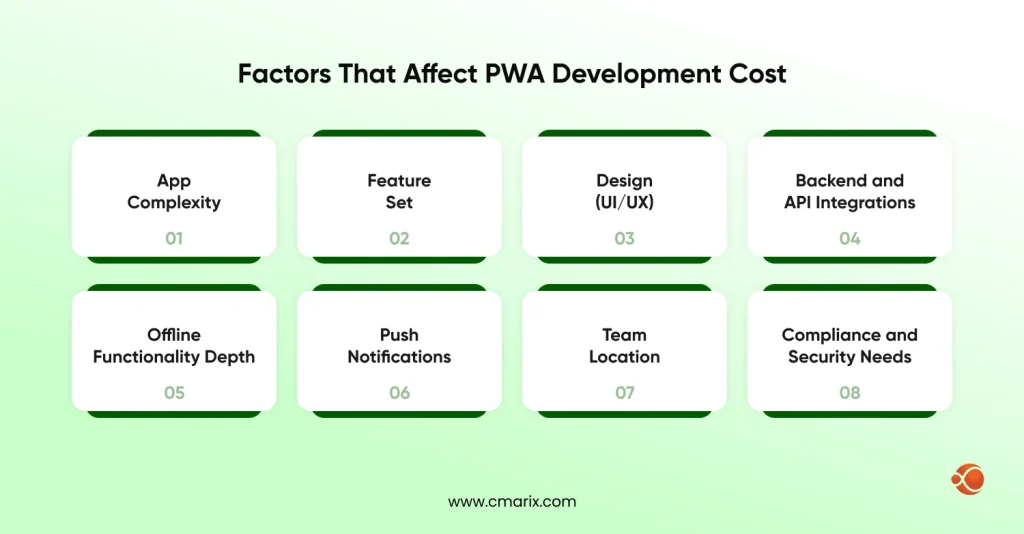
Before you can put a real number on a PWA build, you need to understand what’s actually driving that number up or down. These are the variables that move a quote the most, roughly in order of impact:
- App complexity – A five-screen informational app with a contact form costs a fraction of what a multi-role platform with user permissions, dashboards, and real-time data updates costs. Complexity compounds fast once you add conditional logic, user roles, or dynamic content.
- Feature set – Every feature beyond the basic shell, offline sync, push notifications, and in-app payments adds both development hours and testing surface area. Features rarely cost what they look like they’d cost in isolation, because they interact with everything else already built.
- Design (UI/UX) – Fully custom, brand-heavy design work with original illustration or animation costs meaningfully more than adapting an existing design system or component library.
- Backend and API integrations – Connecting to a CRM, a payment gateway, an inventory system, or any third-party data source adds development hours upfront and ongoing maintenance cost for the life of the app.
- Offline functionality depth – Basic offline viewing (cached pages, static content) is inexpensive. Full offline data entry with sync and conflict resolution once connectivity returns is a meaningfully harder engineering problem, and priced accordingly
- Push notifications – Basic setup is straightforward and cheap. Segmentation, personalization, and behavior-triggered notification logic add real cost on top of that baseline
- Team location – The single biggest swing factor in this entire guide. The same scope of work, same features, same timeline, can cost approximately two to four times more depending purely on where your developers are physically based and what they bill hourly.
- Compliance and security needs – Finance, healthcare, and other regulated industries add security auditing, data handling review, and compliance documentation on top of standard development work, and that work doesn’t scale down just because the app itself is simple.
Progressive Web App Development Cost by Complexity Tier
This is the number that really counts in this whole guide, and it is the number that all of the numbers below will be compared to. If you get this table right, the percentage of the stage and everything else after that should tie back to it.
| Tier | Cost Range | What’s Included |
| Basic PWA (MVP) | $8,000–$20,000 | Core screens (typically 4–8), basic offline caching, responsive design, simple manifest setup, minimal backend |
| Mid-Market / Business PWA | $20,000–$45,000 | Custom UI/UX, push notifications, one or more API integrations, user account system, moderate offline functionality, basic admin visibility |
| Enterprise-Grade PWA | $45,000–$100,000+ | Advanced offline sync with conflict resolution, payment processing, multi-role dashboards, custom security and compliance work, heavy third-party integrations, dedicated QA cycles |
A basic PWA is the one that is required at the very start for most companies and products – the one that will help to validate the idea through actual users, without adding any unnecessary features that have not been validated yet.
A mid-market PWA is the level that most existing small and mid-level companies operate on, with the required amount of polishing and functionality to serve as an actual product, but without any additional costs that come with the enterprise-level products.
If you’re comparing this table against a broader first-release build rather than a PWA specifically, our guide on MVP development cost walks through how these same complexity tiers apply when you’re scoping any first version, PWA or otherwise.
Our team can map your feature list to a real number in a day, not a week.
PWA Development Cost by Region
It is in the team location that budget differences are made, and one might want to examine the calculations for themselves. A standard mid-sized PWA project takes anything from 500 to 900 development hours depending on its final scope; hence, below are the costs of those numbers in different regions.
| Region | Hourly Rate | Estimated Cost (500–900 hrs) |
| India / South Asia | $25–$50/hr | $12,500–$45,000 |
| Eastern Europe | $40–$80/hr | $20,000–$72,000 |
| Western Europe | $80–$150/hr | $40,000–$135,000 |
| North America | $100–$180/hr | $50,000–$162,000 |
Note: Read this table carefully, because the same 500 to 900 hours of work produces wildly different quotes depending purely on where the team billing those hours is based.
Work that fits comfortably inside the mid-market tier ($20,000-$45,000) when built by an India-based team can push into Enterprise-tier pricing ($45,000–$100,000+) once you’re paying North American or Western European hourly rates for that exact same scope. Neither number is wrong. They’re pricing identical work at different labor costs, and that’s precisely why region needs to be part of the budget conversation from the first scoping call, not something that surfaces as a surprise once proposals start arriving.
This also explains why two businesses can compare notes on what “should” be a similar app and end up confused about why their quotes look nothing alike. Before assuming a quote is overpriced or underscoped, check whether it’s actually a rate difference rather than a scope difference.
PWA Development Cost by Feature
Add-on features rarely exist in complete isolation; most Mid-Market and Enterprise builds already fold several of these directly into the base tier cost shown above. Use this table when you’re adding a specific capability to a leaner starting scope, or when you’re trying to understand what’s actually driving a quote that came in higher than expected.
| Feature | Cost Range | Notes |
| Offline mode/service worker integration | $2,000–$5,000 | Depends heavily on how much data needs to sync versus simply cache for viewing |
| Push notification setup | $1,500–$4,000 | Cost rises fast once you add segmentation and behavior-based personalization |
| Payment integration | $3,000–$8,000 | Higher end applies to multiple gateways, subscription billing, or multi-currency support |
| Third-party API integration | $2,000–$6,000 | Per integration; CRM, ERP, and analytics platforms vary widely in documentation quality, which affects hours |
| Admin panel/dashboard | $4,000–$10,000 | Scales directly with number of user roles and the complexity of data views required |
| Analytics integration | $1,000–$3,000 | Basic event tracking sits at the low end; custom reporting dashboards push toward the high end |
| IndexedDB storage setup | $1,500–$4,000 | Required for apps that need to store structured data in offline mode, rather than caching static pages |
| Cross-platform web app optimization | $1,000–$3,500 | Making sure consistent behavior across Chrome and Safari implementations of PWA standards, which still vary |
Worth flagging: Safari’s support for certain PWA features, especially push notifications and storage restrictions, is less developed than in Chrome and Edge. If a meaningful share of your users are on iOS Safari, budget extra quality assurance time here rather than assuming feature parity across browsers.
PWA Development Cost by Development Stage
A typical PWA budget breaks down across the actual build process, from first planning conversation to launch:
| Development Stage | Share of Total Budget |
| Discovery & Planning | 5% |
| UI/UX Design | 15% |
| Frontend Development | 35% |
| Backend Development | 25% |
| QA & Testing | 12% |
| Deployment & Maintenance Setup | 8% |
| Total | 100% |
- Discovery & planning (5%) – Requirements gathering, technical scoping, architecture decisions, and defining what “done” looks like for the MVP before any code gets written
- UI/UX design (15%) – Interactive prototypes, wireframes, visual design, and responsive layout planning across breakpoints
- Frontend development (35%) – Component build-out, app shell setup, frontend framework (React, Angular) implementation, and the actual service worker and caching logic that makes the app function offline
- Backend development (25%) – Data architecture, API development, authentication, and third-party integration work
- QA and testing (12%) – Involves cross-browser testing, performance audits, testing in offline mode, and accessibility testing on various devices and connectivity modes
- Deployment and maintenance setup (8%) – Hosting configuration, CI/CD pipeline setup, monitoring and error tracking configuration, and the initial post-launch support window
Frontend carries the largest share here for a reason specific to PWAs: unlike a standard website, the frontend isn’t just rendering UI; it’s also responsible for the offline architecture, caching strategy, and manifest configuration that make the app installable in the first place.
We have dedicated PWA developers at rates that keep Mid-Market scope inside
Hidden Costs of Progressive Web App Development
The tier table above covers the build itself. These are the costs that tend to show up after launch, or that get left out of an initial quote entirely:
- Ongoing maintenance – Generally around 15-20% of the original build cost per year, accounting for bug fixing, keeping up with changes in PWA standards and browser compatibility, and updating dependencies.
- Third-party API and licensing fees – Mapping services, payment gateways, and platforms often carry their own recurring subscription costs entirely separate from development time
- Security and compliance audits – Required annually, or per major feature release, for regulated industries. Billed separately from feature development, and easy to underestimate if it’s your first time budgeting for one
- Performance monitoring tools – Real user monitoring and error tracking services at any real scale usually require paid tiers, not the free plans most tools offer
- TWA (Trusted Web Activity) packaging – If you want Google Play Store presence in addition to browser access, wrapping your PWA as a TWA adds a smaller, separate line item on top of the core build
- Content and asset updates – Icons, splash screens, and manifest updates as your brand evolves are small individually but add up as recurring maintenance requests
- Server and hosting scaling costs – As user volume grows, backend hosting and database costs scale with it, separate from the original development invoice
How to Reduce PWA Development Cost
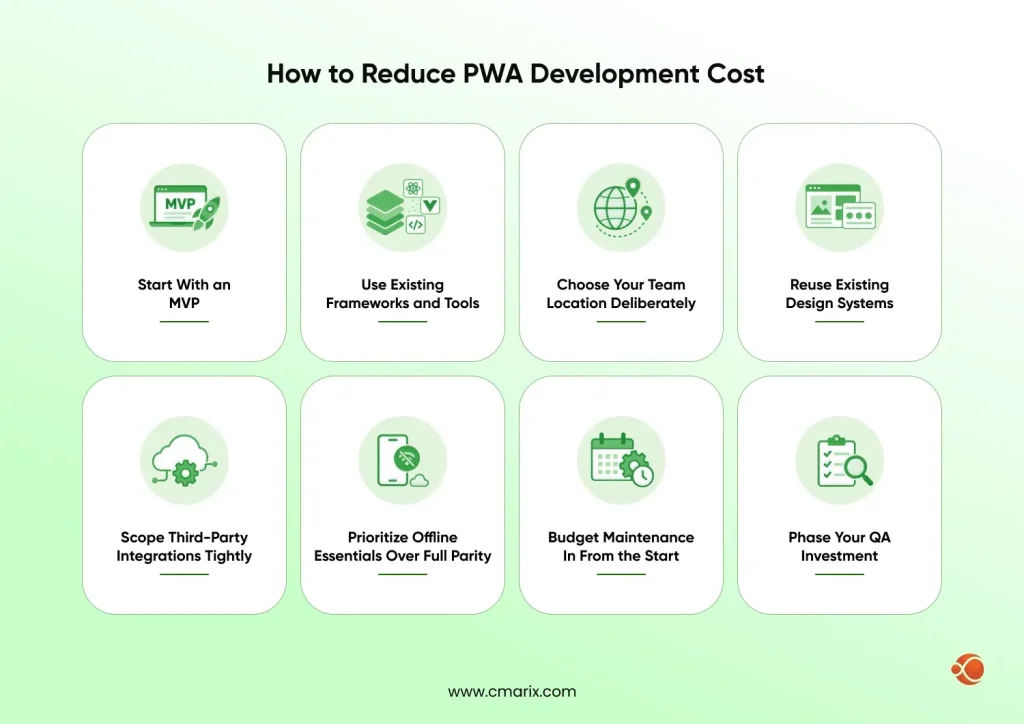
None of the ranges above mean you’re locked into the top of every table. Here’s where teams actually save real money without cutting the corners that end up costing more to fix later:
- Start with an MVP – Main screens and critical features for the ship must be prioritized first. Push notifications, the administrator dashboard, and offline synchronization can come later, once you’ve confirmed users want them.
- Use existing frameworks and tools – Established frameworks and tools for PWA development like Workbox and Lighthouse cut build time significantly versus writing service worker and caching logic entirely from scratch. Tools built around PWA Builder, priced at free to low-cost, also help generate manifest and packaging boilerplate rather than building it by hand
- Choose your team location deliberately – One single decision here impacts your budget even more than anything else you could pick
- Reuse existing design systems – Skip fully custom UI work wherever a proven component library already covers the need, particularly for admin panels and internal-facing screens users won’t judge on visual polish
- Scope third-party integrations tightly – Every additional API adds both integration hours and licensing cost. Start with what the MVP genuinely needs and add integrations only once there’s a confirmed use case
- Prioritize offline essentials over full parity – Full offline functionality across every single feature is expensive to develop and expensive to test. Cache what users realistically need without a connection, and let less critical features simply require connectivity
- Budget maintenance in from the start – Planning for the 15–20% annual maintenance cost as part of the initial budget, rather than treating it as a surprise later, avoids expensive reactive fixes and the temptation to skip updates that should happen
- Phase your QA investment – Cross-browser, cross-device testing needs to be done for each and every release; however, at the stage of MVP development, you can limit yourself only to testing of two or three of the most common browser and device combinations.
Why Choose CMARIX for Progressive Web App Development Services
Developing a PWA that actually performs the way this guide describes- fast, reliably offline, genuinely installable- requires getting the underlying architecture right the first time. Service worker caching strategies that seem fine in testing can fall apart under real-world network conditions; offline sync logic that isn’t developed carefully from the start tends to be expensive to retrofit later.
As a web application development company with hands-on experience across the different types of web development and a proven mobile app development process, CMARIX develops PWAs scoped to the tier that fits your actual budget and actual user needs, not the tier that sounds most impressive in a pitch deck. Our team has shipped PWAs across fintech, healthcare, and e-commerce, each one scoped using the same tier-first approach laid out throughout this guide: define the range honestly upfront, build to it, and flag anything that would push scope before it turns into a budget surprise partway through development.
Also, we staff engagements flexibly, whether you need a small dedicated team for a Basic-tier MVP or a full cross-functional group for an Enterprise build with compliance requirements, so the team structure matches the tier rather than forcing every project through the same staffing model.
Conclusion
Progressive web app development cost lands somewhere between $8,000 and $100,000+, and where your specific project falls in that range comes down to three factors above everything else: how complex your feature set is, how deep your backend and third-party integrations go, and where your development team is physically based. A basic PWA can realistically launch for under $20,000 with a tight, validated feature set. An enterprise build carrying payment processing, compliance requirements, and heavy backend work will land closer to six figures.
The mistake most teams make is not choosing the wrong tier. It is not knowing which tier they’re actually scoped for until a proposal lands in their inbox and the number doesn’t match what they expected.
FAQ About Progressive Web App Development Cost
How much does it cost to develop a web app?
A standard web app generally costs between $10,000 and $150,000+, depending on features, complexity, and whether it’s built as a progressive web app with offline and installation capabilities. Simple informational sites sit at the low end; multi-role platforms with heavy backend logic sit at the high end.
What factors should be considered to get an estimate on Progressive Web App Development cost?
The main factors are app complexity, feature set (offline mode, push notifications, payments), design requirements, depth of backend integrations, and development team location. Team location alone can shift the cost of an identical scope by two to four times, so it deserves the same attention as feature planning during early scoping.
How long does it take to build a Progressive Web App?
A basic PWA typically takes between 6 to 10 weeks from kickoff to launch. Mid-market builds run 3 to 5 months. Enterprise-grade PWAs with heavy integrations, multi-role dashboards, and compliance requirements can take 6 months or longer, particularly if security auditing is required before go-live.
Are PWAs better suited for all sectors, or just some particular ones?
PWAs work well across most sectors, especially e-commerce, media, content-driven businesses, and SaaS dashboards. Industries needing deep device hardware access, advanced camera features, or Bluetooth peripherals, for example, or heavy offline data processing with complex sync requirements may still need a native or hybrid approach instead, at least for specific parts of the product.
Are PWAs cheaper than native apps?
Yes, in most cases, a PWA avoids maintaining two separate codebases for iOS and Android, which typically makes it cheaper than a comparable native app build, largely because you’re not duplicating development and QA effort across two platforms.
Do PWAs require app store fees?
No, PWAs install directly from the browser without going through the Google Play Store or Apple App Store, which means no developer account fees, no store review cycles delaying updates, and no revenue-share cuts on transactions made outside the traditional app store ecosystem. The one exception is if you choose to additionally package your PWA as a TWA for a Play Store listing, which carries the standard Google Play developer fee.