Quick Summary: Cloud cost optimization is the continuous work of matching cloud spend to the value your workloads deliver. This blog covers a pragmatic approach to reducing cloud computing cost, techniques that minimize waste, tools you should consider, and practices that help keep bills predictable.
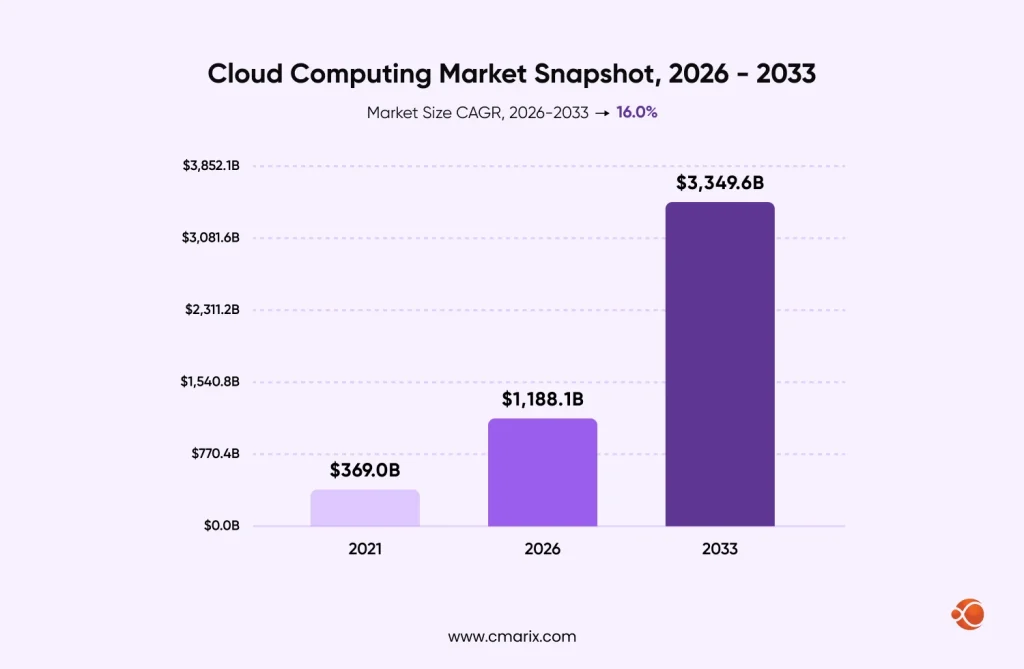
Cloud spending can rise as workloads grow, new services are added, and resource usage goes unchecked. According to Grand View Research, the size of the global cloud computing market amounted to USD 943.6 billion in 2025 and is estimated to grow to USD 1,188.1 billion in 2026 and USD 3,349.6 billion by 2033, with a 16.0% CAGR from 2026 to 2033. As cloud adoption grows, organizations need better visibility into spending to ensure that infrastructure costs remain aligned with business needs. Unused servers, oversized instances, unused storage, and cross-region data migration add extra costs.
Cloud cost optimization is no longer optional; it’s a necessity. Companies that optimize their expenses gain many benefits from the start. They can grow fast, test products, and react to market changes without budget limitations. The problem is that cloud pricing is difficult to manage. It involves hundreds of services, various pricing schemes, and a bill that appears at the end of the month after all expenses are incurred. Businesses that ignore cost optimization face a double punishment.
What Is Cloud Cost Optimization?
Cloud cost optimization is the practice of reducing cloud spend while keeping performance, reliability, and security where the business needs them. It is not a one-time cleanup. It covers how you size resources, which pricing models you buy, how you track spend, and who is accountable for it.
It also differs from plain cost cutting. Cutting costs means spending less. Optimizing means spending the right amount on the right things, which sometimes means spending more on a workload that earns it. A team that shrinks a production database until it slows down has cut costs. A team that matches the database to its real load and moves cold data to cheaper storage has optimized it.
The work pays off in three ways. Cloud cost reduction comes from removing waste. Cloud computing cost savings come from buying capacity at the right price. Visibility ties each dollar to a team, product, or customer. A Good cloud spend optimization effort needs all three.
The Shifting Dynamics of the Cloud Landscape
Cloud adoption has expanded beyond lift-and-shift migrations to include cloud-native applications, hybrid environments, and multi-cloud architectures, each with different cost considerations. There is another trend that has brought infrastructure closer to those building the product. Development teams can provision their own resources without comprehending the cost aspects of architectural decisions made by them. Such a trend in infrastructure brings agility, but at the same time, it introduces costs that are compounded. Running the test environment over the weekend may seem trivial, but it soon turns into a price element.
Core Principles of Cloud Cost Optimization
Cloud cost optimization is not simply about shutting down unused computing resources. It is an ongoing process of aligning cloud usage with business needs. The idea is to match cloud computing utilization with the objectives of the business. This calls for a change in culture where businesses know the cost involved.
The Five Pillars of Cloud Cost Optimization
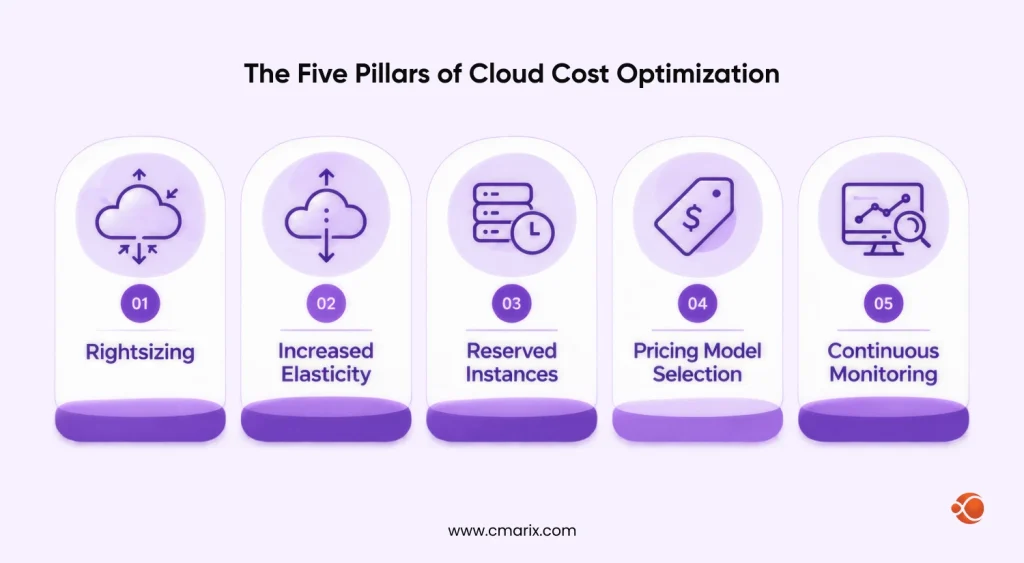
These five pillars form the foundation of any successful cloud cost optimization effort.
| Concept | Description |
| Rightsizing | Matching resources to actual demand rather than theoretical peak needs. Requires continuous monitoring and adjustments based on real usage patterns. |
| Increased Elasticity | Dynamically scaling resources based on demand. Includes predictive scaling, scheduled scaling, and workload-aware resource management beyond basic auto-scaling. |
| Reserved Instances | Cost-effective option for predictable workloads. Works best after reviewing various months of usage, ideally a full business cycle, to identify steady-state demand. |
| Pricing Model Selection | Choosing the right pricing approach per workload: Spot instances for fault-tolerant batch jobs, Reserved capacity for steady operations, and On-demand for unpredictable spikes. |
| Continuous Monitoring | Enables visibility for optimization. Goes beyond basic usage tracking to include cost attribution, anomaly detection, and trend analysis. |
Get a clear view of your cloud spending and identify opportunities to reduce waste
What Is Rightsizing in Cloud Cost Optimization?
Rightsizing means matching each resource to the load it actually carries. If a virtual machine averages 15% CPU and uses a fraction of its memory, you are paying for capacity that never gets used. Moving it to a smaller size or a better-fitting instance family cuts the bill without changing what the application does.
The process is straightforward:
- Collect utilization data for CPU, memory, network, and storage over a period that includes your busiest days.
- Compare each resource with what it actually needs.
- Resize it or move it to a better-fitting instance family.
- Watch performance after the change, then repeat the review on a schedule.
Providers include tools that suggest changes, such as AWS Compute Optimizer and Azure Advisor, and third-party platforms do the same across clouds. Rightsizing is not a one-time project, though. Workloads change, so the right size today may be wrong in six months.
FinOps: Aligning Finance and Technology for Smarter Decisions
FinOps, or Cloud Financial Operations, is a modern approach to the management of cloud expenses. FinOps includes cooperation between finance, engineering, and business departments. FinOps creates a culture of responsibility, where teams make decisions about cloud spend collectively, based on data. Every department understands the financial impact of its decisions. Companies develop their own FinOps models.
A Cloud Cost Optimization Framework
FinOps Lifecycle by the FinOps Foundation consists of three stages – Inform, Optimize, and Operate. They serve perfectly as a cloud cost optimization approach, as they answer various questions.
- Inform: What is the money spent on? Gain visibility by using tagging, cost allocation, and reporting. So all departments can review their respective expenses and maintain costs.
- Optimize: Where can we spend less for the same result? Apply rightsizing, commitment discounts, storage tiering, and waste removal.
- Operate: How can we maintain this? Create budgets, alerting systems, governance policies, and reviews to avoid losing savings.
Teams move through the phases repeatedly rather than once. New workloads appear, prices change, and the cycle starts again.
Proven Cloud Cost Optimization Strategies to Reduce Cloud Costs
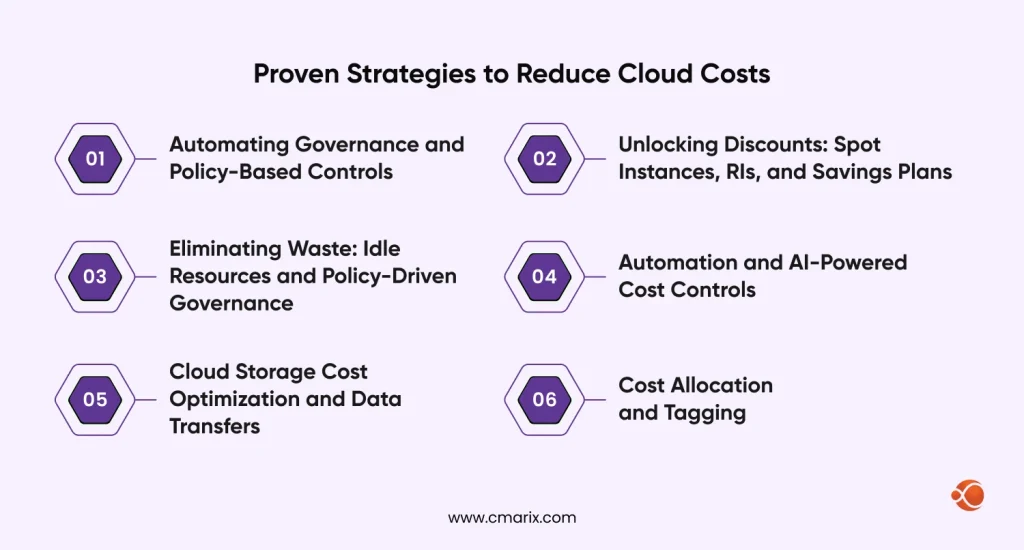
Automating Governance and Policy-Based Controls
A proactive approach to cloud cost optimization includes setting up automated rules and policies. Instead of depending on manual efforts, you can establish governance frameworks that automatically implement your cost-saving rules. This strategy shifts the focus from reactive cleanup to proactive prevention, making sure that cost-conscious decisions are baked into your cloud operations from the start. Typical rules block untagged resources from launching, limit which instance types a team can create, and send budget alerts to owners before overspend happens.
Unlocking Discounts: Spot Instances, RIs, and Savings Plans
Cloud providers give significant discounts. Spot instances are unused capacity. They are great for fault-tolerant workloads. Reserved Instances (RIs) provide a discount for a one- or three-year commitment. Savings Plans follow a similar idea. You commit to a steady amount of usage, measured in dollars per hour on AWS, for one or three years, and in return you get a lower rate than on-demand pricing. Used well, these cloud optimization best practices can lead to meaningful savings and help reduce cloud costs across your entire infrastructure.
The main risk is over-committing. Overcommitting means committing to a larger amount of computing power than your consistent requirements can accommodate, hence paying for resources that you do not necessarily use. Commit to the resources you are certain of and fill up the rest with on-demand or spot capacity. If you rely mostly on AWS, our overview of the benefits of AWS cloud computing covers the platform side of that decision.
Eliminating Waste: Idle Resources and Policy-Driven Governance
Idle resources are a massive source of waste. This includes unattached storage volumes or forgotten servers. Old snapshots, idle load balancers, and test environments nobody switched off belong on the same list. Businesses must create policies to clean them up. Automation can handle this process. Tagging resources is key to this effort. It helps in finding what belongs to which team or project. A strong governance framework prevents future waste.
Automation and AI-Powered Cost Controls
Cloud cost optimization automation is crucial because manual reviews cannot keep pace with how often resources change. Scripts can automatically shut down non-production environments after hours. They can also resize resources based on usage patterns. AI-powered tools can analyze huge amounts of data. They can predict future spending and help in identifying anomalies. This moves you from reactive to proactive.
Cloud Storage Cost Optimization and Data Transfers
Cloud storage cost optimization is the proper placement of data on the appropriate level. It is pointless to keep archival data on the highest level, as well as incur additional expenses associated with moving data. The providers give you hot, cold, and archival-type classes, and lifecycle policies move your data down the tiers automatically depending on its age. There are charges for accessing the colder tiers and a required retention period for data stored there.
This happens especially between different clouds or regions. Moving data out of a provider is billed, and so is traffic between regions and, on some providers, between availability zones. You must design architectures to minimize this. Keeping chatty services in the same zone, caching close to users, and avoiding unnecessary cross-region replication all help. These small changes can result in big savings. Building efficient systems takes people who have done it before, so it helps to hire certified AWS developers who have designed and run these architectures.
Cost Allocation and Tagging
You can’t reduce a cost nobody owns. Cost allocation assigns every dollar of cloud spend to a product, team, environment, or customer, and most teams use tagging to do it.
Choose a few essential tags, like owner, environment, and project, and then make them mandatory through policy so resources can’t be created without them. On AWS, cost allocation tags must be enabled on the billing console before they are reflected on the cost report.
After costs are allocated, you can run either showback, which shows teams what they are spending, or chargeback, which charges the amount to their budget. Shared costs, such as a Kubernetes cluster or a networking layer, need a way to split them.
We audit your cloud bills and put cost controls in place.
Advanced Techniques for Next-Level Savings on Cloud Costs
Machine Learning Models for Cost Prediction
Basic monitoring focuses on the past. Machine learning, on the other hand, looks ahead. Machine learning models can analyze service utilization data. Models can predict future bills by analyzing past trends.
Automated Optimization Platforms in Action
Advanced tools automate much of the optimization process. They assess usage and take action based on their findings, such as rightsizing, load balancing, or decommissioning inactive instances. They automate cloud cost optimization. Always include an approval step for any changes to production.
Optimizing for Sustainability and Cost
The cost and sustainability aspects converge. Although you’re billed for computing, storage, and transfer costs, not kilowatt-hour costs, inefficient use of idle and excess capacity means energy is used to perform functions that don’t need to be performed.
Cost Dynamics in Edge Computing
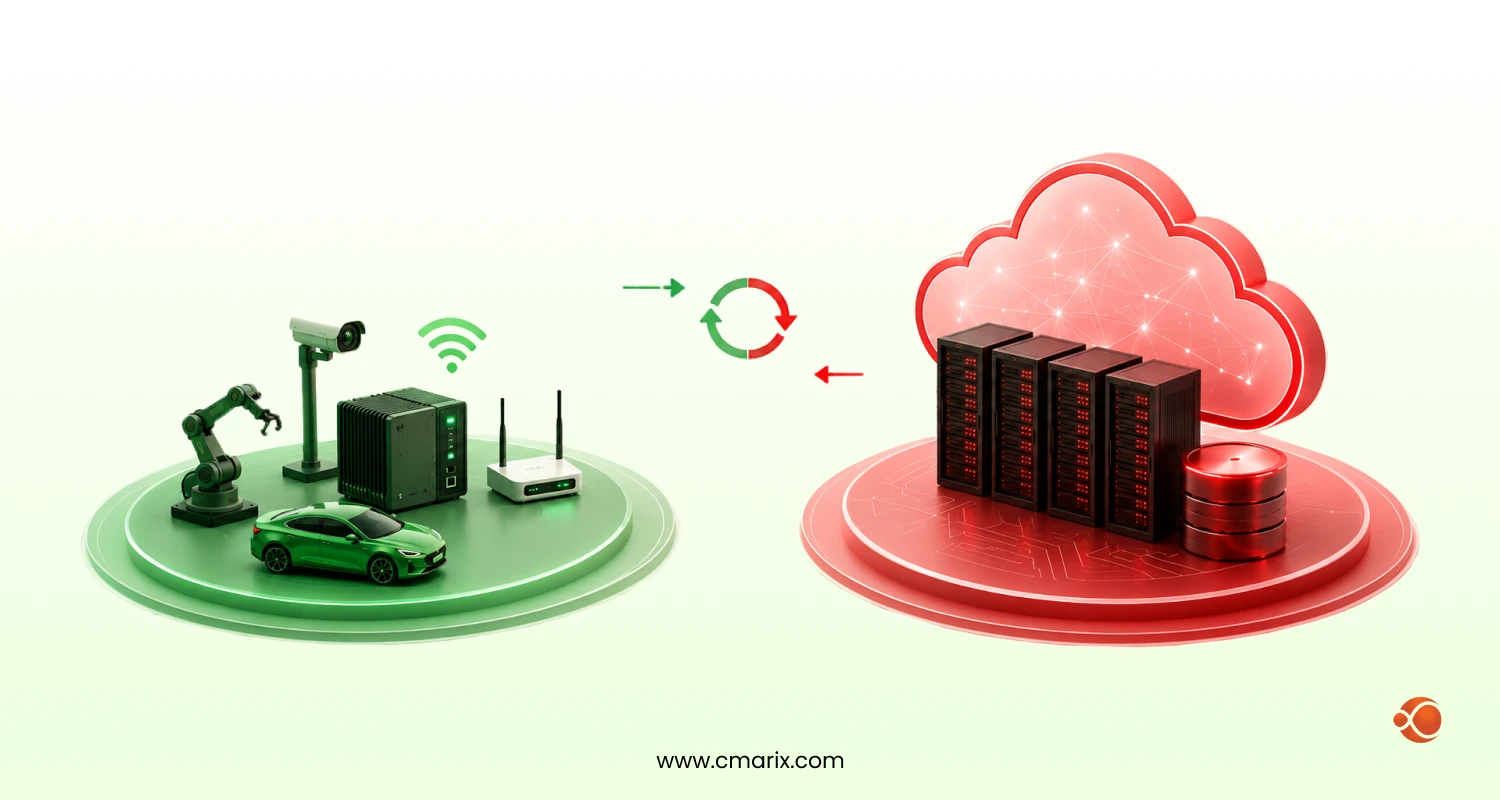
Edge computing is on the rise, as it processes data closer to its source. This reduces latency. It also has unique cost dynamics. Costs are driven by data processing at the edge. They also include data transfer back to the core cloud. Managing these dispersed costs is a new challenge. Edge processing can reduce what you send back to the core cloud, but you still pay for the edge infrastructure. Our comparison of edge computing vs cloud computing explains when each architecture fits.
Optimizing AI/ML Workloads at Scale
AI and ML workloads are computationally intensive. They can be very expensive; thus, optimizing them is important. This includes using the right hardware for each task. It also means using spot instances for training models. Cloud cost optimization strategies must include these specialized workloads. GPU instances are billed by the hour whether the GPU is busy or not, so an idle GPU costs the same as a working one. Schedule training jobs so GPUs stay busy, checkpoint long training runs so they survive spot interruptions, and use smaller models for inference where quality allows.
Fixing Cost Visibility in Kubernetes Clusters
Kubernetes makes cost visibility difficult by sharing nodes among multiple teams. Kubernetes bills virtual machines rather than the pods or services running within them. Three practices address this problem. The first one involves labeling namespaces and workloads using team and product labels so as to distinguish usage. The second one is comparison of resource requests against actual usage, since a pod that requests more CPU and memory than its actual usage reserves that much capacity on the node. The third practice is to measure idle capacity, which represents the difference between the capacity available in nodes and requested by pods.
Multi-Cloud and Hybrid Cloud Cost Optimization Management
Multi-cloud cost optimization is harder than managing one provider because each vendor bills, names, and discounts things differently.
Unified Platforms for Centralized Cost Management
Many organizations use multiple cloud providers. This is a multi-cloud management strategy. Managing costs across different vendors is difficult. Each has its own billing systems and tools. Unified platforms help by providing a single dashboard for all cloud spending. The FinOps Foundation’s FOCUS specification, an open format for cloud billing data, exists to make cost data from different providers comparable, and several providers and tools support it.
Smart Workload Distribution Across Providers
With a multi-cloud setup, you can place workloads where they make sense. You can put some in a cheaper region. You can run others on a provider with better pricing for a specific service. Smart workload distribution is key. It lets you take advantage of competitive pricing. Weigh the savings against data transfer between clouds, which can cancel out a lower compute price.
Frameworks for Billing Transparency and Allocation
Billing transparency is essential in a multi-cloud world. You need to know the cost of each workload, service, team, and project. Allocate costs back to projects and teams. Use tagging and naming conventions everywhere to build a framework that can track all spending. Many companies have a cloud center of excellence to manage this. This team manages all your tagging, costing, and metrics to give you consistency everywhere.
Top 7 Cloud Cost Optimization Tools for 2027
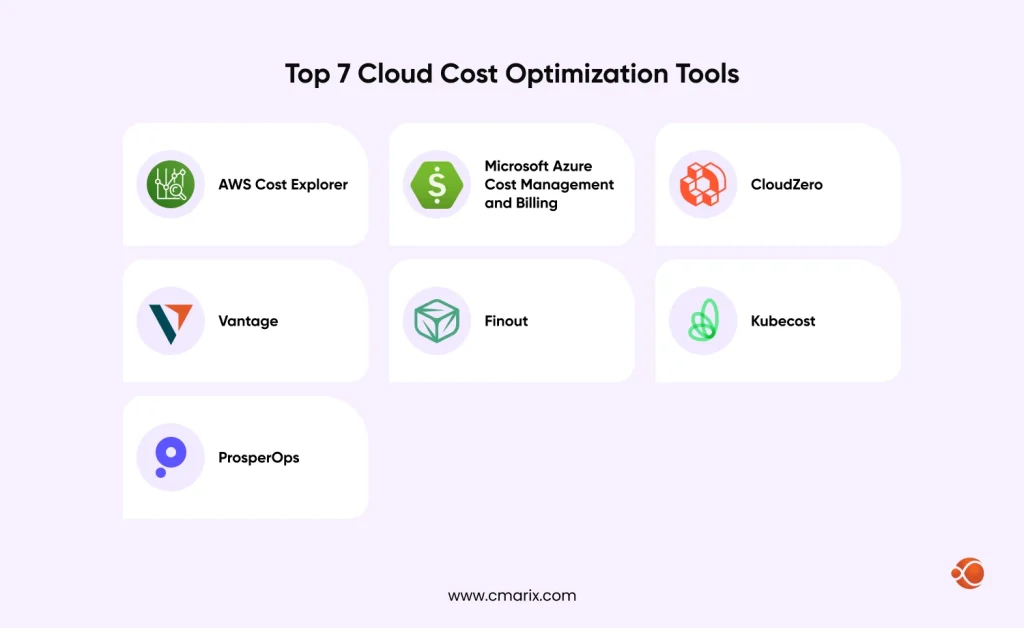
Cloud cost optimization tools and cloud cost management tools fall into a few groups: native tools from the providers, platforms that unify several clouds, and specialists for areas such as Kubernetes or commitment management. The seven below cover each group.
1. AWS Cost Explorer
AWS Cost Explorer is a free, built-in cost management tool that helps businesses track, analyze, and forecast their AWS cloud spending. It provides detailed cost reports by service, region, usage type, and linked account, making it easier to identify which resources contribute most to the cloud bill. Users can review historical spending patterns, monitor usage changes, and forecast future costs to plan budgets.
2. Microsoft Azure Cost Management and Billing
An integrated Azure tool for controlling cloud expenditures. This tool assists users in creating budgets, keeping track of current expenditure, and cost optimization through usage statistics.
3. CloudZero: Real-Time Cost Intelligence
CloudZero connects cloud spending with business outcomes, helping businesses understand how much each customer, product feature, or engineering team costs. It organizes cloud cost data into clear reports and finds savings opportunities. This helps engineering and finance teams make informed decisions about resource allocation and cloud budgets.
4. Vantage: Unified Cloud Cost Visibility and Optimization
Its strength lies in its ability to give you a complete overview of your cloud environment. With a well-designed user interface, Vantage is ideal for monitoring spending across platforms.
5. Finout: Bridging Financial and Operational Data
Finout is for businesses with complex, shared-cost environments. It helps you allocate and analyze spending across cloud providers, SaaS, and third-party services, giving you a complete Megabill.
6. Kubecost: Specializing in Kubernetes Cost Monitoring
Kubecost is the go-to solution for Kubernetes users. Kubecost provides real-time cost visibility at the pod/namespace level, helping developers build more cost-effective apps.
7. ProsperOps: Fully Autonomous Cloud Savings
ProsperOps offers a unique approach by automating discount program management and purchases. It takes the manual effort out of Reserved Instances and Savings Plans, ensuring you get the maximum possible savings without the risk of over-commitment.
Quick Glance at 7 Tools
| Tool | Key Features | Applications | Approximate Cost |
| AWS Cost Explorer | Native AWS cost trackingService-level breakdownsBudgets, and forecasting. | Monitor AWS spending, identify cost trends, and create custom reports. | Free for basic features; API and advanced feature charges may apply. |
| Microsoft Azure Cost Management | Built-in cost reporting BudgetsAlertsOptimization recommendations | Track Azure usage, manage budgets, and identify savings opportunities. | Free for native Azure cost management. |
| CloudZero | Cost intelligenceBusiness-context allocationEngineering-focused cost analysis. | Track unit economics and connect cloud spending to teams, products, or customers. | From $19 per $1,000 of monthly AWS spend under the listed On-Demand offering; other plans vary. |
| Vantage | Unified cloud cost visibilityMulti-provider spend monitoring | Consolidate cloud costs and compare spending across providers. | Free tier; paid published plans at $30/month and $200/month, subject to spend limits. |
| Finout | Centralized cloudSaaS Third-party spend tracking with shared-cost allocation. | Manage multi-cloud costs and allocate shared expenses between teams. | Custom quote based on cloud spend and connected data sources. |
| Kubecost | Kubernetes cost monitoringWorkload allocationCluster-level reporting. | Analyze container costs and identify opportunities to improve Kubernetes resource efficiency. | Free options available; paid plans vary. |
| ProsperOps | Automated management of cloud discountsOngoing optimization of commitment purchases. | Reduce cloud costs through automated discount management and resource optimization. | Free savings analysis; ongoing fees depend on realized savings or managed resources. |
Pricing note: Figures are in USD. We checked prices and plan availability against published sources where available in October 2026. Enterprise quotes, usage limits, and additional charges may apply.
How to Choose Cloud Cost Management Tools
The right tool depends on your clouds, your team structure, and how much of the work you want automated. Use these criteria to compare options, including a cloud cost intelligence platform or cloud financial management software.
- Cloud coverage: Does it cover every provider and service you use, plus SaaS and Kubernetes spend if those matter to you?
- Allocation depth: Can it split shared costs and report by team, product, or customer? The cloud cost intelligence platform is built around this question.
- Data recency and anomalies: How current is visibility into newly created charges, and can it detect anomalies before the invoice does?
- Commitment management: Does it automatically recommend Savings Plans and reservations, and how does it avoid overcommitment?
- Reporting and budgeting: Cloud financial management software can prove its worth here by enabling forecasting, budgeting, and reporting for showbacks/chargebacks that teams can use, with the engineering teams’ help.
- Integrations and access: Does it connect to your ticketing, chat, and CI/CD tools, and does it support single sign-on and role-based access?
- Pricing model: Some tools charge a percentage of cloud spend and others a flat fee. Check which one fits how your spend will change.
Run a trial on a real account before you commit. Savings figures in a demo mean less than what the tool finds in your own bill.
Cloud Cost Optimization Best Practices Every Team Should Follow
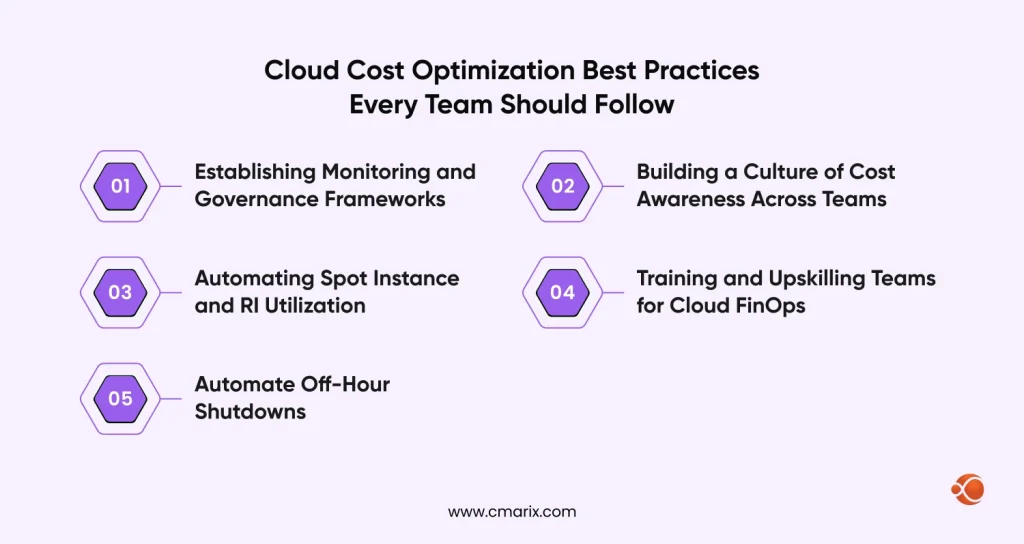
Establishing Monitoring and Governance Frameworks
You must create a framework for long-term success. This begins with visibility; you need near real-time monitoring of your spending. Set up budgets and alerts for overages. Governance policies can prevent uncontrolled spending. Building applications with cost in mind from the start helps too, which is a core point in our guide to cloud application development.
Building a Culture of Cost Awareness Across Teams
Cost awareness isn’t just an IT issue; everyone should be involved. Engineers, the finance department, and project managers should all have an eye on the cloud bill. This can be done through periodic training and open reporting. It is a critical component of cloud cost management best practices.
Automating Spot Instance and RI Utilization
Automation removes the guesswork from these complex decisions. Scripts can automatically use spot instances. Also, they recommend reserved instances. This helps you pay a better price more consistently.
Training and Upskilling Teams for Cloud FinOps
A strong FinOps culture needs skilled people. You must train your teams. They need to understand financial models. They should also understand cloud technology. This upskilling is an investment. It pays off with smarter decisions and lower costs. Tools surface the data, but people decide what to do with it.
Automate Off-Hour Shutdowns
Non-production environments often run 24/7. This is a huge waste. You can automate their shutdown after business hours. A simple script can save a lot of money. You only pay for what you use. A scheduled pipeline is a practical way to do it. With Azure DevOps pipeline automation, for example, a pipeline on a cron schedule can stop development and test virtual machines in the evening and start them again in the morning.
Stopped instances stop accruing compute charges, but attached disks and some network resources, such as static public IP addresses, still bill, so clean those up as well.
Future Trends in Cloud Cost Management and Optimization
AI-Driven Cloud Cost Management
AI is becoming increasingly important. Tools are already moving from suggestions to automated actions, such as scaling up or purchasing commitments, without human intervention. More of this is expected in the future, with proper approval mechanisms in place.
Evolving Multi-Cloud Sophistication
Multi-cloud configurations are expected to grow further. Associated technologies will improve through better cross-cloud reporting and automated workload allocation based on cost and performance.
Intelligent Cloud Migration Planning
Cloud migration approaches will increasingly be driven by data and cost considerations. Future migration tools will consider workload patterns, estimate post-migration costs, and suggest the best migration timing and resource allocation. Migration also has its cost considerations. In a process of a cutover, the organizations usually operate two systems simultaneously, which means that the customer is paying for both of them until the older system gets decommissioned. A zero-downtime cloud migration approach allows keeping users up and running while migrating to the cloud.
Sustainable Cloud Operations
Sustainability is turning into a metric on par with cost. Nearly all providers now offer carbon footprint information in their consoles, and most companies measure sustainability alongside cost.
FinOps Maturity Models
The FinOps framework is constantly evolving, and maturity models help organizations assess their maturity level. The FinOps Foundation describes maturity in three stages: crawl, walk, and run.
Next-Gen Tool Ecosystem
Tools are becoming more specialized and are integrating with each other, which gives teams more granular insight into spending and more automated controls.
Why Choose CMARIX for Optimizing Your Cloud Cost
CMARIX offers a full range of FinOps-based cloud cost optimization solutions that have been successfully implemented to deliver real, sustainable cost savings while protecting business performance and creating value. Cost optimization works best when it is built into how software is delivered, and that is where our enterprise DevOps services come in.
What sets us apart is our integrated approach that combines four critical elements:
- Holistic, FinOps-Led Approach: We embed FinOps principles into your organization, encouraging a culture of shared responsibility and data-driven decision-making.
- Deep Multi-Cloud Expertise: Our team has extensive expertise across all major platforms, including AWS, Azure, and Google Cloud, enabling us to provide strategic solutions built around your multi-cloud environment.
- Automation & AI-Powered Optimization: We go beyond manual recommendations by implementing automated and AI-driven solutions for proactive cost management and anomaly detection.
- Proven Track Record: CMARIX delivers measurable, sustainable savings by implementing best practices that result in immediate and long-term cost reductions without compromising performance.
Final Words
Cloud cost is of paramount importance. It could hinder innovation and growth. A sound strategy for optimizing cloud costs should be put in place. It is not a project, but rather a continuous process. It requires aligning technology, people, and process. Everyone involved should prioritize it. The first step is to gain visibility, that is, to understand your current cloud costs.
As you mature, adopt FinOps principles. Invest in automation and AI-driven tools. Build a culture of cost awareness. This roadmap will help you achieve sustainable savings and make sure your cloud investment delivers value. Cloud platforms make this work practical because usage is measurable and adjustable, which is among the benefits of cloud computing technology.
FAQs for Cloud Cost Optimization
What is cloud cost optimization and how does it work?
Cloud cost optimization is the ongoing process of reducing cloud spending without sacrificing required performance and reliability. This involves identifying unnecessary spending on underutilized resources, negotiating better pricing for capacity through commitments or spot instances, and allocating costs by team and product to clarify ownership. This process repeats constantly because workloads and costs fluctuate regularly.
Why does cloud cost management matter for hybrid enterprises?
A hybrid organization runs applications across on-premises and one or more clouds, and each environment accounts for costs separately. Without a common ground, you can’t compare costs or determine the best environment for execution. Cloud cost management reconciles costs, ownership, and budgeting to the same set of figures.
What are the best practices for cloud cost allocation?
Define a small set of mandatory tags, such as owner, environment, and project, and enforce them with policy. Split shared costs, like a common Kubernetes cluster or network layer, using an agreed rule, for example, usage-based or an even split. Report spend back to teams through showback or chargeback, and review untagged spend every month until almost none is left.
What role does rightsizing play in a FinOps framework?
Rightsizing belongs to the Optimize phase. After the Inform phase shows where money goes, rightsizing matches resources to real utilization so you stop paying for unused capacity. It also feeds the Operate phase, because teams re-check sizes on a schedule as workloads change.
How do companies fix visibility issues across complex Kubernetes clusters?
They label namespaces and workloads by team and product, then use a Kubernetes cost tool such as Kubecost to report spend at the pod and namespace level. They compare resource requests with actual usage to find capacity that is reserved but unused, and they track idle node capacity as its own metric. Shared cluster costs get an agreed allocation rule so they do not go unowned.
What are the top criteria for evaluating enterprise cloud cost optimization tools?
Check cloud and Kubernetes coverage, allocation depth, anomaly alerts, commitment management, reporting for finance, integrations, access controls, and pricing model. Then run a trial on a real account, since savings figures in a demo mean less than what the tool finds in your own bill.
How do automated rightsizing engines compare to manual orchestration techniques?
Automatic engines constantly analyze utilization and can process multiple resources simultaneously, something manual processing can’t achieve. Manual analysis is needed in production when an adjustment requires human intervention or maintenance windows. A good approach would be to automate the recommendation process and non-critical adjustments.
How do you manage cost visibility across multi-cloud environments?
Bring billing data from every provider into one view, using a unified platform or an open format such as the FOCUS specification. Apply the same tagging and naming rules on every cloud so costs can be compared. Report unit costs, such as cost per customer or per transaction, so teams can judge providers on the same terms.
What features should a procurement manager look for in cloud financial management software?
Consider multi-cloud billing, budgeting, forecasting, showback, and chargeback reporting along with anomaly detection capabilities. Assess the way it deals with commitments like reservations and savings plans, along with role-based access and audit trail capability. Seek details on the cost model, because cloud financial management tool vendors bill either a percentage of the cloud cost or a fixed cost.
What is the baseline process for implementing custom cloud cost optimization services?
First, audit current spend, tagging, and utilization to establish a baseline. The second step is creating a prioritized plan that includes removing unused resources, right-sizing, commitments, tiered storage, and governance policies. Next, set up alerts, budgets, and a review schedule to measure progress against the established baseline.