Quick Summary: The latest Flutter version, Flutter 3.44, launched with Dart 3.12 at Google I/O 2026. Material and Cupertino are moving out of Flutter’s core into standalone packages; Impeller is now default on Android with Skia removed; and the release pushes hard into AI tooling like Agentic Hot Reload and GenUI. This is your ultimate guide to know what’s new in Flutter.
On a quarterly basis, Flutter provides a new stable version of its framework, and usually it’s not very different – just a few widgets added, some bugs fixed, etc. The latest release of Flutter, version 3.44, is totally different; it marks the beginning of removing Material and Cupertino from the core of the Flutter framework, making Impeller the default rendering engine for Android, and promoting AI-based tooling from experimental to production-ready.
Here’s the catch though. A release of this structure isn’t a “run flutter upgrade and move on” situation. The Material and Cupertino changes affect how your app imports its design system, Impeller changes how your Android builds render, and Swift Package Manager becoming the iOS default touches your dependency setup. None of this is scary, but it does mean planning the upgrade instead of doing it blind.
That’s really the theme running through this entire release. Google isn’t just adding features on top of the existing framework; it’s restructuring how core pieces of Flutter get built and shipped going forward. For a business, that distinction matters more than any single widget update, because it changes how you should think about long-term maintenance costs, not just this quarter’s feature list.
Key Updates in Flutter 3.44 at a Glance
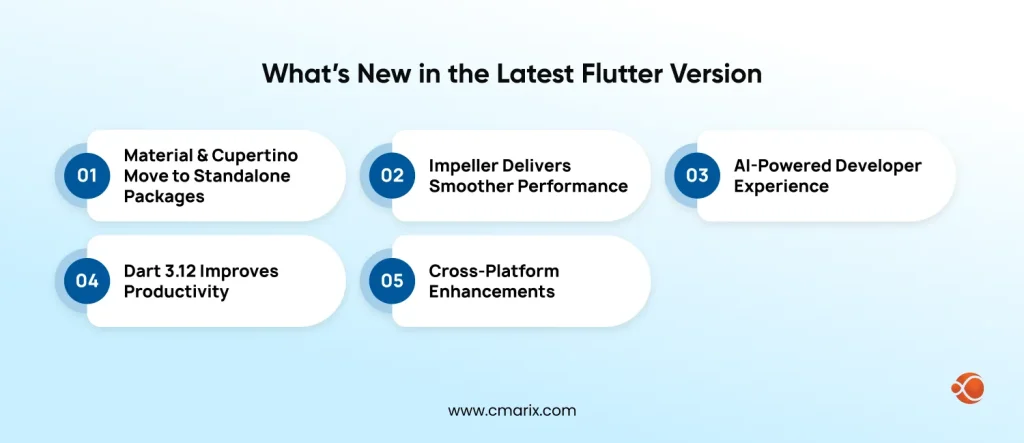
Here are the new Flutter features at a glance before we break each one down in full:
- Material and Cupertino decoupling – frozen in core, moving to standalone
material_ui and cupertino_ui packages - Impeller becomes fully default on Android – Skia removed for Android 10+
- Hybrid Composition++ (HCPP) – opt-in native view compositing via Vulkan
- Dart 3.12 – primary constructors, Firebase Cloud Functions written entirely in Dart
- AI-native tooling – Flutter MCP Server, Flutter Agent Skills, Agentic Hot Reload, Genkit for Dart (preview)
- On-device Gemma models compatibility with iOS, Android, web, and desktop
- Generative UI (GenUI) – AI generating Flutter widget layouts
- iOS – Swift Package Manager as default, phasing out CocoaPods
- Web – better WebAssembly rendering and accessibility
- Desktop – multi-window support, Canonical now driving Flutter Desktop
- Beyond mobile – LG’s webOS SDK running and Toyota’s 2026 RAV4 on Flutter
Each of these is broken down in full below, along with a version comparison table and an upgrade guide.
What Is Flutter 3.44 and Dart 3.12?
Flutter 3.44 is the most recent stable release of Google’s open-source UI framework, which was released at the 2026 edition of Google I/O with the theme “Everywhere, Everyday, Built by Everyone, for Everyone.” This release comes with Dart 3.12, the programming language that Flutter applications are coded in. You can confirm the exact build and changelog on the official Flutter release notes page.
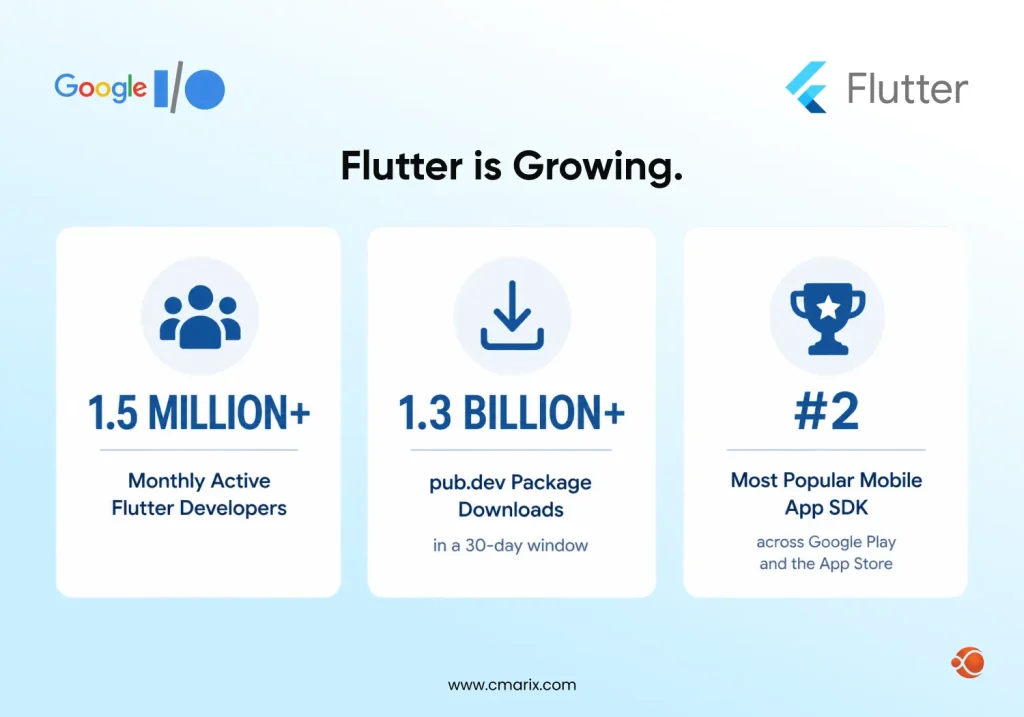
The scale of the ecosystem around this release is part of the story too. At I/O 2026, Google reported roughly 1.5 million monthly active Flutter developers, over 1.3 billion pub.dev package downloads in a 30-day window, and Flutter now sits as the second most popular mobile app SDK across both Google Play and the App Store. That adoption is backed by longer-running survey data as well. Flutter leads the global cross-platform mobile development market with a 46% adoption rate among software developers, according to tracking data from Statista, ahead of every other cross-platform framework on the market.
If you want a sense of what that adoption looks like in practice, from consumer apps to enterprise platforms, it’s worth a look at the range of apps built with Flutter framework before deciding how Flutter’s latest release fits your own roadmap.
Watch the full video of the announcement of the latest Flutter version:
Flutter 3.44 vs. Flutter 3.41 vs. Flutter 3.38: Feature Comparison
Before going deep on any single feature, here’s how the latest Flutter stable version stacks up against the two releases before it. This is the fastest way to see exactly what’s new in Flutter without reading three separate changelogs.
| Area | Flutter 3.38 (Nov 2025) | Flutter 3.41 (Feb 2026) | Flutter 3.44 (May 2026, current) |
| Dart version | Dart 3.10 (dot shorthand syntax) | Dart 3.11 (analyzer and DevTools performance) | Dart 3.12 (primary constructors, Firebase Cloud Functions in Dart) |
| Material/Cupertino | Bundled inside the core SDK | Migration to standalone packages begins | Frozen in core, moving to material_ui and cupertino_ui packages |
| Rendering engine | Skia and Impeller mixed on Android | Impeller migration continues | Impeller fully default, Skia removed for Android 10+ |
| iOS platform support | Full iOS 26 and Xcode 26 support, UIScene migration | UIScene lifecycle enabled by default | Swift Package Manager as default, CocoaPods phase-out |
| AI and agentic tooling | Not yet introduced | GenUI and agentic architecture exploration begins | Agentic Hot Reload, Flutter MCP Server, Flutter Agent Skills, Genkit for Dart (preview) |
| Web | Rendering and layout fixes | WebAssembly advancing toward default | Improved Wasm rendering, memory management, accessibility |
| Release process | Standard quarterly cycle | Public release windows and branch cutoff dates announced | First release under the new predictable 2026 schedule |
You can check exactly which SDK build you’re running against this table using flutter --version, and cross-reference it with the Dart SDK version history if you’re also tracking language-level changes.
Key Takeaway: The last three releases moved from “preparing for change” (3.38) to “starting the change” (3.41) to “the change is here” (3.44), so if you skipped the last two updates, 3.44 is where that catch-up actually lands.
What’s new in the latest Flutter version 3.44?
Biggest Architectural Change: Material and Cupertino Decoupling
This is the single most important structural change in the latest Flutter version, and it’s easy to miss if you’re only skimming feature lists.
- What “frozen in core” means for 3.44: Starting with this release, Google has effectively frozen further development of Material and Cupertino inside Flutter’s core SDK. New features and fixes for both design systems will no longer wait for a quarterly Flutter release.
- New standalone packages: (material_ui and cupertino_ui) Material and Cupertino are being migrated into their own packages, published and versioned independently of the core Flutter SDK.
- Why Google did this: The core reason is release velocity. Design system updates were previously bottlenecked by Flutter’s quarterly SDK cycle. Decoupling means faster iteration, fewer breaking changes tied to unrelated SDK updates, and more flexibility for teams running custom design systems on top of Flutter.
- What developers should do now to prepare: Review your app’s direct dependency on Material and Cupertino widgets, watch the official migration tracking issue, and avoid pinning your SDK version in a way that blocks you from adopting the new packages once they stabilize. This is also the section of the release most likely to introduce Flutter breaking changes down the line, so it’s worth tracking even if you’re not upgrading immediately.
Our engineers can audit your codebase before you commit to an upgrade timeline.
Impeller Becomes the Default Renderer, Plus Hybrid Composition++ for Android
Impeller, Flutter’s newer rendering engine, is now the default for Android 10 and above, with the older Skia backend removed for those devices. For more information, you can read the Impeller documentation page, which is now the default renderer across iOS, Android, and desktop.
Skia, the older renderer, compiled shaders at runtime the first time a visual effect appeared on screen, which is exactly why apps would sometimes stutter or freeze for a frame the very first time a new animation or transition ran. Impeller gets around this by precompiling shaders ahead of time, so that stutter never happens in the first place. Removing Skia from the Android path entirely, rather than keeping it around as a fallback, is Google’s way of saying this problem is considered solved.
In practice, this shows up as:
- Shader jank reduction – Impeller precompiles shaders ahead of time instead of compiling them at runtime; that was the main source of first-frame stutter on Skia.
- Frame stability – more consistent frame pacing under animation-heavy UIs, which matters most for applications with heavy scrolling lists, game-like interactions, or custom transitions.
- Startup performance – faster cold-start rendering, particularly noticeable on mid-range Android devices, which still make up a large share of the global Android install base.
If your app has custom shader code, this is worth testing against first, since custom shaders are one of the few areas where an Impeller migration can surface visual differences. For most standard Material or Cupertino-based UIs, the switch should be close to invisible functionally, and purely a performance win.
Alongside Impeller, 3.44 also introduces Hybrid Composition++ (HCPP), an opt-in feature for Android that solves a different problem: compositing native views like a WebView or a native map component inside a Flutter UI. Instead of routing native views through offscreen buffers, HCPP delegates layer compositing directly to the Android OS using Vulkan’s hardware buffer swapchains, which results in smoother scrolling and more accurate touch input for apps that embed native platform views. It has specific Android API and hardware requirements, so not every device supports it yet, but it’s worth testing if your app relies on PlatformView for things like video players or maps.
AI-Native Development: Agentic Hot Reload, GenUI, and Genkit for Dart
This is where Flutter 3.44 leans furthest into where Google is taking the framework next, and it’s a big part of why this release is generating so much conversation around “the latest Flutter version” as a search topic, not just a changelog topic.
- Agentic Hot Reload – AI coding agents can now trigger Flutter’s hot reload automatically as they modify code, closing the loop between AI-assisted coding and visual feedback.
- Flutter MCP Server improvements – better integration between Flutter projects and Model Context Protocol-based AI tools.
- Flutter Agent Skills – a set of resources that teach AI coding assistants Flutter-specific best practices, so AI-generated code follows framework conventions instead of generic patterns.
- Genkit for Dart (preview) – an open source AI framework supporting Google models, OpenAI, and Anthropic, with tool calling, structured outputs, and multi-turn conversation support built in.
- On-device Gemma model support – Google’s Gemma models can now run entirely on-device across Android, iOS, web, Windows, Linux, and macOS, with GPU and NPU acceleration. If you’re evaluating how far to take this in your own app, our breakdown of Flutter on-device AI development covers the practical tradeoffs beyond what a keynote demo shows.
- Generative UI (GenUI) – instead of AI tools returning plain text, GenUI lets AI dynamically compose Flutter widget layouts. Google DeepMind demoed Gemini building live widget layouts during the keynote.
Note: Several of these AI features, including Agentic Hot Reload and the GenUI widget demo, were announced at the keynote and are early-stage or preview. Treat them as directional signals of where Flutter is headed, not fully mature, production-ready tooling yet. That said, the direction itself is worth paying attention to even if you don’t adopt any of these tools this quarter.
Google is clearly betting that AI coding agents will become a standard part of how Flutter apps get built, and features like Flutter Agent skills exist specifically to make AI-generated Flutter code look like it was written by someone who actually knows the framework’s conventions, rather than generic boilerplate. For teams already using AI coding assistants day to day, that’s a real quality-of-life shift, not just a headline feature.
Our team can help you evaluate whether these tools are ready for production or not.
Dart 3.12 Language and Tooling Updates
Dart 3.12 ships alongside Flutter 3.44 and brings its own set of changes worth knowing before any Flutter version upgrade, since language-level changes can affect your build even when the Flutter side looks like a simple update.
- Easier constructors – simpler syntax for initializing private instance fields, plus experimental primary constructors that cut down on boilerplate.
- Firebase Cloud Functions in Dart – developers can now write Firebase Cloud Functions entirely in Dart, with a pure Dart backend, ahead-of-time compilation, cold starts as low as 10ms, and Dart Admin SDK support.
- Faster analyzer and formatter –
dart analyzeruns faster anddart formatis now near-instant, both powered by an AOT-compiled analysis server. - New tooling – custom analyzer plugins, a
pub cache gccommand for cleaning unused cached packages, and better Widget Preview support inside the Flutter Inspector.
Platform-by-Platform Updates
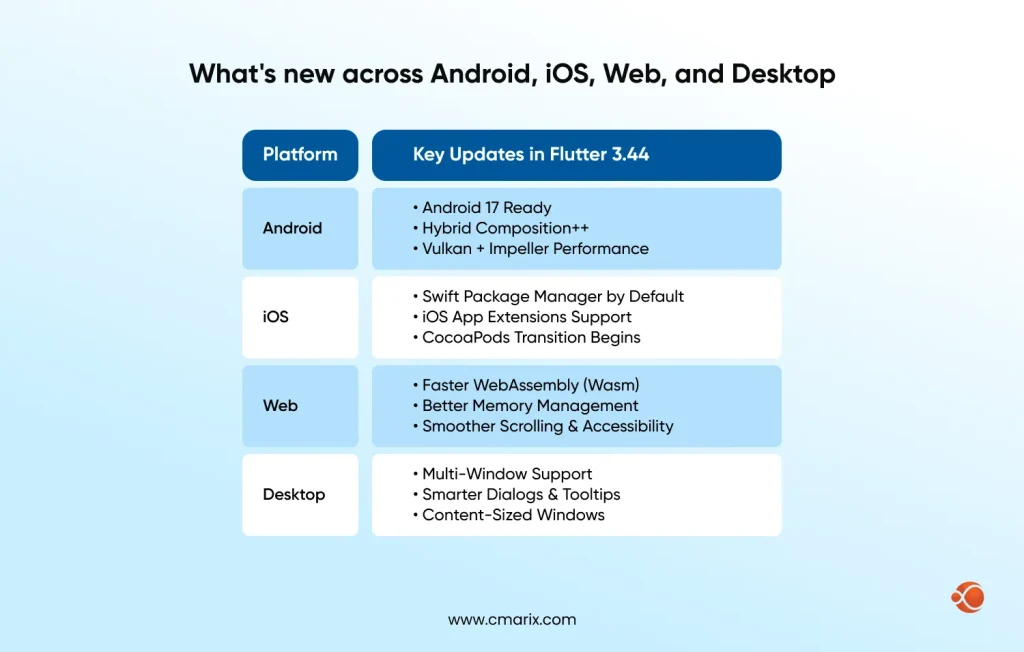
Flutter’s whole pitch has always been one codebase across platforms, so it’s worth looking at how 3.44 moves the needle on each one individually rather than treating “cross-platform” as a single bucket. This matters most if your mobile app development solutions strategy spans more than just phones.
- Android – Android 17 readiness, the new opt-in Hybrid Composition++ (HCPP) covered above, and Vulkan rendering improvements that pair directly with the Impeller default switch. Together, these changes mean Android apps built on the latest Flutter version should feel noticeably closer to native performance than they did even two releases ago.
- iOS – Swift Package Manager is now the default dependency manager, with CocoaPods being phased out over the coming releases rather than dropped immediately. Flutter also gained support for running inside iOS App Extensions, which opens the door to building widgets, share extensions, and other iOS extension types using the same Flutter codebase as your main app, instead of writing them separately in Swift.
- Web – faster WebAssembly rendering, better memory management, reduced jank during scrolling and animation, and improved accessibility and browser integration. Flutter Web has historically lagged behind mobile in polish, and this release is one of the clearer signals that Google is investing in closing that gap rather than treating web as a secondary target.
- Desktop – multi-window support, dialog windows, tooltips, and content-sized windows that resize based on their content rather than a fixed frame. Canonical has also taken over as the official lead on Flutter desktop development, which is a meaningful signal for teams building Linux-first desktop apps, since it means dedicated maintenance rather than a side project inside the core Flutter team.
Flutter Beyond Mobile: Automotive and Smart TV
One of the more unexpected announcements from the Google I/O 2026 keynote was how far Flutter has moved beyond phones and web apps.
- Toyota‘s 2026 RAV4 infotainment system runs on Flutter, chosen for its smartphone-like UI, faster iteration cycles, shared codebase across vehicle lines, and open source flexibility. Toyota confirmed future vehicles will continue building on Flutter as well.
- LG also announced a Flutter SDK for webOS, its smart TV platform, including Firebase plugin support, video playback support, gamepad input, and Riverpod compatibility for state management.
Both of these were announced directly in the keynote rather than through a separate press release, so treat them as confirmed by Google and Toyota’s own presentation, but not yet documented in the standard release notes. For a broader view of where Flutter fits into the wider shift toward embedded and cross-device software, our roundup of top technology trends covers the pattern beyond just Flutter.
Should Your Business Upgrade Now? Decision Framework
Not every team needs to move to the latest Flutter version the day it ships, and treating every release as urgent leads to rushed, poorly tested upgrades. The better question is whether the changes in 3.44 solve a problem that you actually have, or whether they’re improvements you can adopt on your normal release cadence. If you’re weighing whether to handle this in-house or bring in outside help, our guide to Flutter app development companies breaks down what to look for before you commit to a provider.
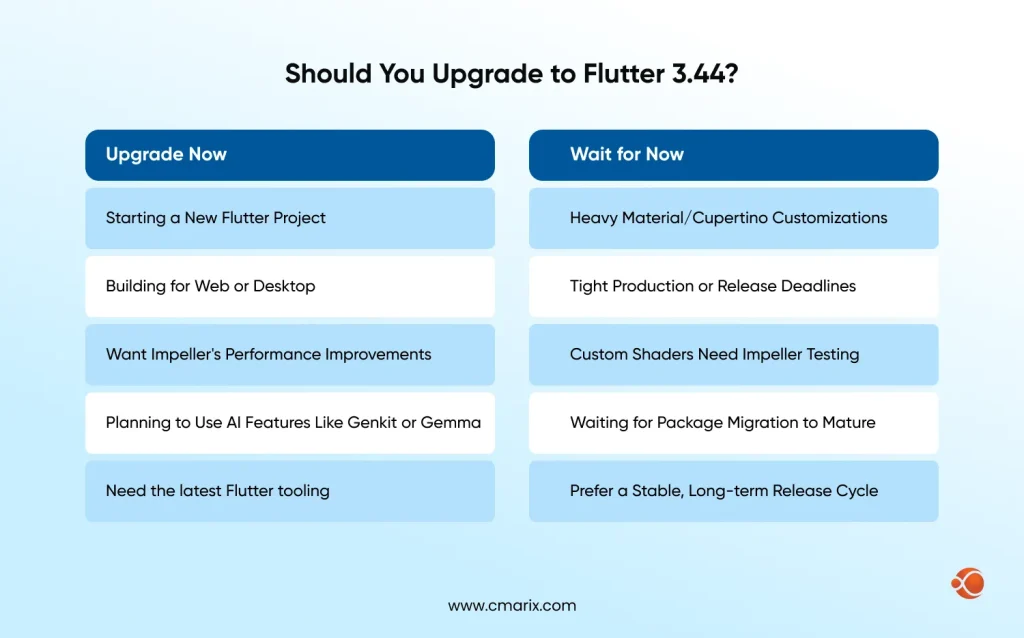
Upgrade now if:
- In case you’re starting a new Flutter project and want the latest rendering and tooling baseline from day one.
- Your app targets web or desktop, where the Impeller and Wasm improvements have the most visible impact.
- You want early access to AI-native tooling like Genkit for Dart or on-device Gemma support. Our guide to Flutter AI Integration covers implementation patterns if this is the part of the release you’re most interested in.
Wait if:
- Your app has deep, custom dependencies on Material or Cupertino internals that haven’t been tested against the new package structure yet.
- You’re on a tight production deadline where any migration risk isn’t worth taking on right now.
- Your team hasn’t yet audited custom shader code against the Impeller-only Android path.
If you’re weighing the cost side of that decision, our detailed breakdown of Flutter app development cost is a useful reference point for budgeting an upgrade or a new build around the latest Flutter version.
How to Upgrade to the Latest Flutter Version 3.44 Without Breaking Production
If you’re wondering how to update Flutter without risking your production app, the short answer is: don’t just run the upgrade command and hope. Here’s the process worth following to move to the latest Flutter version safely.
Step 1: Audit your current version and dependency depth.
Start with a quick Flutter SDK version check by running flutter --version and flutter doctor, then check how deeply your app relies on Material or Cupertino internals versus just the public widget API, and confirm Flutter version compatibility with any third-party plugins you depend on. Apps that mostly use standard widgets will have a far smoother path than apps with heavily customized themes or forked design system code.
Step 2: Review the decoupling tracking issue and migration notes.
Read the official release notes and the Material/Cupertino migration guide before touching any code. This step alone catches most of the surprises teams run into later, since the breaking changes documentation usually flags exactly which APIs are affected.
Step 3: Upgrade in a staging environment first.
Run flutter upgrade, resolve dependency conflicts, and test Impeller rendering particularly on Android devices, not just the emulator, since rendering behavior on physical devices can change meaningfully from what you see in a simulator.
Step 4: Validate your iOS build under Swift Package Manager.
In case you are still using CocoaPods as a plugin to your project, make sure that the plugin supports Swift Package Manager before making the transition, and review your CI/CD pipeline settings to ensure compatibility as well.
Step 5: Benchmark performance and roll out gradually.
Compare frame timing and app size before and after the upgrade, then roll it out to a subset of users through a staged or phased release before pushing to your full production audience. This provides you a real signal on crash rates and performance regressions before they affect everyone.
Why Choose CMARIX for Flutter App Development
Upgrading a production Flutter app through a release this structure isn’t something most in-house teams want to take on alone, especially when Material and Cupertino, Impeller, and iOS dependency management are all shifting in the same release cycle. That’s where a dedicated partner earns its cost. Our Flutter app development services team handles version audits, staged migrations, and performance benchmarking so your app moves to the latest Flutter version without disrupting what’s already in production.
If the choice has been to do an ongoing capacity versus a one-time project, we also have dedicated Flutter developers who can be embedded within your organization, work through your existing sprint process, and be responsible for taking care of any upgrades such as this one on an ongoing basis. Either way, the ultimate objective remains the same: upleveling your application to the latest version of Flutter technology should result in making your application more maintainable, and not putting anything at risk in a previously working environment.
Conclusion
This Flutter recent update is less about flashy new widgets and more about where the framework is heading structurally. Decoupling Material and Cupertino, making Impeller the default on Android, and building AI-native tooling into the developer workflow are long-term bets, not one-off feature drops. If you’re maintaining a production app, audit your dependencies before you upgrade. If you’re starting fresh, building on the latest Flutter version from day one puts you ahead of the migration curve everyone else will eventually deal with.
If you’re maintaining a production app, the smart move is auditing your dependencies before you upgrade. If you’re starting fresh, building on the latest Flutter version from day one puts you ahead of the migration curve everyone else will eventually have to deal with.
Flutter’s release cadence is not slowing down, and with public windows now in place for 2026, the next update is already on a predictable schedule. Bookmark this page and keep reading, since we’ll be updating this post as soon as the next stable Flutter version 3.47 lands, possibly in August.
FAQs on Latest Flutter Version
What is the latest Flutter version?
The current version of Flutter is Flutter 3.44, which was launched along with Dart 3.12 at Google I/O 2026. You may verify the local version of the SDK using the flutter --version command.
Is Flutter 4.0 released yet?
No, there is no confirmed release date or official roadmap for Flutter 4.0 as of this release. Treat any claims of a specific Flutter 4.0 timeline as unverified.
What are material_ui and cupertino_ui?
They’re the new standalone packages that Material and Cupertino are migrating into, separate from Flutter’s core SDK. This lets Google ship design system updates independently of the quarterly Flutter release cycle.
Do I need to change my imports right now?
Not immediately; Material and Cupertino are frozen in core for now, but reviewing your dependency structure before the complete migration process will help you avoid rework later.
Is Flutter still a good choice for app development in 2026?
Yes, Flutter holds roughly 46% adoption among developers developing cross-platform apps, and the latest release adds significant platform, performance, and AI tooling investment, which points to continued long-term support.
What does upgrading to Flutter 3.44 cost or take?
It all depends on the degree of your application’s dependence on the Material or Cupertino framework, as well as on whether your application contains any custom shaders. A simple application will take no more than a couple of days to migrate and test; customized applications need more time to prepare and test.
How do you upgrade a Flutter project to the latest version?
Do an audit of your existing code and its dependencies, check the official migration guide, upgrade your app in a staging environment first, thoroughly test it on both platforms, and then gradually deploy it without rushing to the production environment immediately. The detailed steps are outlined in the migration section above.