

Quick Summary: This blog explains how marketplace split payments work on PayFast, including the setup each vendor account needs and the fields your platform sends with every payment. You get a seven-step implementation path, a sandbox testing plan, a compliance overview, and a launch checklist. It closes with how PayFast compares with other split payment gateways.
Picture a South African marketplace with 200 vendors. Every order needs the platform’s commission taken out, the vendor’s share calculated, and a payout sent. Done by hand, that means late payments, reconciliation errors, and vendors asking where their money is. Marketplace split payments fix this by splitting each payment between the platform and the vendor as soon as it clears.
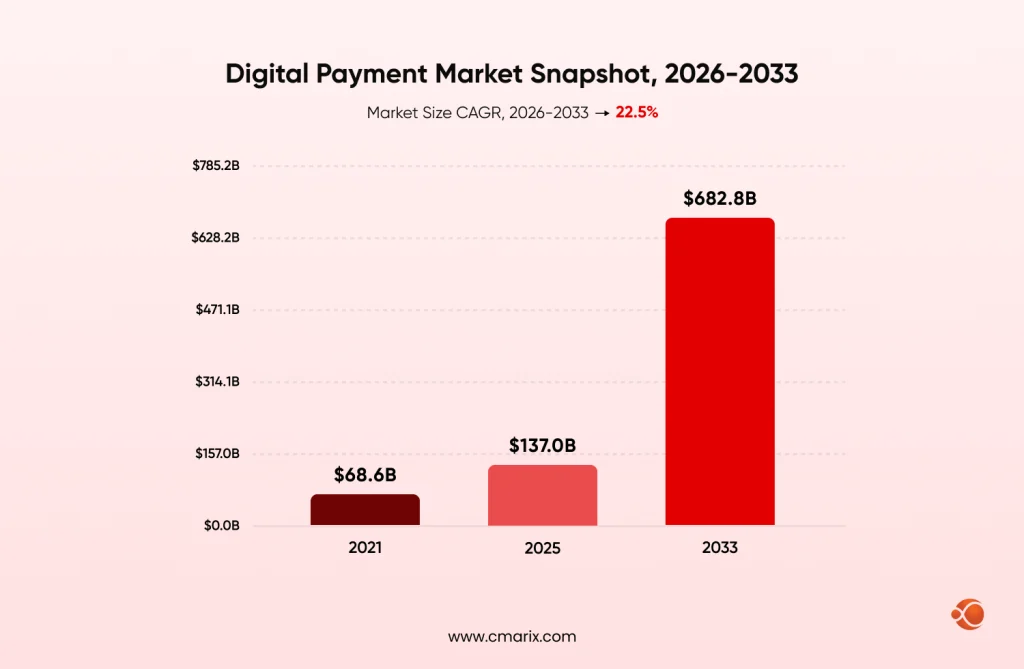
The timing is right too. According to Grand View Research, the global digital payment market is forecast to reach USD $137.0 billion in 2025, USD $164.8 billion in 2026, and USD $682.8 billion by 2033, at a CAGR of 22.5% between 2026 and 2033. The McKinsey Global Payments Report 2026 predicts that fee income will account for 56% of total revenue from global payments by 2030, more than net interest income.
PayFast helps South African websites automate the commission process through its split payment functionality, but it works differently from what many tutorials describe. The split is sent to the person receiving the payment per transaction, and each merchant requires his or her own PayFast account. If you are looking to build a two-sided marketplace or solve issues in your existing payout process, this blog explains how marketplace split payments work at PayFast.
What Are Marketplace Split Payments?
Marketplace split payments divide one customer payment between the parties who earn from it, automatically, at the moment the payment clears. Instead of collecting everything, calculating commissions later, and sending payouts by hand, the gateway applies your rules during the transaction. That is what separates a split payment gateway from a traditional one. A traditional gateway settles the full amount to one merchant and leaves the rest to you. A split payment gateway builds the division into split payment processing itself.
Manual splitting breaks in three predictable ways:
- The cash flow problem: vendors wait days for their split, and the platform spends time trying to reconcile it.
- Scale issue where the platform has 100 vendors doing an average of 1,000 orders each in a month, making 100,000 commission splits per month.
- Vendors who cannot see what they earned, or when, stop trusting the platform.
How PayFast Split Payments Actually Work
PayFast uses two roles. The vendor holds the primary account, which receives the customer’s payment. Your platform is the secondary account, which receives its agreed share. The payment shows up in the primary account first, then PayFast sends the predetermined amount to the secondary account straight away.
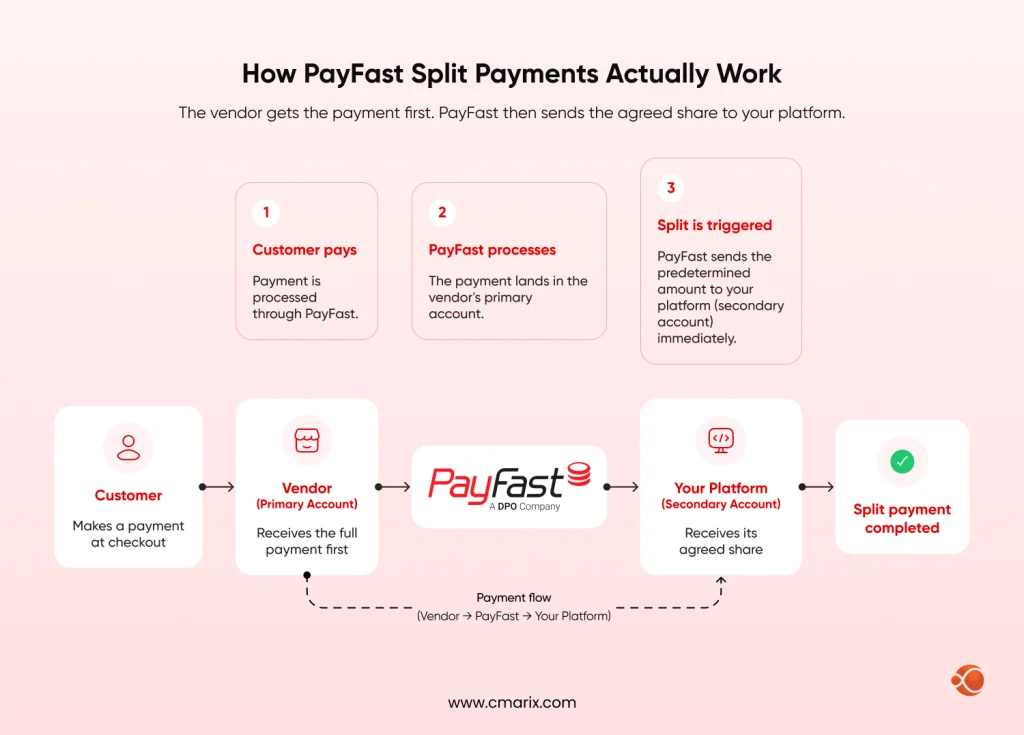
Before anything works, the vendor must allow Split Payments in their own dashboard under Settings, then Integration. They can also fill the Destination Merchant ID Whitelist there. Leave it blank, and the split can go to any account, so adding your platform’s merchant ID tightens security. The vendor then shares their Merchant ID and Merchant Key with your platform, which activates the split through a custom integration.
| Topic | What PayFast supports | What it means for your build |
| Recipients per payment | One receiving merchant per split transaction | Design checkouts around one vendor at a time |
| Split types | Fixed amount, percentage or both, with optional min and max | Flat fee plus percentage commission models work |
| Amount format | All amounts in cents (ZAR) | Convert before sending, so R1000 becomes 100000 |
| Setup method | Global setup through PayFast support, or a direct request per payment | Direct requests let you vary the split by vendor or product |
| Recurring payments | Split data carries over to later recurring payments | Subscription marketplaces keep commissions automatic |
| Availability | Must be enabled on the account and built through a custom integration | Budget developer time, since it is not a checkbox |
Our payment engineers review your flow and map the right gateway setup.
Key Features of PayFast Split Payment Integration for Marketplaces
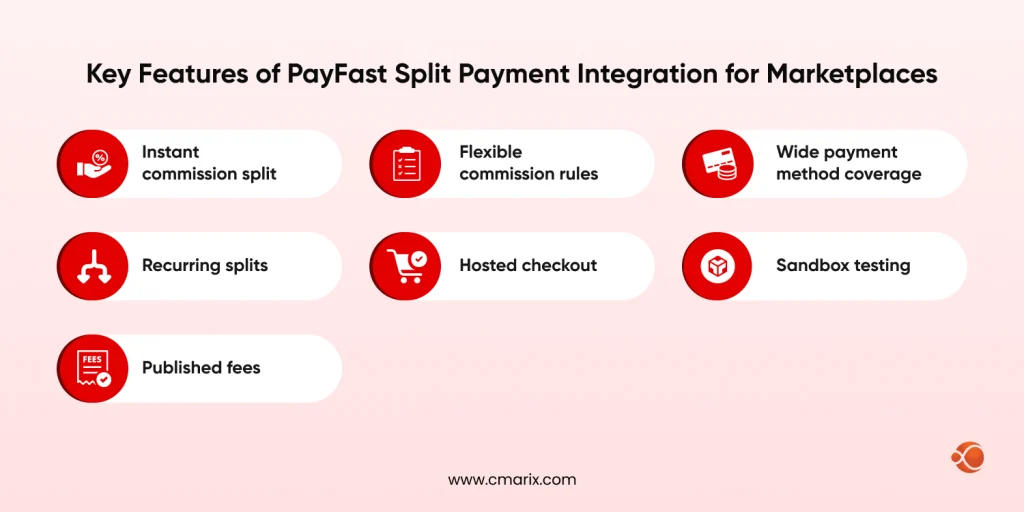
- Instant commission split: The split of your commission goes into your platform account as soon as the payment is made.
- Flexible commission rules: You can set a percentage (only whole numbers) or a fixed amount, or even both of them. A minimum and a maximum ensure that the commission will be reasonable enough. If the split is less than the minimum, then the minimum will apply.
- Wide payment method coverage: PayFast’s fee page currently lists cards, Instant EFT, Capitec Pay, Apple Pay, Samsung Pay, Google Pay, Scan to Pay, SnapScan, Zapper, MoreTyme, Mukuru Pay, Payflex, Mobicred and store cards. Instant EFT and Capitec Pay run over bank-based routes rather than card networks, which puts them in the same family as account-to-account (A2A) payment rails.
- Recurring splits: If you use tokenization or subscriptions through a custom integration, splits continue on later payments.
- Hosted checkout: With the standard redirect flow, customers pay on PayFast’s secure page, so card details stay off your servers.
- Sandbox testing: Test your transactions without any real money involved.
- Published fees: PayFast lists fees per payment method on its fee page, and rates differ by method. You will want to model your margins based on these fees.
Use Cases That Fit PayFast Split Payments
PayFast positions split payments for platforms that earn through commissions or fees, including wholesalers and resellers. The use cases below share one trait: a single payee takes a share of each sale.
- Service marketplaces: Tutoring, consulting and booking platforms keep a platform fee while the provider is paid.
- Digital product marketplaces: Authors, designers and developers earn when their product sells.
- Educational platforms: Instructors earn from each course purchase while the platform keeps its fee.
- Estate agency groups: The agency takes its share of each deal, and the agent receives the rest.
- Community marketplaces: Local sellers get paid per order while the app/platform keeps its commission.
Handling Multi-Vendor Carts Without Multi-Recipient Splits
When splitting payments on ecommerce platforms that have a marketplace presence. A shopper who selects products from three different vendors cannot make payment to all of them in a single PayFast split transaction. Here are 3 practical ways:
- One checkout per vendor: Group the cart by vendor and run a separate payment for each. It maps cleanly to PayFast, though customers go through more steps.
- Platform ledger and payouts: Collect the full amount, track each vendor’s earnings, and run a marketplace payout solution yourself. You gain flexibility but take on money handling and compliance work.
- A multi-recipient gateway: Evaluate split payment solutions for online marketplaces that can pay several recipients from one payment, and confirm they serve your country.
If you are still designing the platform itself, this guide to building a multi-vendor eCommerce marketplace covers the wider build.
How to Implement Marketplace Split Payments with PayFast in 7 Steps
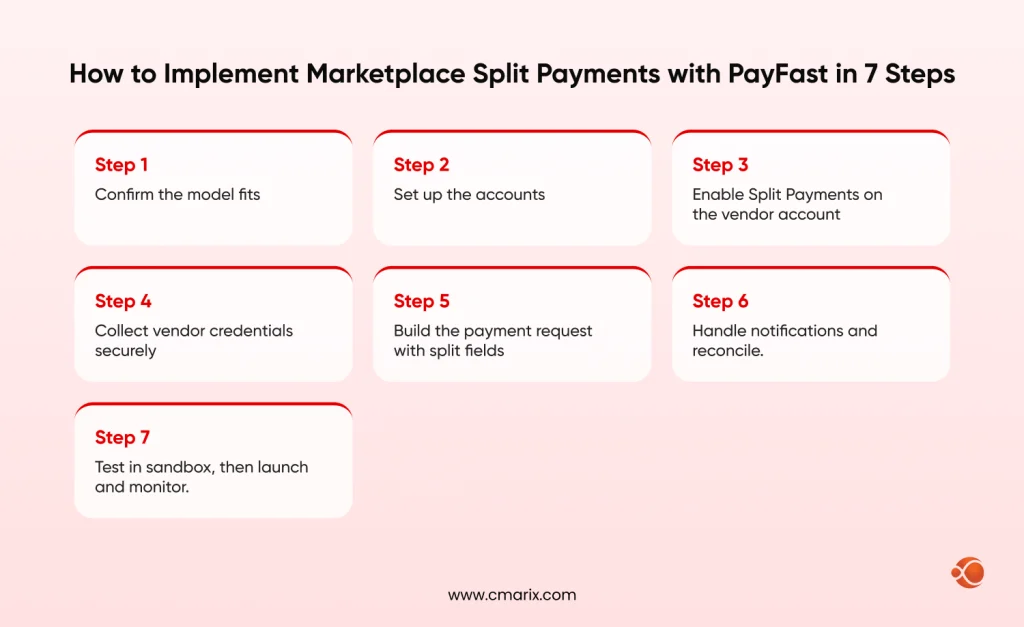
Step 1: Confirm the model fits. Check that each checkout involves one vendor and that your commission is a percentage, a fixed fee, or a mix. If so, PayFast fits. If not, go back to the carts section above.
Step 2: Set up the accounts. Your platform needs a PayFast merchant account, and every vendor needs their own verified account. Create sandbox accounts for both sides first.
Step 3: Enable Split Payments on the vendor account. The vendor goes to Settings, then Integration, and enables Split Payments. Add your platform’s merchant ID to the whitelist so only your platform can receive splits.
Step 4: Collect vendor credentials securely. Your platform requires the Merchant Key and Merchant ID of each vendor for splitting to work. The information is encrypted and should be accessible only by certain people.
Step 5: Build the payment request with split fields. The split details travel as a JSON encoded setup field, and all amounts are in cents. Field names follow PayFast’s developer docs.
setup={"split_payment":{"merchant_id":10000105, "percentage":10, "min":2000, "max":20000}}
| Option | What it does |
| merchant_id | The receiving account (your platform). Required |
| percentage | Whole-number percentage allocated to the receiving merchant. Required if you skip amount |
| amount | Amount in cents that goes to the receiving merchant. Required if you skip percentage |
| min and max | Optional floor and ceiling on the split, in cents |
Three rules apply, per the docs. If you send both a percentage and an amount, the percentage is deducted first, and the amount comes off the rest. If the calculated split falls below the minimum, the minimum is used. If it lands above the maximum, the maximum is used. Run a R400 test in sandbox and check both account balances. Confirm in sandbox how PayFast’s own fee is deducted before you finalize your margins.
Step 6: Handle notifications and reconcile. You should never presume that a customer returning to your site means that you’ve received payment. The real payment validation should be carried out via PayFast notifications, checking their signature and amount, and distributing stakeholders their shares according to the order ID. If your team is stretched, specialists in payment API integration can build and test this layer.
Step 7: Test in sandbox, then launch and monitor. Testing should include a successful split, a split that falls between the minimum and maximum limits, a failed transaction, a canceled transaction, a refund, and recurring transactions where applicable. It must include a vendor without split setup and a whitelist mismatch. Post-launch activity includes setting alerts, tracking success rate, and reconciliation daily.

Troubleshooting PayFast Split Payments: Common Pitfalls and Fixes
| Issue | Description | Fix |
| Split not applied | When your merchant ID is missing from their whitelist, or the vendor has enabled Split Payments | Check the vendor dashboard setting and the IDs, then retest in sandbox |
| Wrong split amounts | Amounts sent in rand instead of cents | Convert to cents in one place and unit test it |
| Failed payments | Network errors or declined cards interrupt checkout | Allow a fresh payment attempt, explain the failure clearly and mark the order paid only after server confirmation |
| Vendor account problems | A vendor’s PayFast account is unverified or incomplete | Check status during onboarding and keep their listings hidden until ready |
| Refund complexity | Several parties share one payment | Check how PayFast’s Refunds API treats split payments, track each party’s share in your own records and publish a refund policy |
| Mixed-vendor carts | One cart holds items from several vendors | Group the cart by vendor before checkout |
How Marketplaces Manage Multiparty Payment Compliance
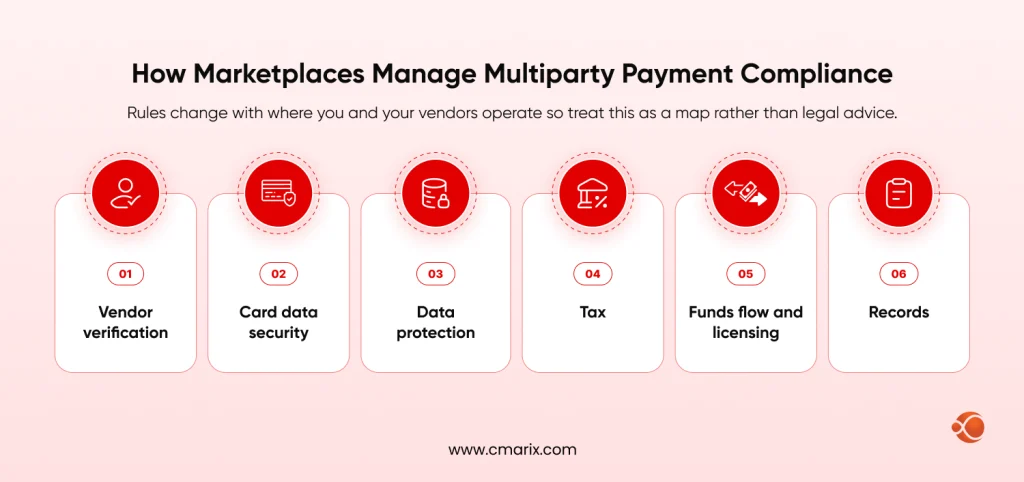
Rules change with where you and your vendors operate, so treat this as a map rather than legal advice.
- Vendor verification: Verify who your vendors are before you let them sell. PayFast does this, and your platform needs to do it too.
- Card data security: Redirect checkout keeps card details off your servers, which narrows your PCI DSS scope. Confirm your obligations with your assessor.
- Data protection: POPIA is relevant for data of both buyers and vendors in South Africa; GDPR is relevant if you offer services to buyers from the EU.
- Tax: Invoicing and VAT status of the vendors should be considered carefully. Make sure to consult your accountant.
- Funds flow and licensing: Your platform will be considered to be involved in payments if you hold or facilitate movement of funds on behalf of regulators. Using splitting at the gateway means that money will flow via the payment processor rather than your account – check with your lawyers.
- Records: Keep a record of every party’s share, refund and dispute for each transaction.
PayFast vs Other Split Payment Gateways
PayFast wins on local fit. South African buyers know Capitec Pay, Instant EFT and Mobicred, and local support helps when something breaks. It loses where one cart must pay several vendors at once.
| Your need | PayFast | What to check elsewhere |
| South African payment methods | Strong fit | Confirm each option exists at the alternative |
| One vendor per checkout with commission | Fits | Compare fees only |
| One cart paying several vendors | Not supported per transaction | Gateways with multi-recipient splits |
| Many currencies or cross-border vendors | Check PayFast’s multi-currency pricing | Compare FX terms and payout rules |
Stripe Connect and Paystack both document ways to route payments between platforms and sellers, and Paystack lists multi-split payments. Availability, fees, and payout timing for South African merchants change, so confirm on their current pages. Compare real quotes against your payment mix instead of assuming either side is cheaper. Whichever gateway you pick, plan multi-vendor gateway integration early, because it shapes your cart, order, and payout design.
Best Practices for Managing Payment Flows
- Accounting integration: Since split transactions produce multiple entries per transaction, integrate them with your accounting software using APIs.
- Clear payout communication: The split is made instantly available in the PayFast account balance, whereas transferring money to a bank occurs at different payout times. Provide your vendors with information about when each part will occur and investigate the Immediate Payout feature in PayFast.
- Error handling: Implement idempotent handling of notifications to prevent recording the same amount more than once from repeated notifications.
- Monitoring: Monitor split transactions success rate and frequency of errors; raise alarms for sudden decreases.
- Fee transparency: Inform your vendors about the way you calculate commissions and fees for the gateway before listing anything.
- Mobile-first checkout: Most buyers pay on phones, so test every screen size. Reliable mobile app development services help here.
- Edge cases: Plan for partial refunds, chargebacks, and disputes before launch.
Marketplace Split Payments Launch Checklist
| Task | Description |
| Accounts verified | Platform and every vendor have verified PayFast accounts |
| Split enabled | Split Payments is on for each vendor account |
| Whitelist set | Your merchant ID is in each vendor’s whitelist |
| Commission model | Percentage, fixed amount, min and max are decided |
| Cents conversion | Every amount is converted to cents before sending |
| Credentials secured | Vendor IDs and keys are stored encrypted |
| Notifications handled | Signature and amount checks run on every notification |
| Sandbox complete | Success, failure, min, max, refund and recurring tests pass |
| Refund policy | Refund and dispute rules are written for vendors |
| Tax and legal review | VAT, POPIA and funds flow have been reviewed |
| Accounting sync | Transactions reconcile daily against order records |
| Vendor documentation | Vendors can see how every payout is calculated |
| Device testing | Checkout works on desktop and mobile |
Get a build plan covering gateway setup, vendor onboarding and payouts.
Why Choose CMARIX for Marketplace Payment Development
CMARIX builds payment-led platforms for enterprises and startups across 40+ industries. Our team handles gateway integration, payout logic, vendor onboarding flows, and reconciliation, so your split rules hold up in production. If you need help developing an entire platform, our eCommerce software development company team can plan and build it.
- Payment integration depth: Our payment API integration work covers hosted checkout, server notifications, signature checks, sandbox testing, and reconciliation- the parts of a gateway build that tend to break first.
- Marketplace architecture: We design the cart, orders, payout logic, and vendor onboarding, so a limit like one recipient per split is handled in the product design instead of patched in later.
- Global reach, local presence: We have offices in India, the USA, Canada, South Africa, Germany, and the UK, so you work with a team that understands South African buyers and vendors.
- Security and quality standards: CMARIX is ISO 9001:2015 and ISO 27001 certified, and our QA testing services cover the checkout, notification, and refund paths before launch.
In case your market needs more than one recipient per cart, or if you do not know which gateway to choose, it makes sense to start with an architectural overview.
Wrapping Up
Marketplace split payments through PayFast work best when you build for reality: one vendor per checkout transaction, configuration at the vendor level, and amounts in cents. Developed for all these, commissions will be transferred faster, vendors will receive payment quicker, and your team won’t need to reconcile payments manually anymore.
If you have a model in which you’ll need a single shopping cart to process several vendors’ payments, plan ahead to build accordingly. Test each case in sandbox, specify your refund policy, and do your taxation and legality check before going live.
FAQs on Marketplace payment solution with PayFast
What are marketplace split payments and how do they work?
Marketplace split payments divide one customer payment between the vendor and your platform automatically when the payment clears. You set the rule, such as a percentage commission or a fixed fee, and the gateway applies it to every transaction. On PayFast, the vendor’s account receives the payment and the agreed share moves instantly to your platform’s account.
What is the easiest way to split payments between my platform and third-party vendors?
Use a gateway that supports native splitting instead of calculating payouts; it sends the split details with each payment request, and the gateway moves your commission quickly. It works cleanly when each checkout involves one vendor.
What is the difference between a traditional gateway and a specialized split payment gateway?
A traditional gateway processes the entire amount to one merchant without doing the commission mathematics for you. A split payment gateway splits the total amount at the time of processing according to the rules you define. This way, you can avoid any manual reconciliation process.
How do digital platforms automate transaction splits for multi-vendor marketplaces?
The commission rules are set for each group of items or vendors separately and are then sent with each transaction via the gateway. When the gateway can handle only one beneficiary per transaction, as in PayFast’s case, platforms typically run a separate checkout for each vendor.
What features should you look for in a modern marketplace payments api?
Look for native split rules with percentage, fixed, minimum, and maximum options, reliable notifications, a full sandbox, and a refunds API. Vendor onboarding support, reconciliation reporting, and the payment methods your buyers use matter too. Check how refunds and fees behave on split transactions, since that is where integrations often break.
How do marketplaces manage multiparty payment compliance and regulatory frameworks globally?
Requirements will vary depending on your location and the vendors using the platform. Full compliance will include vendor identity verification, PCI DSS requirements for card data security, data privacy legislation such as GDPR or POPIA, tax treatment of commission payments, and documentation of every stakeholder’s allocation. If you will be holding payments for vendors on your platform, you should speak to legal counsel.
Which payment api supports split payments for marketplace businesses effectively?
It will depend on the model you have. PayFast works well for South African platforms that deal with one vendor per sale and one platform fee. When one cart needs to pay multiple vendors at once, compare gateways that have multi-recipient splits, like Stripe Connect or Paystack.
What are the best practices for managing payment flows in a multi-vendor e-commerce platform?
Make sure that the payments are confirmed by server notifications only; don’t ever rely on return pages. Save vendor shares against each order, settle daily, and create refund/dispute policies for vendors. Watch your failure rate, and be clear on when payment is received and when vendors get access to it.
How do you implement a PayFast split payments workflow using developer sandboxes?
Create sandbox accounts for your platform and a test vendor, enable Split Payments on the vendor side, and add your merchant ID to the whitelist. Send the split details with test payments, then check amounts, the minimum and maximum rules, notification handling, and failed or canceled payments. Repeat the tests for refunds and recurring payments if you use them.
What is the typical onboarding timeline when deploying an automated marketplace payout solution?
It is dependent mainly on the vendor verification process and also ensuring that all vendors have enabled splitting and have their credentials provided. This is out of your control. The development and sandbox testing process is more predictable. You need to plan for three stages: the integration and testing of the platform, vendor onboarding, and a pilot of selected vendors.