Quick Summary: Clean Architecture iOS separates a Swift application into the Presentation, Domain, and Data Layers. These layers stay testable and modular. This article highlights how CMARIX uses MVVM, SwiftUI, dependency injection, and testing to manage codebase growth.
Building an iOS app is more than developing user-friendly interfaces and functional features. As an application adds more features, its code becomes tightly coupled, making it difficult to test, update, or add new features. Clean Architecture in iOS application development solves these challenges. Combined with MVVM, SwiftUI, dependency injection, and automated testing, this approach gives Swift apps a structure that can evolve as requirements change.
In this blog, we cover:
- What is Clean Architecture in iOS, and why does it matter?
- How do the Presentation, Domain, and Data layers work?
- What is the difference between Clean Architecture and MVVM?
- How do MVVM and SwiftUI work together in modern iOS apps?
- How can you structure a scalable SwiftUI project?
- How do you implement Clean Architecture with a practical Swift example?
- How does Clean Swift (VIP) differ from Clean Architecture?
- How do you implement dependency injection in iOS?
- What testing strategies help maintain clean Swift code?
- How do SOLID principles and other iOS architecture patterns improve maintainability?
What Is Clean Architecture in iOS?
Clean Architecture in iOS is a design approach that splits an app into presentation, domain, and data layers. Dependencies point inward toward business rules. This keeps code testable, framework-independent, and scalable as teams and features grow.
Robert C. Martin described the core rule in his article on The Clean Architecture. Source code dependencies point inward only. Inner layers know nothing about outer layers.
Why does this matter? Poor structure is expensive. The Consortium for Information & Software Quality estimates that poor software quality cost the US $2.41 trillion in 2022. Accumulated technical debt reached about $1.52 trillion. Finding and fixing defects is the largest single expense in the software lifecycle. Cybercrime losses linked to software flaws also rose another 42% between 2021 and 2022.
| Benefit | Description |
| Faster tests | Test business rules without a simulator. |
| Safer migrations | Switch from UIKit to SwiftUI without changing the domain layer. |
| Parallel work | Teams work independently on layers with clear contracts. |
| Lower rework | Keep changes limited to the relevant layer. |
The CMARIX iOS team uses this structure for apps that must survive years of iOS updates.
iOS Architecture Layers Explained
iOS Clean Architecture uses three layers. The presentation layer holds SwiftUI views and ViewModels. The domain layer holds entities, use cases, and repository protocols. The data layer implements repositories, API clients, and local storage such as SwiftData or Core Data.
Presentation (SwiftUI views, ViewModels, coordinators)
      |  depends on
      v
Domain (entities, use cases, repository protocols)
      ^  depends on
      |
Data (API client, DTOs, SwiftData, repository implementations)
| Layer | Responsibilities | Depends On |
| Presentation | SwiftUI views, ViewModels, coordinators | Domain |
| Domain | Entities, use cases, repository protocols | Nothing |
| Data | API clients, DTOs, persistence, repository implementations | Domain |
Presentation Layer
The presentation layer holds SwiftUI views, UIKit controllers, and ViewModels. It formats data for the screen and sends user actions to use cases. It contains no networking and no business rules.
Domain Layer
The domain layer is written purely in Swift. The entities, use cases, and repositories live here. This layer does not import SwiftUI, UIKit, or any third-party SDKs. This is the most portable and testable layer of your app.
Data Layer
The Data layer implements the repository protocol and communicates with REST APIs, SwiftData, Core Data, and the Keychain. DTO maps responses to domain entities so that the API structure is always hidden from above.
Clean Architecture vs MVVM: What Is the Difference?
MVVM structures the presentation layer through the connection between a View and a ViewModel. Clean Architecture structures an entire application with dependencies flowing inward. Many companies use both approaches.
| Factor | MVVM | Clean Architecture |
| Scope | UI layer | Entire app |
| Core idea | Bind View to ViewModel | Dependencies point inward |
| Main layers | Model, View, ViewModel | Presentation, Domain, Data |
| Testing focus | ViewModel logic | Use cases and repositories |
| Best used | Alone for small apps | With MVVM for large apps |
So which one should you pick? You do not have to choose. MVVM gives each screen a clear shape. Clean Architecture gives the whole app clear borders. Our guide to essential Swift design patterns covers the wider toolbox.
What Is MVVM in iOS?
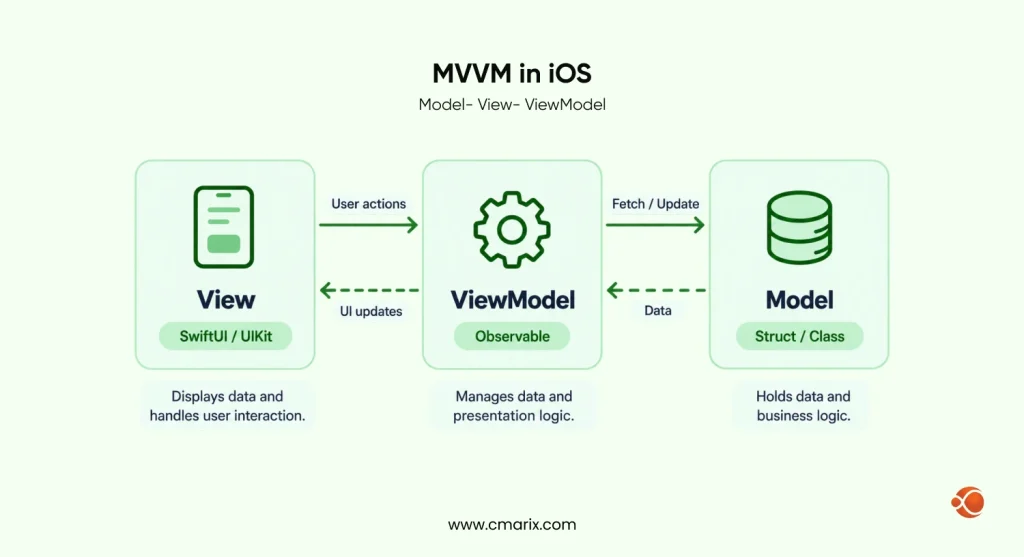
MVVM stands for Model-View-ViewModel. The View displays data. The ViewModel prepares that data and handles user actions. The Model holds the data and its rules. The View never talks to the Model directly.
Model
The Model stores the app’s data and business logic. In iOS development, the Model is normally made up of structs or classes written in Swift. Domain entities have nothing to do with the UI, keeping everything well separated.
View
View is the User Interface itself. This is where information is displayed, and user interaction takes place. In iOS development, Views are implemented by using either SwiftUI Views or UIKit components. While MVC architecture relies heavily on views, MVVM keeps views light and free of business logic.
ViewModel
The ViewModel lies between the View and the Model. It manages data and presentation logic. It contains properties and methods that encapsulate the state and functionality of the View. Because presentation logic resides in this class, you can unit-test it without UI code.
MVVM Clean Architecture iOS: How They Work Together
In this combined architecture, the ViewModel sits in the presentation layer, while the Model becomes a domain entity. Data transfer takes place between the layers in a defined sequence:
- The View sends a user action to the ViewModel.
- The ViewModel calls a use case.
- The use case calls a repository protocol.
- The data layer implements that protocol and reaches the API or database.
- Domain entities travel back up and update the ViewModel state.
Each step has one job. That is why the pair scales so well.
Cutting Repetitive Code in MVVM
MVVM can create repeated code on every screen. Three habits keep it lean:
- Share one loading state type across ViewModels.
- Use small generic protocols for use cases.
- Move common loading and error views into reusable modifiers.
enum LoadState<Value> {
  case idle
  case loading
  case loaded(Value)
  case failed(String)
}
MVVM-C: Adding Coordinators
Coordinators own navigation. ViewModels stay unaware of the next screen. In SwiftUI, a coordinator can manage a NavigationStack path. This keeps routing out of views and makes flows easy to test.
Choose an architecture that keeps your Swift code modular, testable, and easy to maintain.
MVVM in SwiftUI for iOS 17+: Pros and Cons
MVVM with SwiftUI in iOS 17+ is great with the @Observable macro. The benefits are separation of concerns, unit testability, and reusable logic. Disadvantages include more files for basic views, and ViewModels can become “massive.” Use MVVM with screens that have real business logic.
Apple’s Observation framework powers @Observable. It replaces ObservableObject and @Published for most new code. Views refresh only when the properties they read change.
Pros
- Clean split between view and logic.
- ViewModels are easy to unit test.
- Logic is reusable across screens.
- @Observable removes most boilerplate.
Cons
- Simple screens gain extra files.
- ViewModels can become too large.
- Teams may duplicate state that SwiftUI already manages.
While a lightweight Model-View pattern with @Observable suffices for a small application, you should switch to MVVM once the logic gets distributed among various views.
Harmonizing SwiftUI and Combine with Clean Architecture
SwiftUI
Apple developed SwiftUI to create interfaces more quickly for all devices, such as iPhone, Mac, Apple Watch, and Apple TV. In this new framework, developers describe UI state with declarative code. You no longer need to specify the behavior of each element separately.
Combine
Combine is Apple’s framework for writing reactive code. Developers use publishers, subscribers, and operators to perform asynchronous, event-driven tasks in a declarative, modular way.
In a Clean Architecture setup, SwiftUI views sit in the presentation layer. Combine publishers and subscribers and move data between layers. Views bind to ViewModel properties and update when published data changes. Changes in the Model layer flow naturally to the presentation layer, keeping responsibilities separate.
On iOS 17 and later, @Observable can replace Combine for most view state, as the section above shows. Combine still fits streams of events, such as search input or sockets.
Clean Architecture SwiftUI: Folder Structure
A clear folder tree makes the layers visible. Start with this layout:
App/
├── Presentation/
│ ├── Features/Users/ (UsersView, UsersViewModel)
│ └── Common/
├── Domain/
│ ├── Entities/
│ ├── UseCases/
│ └── Repositories/ (protocols only)
├── Data/
│ ├── Network/ (API client, DTOs)
│ ├── Persistence/ (SwiftData or Core Data)
│ └── Repositories/ (implementations)
└── DI/ (composition root)
For larger apps, turn each top-level folder into a Swift Package target. The compiler then blocks illegal imports. Keep third-party UI helpers, such as those in our list of top SwiftUI libraries, inside the presentation layer only.
Clean Architecture iOS Example: Fetching a User List
This example loads a list of users. Each step sits in its own layer.
Step 1: Domain layer.
Define the entity, the repository protocol, and the use case.
struct User: Identifiable, Equatable {  let id: Int
  let name: String
  let email: String
}

protocol UserRepository {
  func fetchUsers() async throws -> [User]
}

protocol FetchUsersUseCase {
  func execute() async throws -> [User]
}

struct DefaultFetchUsersUseCase: FetchUsersUseCase {
  private let repository: UserRepository

  init(repository: UserRepository) {
      self.repository = repository
  }

  func execute() async throws -> [User] {
      try await repository.fetchUsers()
  }
}
Step 2: Data layer.
Decode a DTO and map it to the entity.
struct UserDTO: Decodable {
  let id: Int
  let name: String
  let email: String

  func toDomain() -> User {
      User(id: id, name: name, email: email)
  }
}

struct RemoteUserRepository: UserRepository {
  let baseURL: URL
  var session: URLSession = .shared

  func fetchUsers() async throws -> [User] {
      let url = baseURL.appendingPathComponent("users")
      let (data, _) = try await session.data(from: url)
      let dtos = try JSONDecoder().decode([UserDTO].self, from: data)
      return dtos.map { $0.toDomain() }
  }
}
Step 3: Presentation layer. The ViewModel exposes one state value.
import SwiftUI
import Observation

@MainActor
@Observable
final class UsersViewModel {
  private(set) var state: LoadState<[User]> = .idle
  private let fetchUsers: FetchUsersUseCase

  init(fetchUsers: FetchUsersUseCase) {
      self.fetchUsers = fetchUsers
  }

  func load() async {
      state = .loading
      do {
          state = .loaded(try await fetchUsers.execute())
      } catch {
          state = .failed(error.localizedDescription)
      }
  }
}

struct UsersView: View {
  @State private var viewModel: UsersViewModel

  init(viewModel: UsersViewModel) {
      _viewModel = State(initialValue: viewModel)
  }

  var body: some View {
      Group {
          switch viewModel.state {
          case .idle, .loading:
              ProgressView()
          case .loaded(let users):
              List(users) { Text($0.name) }
          case .failed(let message):
              Text(message)
          }
      }
      .task { await viewModel.load() }
  }
}
The view knows only the ViewModel. The ViewModel knows only the use case protocol. The use case knows only the repository protocol. Nothing points outward.
Clean Swift (VIP) vs Clean Architecture
Clean Swift is another pattern introduced by Raymond Law. In this case, Clean Architecture principles apply to each screen, called a scene. The process goes through View to Interactor to Presenter and again back to View. A router handles navigation.
In Clean Swift, a Worker is a small class that handles one task, such as fetching data from an API. The Interactor calls the Worker, receives the result, and passes it to the Presenter. The Presenter formats it for the ViewController.
final class UsersWorker {
  private let repository: UserRepository

  init(repository: UserRepository) {
      self.repository = repository
  }

  func fetchUsers() async throws -> [User] {
      try await repository.fetchUsers()
  }
}
Use Clean Swift for UIKit-heavy projects with many scenes. Use MVVM with Clean Architecture for SwiftUI-first apps.
iOS Dependency Injection
What is dependency injection on iOS? It is the technique of injecting objects into the constructor, rather than creating them inside the object. You can achieve it via constructor injection using protocols.
| Approach | Best For | Trade-off |
| Constructor injection | Most projects | More init parameters |
| Swinject | Large apps with many dependencies | Extra library, runtime resolution |
| SwiftUI Environment | View-level services | Missing values can go unnoticed |
Work with experienced iOS developers to build a maintainable application architecture.
Types of Dependency Injection
You can apply dependency injection in three ways: constructor, property, and method injection. Constructor injection passes dependencies when the object is created, so everything is available before you use it. Property injection sets dependencies through setters or public properties after construction. Method injection passes them as arguments to specific functions.
Benefits of Dependency Injection
Dependency injection encourages loose coupling because components receive dependencies from outside rather than building them themselves. That makes it easier to update or swap a dependency without affecting the whole system. It also supports inversion of control, so components focus on their main job. Together, these benefits improve extensibility and adaptability.
Build every object in one place, called the composition root. It usually sits in the App struct.
@main
struct UsersApp: App {
  private let viewModel: UsersViewModel = {
      let repository = RemoteUserRepository(baseURL: URL(string: "https://api.example.com")!)
      let useCase = DefaultFetchUsersUseCase(repository: repository)
      return UsersViewModel(fetchUsers: useCase)
  }()

  var body: some Scene {
      WindowGroup { UsersView(viewModel: viewModel) }
  }
}
Need help structuring your app? Talk to a team that ships layered Swift code. Hire dedicated iOS developers from CMARIX and start with an architecture review.
Testing Strategies for Clean Architecture iOS
Clean layers make testing simple. Test each layer alone, then test how they connect.
Unit tests cover use cases and ViewModels. Stub the repository and assert the state.
import Testing
@testable import YourApp

struct StubRepository: UserRepository {
  var result: Result<[User], Error>
  func fetchUsers() async throws -> [User] { try result.get() }
}

@MainActor
@Test func loadsUsers() async {
  let users = [User(id: 1, name: "Asha", email: "asha@example.com")]
  let useCase = DefaultFetchUsersUseCase(repository: StubRepository(result: .success(users)))
  let viewModel = UsersViewModel(fetchUsers: useCase)

  await viewModel.load()

  guard case .loaded(let loaded) = viewModel.state else {
      Issue.record("Expected loaded state")
      return
  }
  #expect(loaded == users)
}
- Integration tests check that the data layer decodes real response samples. Use a mocked URLSession.
- UI tests confirm key user flows on a simulator. Keep them few and focused.
- End-to-end tests confirm that all components work together to deliver the intended user experience. Teams can automate them with XCTest UI testing or third-party tools such as Appium. They simulate real user workflows and help catch integration or system problems.
- Security checks belong in the data layer. Review storage, network, and platform use against the OWASP Mobile Application Security Verification Standard. Run all suites in CI on every pull request.
SOLID Principles in Swift
Clean Architecture puts the SOLID principles into practice.
| SOLID PRINCIPLE | Application in Clean Architecture |
| Single Responsibility | One use case per business action |
| Open/Closed | Add repositories without editing use cases |
| Liskov Substitution | Mock and real repositories behave the same |
| Interface Segregation | Small repository protocols per feature |
| Dependency Inversion | Domain defines protocols, Data implements them |
iOS Architecture Patterns Compared
No single pattern fits every app. Compare the common options before you commit.
| Architecture Pattern | Best Use Case | Implementation Complexity | Testability |
| MVC | Small prototypes | Low | Low |
| MVP | UIKit apps with testable presenters | Medium | High |
| MVVM | SwiftUI screens | Medium | High |
| MVVM-C | Apps with complex navigation | Medium to high | High |
| VIPER | Large UIKit teams | High | High |
| MVI | One-way state flow | Medium | High |
| TCA | Strict state management | High | Very high |
If your product also targets Android, the same layering applies there. Compare the language trade-offs in our Kotlin vs Swift guide.
Build Your iOS App on a Clean Architecture Foundation
Choosing an architecture early saves months of rework later. CMARIX designs layered Swift apps with MVVM, dependency injection, and automated test suites from day one. We have also migrated and upgraded 100+ iOS apps.
Start with a clear budget. Our iOS app development cost guide breaks down the numbers. Then review the mobile app development process we follow from discovery to release.
New to the basics? Learn how to build an iOS app step by step. Building beyond Apple devices? Work with a mobile app development company that covers every platform.
Ready to build? Work with an iOS app development company that treats architecture as a first-class feature. You can also hire Swift developers who already ship Clean Architecture projects.

Conclusion
iOS Clean Architecture provides you with clean layers, safe boundaries, and fast tests. MVVM gives each screen a simple structure. The trick lies in SwiftUI, @Observable, and Dependency Injection, which link everything with very few lines of code. Implement the pattern for one feature, then extend it throughout the app. For any experienced assistance, CMARIX is here to help.
FAQs on iOS Clean Architecture
What is clean architecture iOS and why should developers use it?
Clean Architecture iOS is a three-layer design: presentation, domain, and data. Programmers choose this architecture because it separates business logic from UIKit, SwiftUI, and networking. This separation enables refactoring and increases productivity on big teams. Clean Architecture brings the biggest benefit to long-living applications.
What is the main difference between Clean Architecture Swift and traditional MVVM?
MVVM organizes the presentation layer by linking a View to a ViewModel. Clean Architecture organizes the app into layers with dependencies pointing inward. Most teams combine them: MVVM handles the UI, while Clean Architecture handles business and data rules.
How do you structure a Clean Architecture SwiftUI project for scalability?
Create three main groups at the highest level, or as Swift Package Targets:ts: Presentation, Domain, and Data. Views and ViewModels should go into Presentation. Place entities, use cases, and repository protocols in Domain, while Data holds API clients, DTOs, and persistence.
How do the iOS architecture layers split responsibilities?
iOS Clean Architecture has three main layers. The presentation layer contains SwiftUI views and ViewModels. The domain layer contains entities, use cases, and repository protocols. The data layer implements repositories, API clients, and local storage like SwiftData or Core Data.
What are the pros and cons of using MVVM in modern SwiftUI for iOS 17+?
MVVM with SwiftUI on iOS 17+ works well with the @Observable macro. Benefits: clear separation of responsibilities, testable code, and reusable logic. Drawbacks: additional files for simple screens and a potential “massive” ViewModel class. Use MVVM for screens that contain business logic.
How does a clean Swift worker handle data fetching inside the VIP cycle?
In Clean Swift, a Worker is a small class that handles one task, such as fetching data from an API. The Interactor calls the Worker, receives the result, and passes it to the Presenter. The Presenter formats it for the ViewController.
Can you provide a clean, structured Swift example of network requests?
Define a repository protocol in the domain layer. Implement it in the data layer with URLSession and Decodable DTOs. Call it from a use case, then expose the result through a ViewModel state value. The example earlier in this guide shows each step in Swift.
How do you implement robust iOS dependency injection within clean code layers?
Dependency injection on iOS is when an object’s dependencies come from outside the class rather than being created inside it. Use constructor injection using protocols. This lets tests easily replace real services with mocks, keeping classes decoupled.
What design patterns work best when merging MVVM, Clean Architecture, and iOS frameworks?
Combine the following patterns with MVVM: the Repository pattern, the Use Case pattern, the Dependency Injection pattern, and the Coordinator pattern. The repository pattern hides data sources. The use case pattern contains business rules. Dependency Injection connects objects. The Coordinator manages navigation. You can use the Factory pattern or Adapter pattern where appropriate.
How do you set up automated unit testing for a Swift clean architecture workflow?
Test each layer alone. Stub repositories to test use cases and ViewModels. Use a mocked URLSession to test the data layer. Run suites with Swift Testing or XCTest in CI on every pull request. Keep UI tests few and focused on key flows.