Quick Summary: Struggling to choose the best AI tool for your organization? ChatGPT vs alternatives shows that ChatGPT remains one of the most popular and easy-to-use AI tools, but others are better suited to specific tasks, including content writing, research, coding, and productivity. In 2026, the options only became more diverse, as open-weight contenders such as DeepSeek and Mistral joined existing players such as Gemini, Claude, and Copilot.
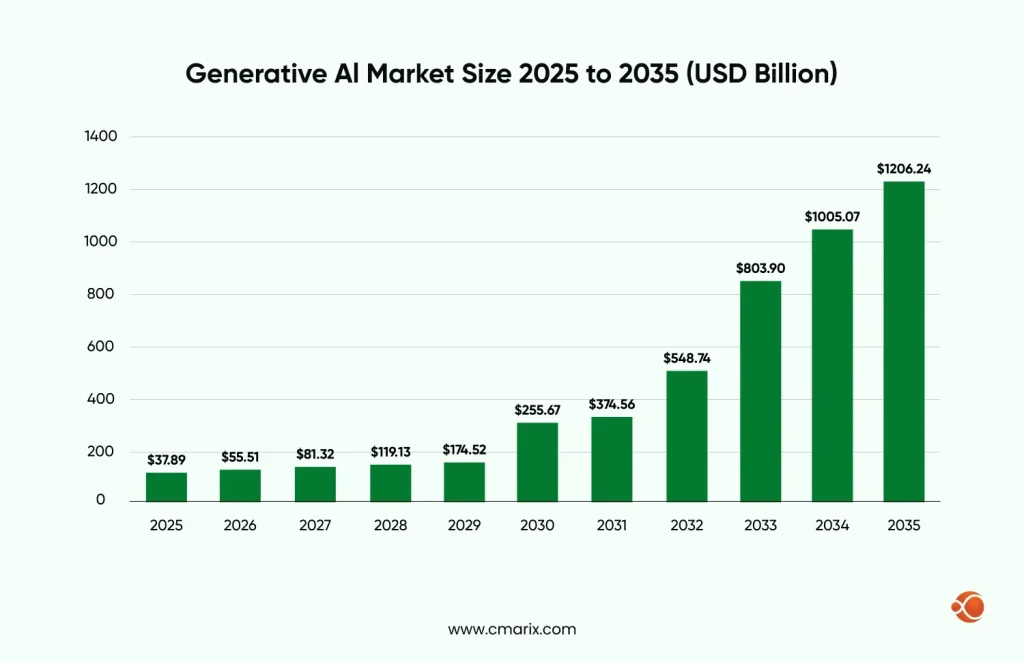
Among the various use cases and integrations of AI in everyday workflows, generative AI has seen the most widespread adoption and demand, with the global generative AI market projected to approach USD 1 trillion by 2034, according to Precedence Research.
The goal here is not to find one super solution that fits all requirements, but building a tailored stack of AI tools that align with specific goals, budgets, and requirements. Today we will be discussing different AI models that provide a ChatGPT better alternative for unique business needs, ranging from content creation to complex data analysis.
ChatGPT played a significant role in catalyzing the revolution in generative AI capabilities; however, a wave of AI-powered business tools has emerged since, each with its own strengths, approaches to large language models (LLMs), and standout features.
It does not mean that there should be a single super-tool that meets all criteria; rather, there needs to be a customized stack of AI tools aligned with objectives, budget, and other criteria. We are going to talk about AI models that offer an alternative to ChatGPT.
What is the Need For Exploring ChatGPT Similar Tools?
As we mentioned earlier, ChatGPT is an exceptional tool with widespread popularity and a range of key capabilities. However, unlocking its true potential for a specific business often requires specialized AI model fine-tuning development services. For businesses that cannot afford to build an in-house specialized AI development team, this can be a significant limitation, one that a ChatGPT alternative or a custom-tuned model can solve more directly.
Points in Favor of ChatGPT
ChatGPT has become the default choice for many businesses exploring generative AI, and with good reason. Some of the major strengths include:
Strong Language Understanding: ChatGPT has nailed natural language processing (NLP), making it useful for diverse applications such as customer support, content creation, marketing copy, and knowledge management. You can assign any role to ChatGPT and get results ranging from subpar to accurate, depending on the quality of the AI prompt engineering behind the request.
Widespread Adoption & Ecosystem There are hundreds of millions of active ChatGPT users who get access to an impressive ecosystem, including community-built GPTs and AI agents built for specific purposes, plus a growing set of third-party integrations.
Ease of Use: Off-the-shelf ChatGPT offers a welcoming, easy-to-navigate user experience with minimal setup. Its conversational interface is easy for anyone with little to no technical expertise. to understand
Rapid Prototyping Businesses can easily test new ideas, automate customization, and ensure data privacy and security
mer interactions, or create content drafts without ever needing to build a custom AI model from scratch.
Constantly Evolving Features OpenAI continues to push enhanced reasoning, longer memory, agentic task execution, and API improvements with each release, including the current ChatGPT Enterprise tier, which pairs advanced data analysis with GPT-5.4-class reasoning and context windows of up to 1,000,000 tokens, so your business stays ahead of the latest AI development trends.
Limitations of ChatGPT
While ChatGPT is a powerful gen AI assistant, it has some clear limitations that businesses should understand before relying on it entirely:
Cost at Scale: Although initial experiments may be inexpensive, full-scale deployment and heavy API use could be more costly than self-hosted or open-source solutions.
Generalized Model ChatGPT isn’t designed with one specific use case in mind. It’s a broad-use AI assistant designed to democratize GenAI for individuals, students, organizations, and all stakeholders. That lack of specialization can lead to gaps in precision. Results for compliance, medical, or other sensitive information tasks should still be fact-checked by a professional, and AI chatbot hallucinations remain a documented risk even in the newest models.
Limited Customization & Control Compared to some ChatGPT alternatives, ChatGPT offers less flexibility around model architecture, deployment environments, and data privacy configurations. You’d need to hire AI developers with expertise in generative AI development to get the most out of it for a specialized workflow.
Data Privacy Concerns: ChatGPT mainly runs in the cloud, which can make deployment and data control less flexible. Unlike some ChatGPT alternatives, it doesn’t offer many options for on-premises hosting, custom privacy settings, or industry-specific compliance. So if you are planning to create a website with ChatGPT, this is an important consideration.
Talk to CMARIX’s AI consultants about a workflow audit before you commit to a single AI vendor.
ChatGPT vs Alternatives: Features, Use Cases, and Pros & Cons
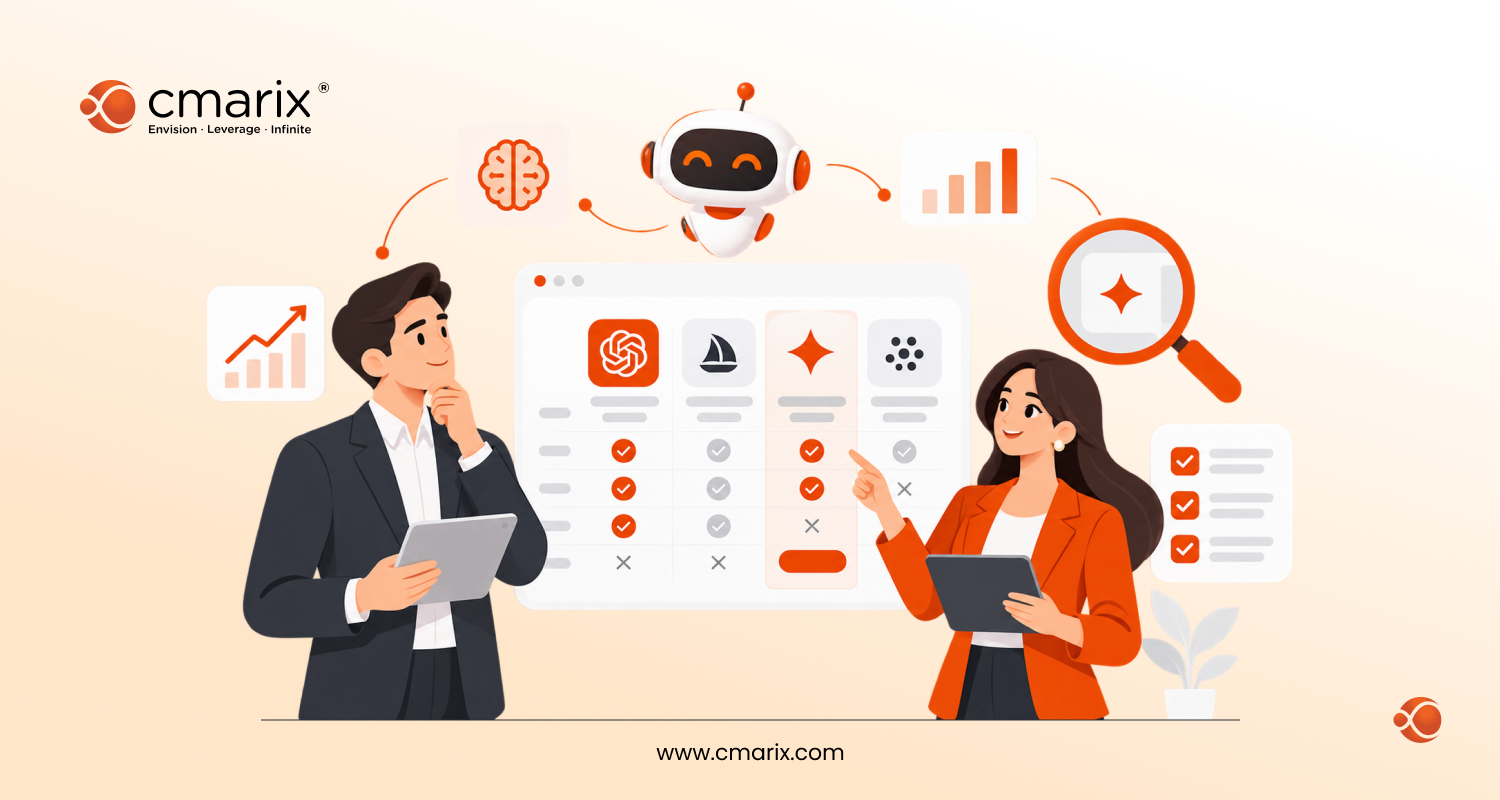
Here are the top picks for ChatGPT vs. other AI tools, compared based on their core use cases, key features, and suitability for your specific requirements.
| AI Tools | Main Focus Area | Description |
| Google Gemini | Best AI Tool for Business Automation | Deeply integrates with Gmail, Docs, Sheets, and the newer Google Vids app. Handles text, images, and code with multimodal support and a 1M-2M token context window. Ideal for automating tasks, research, and coding assistance. |
| Chatsonic | Real-Time Content and Trend AI | Real-time AI platform with live internet access, customizable personas, and multilingual support. Perfect for marketing, creative writing, and trend-driven content. |
| Claude | Long-Form Content and Thoughtful Conversation AI | Empathetic, human-like conversational AI. Handles large documents, brainstorming, research, and nuanced writing with strong memory retention and a large context window. |
| Microsoft Copilot | Microsoft 365 Productivity AI | Built into Office 365 apps. Converts plain-language instructions into automated actions, drafts emails, reports, and presentations. Strong enterprise security, inheriting Microsoft’s Enterprise Data Protection. |
| Perplexity | Research and Fact-Checking AI | AI-powered search engine that cites sources. Ideal for academic writing, research, competitive intelligence, and transparent fact-checking. |
| Character.ai | Creativity and Entertainment AI | AI-driven personas and interactive conversations. Engaging for creative writing, gaming communities, role-playing, and social interaction. |
| GitHub Copilot | Developer Productivity and Coding AI | AI pair programmer integrated into IDEs. Autocompletes code, writes functions, and supports multiple programming languages. Boosts development efficiency and supports ChatGPT for DevOps automation-style pipelines. |
| Meta AI | Open-Source Customization and Experimentation AI | Open-source large language models (Llama family). Highly customizable, suitable for self-hosted AI, research, and experimentation. |
| Grok | Social and Personality-Driven Interaction AI | Witty, edgy AI integrated with X (formerly Twitter). Ideal for conversational engagement, creative responses, and casual entertainment. |
| DeepSeek | Cost-Efficient Reasoning and Coding AI | Open-weight (MIT-licensed) Chinese model family known for low per-token pricing, long context windows, and reasoning that competes with premium closed models on math and coding benchmarks. |
| Mistral AI | European Enterprise & Multilingual AI | Open-weight and commercial models from a Paris-based lab. Strong multilingual performance, agent tooling, and European data-governance options for privacy-conscious enterprises. |
1. Google Gemini – Best AI Tools for Business Automation
Gemini is Google’s flagship AI model and a strong chatbot choice for companies already using Google Workspace. The biggest advantage of Gemini is its deep integration across Gmail, Docs, Sheets, and the newer Google Vids app. This integration lets teams work with a context window that now ranges from 1,000,000 to 2,000,000 tokens, letting Gemini reason over entire codebases or document libraries in one go.
It is also very impressive in its multimodal capabilities; give it text, images, or even source code, and it will interpret them accurately. Even though it may not be as “talkative” as ChatGPT, Gemini is excellent in cases where accuracy and Google’s data ecosystem are important.
Key Features
- Integration with Gmail, Docs, Sheets, Slides, Vids, and NotebookLM
- Features to process information in a multimodal format in the form of text, pictures, and even code
- Advanced features like “Deep Research,” personalized “Gems,” and flash reasoning modes
- Capabilities to convert a blog into an infographic, a quiz, or an audio summary
Use Cases: Automation of tasks within Google Workspace; Research, Homework Help, Visual Creation; Coding Aid, and AI Agents.
Pros: Best fit if you use Google products; great at multimodal understanding; best research and productivity tool.
Cons: If you do not use Google Workspace, it is less attractive for you; there is a paywall for premium features; integration with non-Google websites and mobile applications is spotty.
2. Chatsonic – Real-Time Content and Trend AI
Chatsonic can be compared to ChatGPT’s younger and more experimental cousin. This tool presents itself as an AI-powered platform that is able to keep up with the latest news and topics thanks to its live integrations.
When rapid decision-making and staying ahead of the curve are needed, this could be an excellent alternative to ChatGPT. Users can design customized personas to tailor the assistant’s personality to their requirements.
Key Features: Live internet connection for current answers; persona and prompt libraries; image creation, voice feature, and multi-language capability
Use Cases: Content creation for digital marketing; publication in the news industry and trend-sensitive businesses; creative and social media writing
Pros: Ensures current answers with live search function; persona flexibility; ability to generate different types of content
Cons: Variable quality compared to ChatGPT; unpolished user interface compared to leading platforms
3. Claude – Long-Form Content and Thoughtful Conversation AI
The AI chatbot called Claude, created by Anthropic, still stands among the most “human-like” ones. This AI’s answers are empathic, calm, and context-aware – just like talking to an attentive colleague.
Claude does best with long-form text and retaining context; it can handle large documents without losing the flow of the discussion, and Claude’s context window now goes up to millions of tokens on enterprise plans. While ChatGPT is a great problem solver, Claude can be thought of as a teammate you trust to read, summarize, or brainstorm.
Key Features: Very large context window on enterprise plans; strong memory and empathetic conversational style; Constitutional AI framework for safety and ethics; ability to build custom Artifacts
Use Cases: Reading and summarizing long documents; research, analysis, and brainstorming; writing nuanced, thoughtful content; web development.
Pros: Extremely good at handling long-form text; calm, “human-like” conversational tone; safe and reliable reasoning
Cons: Fewer third-party integrations than ChatGPT or Gemini; not as creative or witty as Grok
4. Microsoft Copilot- Microsoft 365 Productivity AI
If you’re already within the Microsoft ecosystem, then Copilot becomes a no-brainer almost immediately. It comes pre-installed within Office 365, including Word, Excel, Outlook, and Teams, saving you many hours of work. How about asking Excel to generate a pivot table using natural language? What about writing email responses in your voice?
This tool is deeply embedded in the Microsoft subscription system and, therefore, is more of a productivity tool for Microsoft-based businesses than an autonomous AI chatbot. Nevertheless, for businesses, this is one of the most practical solutions on our list, boasting solid security with EDP.
Key Features: Built into Microsoft Word, Excel, Outlook, and Teams applications; turns natural language commands into automated workflows; AI-powered recommendations and summarization capabilities within Microsoft’s popular application lineup; ability to “create a new page” with Copilot assistant; robust enterprise security and compliance features
Use Cases: Automating routine tasks in Word, Excel, and Outlook; writing emails, reports, and presentations rapidly; improving team collaboration in Teams; improving productivity in enterprises using Microsoft 365
Pros: A must-have for Microsoft 365 users; saves time on routine office work; strong enterprise compliance.
Cons: Only available to Microsoft subscribers; feels more like a productivity booster than a conversational AI.
5. Perplexity- Research and Fact-Checking AI
Perplexity AI is the search engine reimagined with AI. Unlike ChatGPT, which generates answers based on what it has learned, Perplexity actively cites sources, providing a transparent research experience. One of the biggest challenges with any LLM is ensuring the answer isn’t a hallucination and is factually backed.
Perplexity suits well researchers, analysts, or even teams who are looking to follow a reliable trail of information, with accuracy taking priority over style.
Key Features: AI-powered search engine that provides direct answers with source citations; transparent, research-style answers; different search modes for web, academic sources, and a “pro” mode for in-depth queries
Use Cases: Research and Verification; Academic writing; Competitive Intelligence & Market Research
Pros: Always references its sources; Highly accurate for research purposes; Makes it very easy to confirm accuracy
Cons: Not as conversational or creative as other AI models; free version has limited features
6. Character.ai – Creativity and Entertainment AI
This particular ChatGPT alternative has nothing to do with productivity; rather, it is more of a creative and entertaining application. With Character.ai, you can talk with personas built using artificial intelligence, whether real people or fictional characters.
However, for gaming and social communities, it may offer possibilities that ChatGPT does not.
Key Features: AI-driven personalities and role-play characters; custom characters and interactive conversations; voice and storytelling modes
Use Cases: Gamers and entertainers community; creative writers and role-playing gamers; social interaction
Pros: Fun and highly engaging; wide range of AI personas; strong Gen-Z appeal
Cons: Not useful for productivity or enterprise work; safety concerns for younger users
7. GitHub Copilot- Developer Productivity and Coding AI
Among the greatest benefits of GitHub Copilot is that it is one of the best assets in any development environment. GitHub Copilot not only works within IDEs but can also write code based on your language prompts. ChatGPT can code, but Copilot is more oriented towards coding and thus is a better choice for your team when using ChatGPT for DevOps automation and CI/CD pipelines.
It isn’t flawless; you’ll still need to review and debug the codebase, but it can meaningfully reduce development timelines and speed up routine development work.
Key Features: Acts as an AI “pair programmer” that plugs directly into your code editor; automatically completes code, writes functions, and suggests fixes; supports a wide variety of programming languages
Use Cases: Writing code much faster; finding and fixing bugs; learning new coding patterns
Pros: Huge boost to developer productivity; works seamlessly within tools developers already use; a cost-effective alternative to hiring a second developer for pair programming
Cons: Generated code isn’t always perfect and needs human review; the free version is limited
8. Meta AI – Open-Source Customization and Experimentation AI
Meta’s AI products still maintain open-source AI models and a friendly stance. It has something to do with its Llama AI, whose popularity stems from its performance in different settings when compared to ChatGPT. For engineering teams that want to experiment with, deploy, and customize their AI, this will be an interesting product.
Meta AI is typically better at social media captions and other light stuff, but not so much at writing detailed blog posts and coding.
Key Features: Open-source large language models across a range of parameter sizes; highly customizable and fine-tunable; supports multimodal and research applications
Use Cases: Building and deploying your own AI solutions from scratch; experimenting with custom AI models; giving startups and research teams full control and flexibility
Pros: Free to use, with code open for anyone to see and modify; can be fine-tuned on your own data; large, active developer community.
Cons: Needs technical know-how and computing power to set up; not as smooth or easy to use as paid AI tools
9. Grok – Social and Personality-Driven Interaction AI
Born out of xAI, Grok is designed to be edgy, witty, and less restricted compared to traditional AI assistants. It’s trained on the rich dataset from X (formerly Twitter), making its responses feel conversational and attuned to internet culture.
It’s an ideal ChatGPT alternative for people who want something less formal and more personality-driven, with newer versions adding stronger reasoning, math, and image-generation capability.
Key Features: Integrated within X; witty, edgy personality compared to other AIs; strengthened reasoning, math, and image generation in recent versions
Use Cases: A conversational AI that operates in the X platform; comes up with clever and witty replies
Pros: Fun, personality-driven tone; strong reasoning and creativity; integrated with X social features
Cons: Still evolving; sometimes controversial; not business-focused
10. DeepSeek: Cost-Efficient Reasoning and Coding AI
DeepSeek is the open-weight competitor that disrupted the frontiers of AI pricing. Its models are MIT-licensed, allowing companies to use, refine, or distribute them without worrying about the licensing issues associated with closed models, and its token-based API pricing beats all its premium competitors while holding up in reasonableness and coding tests.
DeepSeek is one of the most cost-effective AI tools, better than ChatGPT when purely considering performance-to-cost ratio, for companies handling massive amounts of text-processing tasks, such as customer support sorting, document summarizing, or content classification at scale. The drawback of this product is its provenance, as it requires hosting in China and, therefore, might be unusable in certain industries due to compliance requirements.
Key Features: Open, MIT-licensed model weights; very long context windows with “thinking” and “non-thinking” modes; low cache-hit and cache-miss token pricing; strong performance on math and coding benchmarks
Use Cases: High-volume, cost-sensitive text processing; research summarization and information retrieval; self-hosted or air-gapped deployments for privacy-first teams
Pros: Dramatically lower cost per token than most closed models; fully open weights for self-hosting; competitive reasoning and coding performance
Cons: Official API routes through China, raising compliance questions for regulated industries; less polished tooling and support than commercial-first competitors
11. Mistral AI: European Enterprise & Multilingual AI
The French company Mistral AI, founded by former Google DeepMind and Meta scientists in Paris, claims to be an enterprise-focused open-source competitor. It provides both free-to-use models and paid models that offer a strong advantage in multilingual capabilities and data governance options in Europe, which is a very important point for enterprise users under GDPR.
Mistral shines as an enterprise ecosystem platform, where agents, diverse input forms, and various model sizes enable companies to choose the right model for the job, rather than overpaying for a single advanced model.
Key Features: Open-weight and commercial model tiers; strong multilingual and European data-governance support; multimodal input and built-in agent tooling; batch and cached-token pricing discounts for repeat workloads
Use Cases: Multilingual customer support automation; EU-based enterprises with strict data-residency needs; teams that want to mix open and commercial models across a single workflow
Pros: Strong European compliance and data-governance posture; competitive multilingual performance; flexible open-plus-commercial model lineup
Cons: Smaller ecosystem and community than OpenAI or Google; enterprise support and tooling still maturing compared to Big Tech competitors
Enterprise Trust, Security & Compliance: How ChatGPT vs Alternatives Stack Up
Comparing features is not enough. In regulated sectors such as health care, finance, and law, being compliant usually trumps capabilities when determining which vendors make the final cut. This is how the major vendors stack up with regard to compliance and data handling policies:
| Compliance Type | Standards Supported | Data Training Policy | Reference |
| Enterprise Privacy | SOC 2 Type II, ISO 27001 | No training on business data by default | OpenAI Trust Portal |
| Security Layering | Defense-in-depth, Zero Trust | Inherits Enterprise Data Protection (EDP) | Microsoft Trust Center |
| Regulated Data | HIPAA Eligible (with BAA) | BAA available on Enterprise/API tiers | Anthropic Trust Center |
| Cloud Governance | FedRAMP High, GDPR, HIPAA | Managed via Google Cloud Security | Google Cloud AI Security |
The commercial argument for doing this correctly is substantial. Research by the McKinsey Global Institute indicates that generative AI can contribute between $2.6 trillion and $4.4 trillion annually to the global economy. Also, the World Economic Forum has projected that up to 40 percent of business working hours can be automated or enhanced using large language models. It is precisely for this reason that the compliance posture, along with the quality of the chat, should be on any list of AI tools for content creation and research.
When your firm processes confidential data (patient information, financial statements, legal documents), then the standard configurations on a public model won’t always suffice. This is often where the line is drawn for making choices between private and public AI models, as well as developing data governance policies.
When to Choose Custom Generative AI Solutions over Market-Ready Solutions?
While the market is flooded with impressive off-the-shelf tools, some of the most innovative companies are going a step further by building custom generative AI solutions. This is where partnering with a specialized company becomes a game-changer. Rather than adapting your business to a tool, a custom solution adapts a tool to your business.
Outsourcing to a generative AI solutions company like CMARIX offers a strategic edge that off-the-shelf products can’t provide. Here’s how a custom AI software development company like us helps you stand out from the competition.
- Unmatched Specialization: A custom model can be fine-tuned on your company’s proprietary data, including customer service transcripts, internal reports, technical manuals, or a specific brand voice. This creates an AI that understands your business with a depth and nuance no public model can match.
- Total Data Security and Compliance: In healthcare or finance, data security cannot be compromised. The custom-made AI will run on your own secure premises, ensuring that all data remains under your control.
- Seamless Integration with Your Workflow: Custom AI can be built to integrate directly into your internal platforms, ERP systems, and legacy software, eliminating the need for manual data transfer.
- Control and Ownership: You own the intellectual property and the model itself, with full control over updates, maintenance, and future development, without depending on a third-party company’s roadmap or pricing changes.
- Diverse Team of AI Specialists: Access to developers with different specializations across AI programming languages like Python, .NET, Scala, and more.
- Cost-Effectiveness at Scale: While the initial investment might be higher, a custom solution can become far more cost-effective in the long run. By optimizing the model for your specific tasks, you reduce per-token costs and increase efficiency, driving a much higher ROI for high-volume businesses.
Why Businesses Choose CMARIX for Generative AI Development
Partner selection is as important as model selection. CMARIX has been developing software since before “generative AI” entered popular parlance, and this experience is evident in how it designs, develops, and delivers AI solutions.
- Two decades of delivery experience. CMARIX has been in web, mobile, and AI software development for over 16 years, with Founding Director Atman Rathod personally overseeing more than $45 million in delivered software services across 46+ countries.
- A defined, low-risk rollout process. CMARIX’s generative AI solutions team typically moves clients through discovery and use-case definition, prototype building, MVP development, and full production rollout in 1 to 4 months, not an open-ended engagement.
- Evidence-backed ROI expectations. According to statistics on generative AI that are gathered by CMARIX themselves in their generative AI statistics report, the finance industry is one of the sectors with the highest return on investment from generative AI, around $3.7 per $1, as 64% of banks mention fraud detection as a use case for AI agents.
- Regulated-industry experience. From generative AI for life sciences to eCommerce and healthcare, CMARIX has real-world experience creating AI solutions for regulated industries that a generic ChatGPT wrapper won’t provide.
- Integration, not replacement. CMARIX offers generative AI integration services that enable you to add new AI features to your existing ERP, CRM, and other legacy systems via APIs and lightweight gateways.
Get in touch with CMARIX’s AI team for a free workflow assessment.
How to Choose the Right AI Tool for Your Business
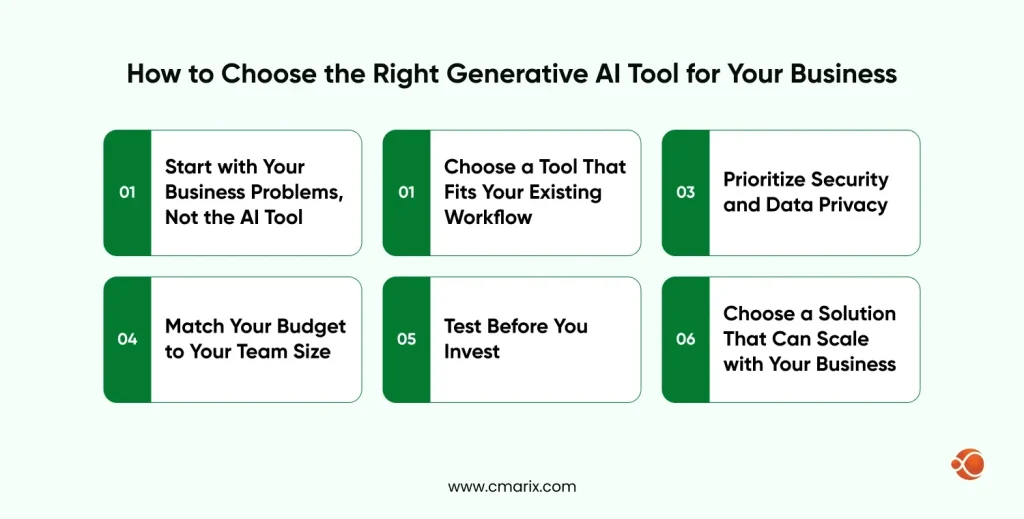
It’s easy to feel lost with so many AI tools, all saying they are the best. Picking the right one for your business doesn’t have to be hard. Here’s a simple guide to help.
1. Start with Your Problems, Not the Tools
What’s actually driving you crazy at work? Are you spending too much time writing content? Is customer support eating up your day? An AI writing detector can help you review AI-assisted content before publishing. Talk to your team and figure out exactly what’s slowing you down before you even look at AI tools.
2. Work with What You Already Have
If your team already uses Microsoft Office, try Copilot first – it’ll work smoothly with everything you know. Using Google Workspace? Start with Gemini. Don’t make your life harder by picking something that doesn’t play nice with your current setup.
3. Think About Your Data Safety
Do you handle private customer info or secret business stuff? Then you need AI tools with serious security. Those free, public AI tools might not cut it if you’re dealing with sensitive information.
4. Match Your Budget to Your Team Size
Small team or working solo? Free tools like Perplexity might be perfect to start. Got a bigger company? Paying per person for something like Copilot might actually save you money in the long run.
5. Try Before You Buy Use those free trials!
Don’t just watch demos, actually use the tool for real work. Pick a specific task you do regularly and see if the AI actually makes it faster or better.
6. Plan for the Future
Think about where your business will be in a few years. If you anticipate needing highly specialized AI capabilities to stay ahead of competitors, it’s worth looking for a reliable AI software development company that can fine-tune an AI model or multiple models for your exact requirements.
Final Words
In conclusion, when evaluating ChatGPT vs. alternatives for business, it is evident that no single AI tool will suffice for every purpose. From the above-listed ChatGPT alternatives, which include known brands such as Gemini and Claude to efficient open weight alternatives such as DeepSeek and Mistral, the choice of an AI tool to suit a specific project will depend on one’s work process, budget, and regulations. By conducting trials and testing different tools, companies can develop a suitable AI stack to increase productivity and enable effective decision-making.
FAQs on ChatGPT vs Alternatives
Why Should Businesses Consider Integrating ChatGPT?
ChatGPT is a reliable, all-in-one assistant that can help with everything from writing content to answering customer questions, and you don’t need to be a tech expert to use it. Because it’s so popular, your team likely already knows how to use it, so you can get started right away.
What Is the Main Reason to Choose an Alternative Over ChatGPT?
Businesses resort to or adopt the alternative when they find a use case that is not specific to ChatGPT: citation of references (Perplexity), integration into workspaces (Gemini, Copilot), lower per-token price (DeepSeek), or European data-governance compliance (Mistral). While ChatGPT retains its generality, the alternative addresses the specificity.
Which AI Chatbot Is Most Suitable for Customer Support?
That is entirely dependent upon what you already have set up. If you are using Microsoft products, Copilot will integrate well, whereas if you are using Google Workspace, Gemini is preferable. When it comes to customer support, it is usually preferable to use purpose-built platforms rather than general chatbots.
Which AI Is Best for Creative and Long-Form Writing?
In terms of longer-form writing and complex thinking, Claude is better due to the model’s large context window and high memory capacity. When it comes to representing current trends, Chatsonic is preferable, whereas ChatGPT works well as a generalist.
How Do the Free Versions of These AI Tools Compare?
While ChatGPT, Gemini, Copilot, Perplexity, and DeepSeek have all offered free tiers, their usage restrictions, model performance, and feature sets vary widely and change frequently. Always check the current limitations on each provider’s pricing page prior to settling on one for your team.
Which AI Tool Is Better for Workplace Productivity?
For Microsoft-based teams, Copilot’s native integration into Word, Excel, Outlook, and Teams makes it the productivity leader. Google Workspace teams should default to Gemini for the same reason: the best productivity AI is almost always the one built into the tools your team already lives in.
Is There a Better AI Alternative for Coding and Technical Tasks?
GitHub Copilot still stands out as the best choice for actual coding within the IDE itself. On the other hand, the reasoning models that DeepSeek is developing have proven useful in the coding and DevOps automation space. The reason behind that is their cost-effectiveness and scalability.
Which AI Should I Use If I Need Accurate, Cited Research?
Perplexity is purpose-built for this: every answer is paired with source citations, which makes it far easier to verify claims than a standard chatbot response.
What Is the Future of AI Chat Solutions for Businesses?
AI chatbots are becoming increasingly personalized in such a way that the AI already knows about your company’s background and past dealings with customers, even before you tell them to do so. In the future, AI will go beyond answering queries; it will alert you to potential issues before customers raise them.