

Quick Summary: Power BI is a reporting tool. Microsoft Fabric is the wider data platform that now includes Power BI. This guide compares Microsoft Fabric vs Power BI on features, pricing, Premium migration, and governance. It closes with a simple rule for choosing and ten direct answers to common buyer questions.
Microsoft Fabric vs Power BI is no longer a head-to-head contest, because Power BI now runs inside Fabric. The real question is how much of the platform your business needs to buy. On its July 29, 2026 earnings call, Microsoft reported over 40,000 paid Fabric customers. That figure is up more than 60% in a year. Many of those buyers started with a Power BI license and a question about budget.
This guide gives you a clear answer. You will see what each product does, what it costs, and when it fits. The CMARIX data team builds Power BI dashboards and Microsoft data platforms for enterprises. The advice below comes from delivery work, not a feature sheet.
What is Microsoft Fabric?
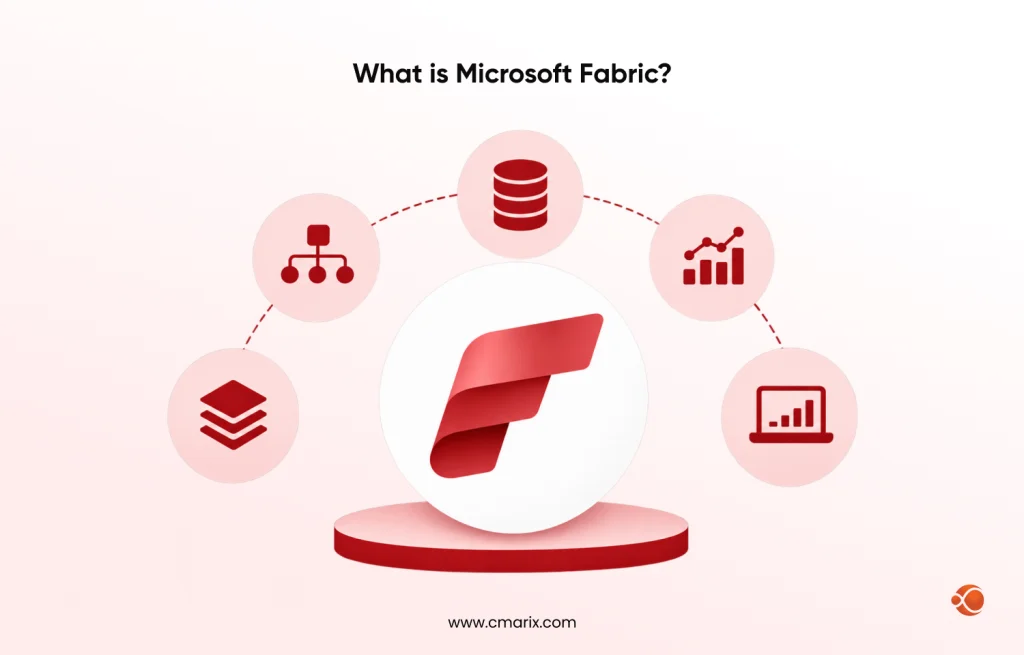
Microsoft Fabric is a software-as-a-service analytics platform. It combines data engineering, data integration, warehousing, data science, real-time analytics, and Power BI in one product. Every workload stores its data in OneLake, the organization’s single logical data lake. Microsoft describes it as a unified analytics platform built from Power BI, Azure Synapse Analytics, and Azure Data Factory.
OneLake stores data in the open-source Delta Parquet format. Spark notebooks, SQL, and Power BI all use the same files. This means there is only one copy of the data and less synchronization work. With Fabric’s Lakehouse architecture, you can ingest raw files, transform them into tables, and generate reports from one place.
Fabric bills by capacity, not by seat. You buy a pool of Capacity Units (CU), and every workload draws from it. The pricing section below has the numbers.
What is Power BI?
Power BI is Microsoft’s business intelligence tool. Analysts connect to data, build a semantic model, and publish reports and dashboards for the business. Its job is analysis and sharing. Heavy data preparation happens elsewhere, usually in a warehouse or lakehouse.
Power BI also embeds into customer-facing products. If your team plans to do that, our guide to Power BI web app integration covers the embedding options. A second walkthrough shows how to integrate Power BI into your web app step by step.
Licensing is per user. You can choose Free, Pro, or Premium Per User (PPU). Pro and PPU are paid tiers; pricing is listed below.
Share your team size and data requirements. Our experts will help you choose the right licensing model.
Is Power BI part of Microsoft Fabric?
Yes. Power BI is one of the Fabric workloads. A report you build in Power BI Desktop works the same way in a Fabric workspace. What changes is where the data lives and how you pay.
The biggest technical change is Direct Lake mode. A semantic model in Direct Lake mode reads Delta tables from OneLake directly instead of importing a copy. That removes the import refresh step for large tables.
Microsoft Fabric vs Power BI: side-by-side comparison
| Comparison Aspect | Power BI | Microsoft Fabric |
| Core job | Reports, dashboards, semantic models | Ingest, store, transform, model, and report |
| Storage | Imported datasets or external sources | OneLake with Delta Parquet tables |
| Data engineering | Power Query | Data Factory pipelines, Spark notebooks, lakehouse, warehouse |
| Data science | AI visuals in reports | Notebooks and ML models in the same workspace |
| Licensing | Per user: Free, Pro, PPU | Capacity-based F-SKU, plus Pro or PPU for authors |
| Best for | Teams whose data is already clean | Teams that must build the data layer too |
Most enterprise analytics tools stop at the dashboard. Fabric also covers the pipeline behind it. If reports run slowly because the data layer is messy, a better dashboard will not fix it. That’s why our business intelligence team starts at the data layer.
Some teams still run SSRS for paginated reports. You can keep both tools side by side, and our guide to Power BI and SSRS integration explains how.
Microsoft Fabric pricing vs Power BI pricing
Power BI pricing is simple. Pro costs $14 per user per month and PPU costs $24, both on annual terms, as published in July 2026.
Fabric pricing works differently. Pay-as-you-go costs $0.18 per CU-hour in US West 2, according to Microsoft. A one-year reservation costs $938 per CU per year, about 41% less. OneLake storage is billed separately at roughly $0.023 per GB per month.
| Fabric SKU | Capacity Units (CU) | Monthly Pay-As-You-Go Cost | Monthly Reserved Cost |
| F2 | 2 | $262.80 | $156.33 |
| F4 | 4 | $525.60 | $312.67 |
| F8 | 8 | $1,051.20 | $625.33 |
| F16 | 16 | $2,102.40 | $1,250.67 |
| F32 | 32 | $4,204.80 | $2,501.33 |
| F64 | 64 | $8,409.60 | $5,002.67 |
Figures use a 730-hour month and US West 2 rates. Prices vary by region, so check the Azure pricing calculator before you budget.
The F64 threshold
Below F64, every viewer of a Power BI report still needs a Pro or PPU license. Above F64, viewers need no per-user license. Report authors need Pro or PPU on every size.
The maths is quick. An F64 reservation costs about $5,003 a month. That equals roughly 358 Pro licences at $14 each. A retailer with 600 viewers pays $8,400 a month on Pro alone. F64 would cost about $5,003 and also cover its pipelines and notebooks.
Small teams see the opposite result. A 40-person team on Pro pays $560 a month. An F2 would add cost without adding licenses.
Costs buyers miss
Three hidden costs to watch out for. OneLake is charged in addition to capacity and based on your data volume. Reserved billing continues even if you suspend your capacity. Throttling begins if your average CU usage remains above your SKU allocation.
Want a cost model before you commit? CMARIX will compare your Power BI license spend with an F-SKU capacity, using your real viewer counts and refresh loads. You get one clear number to take to finance. Request My Cost Comparison
Microsoft Fabric vs Power BI Premium: what changed
Microsoft is discontinuing the Power BI Premium capacity SKUs P1 to P5. Microsoft’s migration guide recommends moving workspaces to an F-SKU Fabric before the P-SKU subscription reaches end of life. F64 has the same capacity as P1, while F128 has the same capacity as P2.
A few details change with the move:
- Premium autoscale does not exist on F-SKUs. You resize on demand instead.
- Power BI Embedded comes included with every F-SKU.
- Power BI Report Server needs an F64 or larger reservation, or SQL Server Enterprise Edition with Software Assurance.
How hard is it to migrate from Power BI Premium to Fabric?
It is moderate and mostly planning work. Workspace reassignment takes seconds per workspace. Sizing takes the most time. Follow these steps:
- Capture 30 to 45 days of CU consumption on your current P-SKU, including autoscale.
- Run Microsoft’s Fabric SKU Estimator to pick a size.
- Buy the F-SKU in Azure.
- Reassign workspaces in the admin portal, or use the automated migration tool.
- Test row-level security and gateway connections.
- Delete the old Premium capacity once everything works.
Connecting Fabric outputs to ERP or procurement systems follows the same pattern as enterprise application integration. Plan that work early, because it often sets the real deadline.
Key Microsoft Fabric features to check before you buy
OneLake and the lakehouse provide a single, governed data store for raw and refined data. Data Factory pipelines handle ingestion and scheduling. Our data engineering services cover all three layers.
Real-Time Intelligence supports stream processing of device data and logs. The data science workload enables organizations to train and monitor ML models alongside the dashboards that consume them. Predictive analytics consulting services help here. First, estimate the model requirements using a data science playbook, then estimate training capacity.
Volumes that outgrow one warehouse need a different design. CMARIX builds big data development solutions for those cases.
Governance and security: What to Check First
Governance determines whether anyone trusts the dashboard. Fabric integrates with Microsoft Purview to help you classify data within workspaces. OneLake governs governance. Select the appropriate data governance solutions according to your needs before extending permissions.
How does Power BI consulting help secure our data? It starts with access roles, row-level security, and auditing. We address these data governance consulting services and set everything up before any report goes live.
Each industry has its own standards. Auditing financial information requires audit trails for each item. Healthcare information should be accessible only to designated people. Manufacturing teams use machine data for real-time monitoring. Logistical companies track their fleets and deliveries.
Microsoft Data Fabric or Power BI: Which one should you choose?
| Your Requirement | Best Option |
| Fewer than about 350 viewers, clean data in a warehouse | Power BI Pro |
| A Premium P-SKU renewal is coming | Fabric F64 or larger, after sizing |
| You need pipelines, a lakehouse, and reports from one vendor | Fabric |
| You want to test data engineering on a small budget | Fabric trial or a small pay-as-you-go F-SKU |
What F-SKU Should You Begin With? According to Microsoft, start with either trial or pay-as-you-go capacity. Operate them through an entire business cycle and study the capacity metrics. After that, reserve only baseline capacity. Shut down pay-as-you-go capacity outside of business hours to reduce costs.
Why build your Microsoft Fabric or Power BI project with CMARIX
Buying the license is easy. Building a data layer people trust takes longer. CMARIX runs a dedicated Power BI team. Our Power BI development consulting covers custom dashboards, embedded analytics, and security and governance setup. Our Microsoft development services connect those builds to your .NET and Dynamics 365 systems.
| Service Area | What We Offer | Business Benefit |
| Dashboards and embedded analytics | Custom reports, semantic models, embedded Power BI | Reporting inside your own product |
| A data platform | Pipelines, lakehouse and warehouse design | One governed data layer under every report |
| Governance and security | Access roles, security setup, audit trails | Reports your leaders and auditors trust |
| Forecasting | ML models on the same data | Predictions next to your dashboards |

The bottom line
Run one test before you decide. Multiply your report viewers by $14. If the total beats about $5,000 a month, price an F64 reservation next to it. If it does not, stay on Power BI Pro and add Fabric workloads later through a pay-as-you-go capacity. If a Premium contract is ending, start sizing now, because the renewal date sets your timeline.
FAQs on Microsoft Fabric vs Power BI
What is the difference between Microsoft Fabric and Power BI?
Power BI is a reporting and dashboard tool. Fabric is a full analytics platform with data engineering, warehousing, data science, real-time analytics, and Power BI. Fabric bills by capacity. Power BI bills per user unless the content sits on an F64 or larger capacity.
Is Power BI part of Microsoft Fabric?
Yes. Power BI is one of the Fabric workloads, so reports, dashboards, and semantic models run in Fabric workspaces. You can still buy Power BI separately with Pro or PPU licenses.
What is Microsoft Fabric used for?
Teams ingest data with Data Factory pipelines, store it in OneLake, and transform it with Spark or SQL. They then train models and report on the results in Power BI.
Can Microsoft Fabric replace Power BI?
No. Fabric contains Power BI, so it cannot replace it. Fabric can replace separate Synapse and Data Factory purchases. It also replaces Power BI Premium per-capacity licensing.
Do I still need a Power BI Pro license with Fabric capacity?
Often, yes. On F2 to F32, every viewer needs Pro or PPU. On every size, report authors need Pro or PPU. From F64 up, viewers need no per-user license.
Is Microsoft Fabric more expensive than Power BI Premium?
It depends on size and billing. An F64 gives the same power as a P1. A reserved F64 costs about $5,003 a month, and a pay-as-you-go F64 costs about $8,410 if it runs all month. Compare both with your current Premium invoice.
What replaced Power BI Premium P-SKUs?
Fabric F-SKUs replaced them. Microsoft is retiring P1 to P5 at the end of each customer’s agreement term. Pro and PPU are not part of that retirement.
When should a business stay on Power BI alone?
Continue when your data is clean, and you have fewer than about 350 viewers. Continue when you don’t need pipelines, notebooks, or a lakehouse. Evaluate again at every license renewal period.
How hard is it to migrate from Power BI Premium to Fabric?
Moving workspaces takes seconds each. Sizing is the slow part, because you need 30 to 45 days of consumption data. Finish before your P-SKU subscription ends. CMARIX can run the sizing and the move for you.
Which Fabric F-SKU should I start with for my team size?
Start on a trial or pay-as-you-go capacity and measure CU use across a full business cycle. Then reserve the baseline. Below F64, budget Pro licenses for viewers. With hundreds of viewers, price F64 first.