Key Takeaways
- ERP software development cost typically runs from $40,000 for a lean small-business build to $600,000 or more for a full enterprise rollout
- Most mid-market companies land between $100,000 and $250,000 for a custom ERP development cost
- ERP implementation cost sits on top of the build itself, usually adding another 30–40% for configuration, integrations, and training
- The number of systems you’re integrating with moves your budget more than the feature list does
- Build your cost tiers before you scope features, not after
It’s not the lack of a particular function in your ERP system that makes you lose money. It is the fact that your inventory, finance, and sales processes are operating with different software solutions that don’t speak to each other, and every solution to these problems takes a few hours of your staff’s time, an export, a reconciliation, and a spreadsheet that only one person in your company understands. You won’t see any of those in your budget, but they are certainly costing you.
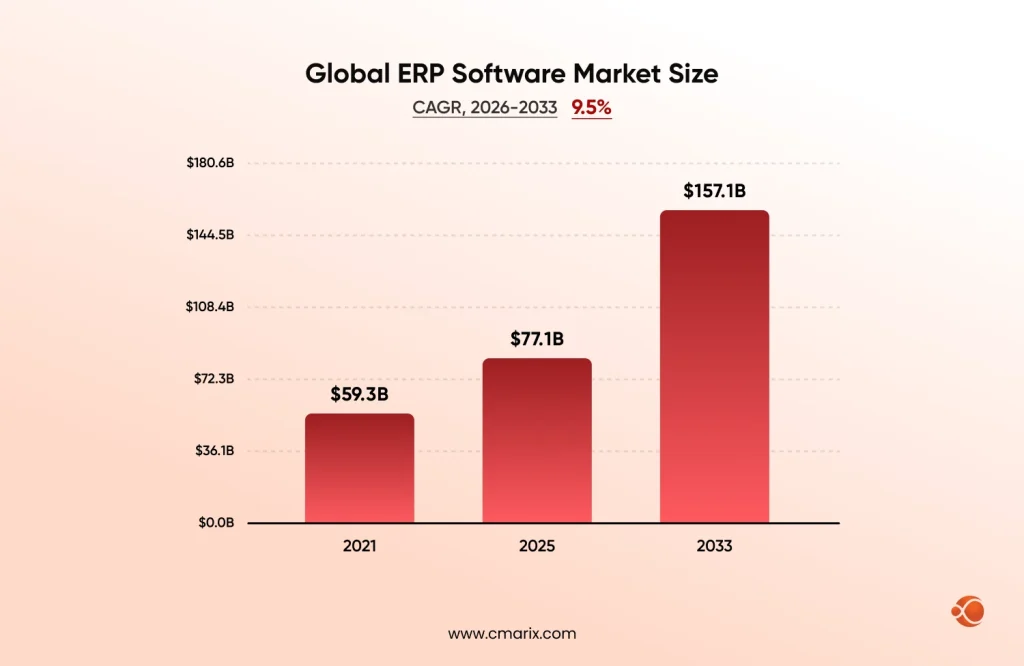
The global ERP software market size was valued at USD 77.1 billion in 2025 and is projected to grow from USD 83.2 billion in 2026 to USD 157.1 billion by 2033, at a CAGR of 9.5% from 2026 to 2033. This is right in line with the push toward digital transformation of enterprises, where the end result of using new software isn’t adoption of new software for the sake of it, but eliminating the friction.
Here’s the catch, though. Search “ERP software development cost,” and you’ll find different answers that don’t agree with each other. None of them tell you which number was written for a business: your size, your industry, or your level of complexity, and that’s the actual problem. A number without context isn’t a budget; it’s a guess dressed up as one. The real number depends on scope, modules, and how many existing systems you’re connecting, not on which article you happened to land on first. This guide walks through where that number actually comes from, tier by tier, so you can build your own estimate instead of borrowing someone else’s.
What Is ERP Software Development? A Quick Overview
ERP software development is the process of building a system that centralizes core business functions- finance, inventory, HR, supply chain, and often customer-facing operations- into one connected platform instead of running each on separate, disconnected tools. Rather than logging into five different systems to get a full picture of the business, everyone works from the same data, updated in real time.
Custom ERP development takes that a step further. Instead of licensing a pre-built system and adjusting your processes to fit it, the software is built around how your business actually operates. That distinction matters more than it sounds like it should, because it’s the single biggest factor in how much you’ll end up paying, and how much value you’ll get out of what you paid for.
ERP Software Development Cost Tiers at a Glance
Before getting into what drives the number up or down, here’s the baseline. Every figure elsewhere in this guide checks against this table, so if a number looks different somewhere else in this article, this table is the one that’s right.
| Tier | Business Profile | ERP Development Cost | Timeline |
| Starter / MVP | Small business, single location, core modules only | $40,000 – $100,000 | 3–6 months |
| Mid-Market | Growing company, multiple departments, moderate customization | $100,000 – $250,000< | 6–12 months |
| Enterprise | Large organization, multi-location, deep integrations | $250,000 – $600,000+ | 12–24 months |
A few things worth understanding about how to read this table:
- These figures cover development itself, not the full cost of getting the system live and adopted across your team.
- ERP implementation cost, integration, configuration, data migration and training usually add another 30-40% on top of whichever tier you fall into. A $150,000 mid-market build, for example, could realistically carry another $45,000 to $60,000 in implementation spend before it’s fully operational.
- Businesses rarely move cleanly between tiers. A small business adding two or three complex integrations can find itself pushed toward the low end of the mid-market range even though headcount and revenue still look like a small business. Complexity, not company size alone, is what moves the number.
How to Budget for ERP Software Development in 7 Steps
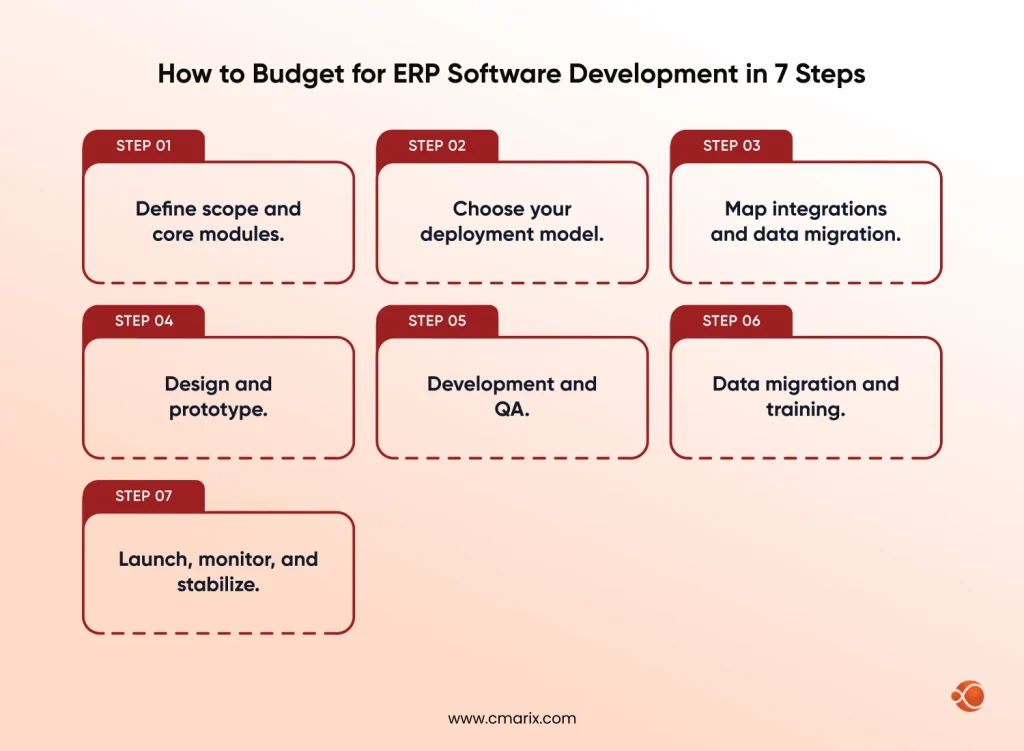
Budgeting for ERP software isn’t a single estimate you get once and lock in. It’s a series of decisions, each with its own cost implication, made in roughly this order.
Step 1: Define scope and core modules.
Decide which functions the ERP needs to own on day one: finance, inventory, HR, and which can reasonably wait for a later phase. This single decision has the biggest effect on which tier from the table above you land in. Businesses that try to launch everything at once tend to blow past their original budget before they’ve even reached testing.
Step 2: Choose your deployment model.
Cloud, on-premise, or hybrid each carry a different cost structure, covered in detail further down. Lock this early, since it affects your infrastructure budget for the rest of the build, and switching deployment models midway through a project is expensive in a way that switching a feature request isn’t.
Step 3: Map integrations and data migration.
List every existing system the ERP needs to connect to, your CRM, e-commerce platform, accounting software, shipping providers, and plan how existing data moves over. A clean integration with a modern, well-documented API costs a fraction of what a messy integration with an outdated legacy system costs, even if both systems technically do the same job.
Step 4: Design and prototype.
Build wireframes for the core workflows before writing production code. Catching a workflow problem here costs a design revision, maybe a day or two of rework. Catching the same problem after launch costs a rebuild, plus the frustration of a team that’s already trying to adopt the new system.
Step 5: Development and QA.
The main build phase is usually delivered module by module, so you can review working software early rather than waiting for one big reveal at the end of the project. This is also where the custom ERP software development process differs most from an off-the-shelf rollout, since every module is being written for your workflows specifically, not configured from a template someone else designed for a different business.
Step 6: Data migration and training.
Move your historical data into the new system and get your team comfortable using it. Skipping proper training is one of the most common reasons a technically sound ERP still underperforms in its first few months, not because the software is wrong, but because the people using it are working around it instead of with it.
Step 7: Launch, monitor, and stabilize.
Start with the ERP, and then during the coming weeks, monitor any performance problems and optimize according to actual use. Most providers have a support period here prior to moving into normal maintenance.
Key Factors That Affect ERP Software Development Cost
Various factors decide which end of the tier table you land on, and understanding them ahead of time is what turns a vague estimate into a real budget.
- Number of modules. Each extra module – be it HR, Procurement, CRM – increases development and testing time, while modules seldom stay in isolation from one another, and adding one may mean that two or three more need to be changed.
- Integration complexity. Connecting to five external systems costs meaningfully more than connecting to one, and connecting to a legacy system with poor documentation costs more still, sometimes significantly more, since a chunk of that budget goes toward simply figuring out how the old system behaves before any new code gets written.
- Customization depth. Configuring an existing framework is cheaper than writing custom logic for a workflow that doesn’t exist anywhere off the shelf. The more unusual your process, the more of the build is custom code rather than configuration.
- Team location. Development team location can shift the same scope of work by 40–60% between regions, which is often the single biggest lever a business has for controlling cost without changing scope at all.
- Compliance requirements. Industries with strict regulatory needs carry added cost for the extra controls involved, particularly around data security and audit trails; for example, the access control, incident response, and system integrity requirements.
- Module priority. Finance and accounting functionality tends to be the module businesses treat as non-negotiable, which is often where the bulk of early-phase budget goes, even before HR or supply-chain modules enter the conversation. An industry study cited by NetSuite found finance was the top-priority module for 89% of companies evaluating ERP systems, well ahead of any other function.
This is also where an enterprise UX design investment either pays for itself or gets skipped. A system your team resists using is one you end up paying to fix twice, once to build it, and again later to redesign the parts nobody adopted. Broader enterprise software trends, like AI-assisted workflows and industry-specific modules, are also nudging build costs up slightly compared to a few years ago, since more buyers are asking for them by default rather than treating them as an optional add-on.
Talk through your ERP scope with a team that’s shipped custom builds before.
Cloud ERP Cost vs Off-the-Shelf Cost: Which Costs Less?
| Factor | Custom ERP | Off-the-Shelf ERP |
| Typical cost | $40,000 – $600,000+ (one-time build, by tier) | $10,000 – $50,000 setup + $40–$200 per user/month |
| Upfront cost | Higher | Lower |
| Long-term fit | Built around your exact workflows | You adjust processes to match the software |
| Scalability | Scales with your business without re-platforming | May require switching platforms as you grow |
| Hidden costs | Fewer workarounds needed later | Plugins, add-ons, and manual processes tend to accumulate |
| Best fit | Businesses whose operations are a competitive advantage | Businesses running standard, well-established processes |
- Off-the-shelf ERP software is cheaper to get running initially, and for some businesses that’s genuinely the right call, particularly if your processes look a lot like everyone else’s in your industry. But it starts costing more the moment your business needs something the template doesn’t support. Workarounds, third-party plugins, and manual processes quietly add up, and a few years in, some businesses find they’ve spent nearly as much patching an off-the-shelf system as a custom build would have cost from the start.
- Custom ERP development cost is higher upfront, but you’re not paying for modules you’ll never use, and you’re not restructuring your workflows to match someone else’s software. If your business runs on a fairly standard set of processes, off-the-shelf may be the more economical route. If your operations are the reason you’re competitive, custom is usually the better long-term spend. This is the same build-versus-buy tradeoff that comes up in cost to develop an app decisions, and the underlying logic carries over directly: buy when your needs are common, build when they’re not.
Cloud ERP Cost vs On-Premise ERP Cost: Which Costs Less?
| Factor | Cloud ERP | On-Premise ERP |
| Upfront cost | Lower, subscription-based | Higher, one-time license and infrastructure |
| Ongoing cost | $40–$200 per user/month | Internal IT staffing and hardware maintenance |
| Deployment time | Faster, 3–6 months typical | Slower, more setup and infrastructure work required |
| Data control | Managed by the provider | Full control, hosted internally |
| Best fit | Businesses wanting lower upfront spend and faster rollout | Businesses with strict data residency or control requirements |
- Cloud ERP cost scales with your user count; that makes it predictable in the short term, but it also means the bill keeps growing as your team does, month over month, for as long as you’re running the system.
- On-premise ERP cost works the opposite way. It’s front-loaded, a bigger number to approve once, but the ongoing spend is largely internal, tied to your own IT resources rather than a recurring per-user fee. Neither is universally cheaper. It depends on how many users you’re licensing and how many years you plan to run the system before your next major upgrade.
- Hybrid systems are becoming increasingly prevalent as companies try to use cloud computing capabilities for most operations while keeping some private data in-house. They have a combination of costs and tend to fall somewhere in the middle of those listed above.
ERP Development Engagement Models and Their Pricing Structures
How you fund the construction can be almost as important as what is being built, and selecting the incorrect one can easily become a problem in terms of budgeting.
| Model | Cost Structure | Typical Rate | Best Fit |
| Fixed Price | One agreed total for a defined scope | Baked into the tier table figure above | Well-defined scope, unlikely to change |
| Dedicated Team | Recurring monthly billing, no fixed ceiling | $8,000 – $20,000+ per developer/month, by region | Long-term builds expected to evolve after launch |
| Time & Material | Billed for actual hours worked | $25 – $150+ per hour, by region and seniority | Scope still taking shape or likely to shift |
- Fixed price works when scope is well-defined upfront. You know your total cost going in, which makes budgeting simple, but any change request usually means a formal change order, and those tend to cost more than the same work would have if it had been scoped from the start.
- Dedicated team puts a team on your project full time, billed on a recurring basis. This model fits businesses expecting the ERP to evolve after launch, since the team stays available rather than disbanding at go-live.
- Time & materials billed according to the hours actually spent working on the project, and more appropriate for projects that have an uncertain scope. More flexible compared to fixed-price, but this model needs you to have some control over costs since there is no ceiling set in the agreement.
Businesses integrating their ERP with existing platforms, particularly around B2B SaaS integration, often lean toward the dedicated team model to surface new requirements mid-project rather than staying fixed from day one. If you’d rather not manage that relationship in-house, this is also where teams typically look to hire dedicated developers instead of building out an internal hiring pipeline from scratch, which carries its own cost and timeline that many businesses underestimate going in.
Get a clear estimate based on your modules, integrations, users, and business requirements.
Beyond the Build: Ongoing ERP Costs to Plan For
The number on your initial quote isn’t the number you’ll pay over the system’s lifetime, and this is where a lot of ERP budgets go sideways, not because the initial estimate was wrong, but because everything after launch got treated as an afterthought.
| Ongoing Cost | Typical Range | Frequency |
| Maintenance | 15–25% of original build cost | Annual |
| New integration cost | Priced per system, separate from original build | As needed |
| Security and compliance | Varies by industry and framework | Annual, plus audits |
| Training refreshers | $1,000 – $5,000+ per session, by team size | As needed |
| Scaling (users, locations, modules) | Cloud: $40–$200 per additional user/month | Ongoing |
- Maintenance. Typically adds 15–25% of the original build cost annually, covering updates, bug fixes, and system upgrades. Over a five-year period, that’s a meaningful multiple of the original build cost, worth planning for explicitly rather than discovering a year in.
- ERP integration cost for new systems added later. The cost of integrating each new tool that you add on to your business is independent of the initial development cost, and it is also something which tends to be forgotten while budgeting.
- Security and compliance. Enterprise builds handling sensitive data may need additional controls to meet frameworks relevant to their industry, such as NIST SP 800-53 Rev. 5, which adds to both build and maintenance cost over time.
- Training refreshers. Costs recur any time you onboard new staff or roll out a major update, since a system that’s intuitive to your original team isn’t automatically intuitive to everyone who joins after launch.
- Scaling costs. Adding users, locations, or modules after the initial build isn’t free, and cloud per-user pricing in particular means growth itself becomes a recurring line item.
How to Calculate ERP ROI (Formula and Example)
Instead of comparing prices between suppliers before approving a budget, it is prudent to calculate your return on investment. The calculation for return on investment when implementing an ERP system will take into consideration the costs incurred for building and implementing the system, together with a few years of its maintenance, relative to the benefits of reducing manual work, reducing errors in reconciliation, faster report preparation, and making decisions based on live data and not outdated information from the spreadsheet.
Midsize organizations reportedly allocate a modest single-digit percentage of annual revenue toward total ERP ownership, which provides you a rough ceiling to plan around when sizing your own investment.
It’s easy to understand the equation:
ERP ROI (%) = [(Total Annual Benefit − Total Cost of Ownership) ÷ Total Cost of Ownership] × 100
Where:
- Total Cost of Ownership = Build Cost + Implementation Cost (30-40% of Build) + Maintenance Costs Per Year (15-25% of Build) x Number of Years
- Total Annual Benefit = hours saved per week across all departments × loaded hourly cost × 52, plus any measurable reduction in errors, delays, or manual rework
A related number worth calculating along with ROI(Return on Investment) is payback period, how long it takes the system to pay for itself:
Payback Period (months) = Total Cost of Ownership ÷ Average Monthly Benefit
Worked example: The mid-level firm will pay $150,000 for construction costs, $52,500 for the implementation (35%), and $30,000 per year for the upkeep (20%). In total, in three years it will cost them around $292,500.
If the system saves the finance team ten hours a week and operations another eight, eighteen hours a week at a $45 loaded hourly rate works out to just over $42,000 a year, or around $126,000 over the same three years.
That business is still short of breakeven at the three-year mark, which either means the ROI window needs to extend further out, or the benefit side of the calculation needs to include more than just hours saved, error reduction and faster reporting, for instance, before the investment can be judged fairly.
The clearer way to build your own ROI case, rather than depending on an industry average that may not reflect your business, is to estimate hours saved per week across the departments the ERP will touch, multiply by loaded hourly cost, and run it through the formula above using your own numbers from the tier table.
How to Reduce ERP Software Development Costs
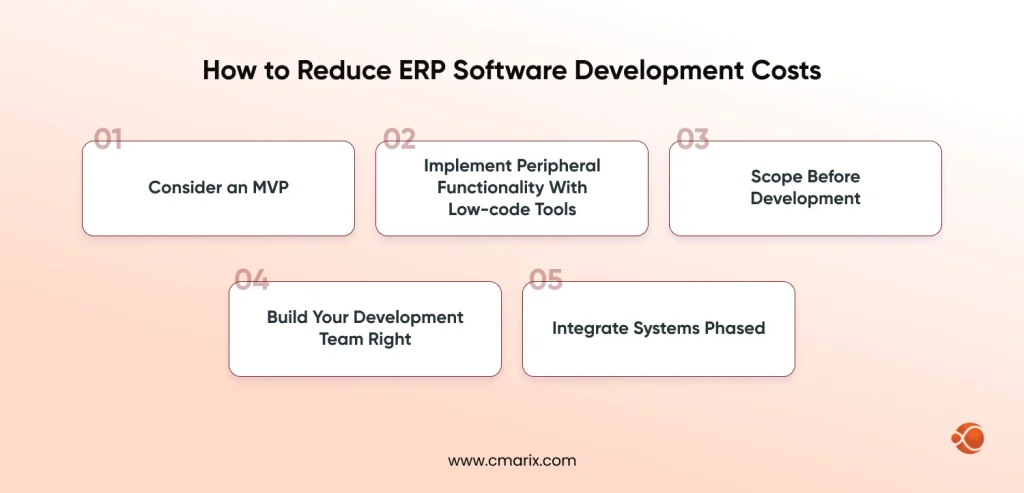
- Consider an MVP. Implement core modules and introduce the rest sequentially. Just by itself, this approach will significantly reduce your initial budget and put the system in use earlier, thus allowing you to get your ROI earlier as well.
- Implement peripheral functionality with low-code tools. Build those things that truly set your company apart and report on results using lighter solutions, not building them from the ground up.
- Scope before development. Any change while in the process of development is the most frequent cause for exceeding project boundaries. Properly run discovery takes time initially but pays off in saved money in the end.
- Build your development team right. It does not mean that a larger team guarantees faster implementation, and an overstaffed team on an under-scoped project is a common and preventable way for a budget overrun.
- Integrate systems phased. Not all integrations are essential on Day 1. Identifying two to three key integrations and integrating the rest later will help you to keep the initial development within the selected tier.
This is the same discipline behind a full ERP development cost breakdown: know where every dollar in the tier table is going before you approve it, not after the invoices start arriving.
Skip the generic templates and get a system scoped to your workflows.
Why Choose CMARIX for Custom ERP Software Development
Building ERP software that fits how your business actually runs takes more than assembling modules from a checklist; it takes a team that scopes the system around your workflows from day one, rather than fitting your business into a template built for someone else’s. CMARIX brings that through hands-on enterprise app development solutions and dedicated custom software development services, built for businesses that need something a template genuinely can’t give them.
For a closer look at how that process plays out end-to-end, CMARIX’s own ERP software development guide walks through the build phases and platform decisions in more depth.
Conclusion
ERP software development cost ranges from $40,000 for a small-business MVP to $600,000 or more for a full enterprise build, with most mid-market companies landing between $100,000 and $250,000. The number that matters most for your budget isn’t the feature count; it’s how many systems your ERP needs to talk to and how much of your process is custom versus configurable. Get your scope and integrations mapped early, and the rest of the budget tends to follow logically from there, rather than surprising you a few months into the build.
FAQs on ERP Software Development Cost
How much does an ERP system cost to build?
ERP software development cost typically ranges from $40,000 for a small-business build to $600,000 or more for a full enterprise system, with most mid-market projects landing between $100,000 and $250,000.
What are the key stages in the ERP software development process?
The process runs through scope definition, deployment model selection, integration and data migration planning, design and prototyping, development and QA, data migration and training, and launch with post-launch stabilization.
How long does it take to develop custom ERP software?
Timeline runs 3–6 months for a small-business MVP, 6–12 months for a mid-market build, and 12–24 months for a full enterprise rollout.
What factors have the biggest impact on ERP development costs?
Integration complexity has the largest impact, followed by the number of modules, customization depth, development team location, and any compliance requirements specific to your industry.
What is the difference between Cloud ERP and On-Premise ERP costs?
Cloud-based ERP solutions typically cost $40 to $200 per user per month (estimated), with lower upfront costs and faster implementation. On-premises ERP has higher upfront costs and increased maintenance by internal IT resources, but provides better control over data.
How can businesses reduce ERP software development costs?
Starting with an MVP, using low-code tools for non-core features, locking scope before development begins, right-sizing the development team, and phasing integrations rather than launching all of them at once are the most effective ways to control cost.
How do you calculate the Return on Investment (ROI) for an ERP system?
ERP ROI (%) = [(Total Annual Benefit − Total Cost of Ownership) ÷ Total Cost of Ownership] × 100
Compute the overall cost of ownership, summing up build cost, implementation cost, and maintenance cost for a number of years, and then do an apples-to-apples comparison to the tangible benefits, such as reduction in time spent per week in hours, and the loaded cost per hour, to calculate payback time.