Quick Summary: Thousands of web app ideas exist, but few have a buyer and a revenue model behind them. This guide covers 15 profitable web app ideas for 2026, grouped by how they earn. Each one lists who pays and how big the build is. You also get a five-step way to validate an idea before spending on development.
With an increased demand for applications in today’s world, there is a large number of startups coming up each year. In order to make their presence felt in the tech industry, these startups look for innovative ideas for developing web apps. Web apps keep the barrier low. One browser-based product reaches phones, tablets, and desktops, so a small team can launch and learn fast.
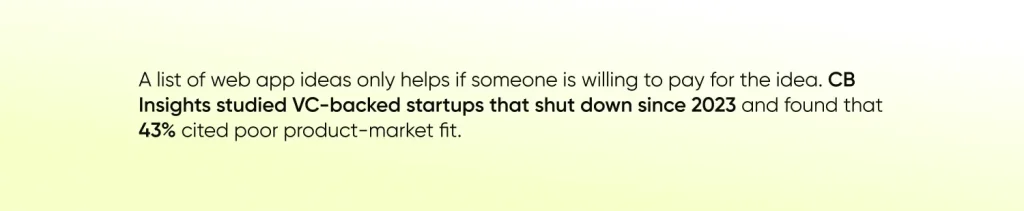
If you are hunting for startup web app ideas, demand comes before code. So every idea below comes with who pays, how it earns, and what it takes to build.
What Makes a Web App Idea Profitable?
A profitable web app idea solves a specific, repeated problem for someone who already spends money on it. That is the whole definition. The tech stack and the marketing come after. Five traits separate ideas that earn from ideas that only sound good.
- Clear buyer – The person using the app and the person paying can be different people. Agencies pay for client portals. Clinic owners pay for booking tools. Know who signs the check.
- Repeat use – Apps people open every week can charge a subscription. Apps people open once a year struggle to charge anything. Many of the SaaS (Software as a Service) ideas below lean on recurring plans for this reason.
- Defined revenue model – Subscriptions, commissions, listing fees, affiliate income, or advertising. Decide which one leads before you write code, because monetizing an app after launch is harder than designing for it from the start.
- Narrow start – Validating niche applications is much faster than validating platforms. This is because Micro-SaaS niches, where one tool serves one group, can be validated faster compared to a platform where everyone is served.
- Buildable scope – The first release should fit a Minimum Viable Product (MVP), which is the smallest version that proves people will pay. If the MVP needs a year of work, the idea is too big to start with.
Top 15 Web App Ideas to Make Money in 2026
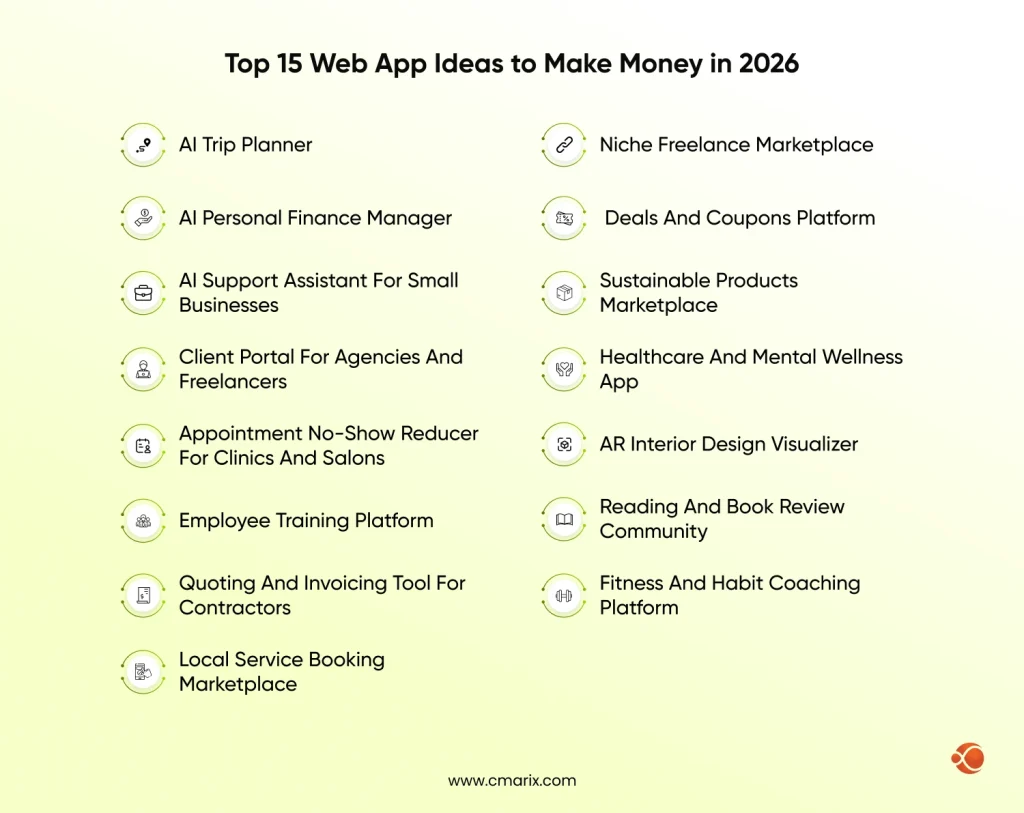
These are the trending web app ideas we would look at first this year. They split into four groups by how they earn, so you can match an idea to your budget and skills. Build scope is a rough size for a first version, not a quote.
AI Web App Ideas
1. AI Trip Planner
Travel planning involves balancing about ten web browser tabs. The task of an AI travel planner is to input dates, preferences, and budget and get a schedule in return.
- Who pays – Travelers on a premium plan, plus booking partners.
- Revenue model – Freemium subscription plus affiliate commissions on bookings.
- Build scope – Medium. A language model API, maps and booking data, and a clean itinerary editor.
2. AI Personal Finance Manager
People would love to see where their money is going without making a spreadsheet for it. The AI-powered finance application can categorize expenses, detect unusual charges, and provide a budget estimate for a month. As a finance tool, security and compliance play a significant role in development.
- Who pays – Individuals and freelancers.
- Revenue model – Monthly subscription with premium reports.
- Build scope – Medium to high. Bank data connections and security review take the most time.
3. AI Support Assistant for Small Businesses
Small shops answer the same ten questions all day. An assistant that learns from a company’s own help pages, product data, and policies can answer those questions on the website and hand harder ones to a person. This is one of the more practical AI web app ideas because the savings are easy to see.
- Who pays – Small online businesses and local service firms.
- Revenue model – Tiered subscription based on monthly conversations.
- Build scope – Medium. Search over company documents plus a simple admin dashboard.
B2B and Micro-SaaS Web App Ideas
4. Client Portal for Agencies and Freelancers
Scattered feedback, missing files, and numerous iterations waste time for agencies each week. A client portal keeps all the files, approvals, and feedback in one single place.
- Who pays – Agencies and freelancers.
- Revenue model – Subscription per workspace.
- Build scope – Low to medium. Logins, file upload, feedback, and approval status.
5. Appointment No-Show Reducer for Clinics and Salons
The cost of not having an appointment equals the loss of income for a small salon or a clinic. You could develop a simple web app that sends reminders to clients, letting them cancel or reschedule with one click. We have built this kind of scheduling engine before: Pure Prospects is a web-based platform that syncs with Google and Outlook calendars and handles reschedule and cancellation approvals.
- Who pays – Clinic and salon owners.
- Revenue model – Per-location subscription.
- Build scope – Low to medium. Scheduling, email and SMS reminders, and a waitlist.
6. Employee Training Platform
In order to increase the skill set of the employees, offices often conduct training. A training platform makes that repeatable. Managers assign courses, track who finished, and keep documents and class lists in one place. Securtac is an example we built: an eLearning platform where corporate clients enroll employees in security training, with SCORM-compliant courses and digital certificates.
- Who pays – HR teams and growing companies.
- Revenue model – Per-seat subscription.
- Build scope – Medium. A content library, progress tracking, and role-based access.
7. Quoting and Invoicing Tool for Contractors
Contractors lose jobs when quotes take days. A simple web app can turn a job description into a priced quote, collect an online signature, and convert the approved quote into an invoice.
- Who pays – Independent contractors and small service firms.
- Revenue model – Monthly subscription, plus a small fee on invoice payments.
- Build scope – Medium. Quote templates, e-signature, and payments.
Our team scopes MVPs and turns validated ideas into working products.
Marketplace Web App Ideas
Marketplaces need buyers, sellers, payments, and trust features such as reviews. That makes them harder to build and harder to copy. The strongest ones start in one city or one category and expand after the model works.
8. Local Service Booking Marketplace
Homeowners seek trustworthy plumbers, cleaners, and lawn care providers. The booking system will list reliable providers who will be available to provide services and manage payment and feedback for the services provided. Start with one service in one city.
- Who pays – Customers pay for bookings; providers pay lead or listing fees.
- Revenue model – Commission per booking.
- Build scope – High. Two user types, payments, availability calendars, and reviews.
9. Niche Freelance Marketplace
General freelance platforms are crowded. A marketplace built for one skill, such as podcast editors or legal translators, can win on quality and trust instead of volume.
- Who pays – Clients pay for work; freelancers pay a fee.
- Revenue model – Commission plus optional featured profiles.
- Build scope – High. Profiles, secure payments, messaging, and dispute handling.
10. Deals and Coupons Platform
In an effort to sell more products, various eCommerce stores provide different coupons, deals, and discounts. A web app that gathers them in one place saves shoppers time and gives them a reason to check back. Here, a user-friendly interface is of utmost importance.
- Who pays – Retailers, through affiliate programs.
- Revenue model – Affiliate commissions plus sponsored deal placements.
- Build scope – Low to medium. Deal feeds, search, user accounts, and click tracking.
11. Sustainable Products Marketplace
Shoppers who care about the environment find it hard to tell real green claims from marketing. A curated marketplace lists verified sustainable brands and shows why each one qualifies.
- Who pays – Brands pay to list; shoppers pay for products.
- Revenue model – Transaction fees plus brand subscriptions.
- Build scope – High. Vendor onboarding, a verification workflow, a catalog, and checkout.
Consumer and Health Web App Ideas
12. Healthcare and Mental Wellness App
Healthcare apps work best when they do one job well. You can pick from options such as medicine delivery, doctor appointments, diagnostic report tracking, or mental wellness tools like guided sessions and mood tracking. Compliance and system integrations drive the budget here, so check the healthcare app development cost breakdown before you fix the scope. CMARIX built Vezeeta, a healthcare platform with real-time appointment booking, telehealth, and medication delivery.
- Who pays – Patients, clinics, or employers.
- Revenue model – Subscription, per-visit fees, or B2B licenses.
- Build scope – High. Data privacy rules, secure records, and provider accounts.
13. AR Interior Design Visualizer
Often, people have the choice of whether the piece of decor will fit into the area that you want it to. In such cases, an application that makes use of the AR concept would come in handy. Using this AR technology, it is feasible to view the 3D model of the room along with the furniture.
- Who pays – Furniture retailers and designers.
- Revenue model – Retailer subscription plus lead fees on referred sales.
- Build scope – High. 3D model handling, AR viewing that works across devices, and a product catalog.
14. Reading and Book Review Community
For book lovers, they look out for book reviews before actually purchasing them. A community where readers rate books, follow reviewers, and build reading lists gives them a reason to return. Apart from book reviews, readers can also create a database of books.
- Who pays – Publishers, advertisers, and premium readers.
- Revenue model – Affiliate links to booksellers, publisher promotions, and an optional premium tier.
- Build scope – Low to medium. Profiles, ratings, lists, and search.
15. Fitness and Habit Coaching Platform
Signing up to achieve fitness goals is easy, and so is quitting. A coaching program matches trainers with their clients and monitors them through regular reminders.
- Who pays – Individuals and trainers.
- Revenue model – Client subscription plus a platform fee on coaching sessions.
- Build scope – Medium. Programs, progress tracking, scheduling, and payments.
Web App Ideas for Beginners at a Glance
| Idea | Main revenue model | Build complexity | Good first project? |
| AI Trip Planner | Freemium plus affiliate | Medium | Maybe |
| AI Personal Finance Manager | Subscription | Medium to high | No |
| AI Support Assistant | Tiered subscription | Medium | Maybe |
| Client Portal | Subscription per workspace | Low to medium | Yes |
| No-Show Reducer | Per-location subscription | Low to medium | Yes |
| Employee Training Platform | Per-seat subscription | Medium | Maybe |
| Quoting and Invoicing Tool | Subscription plus payment fee | Medium | Maybe |
| Local Service Booking | Commission | High | No |
| Niche Freelance Marketplace | Commission | High | No |
| Deals and Coupons Platform | Affiliate commissions | Low to medium | Yes |
| Sustainable Products Marketplace | Transaction fees plus brand plans | High | No |
| Healthcare and Wellness App | Subscription or per-visit fees | High | No |
| AR Interior Design Visualizer | Retailer subscription plus lead fees | High | No |
| Book Review Community | Affiliate links plus promotions | Low to medium | Yes |
| Fitness and Habit Coaching | Subscription plus session fee | Medium | Maybe |
How to Validate a Web App Idea in 5 Steps
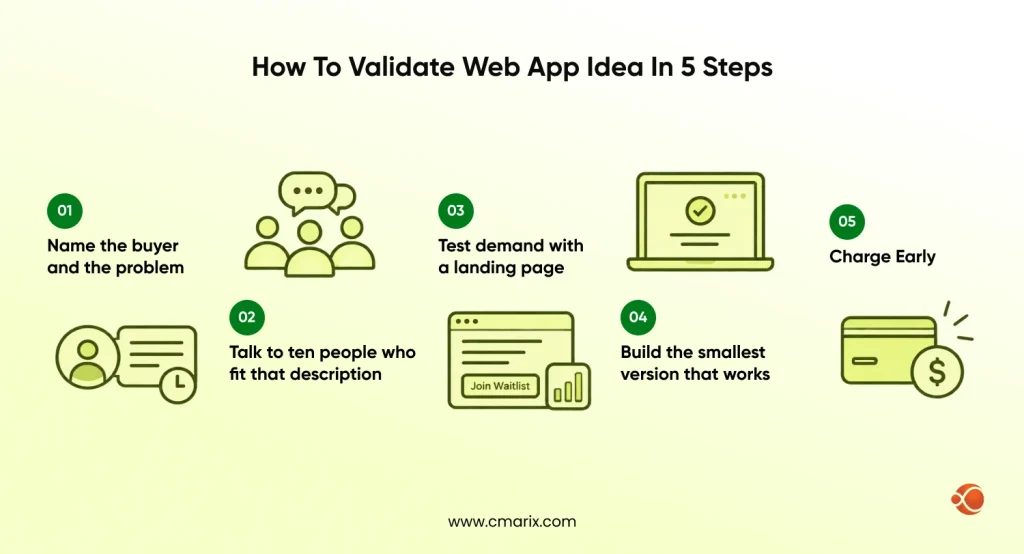
- Step 1: Name the buyer and the problem. Write one sentence: this buyer loses this much time or money because of this problem. If you cannot write it, the idea is still a hunch.
- Step 2: Talk to ten people who fit that description. Ask: How are they solving their problem now? How much are they paying? The existing solution is your fiercest competition.
- Step 3: Test demand with a landing page. Explain your product, include a waitlist sign-up form, and direct some traffic there. Signing up is more valuable feedback than praise.
- Step 4: Build the smallest version that works. Launch one flow solving your user’s problem and nothing more. Strip down everything not asked for until they demand it.
- Step 5: Charge early. Ask a few customers to pay you, even at a reduced rate. Nothing proves your business is worth anything like a payment.

Tech Stack and Build Approach for a First Web App
You do not need a huge stack to launch. You need one that lets you ship fast and change direction. Software development projects stall fastest when scope grows before demand is proven, so keep the first build lean and let web application development follow real usage.
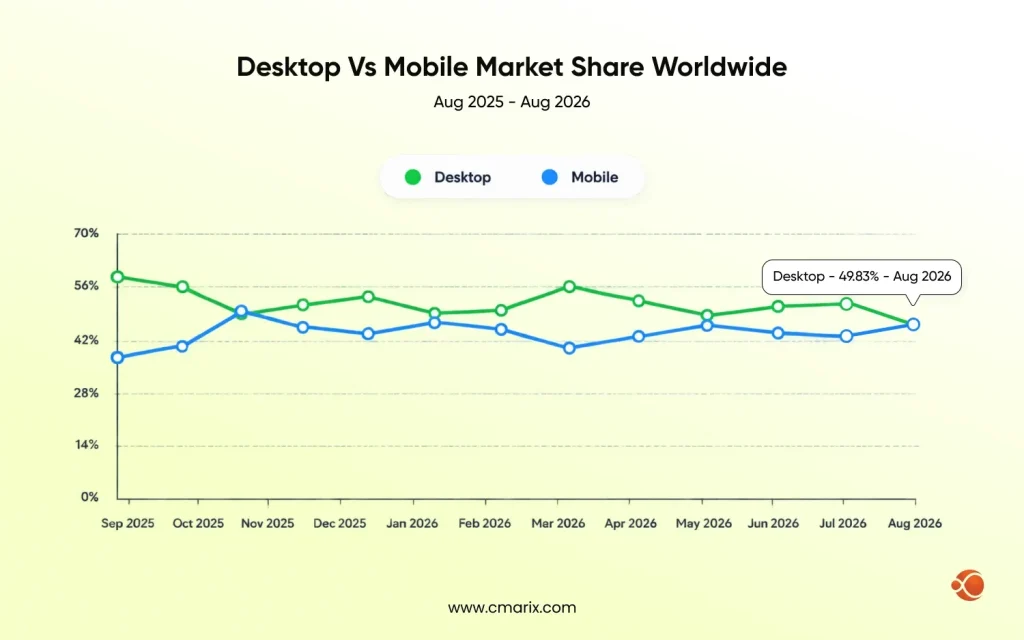
- Frontend- Angular, React, or Vue suit interactive interfaces. Make sure your application is mobile-friendly right from the beginning. StatCounter puts mobile at 50.13% of worldwide desktop and mobile page views in August 2026, so a desktop-only layout risks half your audience.
- Backend – Node.js, Python, or Laravel handle most first builds. Pick what your team already knows well.
- Database – PostgreSQL or MySQL for structured data such as users, orders, and subscriptions.
- Hosting – A managed cloud platform with autoscaling, so a traffic spike does not take the app down, and you can grow into scalable web applications without a rebuild.
- Progressive Web App (PWA) option – A PWA adds offline support and home screen install to a web app. It can bridge the gap until you need a native mobile app.
A team with full-stack web development skills can cover the frontend, backend, and deployment without handoff delays, which matters when the budget is small.
Why Choose CMARIX for Your Web App
CMARIX builds web and mobile products for startups and enterprises across fintech, healthcare, and SaaS. We can help with idea validation, launch, and support.
- Idea to MVP – We help you scope the smallest release that tests your idea, then build it. Our end-to-end web development services cover design, development, testing, and maintenance.
- Domain experience – Our portfolio spans healthcare, fintech, insurance, and education, including Eddbee, an investment and algorithmic trading platform. Chances are we have already solved a problem close to yours.
- Full-stack team – Designers, frontend and backend engineers, and QA work together, so decisions move faster and handoffs stay short.
- Flexible engagement – Start with a small MVP team and scale up as the product proves itself, using an engagement model that fits your budget.
- Built to grow – We plan the architecture so the product can handle more users and features after launch, then stay on for support and maintenance.
Conclusion
A good web app idea is not the one that sounds clever. It is the one with a clear buyer, a revenue model that works, and a first version small enough to test before you commit a big budget.
The 15 web app ideas provided above are just a starting point, but the real work begins after you pick one. Use the comparison table to match an idea to your budget and skills, run the five validation steps, and ask early users to pay before you build anything large. If they say yes, you have found demand, and that is the right time to invest in scalable web applications.
FAQs on Web App Ideas
How do I come up with unique web app ideas?
Identify problems first and not their solutions. Identify the things your neighbors keep repeating or complaining about or even paying others for. Find out how others have solved those problems already and see if there is any area where what has been done is not too generic, too costly, or too time-consuming. The best web application ideas are usually niche-focused, not technology-focused.
How can I protect my web app idea?
In most places, an idea on its own is hard to protect. What you can protect is how you carry it out, such as your code, brand, and design. Use NDAs when you share details with developers, register your trademark, and make sure your development contract assigns code ownership to you. For rules specific to your country, speak with an IP attorney.
What are some profitable web app ideas for 2026?
Profitable web app ideas tend to be narrow tools that save a business time or money, such as client portals, appointment reminders, and quoting tools. AI assistants, niche marketplaces, and deals platforms are also strong options. The list above covers 15 of them with revenue models and build scope.
How can I make money from a web application?
Some examples of lead models include subscription, commission, listing fees, affiliate earnings, and advertising. The subscription model works well for tools that will be used regularly by users, while commission is good for marketplaces. It is important to choose the lead model early on.
What are some simple web app ideas for beginners?
Begin with something simple to build: client portals, appointment reminders, sites for discounts, or a community of book reviews. Such products would require only a few key functionalities and no integration with external systems. The ideas listed at the top of the table are among the least complex options.
How do I turn a web app idea into a startup?
Validate demand first, then build an MVP for one audience. Get a few paying users, learn what they actually use, and improve from there. Once you see repeat usage, set up the business basics such as a legal entity, pricing, and a plan for finding customers, then decide whether you need outside funding.
What kind of web apps are in high demand right now?
Builders are putting most of their attention on AI-powered tools, niche B2B utilities, and marketplaces built around one category. Web apps that save a small business time, such as scheduling, quoting, and client communication tools, are easier to sell because the benefit is clear.
How do I validate a web app idea before building it?
Identify the customer and their pain point, conduct interviews with customers, and test demand by using a landing page. Next, create an MVP and charge your customers. The five steps above take you through that process.
Should I build a mobile app or a web app first?
In most cases, for your first release, you should start with creating a web app. It will work on all devices via the browser and will be easier to maintain and update, not requiring app store approval. You should create a mobile app first if the concept relies on device capabilities like the camera, push notifications, or offline functionality.