Quick Summary: Animation impacts the visitor’s perception of a website within the first few seconds. This guide covers 15 Vue animation library options worth considering in 2026, from CSS-based to GSAP-integrated animations. We cover each library’s unique features, key strengths, and real-world use cases. The guide ends with a selection framework to help you pick a library, a case study on how CMARIX develops Vue.js animations, and the FAQs developers frequently ask.
A website has a few seconds to earn a visitor’s attention. Static pages rarely hold it. Motion does — a button that responds to a hover, a section that eases into view, a page that transitions instead of jumping. Vue.js developers have no shortage of ways to build these moments, thanks to a mature ecosystem of animation tools built for the framework.
This guide will help you to select the right one. Instead of listing every library created to wrap Vue to date, this guide focuses on libraries that are actively developed, add real value, and are worth considering in 2026—a period when Vue continues to hold a meaningful share of the JavaScript library market, making the ecosystem worth investing in.
What Is a Vue Animation Library?
A Vue.js animation library is a tool or plugin that helps you add animations to a Vue.js app without coding them from scratch. Instead of writing CSS keyframes or manually timing the DOM, you use ready-made components, directives, or composable tools.
Vue.js already ships with a <Transition> component for entering and leaving elements, which covers most basic needs. A dedicated Vue animation library goes further, adding features like spring physics, scroll-triggered effects, SVG morphing, or particle systems that would take considerably more code to build from scratch.
Why Animation Matters for Your Website
Animation isn’t decoration; it’s a usability technique. When interface elements animate in response to user actions, they provide feedback and make the application interactive, not passive.
The timing matters as much as the effect itself. Research from Stanford’s Graduate School of Business found that animations played at a moderate pace during load or wait times reduce how long a delay feels to users, compared to animations that are too fast or too slow — a detail worth testing rather than guessing at. (Stanford GSB)
For a Vue.js application, this translates into three concrete benefits:
- Perceived performance – timing your animations to create a sense that wait times have been shortened
- Guided attention – movement helps people notice your calls to action, form errors, and new information.
- Brand experience – animations show off your ability to design with more skill than static design. Just like users judge a web platform’s credibility by its polished UI, students evaluating the best essay writing service often look for well-designed, smooth interfaces as a sign of professionalism.
15 Best Vue Animation Libraries in 2026
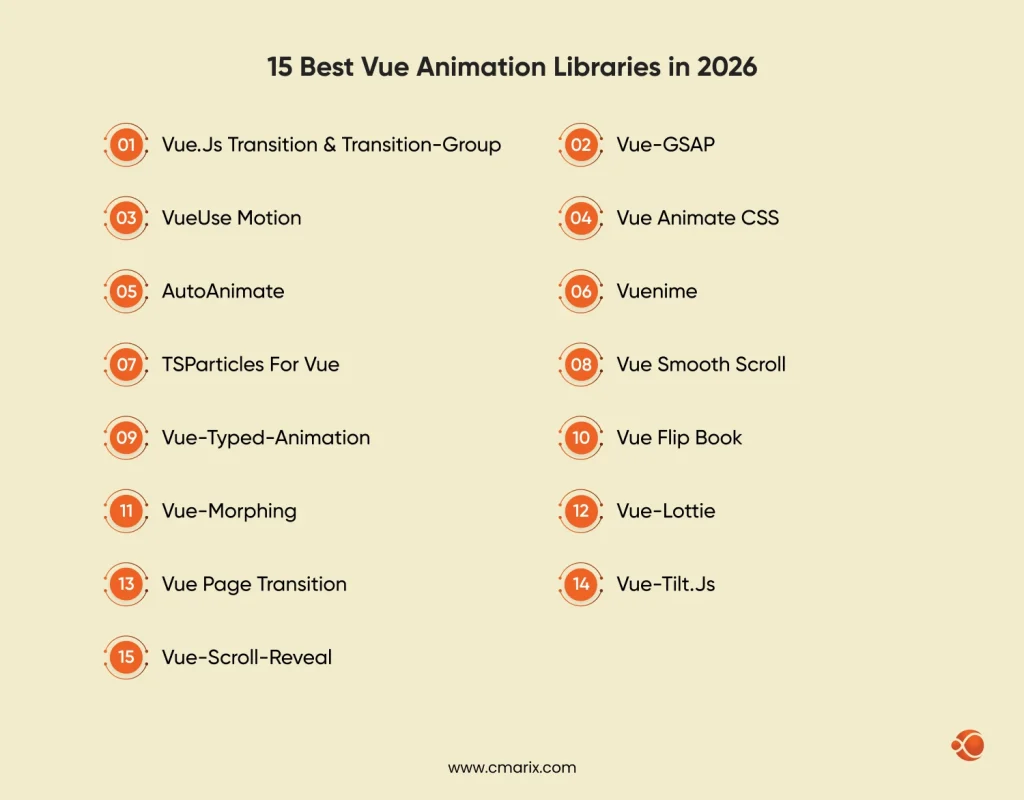
The list below has been refreshed to reflect what is actively maintained and widely used in the Vue ecosystem today, rather than tools that have gone stale since their initial release.
1. Vue.js Transition & Transition-Group
Vue’s own <Transition> and <TransitionGroup> components remain the starting point for most projects. They handle enter, leave, and list-reordering animations using CSS classes Vue applies automatically at each stage.
Key Benefits
- Built-in, so there is nothing extra to install
- Works with plain CSS, so no new animation syntax to learn
- Handles list animations, including reordering, out of the box
2. Vue-GSAP (GreenSock Animation Platform)
GSAP is widely regarded as the most capable animation engine for the web, and its official Vue plugin brings that power—ScrollTrigger, timelines, and easing—directly into Vue components. GSAP’s full plugin set, including ScrollTrigger and SplitText, has been free to use since version 3.13, which removed the main barrier to adopting it on commercial projects.
Key Benefits
- Ability to manage intricate, multi-stage timelines with precision
- ScrollTrigger makes scroll-based animations possible without additional plugins
- Operates reliably on both Vue.js, React, and plain JavaScript projects
3. VueUse Motion
Built on top of the popular VueUse composables collection, VueUse Motion brings spring-physics-based animation to Vue 3 using the Composition API. It is inspired by Framer Motion’s approach on the React side.
Key Benefits
- Declarative syntax that fits naturally into Composition API code
- Spring physics produce natural-feeling motion with little tuning
- Actively maintained as part of the broader VueUse ecosystem
4. Vue Animate CSS
Vue Animate CSS includes a plugin called Animate.css, which is widely used to create fade, bounce, and slide animations with built-in animations.
Key Benefits
- Huge number of pre-built animations without any need for custom CSS
- Rapid to set up for typical effects
- Low learning curve for teams new to Vue animation
5. AutoAnimate
The AutoAnimate feature makes animations smooth for elements added to or removed from the list, or for any other list changes, requiring only one line of code and no configuration.
Key Benefits
- Near-zero setup — one directive handles most cases
- Lightweight, with minimal impact on bundle size
- Great fit for dynamic UI like to-do lists or filtered grids
6. Vuenime
Vuenime brings the flexibility of Anime.js into Vue, supporting fades, flips, slides, and custom easing curves through a component-based API.
Key Benefits
- Wide selection of predefined transitions and effects
- Allows minute control of duration, delay, and easing properties
- Best suited for staggered animations among various objects
7. TSParticles for Vue
TSParticles is a particle engine built in TypeScript, with an official Vue integration for creating interactive backgrounds and other animations.
Key Benefits
- Highly configurable particle behavior and physics
- Strong performance even with large particle counts
- Official support for both Vue 2 and Vue 3
8. Vue Smooth Scroll
Vue Smooth Scroll improves page scrolling when users move between anchors or sections, making it feel more natural rather than jerky.
Key Benefits
- Easy implementation of anchor navigation
- Adjustable scrolling speed and easing
- Enhances the experience of one-page sites
9. Vue-Typed-Animation
This library replicates the typewriter effect, where text animates to appear as it is typed. The library is used in hero areas and taglines.
Key Benefits
- Draws attention to key headlines and messaging
- Configurable typing speed and cursor style
- Easy to swap in multiple rotating phrases
10. Vue Flip Book
Vue Flip Book recreates the experience of flipping through a physical book or magazine, complete with page-turn animation and realistic motion.
Key Benefits
- Well suited to digital catalogs, magazines, and portfolios
- Configurable page size and turn animation
- Works across desktop and touch devices
11. Vue-Morphing
Vue-Morphing handles shape and SVG morphing, letting one shape smoothly transform into another instead of abruptly swapping between states.
Key Benefits
- Generates smooth visual transitions between icons or forms
- Suitable for drawings, logos, and interactive diagrams
- Works great with SVG-driven design systems
12. Vue-Lottie
Vue-Lottie is an animation plugin that lets you import the JSON file of an Adobe After Effects animation directly into your Vue project without increasing file size.
Key Benefits
- Introduces animations made by designers to the app precisely
- Much lighter than videos or animated GIFs
- Perfect for onboarding and loading animations
13. Vue Page Transition
Vue Page Transition manages animated transitions between routes, so navigating from one page to another feels continuous rather than jarring.
Key Benefits
- Navigation assistance based on Vue Router
- A library of preset transition styles to choose from
- Improves perceived polish across multi-page apps
14. Vue-Tilt.js
Vue-Tilt.js adds a 3D tilt effect to elements as a user moves their cursor over them, commonly used for product cards and feature highlights.
Key Benefits
- Depth and interactivity without the need for complicated animations
- Adjustable angle of tilt, speed, and glare
- Perfect for use on marketing and product pages
15. Vue-Scroll-Reveal
Vue-Scroll-Reveal animates elements into view as a user scrolls down the page, a widely used pattern on modern landing pages.
Key Benefits
- Simple directive-based setup
- Configurable delay, direction, and distance per element
- Encourages users to keep scrolling and exploring content
How to Choose the Right Vue Animation Library
With a total of 15 good choices, the choice really depends on the project and not on any specific “perfect” library. Some important questions include:
- How complicated is the animation? Most fades and simple transitions require little more than the default
<Transition>tag or the Vue Animate CSS library. More sophisticated transitions involving scrolling or a timeline animation sequence would use GSAP. - Is performance an issue? Performance-intensive mobile applications would need lightweight options like AutoAnimate rather than heavy particle libraries.
- Does the team use Composition API? VueUse Motion works well with the Composition API and keeps animation and component logic consistent.
- Do designers provide motion files? If the animations come as After Effects exports, Vue-Lottie is a no-brainer choice.
- Is it a one-off animation effect or a design system? If you’re only going to have one hero animation, choosing a library that does exactly that is great. But if you need consistency across an entire application, GSAP is the better choice.
Best Practices for Using Vue Animations
A few habits keep animation from becoming a liability:
- Use one animation system for one task. Using multiple animation libraries for different tasks can increase bundle size and cause transition conflicts.
- Test on actual devices, not in the Chrome browser on desktop. What looks smooth on your laptop may have issues on mid-level smartphones.
- Respect reduced-motion preferences. Support the prefers-reduced-motion media query so animation does not create accessibility issues.
- Keep durations short. Most UI animation should land between 150 and 400 milliseconds; longer durations start to feel sluggish rather than polished.
- Profile before shipping. Check for dropped frames using browser developer tools when you have scroll or particle effects in the app.
Why Partner With CMARIX for Vue.js Development
Choosing a library is one part of the equation; building it into a fast, accessible, production-ready application is the harder part. CMARIX’s Vue.js development team, trusted by 2000+ clients, including Fortune 500 companies, across 120+ Vue.js-based projects, works across this full range, from lightweight transition polish on marketing pages to complex, animation-heavy product interfaces built with GSAP and the Composition API.
We assess each project practically, considering factors such as page load budget, accessibility, and library scalability, backed by 200+ successful API integrations and 2000+ custom design projects delivered. This ensures animations won’t turn into technical debt after a few iterations. Teams needing expert advice on choosing a library or developing in JavaScript frameworks should contact CMARIX developers.

Conclusion
The Vue animation ecosystem has come a long way since its built-in <Transition> component, and the list below highlights some of the best libraries to check out in 2026. Instead of focusing on popularity, focus on your motion complexity, performance budget, and studio workflow. Start with components that solve a specific problem, then move to general-purpose engines like GSAP.
FAQs about Vue Animation Library?
What is the best Vue animation library for beginners?
The built-in <Transition> component and Vue Animate CSS are the easiest starting points. Both require minimal setup and use CSS classes most developers already understand.
How can I add animations to Vue avatars?
Small UI elements need only a simple transition or Vue Animate CSS. If you want additional movement like bouncing and scaling when loading avatars, then you can use the Vuenime and GSAP libraries.
Which library is best for complex animations in Vue?
For complex animations with many steps, or even those triggered by scrolling, GSAP is the best library.
Can I use SVG animations in Vue.js?
Yes. Vue-Morphing handles shape and path morphing directly, and GSAP includes strong SVG animation support for more advanced cases like drawing effects or icon transitions.
How do I implement page transitions in Vue?
Vue Page Transition works directly with Vue Router to animate route changes. For custom transition logic, Vue’s <Transition> component can also be paired manually with router hooks.
Are there specific animation libraries for Vue charts and data?
Data visualization typically pairs a charting library with an animation engine like GSAP to animate values, bars, or paths as data updates. Some chart libraries also include their own built-in transition support.
How do I improve animation performance in a Vue application?
Use CSS animations on properties that don’t affect layout, such as “transform” and “opacity”, use brief animation duration times; load animations on-demand; and test animations on weaker machines prior to deployment.
Is Vue Motion (VueUse Motion) a good choice for Vue animations?
Absolutely, especially for Composition API-based teams. It has a spring-based physics system that generates very intuitive motion and integrates easily with modern Vue 3 codebases.
Can I use CSS animations instead of a JavaScript library in Vue?
Yes. For simple fade, slide, and hover transitions, Vue’s is lighter and more efficient than a JavaScript library.
How do I animate components in Vue 3?
Vue 3’s Composition API works well with libraries like VueUse Motion for declarative, reactive animation, or with <Transition> and <TransitionGroup> for standard enter, leave, and list animations.