

Quick Summary: Teams that train their AI models successfully take one single route: Problem framing, Data preparation, Approach selection, Training, Validation, Testing, Deployment, and Monitoring. This article takes you through all eight phases, highlighting in which situations it is better to fine-tune a pre-trained model rather than train a new one from scratch. In addition to hardware and tool comparisons, which are the key determinants of cost and time, you will find here some of the main obstacles to the complete success of projects.
Almost every organization has its AI concept, but only a few organizations can build a model that works for them. The gap is training, and knowing how to train AI models turns a promising prototype into a system that makes accurate calls in production. Companies that want to build smarter enterprises with AI treat training as a repeatable discipline, not a one-off experiment.
Training is not pressing run on a GPU and waiting. Poor data, the wrong approach, thin evaluation, and no deployment plan sink more projects than model architecture ever does. Let’s break the whole AI model training process into eight steps so you know what to decide and when.
What Does It Mean to Train AI Models?
To train AI models means showing a model many examples so it can find patterns and apply them to data it has never seen. Machine learning model training works by adjusting the model’s internal numbers, called weights, until its predictions match reality as closely as possible.
How does learning happen in the case of AI models? In a cycle, the AI model provides predictions, computes how wrong it was using loss functions, and tweaks the weights through an optimizer like gradient descent. This is repeated thousands or millions of times.
The model is only one part of the picture. A working setup also needs data pipelines, compute, evaluation, and monitoring. If you want the bigger view, our guide on how to create an AI system includes the full build. This guide is for founders, product managers, and engineers who want a clear view of the steps in training AI before they commit a budget or write code.
How to Train an AI Model: 8 Steps from Data to Deployment
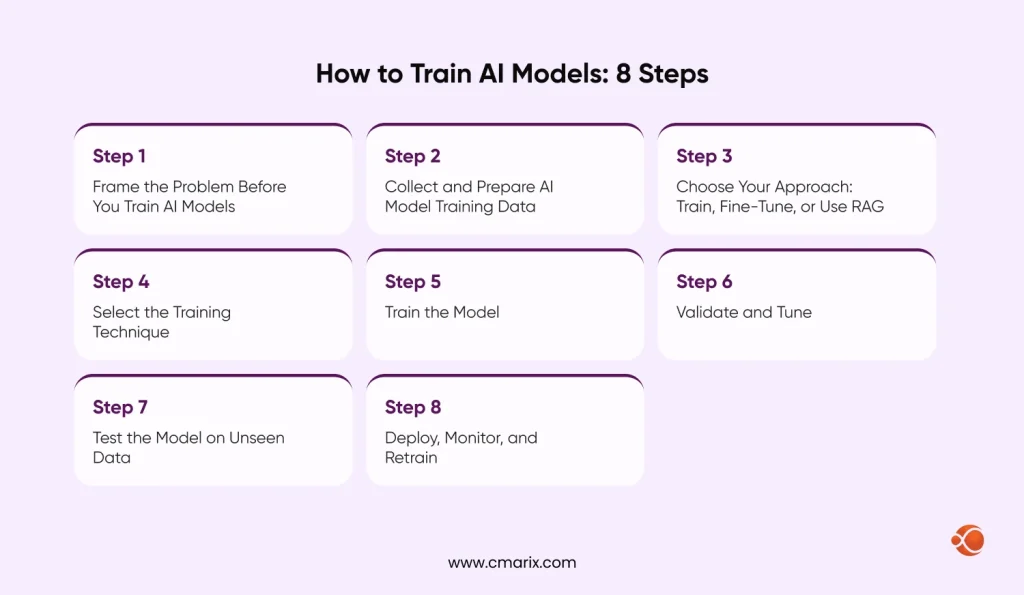
The steps in training AI run in this order: frame the problem, prepare data, choose an approach, choose a technique, train, validate, test, and deploy with monitoring. Here is each one in detail.
Step 1: Frame the Problem Before You Train AI Models
Begin with the question, not the model. Decide what the model should generate or predict, what a good output looks like, and which metric proves it works. Google’s framing an ML problem guide boils this into two moves: confirm that ML is a good approach by understanding the problem, the use case, and the data, then restate the problem in ML terms with a goal, an output, and success metrics.
If a simple rule or a database query solves the problem, you do not need a model. Saying so early saves months.
Step 2: Collect and Prepare AI Model Training Data
Data is where most AI model development projects are won or lost. A model can only learn patterns that exist in the data you give it, so collect, clean, label, and split that data before you touch an algorithm. These methods cover most real projects.
| Method | How it works | Typical use |
| Sensor data collection | Captures readings from GPS units, cameras, and IoT devices | Predictive maintenance in manufacturing and industry |
| Web scraping | Automated programs extract structured data from web pages | Competitor price and product analysis |
| Crowdsourcing | Online platforms gather inputs or labels from many contributors | Sentiment analysis on social media posts |
| Open-source datasets | Publicly available datasets reused for training | Image recognition research |
| In-house collection | Data from internal systems, surveys, and experiments | Proprietary software tools |
| Synthetic data generation | Simulations and algorithms produce artificial records | Healthcare diagnosis and treatment planning where real data is scarce |
Check licensing and privacy rules before you scrape or reuse any dataset.
Data preparation involves cleaning the dataset by removing duplicates, normalizing, imputing, and labeling instances. After this step, split the dataset into training, validation, and test sets, keeping the test set hidden until the end. Now, analyze the biases and gaps in your dataset.
Step 3: Choose Your Approach: Train, Fine-Tune, or Use RAG
Before picking an algorithm, decide how much training you need at all. Many teams do not have to train from scratch.
| Approach | What it means | Data and compute | Best when |
| Train from scratch | Build and train a new model on your own data | High data volume, heavy compute | You hold unique data and no existing model fits |
| Fine-tune a pretrained model | Adapt an existing model to your task or domain | Moderate data, moderate compute | You need domain accuracy or a set tone and format |
| RAG | Retrieve your documents at query time and pass them to a model | Little training, needs a good search layer | Answers must reflect fresh or private knowledge |
| Prompting only | Instruct an existing model with no training | No training data | You are testing an idea fast |
What this really means is: start with the lightest approach that hits your accuracy target, and move up only when it falls short.
Weigh four things:
- How complex the problem is
- How much structured data you have
- How accurate the model must be
- What compute you can afford
An image classifier often suits a convolutional neural network, while spotting outliers calls for an anomaly detection method.
Real products usually mix these options, with an orchestration layer routing work between models, retrieval systems, and tools. Our AI Orchestration guide shows how that fits together.
Step 4: Select the Training Technique
Your technique depends on the labels you have.
- Supervised learning: Learns from labeled examples where each input has a known answer. It fits fraud detection and medical image classification.
- Unsupervised learning: Finds structure in unlabeled data. It fits customer segmentation.
- Semi-supervised learning: Combines a small labeled set with a large unlabeled one, which helps when labeling is costly.
- Reinforcement learning: An agent learns through trial and reward. It fits robotics, game playing, and tuning models with human feedback.
Large language models begin with self-supervised learning, where the model predicts the next or missing piece of text across huge collections of documents.
Our AI engineers help you choose, train, and validate the right model.
Step 5: Train the Model
Now feed the prepared training data into the model and let the loop run. Set hyperparameters like learning rate, batch size, and number of epochs, then watch the loss curve as training progresses.
Watch for two failure modes:
- Overfitting happens when the model memorizes training examples and stumbles on new ones.
- Underfitting happens when it never learns the pattern at all.
Techniques that help overfitting include regularization, dropout, early stopping, and more varied data. Save checkpoints and log every run so you can reproduce results later.
Step 6: Validate and Tune
Validation checks the model’s ability to generalize using an independent dataset, separate from the training data. Use it to identify overfitting before the final test and tune hyperparameters.
Say you built a model that labels movie reviews as positive or negative. You run it on fresh validation reviews and score it with the metrics below. Accuracy alone can mislead on imbalanced data, so look at the full set.
| Metric | What it tells you |
| Accuracy | Share of all predictions that were correct |
| Precision | Of the items flagged positive, how many truly were |
| Recall | Of the truly positive items, how many the model found |
| F1 score | Balance of precision and recall in one number |
When data is limited, cross-validation rotates which slice is held out, which gives a steadier read on performance.
Step 7: Test the Model on Unseen Data
The testing phase comes last. Test the model using the hold-out test dataset that must resemble real-world data and evaluate it based on the success criteria set out in step one. If the performance does not match expectations, revisit the data or the methodology, but not the training time. Here is what needs to be done:
- Prepare the test data the same way you prepared the training data
- Run the trained model on the test set
- Compare predictions against actual values
- Calculate the metrics that match your goal
- Study the cases where the model failed
- Benchmark against a simple baseline and other models
- Record results and lessons for future runs
Step 8: Deploy, Monitor, and Retrain
The tested model must survive in real-world traffic. Wrap it up with an API or develop into an app, set latency and cost requirements, and roll out gradually. Once deployed, Track prediction quality, system health, and incoming data streams. Accuracy can degrade silently as real-world data shifts. Things will change with time, and your model accuracy will slowly degrade until it is noticed.
Establish retraining signals, such as dropping below an important threshold or new patterns in data, and always have a rollback strategy in case of trouble. If your model will live inside an app, our guide on trained AI models in mobile app development covers how to bring trained models into mobile products.
How to Train Generative AI Models: Fine-Tuning, LoRA, and RAG
Training generative AI works differently from classic machine learning. Most businesses do not pretrain a large language model from scratch because of the cost, so teams start from a pretrained model and adapt it. Here is how to train generative AI in practice:
- Pretraining: Teaches a model general patterns from very large datasets. Model providers usually do this once.
- Fine-tuning: Adapts the model to your task or domain using a smaller, curated dataset.
- Parameter-efficient tuning: Methods like LoRA freeze the original weights and train small add-on matrices. The original LoRA paper reports 10,000 times fewer trainable parameters and 3 times less GPU memory than fully fine-tuning GPT-3 175B.
- Human feedback tuning: Aligns outputs with what people actually prefer.
What about contextual live data? Combine the model with retrieval. RAG retrieves up-to-date documents on the fly, so the answers are always updated without retraining. Train on style and behavior, and retrieve data that changes constantly.
Evaluation is different too. Generative models don’t have an accuracy score, so you’ll have to use a combination of benchmarking, manual evaluation, and safety checks. If you don’t have the capacity, check out our LLM development services.
Guard your data as well. Strip personal information from fine-tuning sets and keep records of where each dataset came from and how it is licensed.
Generative output raises a trust question too. Watermarking systems such as Google SynthID embed invisible signals in generated content so it can be identified later, which is worth planning for if you publish what your model creates.
Best Hardware and Software Setup for AI Model Training
Your setup depends on model size and budget. Small models run on a laptop, deep learning needs GPUs, and very large models need GPU clusters. Deep learning requires larger models, while GPUs require a cluster of them.
| Setup | Strengths | Trade-offs | Best for |
| Local machine | Full data control, no usage bills once hardware is bought | Limited GPU memory, slow on large jobs | Prototypes, small models, sensitive data |
| Cloud | On-demand GPUs and TPUs, easy scaling | Costs climb on long runs | Most teams and variable workloads |
| Hybrid | Experiment locally, scale in the cloud | More tooling and setup | Teams balancing cost and control |
Managed platforms handle provisioning for you. Services like Vertex AI run custom training jobs on NVIDIA GPUs or Google TPUs without server management, which is one practical route into machine learning on Google Cloud. Whether you train AI models online or choose to train local AI model setups, the tools below cover most needs.
| Tool | Category | Best for |
| PyTorch | Deep learning framework | Research and production deep learning |
| TensorFlow | Deep learning framework | Large production pipelines |
| scikit-learn | Classical ML library | Tabular data and quick baselines |
| Hugging Face Transformers and PEFT | Pretrained model libraries | Fine-tuning language and vision models |
| MLflow | Experiment tracking | Logging runs and comparing results |
| Vertex AI, Amazon SageMaker, Azure Machine Learning | Managed cloud platforms | Scaling training without managing servers |
Training tools are only part of the stack. For the wider toolbox, see our list of the best AI tools for business.
How Long Does It Take and What Does It Cost to Train AI Models?
Time depends on model size, data volume, and hardware. This table shows the usual scale.
| Model type | Typical training time | Main driver |
| Classical ML such as regression and tree models | Minutes to hours | Dataset size |
| Deep learning for image or text classification | Hours to days | GPU power and number of epochs |
| Fine-tuning a pretrained LLM | Hours to days | Data size and tuning method |
| Pretraining a large model from scratch | Weeks to months | Cluster size and data volume |
Cost follows the same pattern, and at the top end it climbs fast. Epoch AI’s research estimates that the cost of training frontier models has grown about 2.4 times per year since 2016, and that the largest runs could pass a billion dollars by 2027 if the trend holds. Most businesses never get near that level.
Cost disclaimer: Costs will vary based on data volume, team salaries, equipment costs, and cloud services. This table is a relative comparison of cost, not a cost estimate.
| Approach | Main cost drivers | Relative cost |
| Prompting or RAG | API usage, retrieval infrastructure | Low |
| Fine-tuning | GPU hours, data labeling, evaluation | Medium |
| Custom training from scratch | GPU clusters, large datasets, specialist team | High |
| Frontier-scale pretraining | Massive clusters and research teams | Very high |
The most cost-effective custom AI model training plan is ordinary on purpose. Start with the lightest approach, use parameter-efficient fine-tuning when you need more, rent spot or reserved GPUs for long runs, and clean your data before scaling because bad data wastes compute. For a full budget view, read our breakdown of AI app development cost.
Common Challenges When You Train AI Models
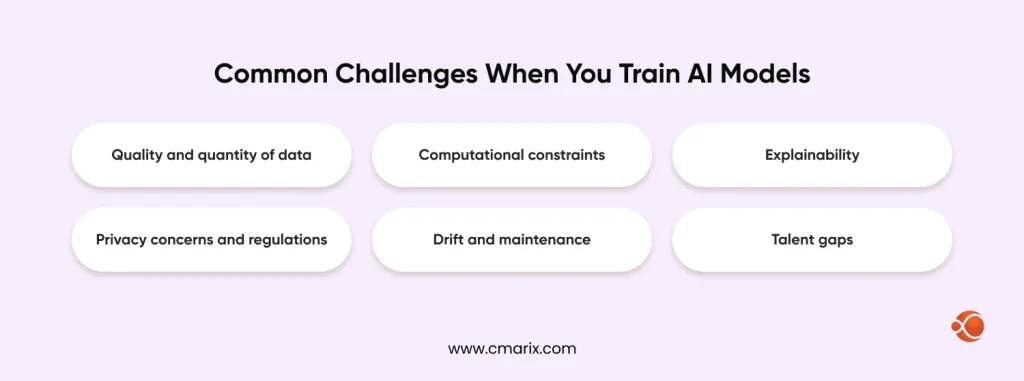
- Quality and quantity of data: Training models require massive datasets that must be cleaned, and it usually takes more time than the training itself.
- Computational constraints: GPUs are expensive and might not always be available, hence the slower pace of conducting experiments.
- Explainability: It is difficult to interpret complex models, which is especially important for healthcare and financial industries.
- Privacy concerns and regulations: Datasets used for training include personal information, which is why relevant legislation applies. Under the EU AI Act, obligations for stand-alone high-risk systems take effect on 2 December 2027, following the 2026 Digital Omnibus legislation, while general-purpose AI model responsibilities started in August 2025.
- Drift and maintenance: Real-world data changes, so models need monitoring and periodic retraining.
- Talent gaps: Data engineering, ML, and MLOps skills are hard to hire in one team.
Share your use case and we will map the right approach.
Why Choose CMARIX for AI Model Development
CMARIX was founded in 2009 and now delivers AI solutions for businesses across 40+ industries. Our teams cover the full path in this guide, from problem framing to production monitoring, so you do not have to stitch together separate vendors.
- Data to deployment: ML engineering, data engineering, tuning, and MLOps are all in-house, ensuring that transfer between different stages is seamless.
- Right-sized approach: We check upfront if your project needs customized training, fine-tuning, or RAG before investing any resources in GPUs.
- Secure delivery: Projects run under ISO 9001:2015 and ISO 27001 certification, which is important when your training data is sensitive.
- Flexible engagement: Start with a consulting sprint or a proof of concept, then scale the team as the model proves itself.
If you want a dedicated team, you can hire AI Developers who work as an extension of yours.
Conclusion
Learning how to train AI models comes down to discipline at each step. Frame the problem, protect the quality of your data, pick the lightest approach that works, and judge results on data the model has never seen. Then treat deployment and monitoring as part of training, not an afterthought.
Whether you fine-tune an open model or build custom pipelines, the same eight steps keep AI model development predictable and the budget in check.
FAQs on Training AI Models
What does it actually mean to train AI models?
Training AI models means training a model on data so it can learn patterns it can apply to new inputs. During training, the model’s internal weights are adjusted over many rounds until its errors shrink. The result is a model that can predict, classify, or generate content on data it has not seen.
What is the overall AI model training process from scratch?
Frame the problem, prepare data, choose an approach and technique, train, validate, test, then deploy and monitor. Training from scratch means starting with randomly initialized weights instead of a pretrained model, which needs far more data and computation. Most teams begin with fine-tuning instead.
How do AI companies gather their initial training datasets?
It is done through multiple means, such as licensed datasets, open data, web scraping, data collected by themselves, human-labeled data, and synthetic data. All of those have their own licensing, privacy, and quality checks. The origin of the data becomes more important as the regulation evolves.
How do machine learning model training loops adjust weights over time?
Weight updates happen in four steps: prediction, loss calculation, gradient calculation through backpropagation, and weight updates using an optimization function like gradient descent.
What are the core stages of AI model development?
Problem framing, data preparation, model and technique selection, training, validation, testing, and deployment with monitoring. Teams often loop back between stages, especially from validation to data preparation.
How do you train generative AI models using live contextual data?
Pair the model with RAG. Retrieval pulls current documents at query time and passes them to the model as context, so answers reflect fresh information without retraining. Fine-tune for style and behavior, and retrieve for facts that change.
What hardware and software setup works best for training models?
If models are small, then using a laptop and scikit-learn is sufficient. Deep learning requires GPU and PyTorch or TensorFlow. MLflow will be needed for experiment tracking.
How long does a deep learning model training run usually take?
For most deep learning and fine-tuning tasks, it varies from hours to days, while for pre-training on large datasets, it takes weeks to months. It depends upon several factors including data size, model size, hardware, and experiments.
What is the most cost-effective way to handle custom AI model training?
First, you should start with prompting or RAG, then consider parameter-efficient tuning (LoRA), and use custom training only when your data is special enough. Do not forget to use spot instances for lengthy training sessions.
Which AI model training tools perform best at scale?
TensorFlow and PyTorch are the two major deep learning libraries, while Vertex AI, Amazon SageMaker, and Azure Machine Learning take care of provisioning and distributed training. It all depends on which cloud you use, your skills, and what you specifically need for fine-tuning or full-scale training.