Quick Summary: AI tools for software development span the entire software delivery cycle, from coding to debugging and testing, documentation, and incident management. This blog post gives an overview of the best solutions in each category, describes the steps to take to select one, and highlights the security and cost considerations that will determine the success of the adoption. This blog is geared toward CTOs, engineering managers, and product owners.
Artificial intelligence(AI) is already integrated into everyday engineering work. In the Stack Overflow 2026 Developer Survey, only 17% of respondents said they do not use AI tools, and 66% use coding assistants or agents. The real question is no longer whether to adopt, but which tools deserve a place in your stack.

This is more difficult than it seems. Companies are constantly changing: Windsurf became Devin Desktop, Amazon Q Developer was replaced with Kiro by AWS, and Cursor has been bought by SpaceX. Only 24% of developers state that their companies release guidelines for tool usage. Thus, most teams use certain tools due to habit rather than data. Our guide helps you to avoid this.
What Are AI Tools for Software Development?
AI tools for software development are products that use large language models (LLM) and related machine learning (ML) to help with writing, reviewing, testing, documenting, and operating software. Some sit inside your editor and suggest code as you type. Others take a ticket and return a pull request. A third group turns plain language into a working app. Most teams end up using several, so AI development tools are better judged by the job they do than by the brand name.
How They Work Across the Software Lifecycle
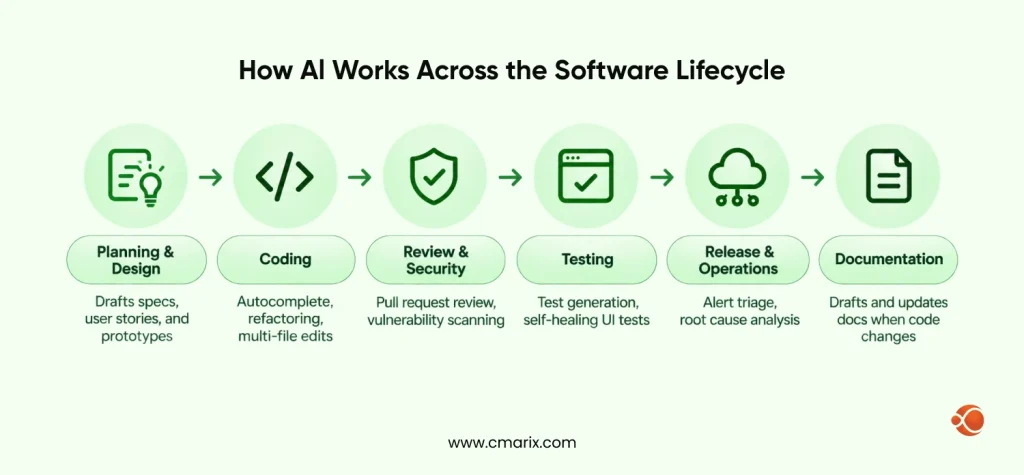
The AI software development process touches every stage of delivery, not just coding. The table shows where tools usually plug in.
| Stage | What AI handles | Typical tool type |
| Planning and design | Drafts specs, user stories, and prototypes | Chat assistants, AI app builders |
| Coding | Autocomplete, refactoring, multi-file edits | AI coding assistants, AI-powered IDEs |
| Review and security | Pull request review, vulnerability scanning | AI code review and security tools |
| Testing | Test generation, self-healing UI tests | AI testing platforms |
| Release and operations | Alert triage, root cause analysis | AI DevOps and observability agents |
| Documentation | Drafts and updates docs when code changes | AI documentation tools |
AI Assistants, Agents, and App Builders
Three labels come up constantly, and they mean different things.
- AI coding assistant – Works beside you in the editor or terminal. You prompt, it suggests or edits, and you accept or reject. GitHub Copilot and Claude Code fit here.
- AI agent – Takes a defined task and works on its own, often in a cloud sandbox, then opens a pull request. Devin, OpenAI Codex, and Google Jules fit here.
- AI app builder – Turns a plain language prompt into a running app. Lovable, Bolt.new, and Replit Agent fit here.
The lines blur more each quarter, and generative AI developer tools increasingly combine all three.
Our engineers help you shortlist, pilot, and scale the right tools.
Why Software Teams Are Investing in AI Tools Now
Adoption is the first reason. The Stack Overflow 2026 survey found that 65.9% of developers use coding assistants or agents, while 26.2% already run AI agents or automated workflows. Agent use is still earlier in the curve.
Output is the second reason, but here, too, there is conflicting information. In a controlled experiment carried out by scientists from GitHub, Microsoft Research, and MIT Sloan, developers who used GitHub Copilot completed a JavaScript HTTP server task 55.8% quicker than developers from a control group.
| Signal | Figure |
| Developers who do not use AI tools | 17.2% |
| Developers using AI agents or automated workflows | 26.2% |
| Employers with approved tools or AI guidance | 24% |
| Task completion time with GitHub Copilot in a controlled experiment | 55.8% faster |
| Task completion time for experienced developers using early-2025 AI tools | 19% longer |
Reality Check
6.6% of developers trusted AI outputs when making important decisions, while 48% of developers trusted AI outputs only if they could easily check them, according to the Stack Overflow 2026 survey. The benefits are genuine but conditional on reviewing practices and policies.
How to Choose the Right AI Tool for Software Development in 6 Steps
Step 1: Define the workflow problem first.
Identify one such bottleneck before opening a pricing page. A slow process in pull request reviews, old documentation, test failures, and lengthy triaging of incidents correspond to different types of tools. A team that purchases an AI-based IDE for resolving its documentation problems will end up disappointed.
Step 2: Check language, framework, and IDE support.
Confirm the tool works with your frameworks, languages, and editors. GitHub Copilot runs as an extension in VS Code, Visual Studio, JetBrains IDEs, and Vim, while Cursor, Kiro and Devin Desktop are standalone editors built on a VS Code base.
It also helps to know which models sit behind a product, because the AI ecosystem models and methods a vendor chooses shape quality, speed, and cost. Kiro, for example, routes tasks across several models, while other tools let you pick one.
Step 3: Review security, privacy, and IP terms.
Ask about where your code is headed, if it is used to train vendor models, if it will be stored, and what administrator controls are available, such as single sign-on and audit logs. For instance, Tabnine provides options like self-hosting, virtual private cloud, and air-gapped deployment for security purposes. According to Veracode’s 2025 GenAI Code Security Report, more than 100 language models have been tested against 80 coding tasks, with 45% of them showing security vulnerabilities.
Step 4: Test output quality on your own codebase.
Perform a two-week trial on an actual repository using identical tasks for all candidates. Measure accepted suggestions, reviews, and defects. Quality is important in reality; in the Stack Overflow 2026 survey, 25% of participants had already changed their AI software in the previous year due to higher quality, which was the most popular reason.
Step 5: Compare total cost, not seat price.
It’s possible to be misled by the low monthly price of the seat because of usage credits, limitations in model choice, and additional review time. For example, GitHub Copilot switched to a usage-based model in June 2026, so all the plans have included monthly AI credits, which complicates estimation of long agent runs.
Step 6: Set success metrics before you scale.
Make sure to estimate review time, baseline cycle time, change failure rate, and recovery from incidents times prior to implementing the pilot program; otherwise, you’ll just be tracking the “accept” clicks.
Best AI Tools for Software Development by Category

Ownership and product names changed a lot this year, so each entry notes what is current. Coding AI has also moved well past autocomplete, which is why the first category is the biggest.
AI Coding Assistants and AI-Powered IDEs
These tools carry most daily AI coding work. Some are an AI native code editor, some add AI to the editor you already use, and some live in the terminal.
- GitHub Copilot – Works inside the editors teams already use and includes a cloud agent that can turn a GitHub issue into a pull request. Best for GitHub-centered teams.
- Cursor – It is an AI-native code editor developed on the VS Code foundation, which has good capabilities for editing multiple files. The parent company was acquired by SpaceX in 2026, and now its plans are offered in packages along with Grok, while other models are available separately at API prices.
- Claude Code – A terminal-first agentic coding tool with VS Code and JetBrains extensions, a desktop app, and a web version. A good fit for large refactors.
- Kiro – AWS’s spec-driven agentic IDE and CLI, and the replacement for Amazon Q Developer, whose IDE plugins lose support on April 30, 2027.
- Devin Desktop – The AI-powered integrated development environment formerly known as Windsurf, renamed by Cognition in June 2026.
- Tabnine – Built for regulated industries, with air-gapped deployment options. It now sells company plans only, and Tricentis acquired it in July 2026.
AI Code Review and Security
AI improves code writing efficiency, and hence the review becomes the bottleneck. According to the Stack Overflow 2026 survey, 40.5% of developers use AI for reviewing code, pull requests, or architectural designs, and 34.6% use it for discovering and fixing security issues. Only 10% use AI answers as-is, while 76.5% run them locally first.
- CodeRabbit – Automated pull request reviews across GitHub, GitLab, Bitbucket, and Azure DevOps.
- Qodo – Pull request review and test generation. It has a free Developer plan with limited monthly usage.
- Snyk – A security platform that scans code, dependencies, containers, and AI-generated code, with controls designed for AI coding assistants and agents.
AI Testing and QA
- Mabl – A low-code platform for web, mobile, and API tests that moved toward an agentic tester in 2026.
- Katalon – Covers web, mobile, desktop, and API testing, with self-healing locators.
- Tricentis Testim – AI-driven element locators and self-healing UI tests, though some G2 reviewers find it expensive.
AI for DevOps and Observability
- Harness – A CI/CD platform with AI agents for pipeline creation, incident triage, and security scanning.
- Datadog Bits AI SRE – Investigates alerts on its own and proposes a likely root cause from your telemetry. It only helps if you already run on Datadog.
AI Documentation and Knowledge Tools
- Mintlify – Best for public developer and API docs, with an AI assistant for readers and an AI writing agent that drafts pages from your codebase.
- GitBook – A good all-rounder for internal and public docs, with a visual editor, Git sync, and an AI assistant for readers.
- Swimm – Keeps internal code documentation from going stale by flagging linked docs when the code changes.
AI App Builders and Vibe Coding Platforms
These AI-powered coding platforms suit prototypes, internal tools, and early product validation. Teams that start from designs can pair them with AI tools in UI/UX design to move from mockup to working prototype faster.
- Lovable – A full-stack app builder driven by prompts.
- Bolt.new – A browser-based builder from StackBlitz that supports React, Vue, and Vite, with instant preview and deployment.
- Replit Agent – Builds and deploys full-stack apps from natural language.
Treat the output as a strong first draft. Prototypes still need security checks, architecture review, and tests before they reach production.
AI Agents for Autonomous Development Tasks
Agents are best suited for well-defined work such as updating dependencies, bug fixing, and test filling. Teams that wish to integrate agents into their products and/or workflow frequently opt for custom AI generation solutions in addition to agents.
- Devin – The most autonomous option here. You hand it a ticket from Slack or GitHub, and it works in its own cloud sandbox. It is weaker on vague, open-ended work.
- OpenAI Codex – Runs across terminal, cloud, and app, and handles parallel background tasks that open pull requests.
- GitHub Copilot coding agent – Works inside GitHub Actions in a sandbox with read-only repo access, and needs approval before CI/CD runs.
- Google Jules – An asynchronous agent for GitHub tasks that runs in cloud VMs, with a free tier.
AI Software Development Tools Comparison Table
| Tool | Category | Best for | Where it runs |
| GitHub Copilot | Assistant and agent | GitHub-centered teams | VS Code, JetBrains, Visual Studio, Vim, GitHub |
| Cursor | AI-powered IDE | Fast multi-file edits | Standalone editor |
| Claude Code | Terminal agent | Large refactors | Terminal, VS Code, JetBrains, desktop, web |
| Kiro | Spec-driven IDE | Structured, plan-first builds | IDE and CLI |
| Devin Desktop | AI-powered IDE | Running local and cloud agents side by side | Standalone editor, formerly Windsurf |
| Tabnine | Assistant | Regulated industries | SaaS, VPC, on-premises, air-gapped |
| CodeRabbit | Code review | Pull request automation | GitHub, GitLab, Bitbucket, Azure DevOps |
| Qodo | Code review | Pull request review and test generation | Pull requests, IDE, and CLI |
| Snyk | Security | Scanning AI-generated code | Developer workflows and pipelines |
| Mabl | Testing | Low-code end-to-end tests | Web, mobile, and API |
| Katalon | Testing | Web, mobile, desktop, and API tests in one platform | Studio IDE with CI execution |
| Tricentis Testim | Testing | Stable UI tests with self-healing locators | Web UI test automation |
| Harness | DevOps | AI-assisted CI/CD and incident response | Harness platform |
| Datadog Bits AI SRE | Observability | Incident triage | Datadog platform |
| Mintlify | Documentation | Public developer docs | Git-synced docs site |
| GitBook | Documentation | Internal and public docs with Git sync | Hosted docs sites |
| Swimm | Documentation | Keeping code documentation current | Linked to your repositories and CI |
| Lovable | App builder | Prototypes from prompts | Browser |
| Bolt.new | App builder | In-browser prototypes with instant preview | Browser |
| Replit Agent | App builder | Building and deploying full-stack apps from prompts | Browser-based Replit workspace |
| Devin | Agent | Assign-and-walk-away tickets | Cloud sandbox via Slack or GitHub |
| OpenAI Codex | Agent | Parallel background tasks | CLI, cloud, desktop app |
| GitHub Copilot coding agent | Agent | Turning GitHub issues into pull requests | GitHub Actions sandbox |
| Google Jules | Agent | Asynchronous GitHub tasks like bug fixes and dependency updates | Cloud VMs connected to GitHub |
Free vs Paid AI Development Tools
Free tiers are ideal for individual experimentation and testing. These plans generally have limits on consumption, restrict the use of premium models, and feature limited data management capabilities, especially when considering proprietary code.
| Tool | Purpose | Free option | Paid starting point |
| GitHub Copilot and coding agent | AI code completionCode generationCoding assistance | Free tier with limited features | Pro at $10 per month, including $10 in monthly AI Credits |
| Cursor | AI-powered code editorEditingDebuggingCodebase queries | Free plan with limited usage | Plus at $8 per month (Grok models only), Premium at $30 per month |
| Claude Code | AI coding agent for multi-file code changesDebuggingRefactoring | Not included in the Free plan | Included with Claude Pro at 20permonth(17 per month billed annually), or pay as you go with API credits |
| Kiro | AI-powered IDE for:Spec-driven developmentCode generation | 50 credits per month | Pro at $20 per month |
| Devin Desktop and Devin | AI software engineering agent for:Implementing featuresFixing bugsHandling development tasks | Free plan with limited Devin usage | Pro at $20 per month |
| Tabnine (acquired by Tricentis) | AI code completion, Code generationCoding assistance with a focus on enterprise privacy and security | None | From $39 per user per month on annual contracts |
| CodeRabbit | AI-powered code reviewsPull request feedback | Free plan with a 14-day Pro+ trial | Pro at $24 per developer per month, billed annually |
| Qodo | AI code reviewTest generationCode quality checks | Free Developer plan with limited reviews | Teams at $30 per user per month, billed annually |
| Snyk | Application security testing Vulnerability detection AI-assisted code security reviews | Free plan, priced per contributing developer | Team plan per contributing developer; Enterprise on request |
| Mabl | AI-powered end-to-end application testingTest automation Regression testing | 14-day free trial | Custom pricing |
| Katalon | Automated functional, API, web, mobile, and regression testing | Varies by edition | Per-seat editions; see vendor for current rates |
| Tricentis Testim | AI-assisted web application test automationMaintenance of automated tests | Not published | Quote based |
| Harness | Software delivery automationCI/CD pipelinesAutomated testing Deployment workflows | Free plan | Essentials and Enterprise through sales |
| Datadog Bits AI SRE | AI-assisted site reliability engineeringIncident investigationProduction troubleshooting | Not listed | AI Credits from $625 per 500 credits a month on annual billing, or $1.30 per credit on demand |
| Mintlify | AI-assisted developer documentation Creation MaintenancePublishing | Free Hobby plan | Paid tiers vary; see vendor |
| GitBook | Creating, managing, and publishing technical documentation and knowledge bases | Free plan for one user | Premium at $65 per site per month, plus $12 per user |
| Swimm | Keeping code documentation synchronized with code changes Helping developers understand codebases | Free plan with 1 private repository | Teams plan for 5 to 30 seats; Enterprise on request |
| Lovable | AI-powered app building from natural-language prompts, particularly for web app prototypes and MVPs | 5 daily credits, up to 30 a month | Pro from $25 per month |
| Bolt.new | Browser-based AI app development for:GeneratingEditingRunning web applications | 1M tokens a month with a 300K daily cap | Pro at $25 per month |
| Replit Agent | AI-assisted application development, from generating code to running and deploying apps | Starter plan with daily Agent credits | Core from $20 per month |
| OpenAI Codex | AI coding agent for:writing codeFixing bugsRunning testsCompleting software engineering tasks | Limited use on ChatGPT Free | Included with ChatGPT Plus at $20 per month |
| Google Jules | Asynchronous AI coding agent for:Fixing bugsImplementing featuresMaking code changes in a separate environment | 15 tasks per day | Included with Google AI Pro or Ultra |
Paid plans earn their cost when they add admin controls, audit logs, and higher limits. If you are also planning to build AI features into your own product, AI app development cost is a separate budget line worth modeling early.
Build vs Buy: Custom AI Tooling or Off-the-Shelf
It is generally advisable for most teams to start off by making use of readily available tools. There are cases where custom tool building becomes a necessity, such as when the data cannot be moved out of your system, or when existing tools are not compatible with your work flow.
| Factor | Off-the-shelf tools | Custom AI tooling |
| Time to value | Days to weeks | Months |
| Data control | Depends on vendor terms | Full control over models and data flow |
| Upfront cost | Low, per seat | Higher |
| Fit with internal standards | Generic | Built around your codebase and policies |
| Maintenance | Vendor handles it | Your team or a partner handles it |
| Best for | Teams starting out | Regulated or proprietary-heavy environments |
When off-the-shelf options fall short, custom LLM development lets you build models and assistants around your own code, data, and compliance rules.
Common Mistakes Teams Make When Adopting AI Dev Tools
- Buying for hype – Choosing the most talked-about tool instead of the one that fixes your actual bottleneck.
- Skipping review of AI output – AI-generated code needs the same scrutiny as any pull request. If you want a clearer view of what the difference is between AI and Traditional Software, start with the fact that AI output is probabilistic, so it needs checking every time.
- Ignoring data exposure – Letting developers paste proprietary code into unapproved tools, which is easy when only 24% of employers publish guidance.
- Measuring usage instead of outcomes – Counting accepted suggestions says little about delivery speed or code quality.
How to Roll Out AI Tools Across Your Engineering Team
Start small, measure objectively, and scale access.
- Pilot- Select one team, one repository, and a few tools and use them for two to four weeks.
- Measure- Measure your performance against the baseline and get feedback from developers.
- Scale – Roll out the winner with training, usage rules, and an approved tool list.
Teams building AI-first products can also borrow ideas from agile development for AI-first SaaS, where short feedback loops matter even more. If you want outside help planning the rollout or building AI features, AI Product Development Services can cover strategy through delivery.
| Metric | What it shows |
| Cycle time | Speed from first commit to merge |
| Review time | Whether AI helps or burdens reviewers |
| Change failure rate | Whether faster code is still stable |
| MTTR | How quickly incidents get resolved |
| Developer satisfaction | Whether the team actually uses the tools |
Work with a team that ships production AI software for global clients.
Why Choose CMARIX for AI-Powered Software Development
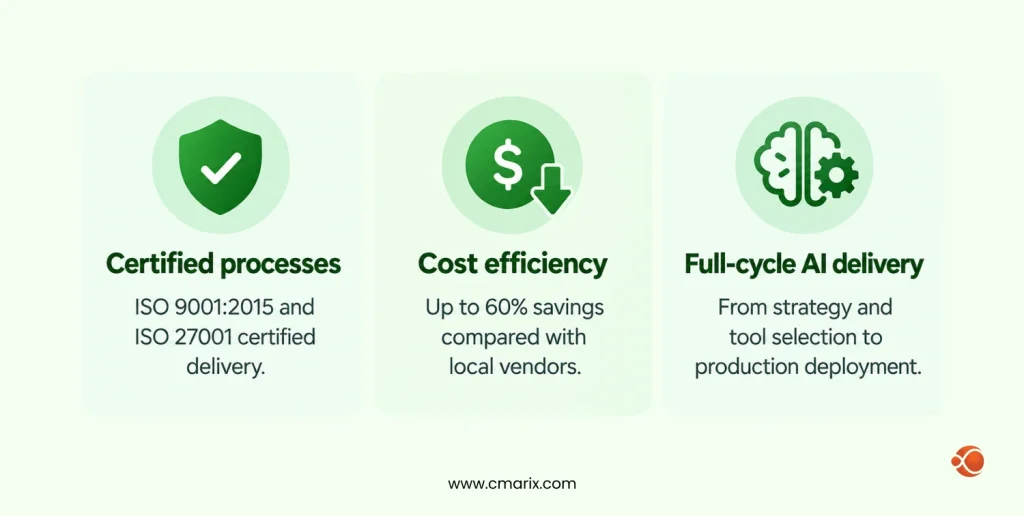
CMARIX is an AI software development company with 16+ years in product engineering, 1,500+ AI and digital products shipped for 2,000+ clients (Fortune 500 companies among them), and 240+ in-house AI engineers. Clients stay with us, with a 95% retention rate, across 40+ industries. Our delivery is ISO 9001:2015 and ISO 27001 certified, and our global delivery model brings up to 60% cost savings compared with local vendors. That matters because picking AI tools is only half the job. The other half is a team that can secure them, connect them to your stack, and build custom AI where off-the-shelf products fall short. Here is what to look for in a partner, and what you get with CMARIX.
Conclusion
The right AI tools for software development must be selected based on your risk appetite and workflow stack, rather than whatever is popular. Start with defining the problem, testing the options with your own code, assessing the overall cost and outcomes, before going ahead. Keep the people involved in reviewing AI decisions, since data suggests that trust in the output of AI is still dependent on its verification.
The marketplace changes very quickly, and tools get rebranded, bought out, or discontinued within just months. Review your stack every quarter and consider any tool selection as a pilot project.
FAQs About AI Tools for Software Development
What is the best AI tool for software development?
There is no single winner for the best AI tool. The best artificial intelligence for coding is the one that fits your languages, security rules, editor, and budget. GitHub Copilot suits GitHub-centered teams, Cursor and Kiro suit editor-first workflows, and Claude Code suits terminal-heavy refactors. Pilot two or three on your own repository before deciding.
What is the best free AI for coding right now?
The free tiers are updated frequently, but GitHub Copilot Free, the free tier from Kiro, which provides 50 credits per month, Google Jules, which allows 15 tasks per day, and Devin Desktop’s free tier are actual free trials. Usage limitations will apply, as well as the lack of premium models. Please read data privacy policies first.
How do AI code completion tools speed up development?
They analyze the code comments and the surrounding code, and make predictions about the next lines or the entire function. This eliminates a lot of the mundane typing and makes it easier to generate tests or repetitive code. Time savings are only achieved if developers review the accepted code.
Can AI completely generate a full-stack software application?
Yes, for prototypes and internal tools. App builders such as Lovable, Bolt.new, and Replit Agent can generate and deploy a working full-stack app from a prompt. Production software still needs architecture decisions, security review, testing, and maintenance from experienced engineers.
What are AI-powered IDEs and code editors?
They are editors with a model built in, so the AI can read your whole project, edit several files at once, and run terminal commands. Cursor, Kiro, and Devin Desktop are examples. Tools like GitHub Copilot take a different route and add AI to the editors you already use.
Which AI tools are best suited for web development?
When it comes to writing code on an everyday basis, GitHub Copilot and Cursor are fantastic tools when dealing with TypeScript, JavaScript, and frameworks. To build quick prototypes, one may use Bolt.new and Lovable to build React-based apps. For end-to-end testing, Mabl or Katalon may be used.
Is it secure for enterprise teams to use AI developer tools?
This is possible only if you put in place the necessary controls. These include SSO, audit logs, data retention policies, absence of training for your code, and self-hosting for sensitive projects. Security testing should become part of your pipeline because Veracode’s 2025 research revealed that 45% of AI-generated code contained security issues across more than 100 models.
How do AI automation and debugging tools work?
They input code, stack traces, logs, and recent changes into the model to come up with potential causes and fixes. Observability tools like Datadog Bits AI SRE use your telemetry to look into alerts, whereas test automation tools like Mabl and Katalon automatically fix broken locators. Engineers approve the fix.
What is an AI pair programmer?
It is an assistant which works with you right inside the editor, proposing code, explaining strange pieces of code, and doing the editing for you. You are in control of all design and review processes. GitHub Copilot coined the name.
How do I choose the best AI tool for my development stack?
Begin with the workflow issue you wish to resolve, then assess language and IDE compatibility, terminology related to security, and overall cost. Test two or three applications on an actual repository, and measure the results against a control. The six steps in this guide will help you accomplish that task.