Quick Summary: The Apple iPhone Duo is the foldable iPhone by Apple that will be released on October 23, 2026, having two displays: an outer and an inner one. Legacy iOS apps don’t require a full code refactor; however, developers still need to prepare apps for different screen sizes, safe areas, navigation, and orientation. In this post, we cover the essential steps to build applications for apple iPhone Duo using the Xcode 27.1 SDK. The CMARIX team can help you prepare your business iOS application for iPhone Duo.
Apple’s first foldable iPhone, iPhone Duo, introduces a new screen experience for iOS developers. With a 5.4-inch outer display and a 7.6-inch inner display, the device gives apps more space for multitasking, navigation, content, and adaptive interfaces. Apple has also introduced updated iOS and developer APIs to support different ways users can open, close, rotate, and position the device.
This raises several practical questions for businesses with existing iOS applications:
- What is an iPhone Duo app?
- Does an existing iPhone app work on iPhone Duo?
- How do developers prepare an iOS app for Apple’s foldable iPhone?
- What changes are required for adaptive layouts?
- How should iPhone Duo apps handle screen sizes, safe areas, navigation, and different device poses?
- How can teams test an iPhone Duo app before launch?
The good news is that an existing iOS application does not require a complete rebuild to run on apple iPhone Duo. The bigger task is adapting layouts and screen-dependent logic to work across its outer and inner displays. Apple provides new and updated APIs to support these requirements, along with iPhone Duo simulation and testing capabilities in Xcode.
The guidelines below show how to adapt your existing iOS application for iPhone Duo, including updating the SDK, implementing adaptive layout, using size classes, screen access, navigation, safe area, Concentricity APIs, ReservedRegion, and DeviceHub. The announcement also includes information on how businesses can evaluate their code and prepare for the new experience.
What is an Apple iPhone Duo App?
An Apple iPhone Duo app is any iOS app running on Apple’s foldable iPhone, a device Apple explains in its official Tech Talk, “Prepare your app for iPhone Duo”. The iPhone Duo has two displays. The outer display behaves like a standard iPhone screen. The inner display unfolds into a larger, regular-sized canvas built for split layouts and richer navigation.
Your existing app already qualifies as an iPhone Duo app the moment it launches on the device. It runs without recompiling. How much of the inner screen it can use as an iPhone Duo app depends on which SDK you build against, and that is where preparation starts.
iPhone Duo App vs Standard iPhone App
| Aspect | Standard iPhone App | iPhone Duo App |
| Display | One screen with a fixed shape | Outer display plus a larger inner display |
| Layout Signal | Interface idiom or orientation | Horizontal and vertical size classes |
| Screen Reference | UIScreen.main works fine | UIScreen.main is ambiguous and deprecated |
| Navigation | Single-column layout | NavigationSplitView and TabView adapt automatically, with an inner-display sidebar option |
| Safe Areas | Usually symmetric | Often asymmetric, handled per side |
| Custom UI Space | Fixed frame calculations | ReservedRegion or UIViewReservedRegion claims space dynamically |
This is the core shift behind every recommendation below: an iPhone Duo app treats screen space as a range, not a fixed shape.
Why the iPhone Duo App Shift Matters Now
Foldable phones are no longer something new or a new market area to explore. This category emerged after several major phone companies, including Samsung, Huawei, and Motorola, launched foldable phones with different designs in 2018 and 2019.
Counterpoint Research monitors a market on the verge of reaching 100 million cumulative shipments by 2026.Market size of the global foldable smartphones market was estimated at USD 36.43 billion in 2025. The global market for foldable smartphones is expected to expand from USD 41.43 billion in 2026 to USD 115.86 billion till 2034, with a CAGR of 13.72%.
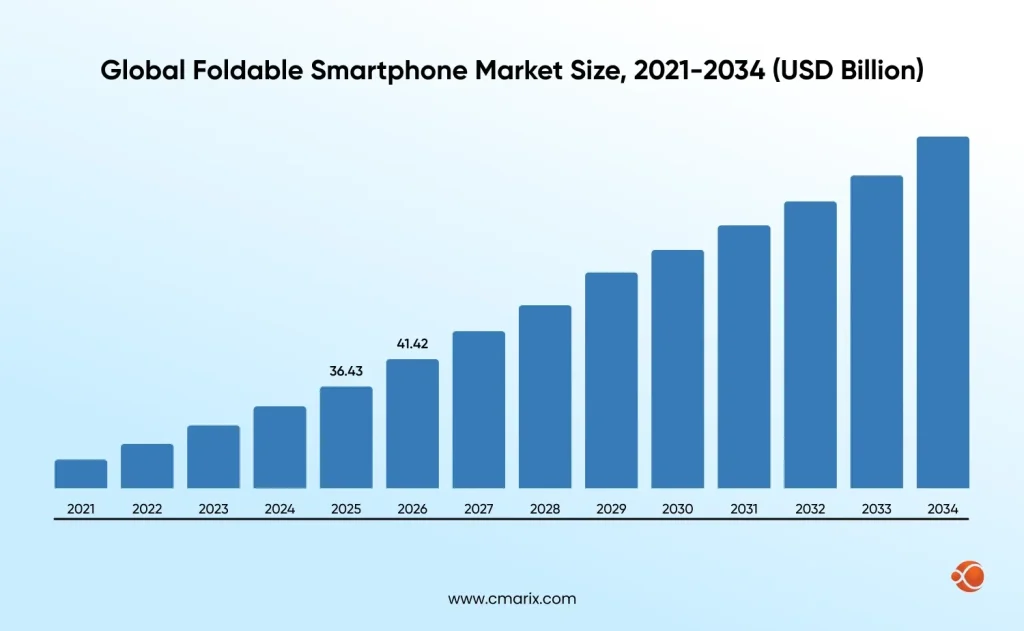
This growth will mean more of your customers ultimately own a device with multiple screen formats. Apple’s developer guidelines treat an efficient iPhone Duo app as the norm, not the exception.
Build a practical roadmap around SDK updates, adaptive layouts, and DeviceHub testing.
8 Steps to Get Your iPhone Duo App Ready
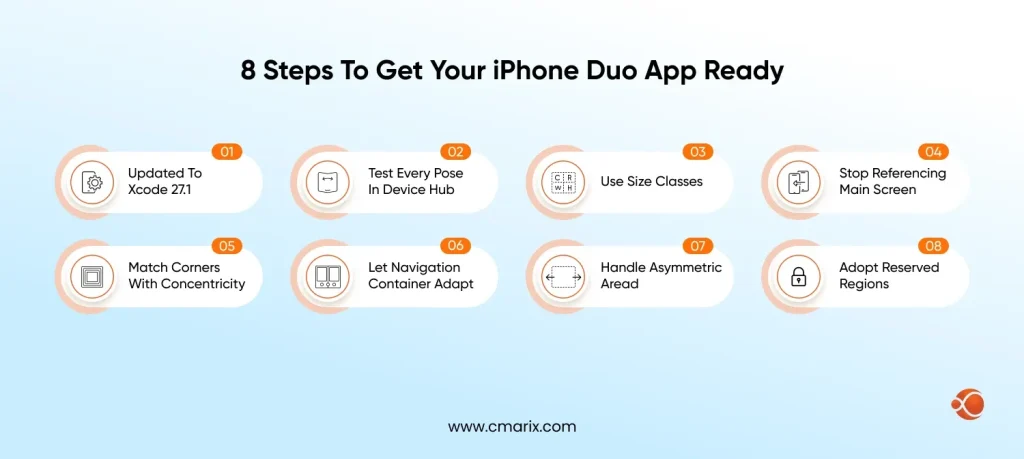
1. Update to Xcode 27.1 and the iOS 27.1 SDK
Apps built with the iOS 27 SDK extend to the left of the status bar on the inner display. Apps built with the iOS 27.1 SDK reach the full screen edge and lay out standard navigation and toolbar buttons vertically instead of horizontally. Download Xcode 27.1 first, since every later step depends on it.
2. Test Every Pose in the DeviceHub Simulator
Xcode 27.1 includes an iPhone Duo simulator in DeviceHub, Apple’s device simulation tool. On-screen controls let you open, close, rotate, and fold the simulated device, so you can check your layout in every pose before you touch real hardware. CMARIX’s iOS team runs this same DeviceHub pass on every layout change, since a design that looks right folded can break completely once it opens. For a sense of what a full iPhone Duo app project typically costs to plan and budget for, see CMARIX’s iOS app development cost breakdown 2026.
3. Replace Interface-Idiom Assumptions with Size Classes
Size classes represent the amount of space available for your application; they are not related to device orientation. In the case of SwiftUI, it is the environment, and in the case of UIKit, it is the trait collection. The outer display on iPhone Duo behaves like any other iPhone. The inner display is regular in both dimensions, which leaves room for sidebars and richer layouts. Because the inner display does not honor supported interface orientations, orientation is the wrong signal for an iPhone Duo app to build on. Apple’s Human Interface Guidelines cover this adaptive approach in detail, and CMARIX’s iOS app development services team treats size-class support as a baseline requirement now, not an optional extra.
SwiftUI
@Environment(\.horizontalSizeClass)
private var horizontalSizeClass
@Environment(\.verticalSizeClass)
private var verticalSizeClass
UIKit
traitCollection.horizontalSizeClass
traitCollection.verticalSizeClass
4. Stop Referencing the Main Screen
Since all iPhones had only one screen before, it made sense to use the main screen reference. But with two screens on one device, the concept of a main screen gets vague, and you should phase out this practice. Instead, access the screen dynamically using the window scene.
Avoid referencing the main screen on a two-display device.
Access the screen dynamically from the window scene instead.
let screen = window?.windowScene?.screen
5. Match Corners with Concentricity APIs
iOS 26 introduced Concentricity APIs, ConcentricRectangle in SwiftUI and UICornerConfiguration in UIKit, so custom shapes in your iPhone Duo app can match the screen’s actual corner radius instead of a hardcoded value.
SwiftUI
ConcentricRectangle()
.fill(Color.green)
.padding(8.0)
.ignoresSafeArea()
UIKit
UICornerConfiguration
6. Let Standard Navigation Containers Adapt on Their Own
The columns in NavigationSplitView and UISplitViewController collapse when the device is closed and tile or overlay when it is opened. Similarly, TabView and UITabBarController collapse and tile/overlay when the device is closed and opened, respectively. In the inner screen, you can set TabView as a sidebar for better navigation.
SwiftUI
TabView { ... }
.defaultTabBarPlacement(.sidebar)
UIKit
tabBarController.sidebar.preferredPlacement = .sidebar
7. Handle Asymmetric Safe Areas Independently
The default bars have been positioned outside the safety zone, and they will automatically avoid the status bar and camera. You just have to ensure that all interactive elements remain inside the safety zone and other non-interactive elements remain outside the safety zone.
UIKit: keep interactive foreground content inside the safe area
foreground.frame = view.bounds.inset(by: view.safeAreaInsets)
SwiftUI: let background content extend past the safe area
.ignoresSafeArea()
On iPhone Duo, safe areas and layout margins are often asymmetric, so the left and right insets can differ. Handle each side independently instead of assuming they match, and test the result in Split View.
Avoid assuming insets on opposite sides are equal
let width = view.bounds.width - view.safeAreaInsets.left * 2
Handle each side independently
let width = view.bounds.inset(by: view.safeAreaInsets).width
8. Adopt Reserved Regions for Custom UI
ReservedRegion in SwiftUI and UIViewReservedRegion in UIKit are new in iOS 27.1. They let custom UI in your iPhone Duo app claim as much screen space as possible without colliding with system UI, which is useful for custom bars and edge-to-edge designs.
iPhone Duo App Readiness Checklist
| Area | What Changes | Action |
| SDK and tooling | Screen usage depends on SDK version | Build against Xcode 27.1 and the iOS 27.1 SDK |
| Testing | No hardware needed pre-launch | Run every pose in the DeviceHub simulator |
| Layout signal | Orientation is unreliable on the inner display | Switch to horizontal and vertical size classes |
| Screen access | UIScreen.main is ambiguous | Read the screen from the window scene |
| Navigation | Containers adapt automatically | Confirm sidebar placement on the inner display |
| Safe areas | Insets can be asymmetric | Handle left and right sides independently |
| Custom UI | Needs dynamic space claims | Use ReservedRegion or UIViewReservedRegion |
Watch the Official Apple Session
Apple’s engineering team will walk you through the changes above with live demonstrations. Watch the entire Tech Talk, “Prepare your ap for iPhone Duo,” available on the Apple Developer official site.
How Businesses Should Prepare for an iPhone Duo App Migration
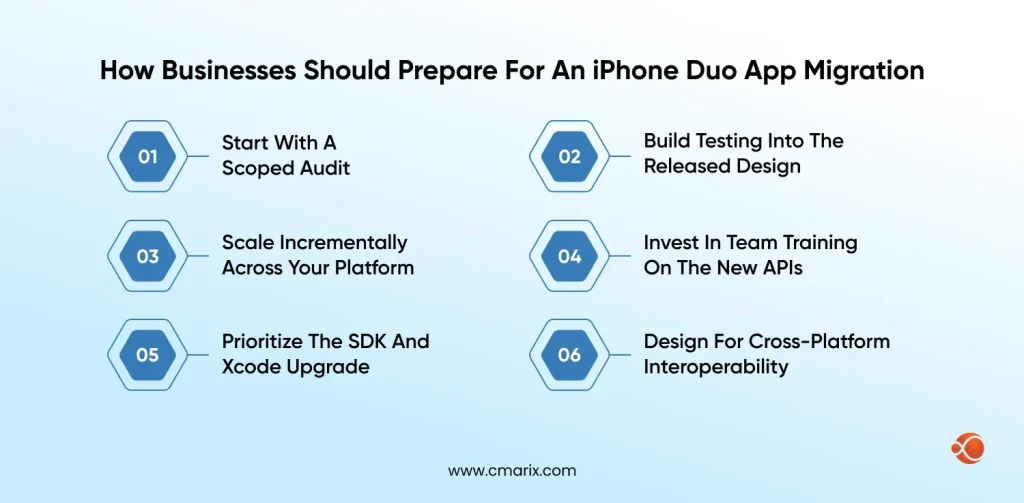
Most existing iPhone codebases were written for a single screen shape. Getting ready for an iPhone Duo app migration takes more than a quick patch.
1. Start With a Scoped Audit
Do the readiness checklist against your current codebase line-by-line before you write any new code.
2. Build Testing Into the Release Design
Include a DeviceHub test as part of your usual QA process and not as a one-off.
3. Scale Incrementally Across Your App
Start with the screens that get the most traffic, then work step by step through your application.
4. Invest in Team Training on the New APIs
Make sure your engineering team feels comfortable using size classes, window scenes, and concentricity.
5. Prioritize the SDK and Xcode Upgrade
Move to Xcode 27.1 early so the rest of the checklist can proceed in parallel.
6. Design for Cross-Platform Interoperability
When you ship on Android, too, don’t solve this problem twice; keep layout logic consistent across both operating systems.
What to Consider Before Migrating to iPhone Duo
Legacy Layout Debt
After years of development, one ends up with references to the main screen, orientation, and symmetric safe area assumptions. None of these fail on the regular iPhone. All of these may fail on the iPhone Duo app.
Testing Without Hardware
Since most teams will have their iPhone Duo applications ready before the product’s release, the DeviceHub emulator will carry most of the QA responsibility.
Team Familiarity With New APIs
Concentricity, ReservedRegion, and window-scene access are new enough that most iOS teams have not used them in production yet.
Cross-Platform Consistency
Teams shipping on both iOS and Android need a layout strategy that holds up across foldable and standard devices on both platforms.
Why Choose CMARIX for iPhone Duo App Development
CMARIX runs a dedicated iOS development team with direct experience shipping through Apple’s App Store review, backed by 16-plus years in business and 2,000+ projects delivered across 46+ countries.
Moreover, if teams want to develop apps for Android too, CMARIX’s cross-platform app development strategy ensures consistent layouts across both applications, even with newer screen forms such as iPhone Duo, using either Flutter or React Native based on the project’s requirements.
Final Words
The Duo application on iPhone will not need a full rebuild, but it does prefer adaptive layouts over static layouts. Update Xcode to 27.1, pass the DeviceHub testing, and go through the readiness checklist above before users start using the device.
The defining question is no longer whether iPhone Duo apps will become common. It is how ready your app will be when they do. If you are weighing where to start, talk to CMARIX’s iOS team about your iPhone Duo app readiness audit.
FAQs on iPhone Duo App Development
What is an iPhone Duo app?
An iPhone Duo app is any iOS app running on Apple’s foldable iPhone, which Apple covers in its official developer Tech Talk. It has an outer display that behaves like a normal iPhone and an inner display that unfolds into a larger, regular-sized screen.
Does my existing iPhone app automatically become an iPhone Duo app?
Yes, in the sense that it runs without recompiling. But how much of the inner screen it can use as a true iPhone Duo app depends on whether it is built against the iOS 27 SDK or the iOS 27.1 SDK.
What’s new in the iOS 27.1 SDK for an iPhone Duo app?
The iOS 27.1 SDK extends your app to the screen edge on the inner display, lays out standard navigation and toolbar buttons vertically, and adds ReservedRegion and UIViewReservedRegion for custom UI.
How do I test an iPhone Duo app without owning the hardware?
Install Xcode 27.1 and test your application in the iPhone Duo emulator within DeviceHub. Inbuilt controls allow you to open, close, rotate, and fold the device for checking all poses.
Should an iPhone Duo app use orientation or size classes for layout?
Size classes. The inner display on iPhone Duo doesn’t honor supported interface orientations, so orientation isn’t a reliable signal for layout decisions.
Do I need to rebuild against iOS 27.1 before shipping an iPhone Duo app?
Apple’s Tech Talk does not require it. Your app already runs on iPhone Duo without changes. Building against iOS 27.1 simply unlocks full-edge screen usage and vertical toolbar layout on the inner display.
How much does it cost to prepare an iPhone Duo app for launch?
Cost depends on how much of your codebase still assumes a single screen shape. You can hire iOS developers for a scoped audit, or hire dedicated developers for a longer engagement.
What does CMARIX’s iOS App Development Services include for iPhone Duo app projects?
CMARIX’s iOS app development services cover native Swift development, App Store submission support, and adaptive-layout work for new device shapes like iPhone Duo.