Key Takeaways
- Driver fatigue is a major safety risk, with data from the National Highway Traffic Safety Administration showing thousands of crashes each year.
- AI-based systems detect drowsiness in real time by tracking facial movements like eye closure and head position.
- Computer vision techniques such as EAR, PERCLOS, and head pose help identify early signs of fatigue.
- Models like CNN and LSTM improve accuracy by analyzing both images and behavior over time.
- Edge devices enable fast, real-time alerts, while cloud systems support fleet-level monitoring and analytics.
- Multi-stage alerts (audio, visual, vibration) ensure drivers respond before losing control.
Drowsy driving is not just a minor inconvenience; it kills. The NHTSA links fatigue to tens of thousands of road crashes every year, and the NSC confirms that 1 out of 25 adult drivers has fallen asleep while driving. Shift workers, long-haul truckers, and night commuters are particularly at risk, and micro-sleeps, those 1–30 second lapses in consciousness, often happen without the driver even realizing it.
Traditional countermeasures like rest break policies and rumble strips react after the fact. A driver fatigue detection system built on computer vision and AI works in real time, like watching facial behavior continuously, triggering alerts before the driver loses control, and scoring drowsiness frame by frame.
This guide covers the complete build: architecture, CV techniques, AI models, step-by-step code, deployment, and the business decisions that follow.
Core Architecture of a Driver Fatigue Detection System
A driver fatigue detection system runs on three layers: input, processing, and output.
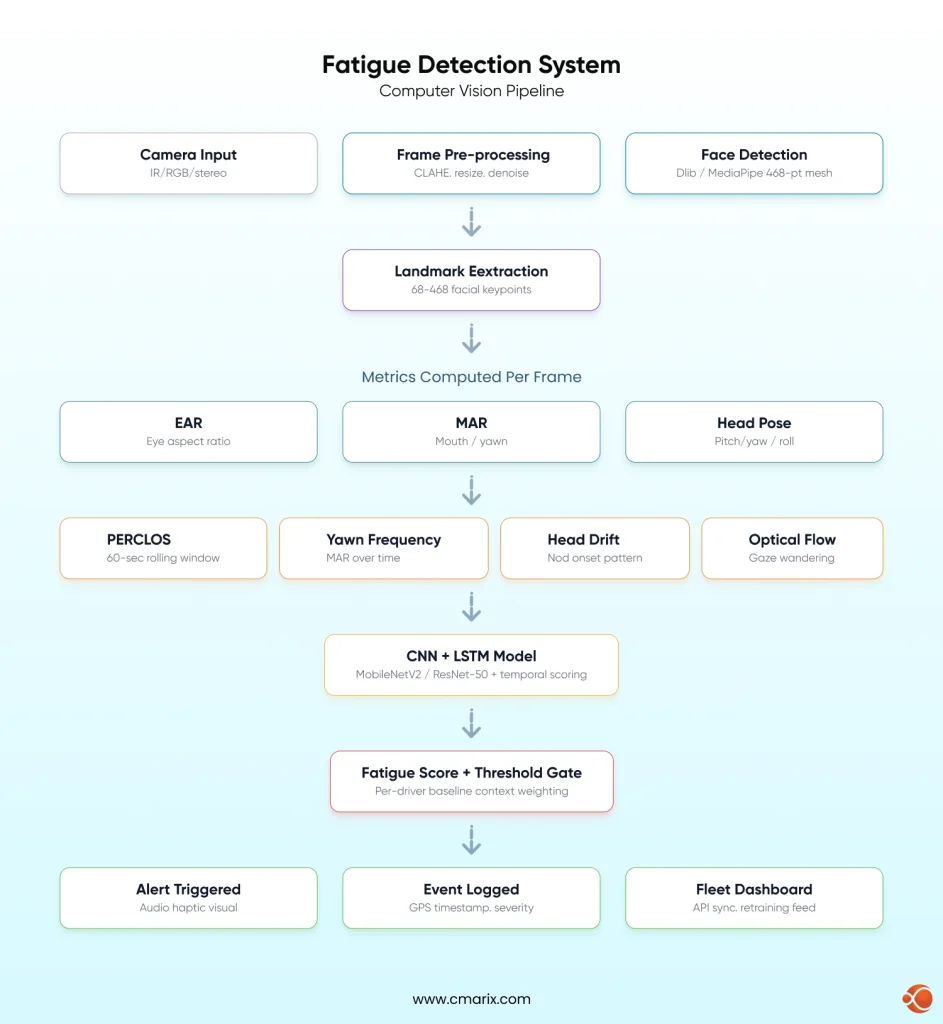
Input Layer: Sensors and Cameras
- IR cameras: Essential for night driving, when driving in complete darkness
- RGB cameras: Work well in daylight; struggle in low-light or glare
- Stereo cameras: Enable 3D depth estimation for more accurate head pose tracking
- Sensor fusion with on-board diagnostics (OBD) solutions combines vehicle telemetry with facial data for a richer signal
Processing Layer: Edge vs. Cloud
- Edge: Runs on-vehicle hardware(Raspberry Pi, Jetson). Sub-100ms latency, no connectivity required
- Cloud: Heavier models, centralized fleet analytics; requires reliable connectivity
- Hybrid: Lightweight on-device alerts+ cloud sync for fleet dashboards and retraining
Output Layer: Alerts and Logging
- Multi-stage escalation logic
- In-cabin audio, visual, and haptic alerts
- Timestamped event logs with GPS coordinates
- Fleet dashboard integration via API integrates with enterprise fleet management integrations
Computer Vision Techniques Used in Fatigue Detection
Understanding computer vision in AI is the foundation of any fatigue detection pipeline. The table below maps each technique to what it detects and how it contributes to the system.
| Technique | What It Detects | Key Tool / Method | Fatigue Signal |
| Facial Landmark Detection | Face geometry — eye corners, mouth edges, nose tip | Dlib (68-point) / MediaPipe Face Landmarker (468 3D points) | Foundation for all downstream metrics |
| Eye Aspect Ratio (EAR) | Eyelid openness per frame | 6 eye landmark coordinates, Euclidean distance ratio | Sustained low EAR indicates drowsiness |
| Percentage of Eye Closure (PERCLOS) | Percentage of frames where eyes are >80% closed over a 60-second window | Rolling EAR calculation + RNN temporal modeling | Clinically validated fatigue indicator |
| Mouth Aspect Ratio (MAR) | Yawn detection via mouth opening | Landmark-based geometry applied to the mouth | Increased yawn frequency signals early fatigue |
| Head Pose Estimation | Pitch (nod), yaw (turn), roll (tilt) | PnP solver using facial landmarks | Downward head drift indicates fatigue onset |
| Optical Flow | Pupil movement, gaze wandering | Lucas-Kanade or dense optical flow (OpenCV) | Slow, wandering gaze precedes microsleep |
MediaPipe’s Face Landmarker documentation provides the full 468-point 3D mesh specification used for precise EAR and MAR calculations. Research on PubMed Central particularly supports PERCLOS combined with RNNs as one of the strongest clinical drowsiness indicators available. A 2024 paper on arXiv validates facial feature point distances as useful fatigue proxies.
AI and ML Models That Power Real-Time Fatigue Detection
Convolutional Neural Networks (CNN)
CNN classifies facial states from image crops. Strong for single-frame classification, but doesn’t capture the temporal drift that defines real fatigue.
LSTM and Temporal Models
LSTM networks process sequences of EAR values or CNN feature vectors over time, learning the trajectory of fatigue, not just its momentary state. CNN+ LSTM combination is a highly common production architecture.
Transfer Learning
MobileNetV2 (edge-optimized) and ResNet-50 (server-side accuracy) are the go-to choices for fine-tuning on fatigue data rather than training from scratch.
Training Datasets
- NTHU-DDD: Multi-subject, varied lighting and eyewear — good for baseline training
- YawDD: Focused on yawn behavior, useful for MAR classifiers
- UTA RealLife Drowsiness Dataset: multi-stage labeling, such as alert, low-vigilant, and drowsy. Best for catching subtle micro-expressions and early-onset fatigue
- Custom datasets: Training on your specific vehicle cabin, camera angle, and driver population produces better results meaningfully
Building and labeling custom datasets is also where project timelines slip if you don’t have the right people. If your team is stretched, hire skilled Python developers for AI projects who can own the data pipeline end-to-end.
From Detection to Action: Designing Alerts That Work
If detection does not lead to action, it is useless. Alert design is what will determine whether or not the driver trusts the system enough to use it or not.
Alert Mechanisms
- Audio: A sharp tone cuts through drowsy states better than any visual stimulus
- Visual: Dashboard or HUD warnings, useful as secondary alerts only, since visual attention is exactly what’s compromised in fatigue
- Haptic: Seat or steering wheel vibration works in noisy environments where audio may not register
Multi-Stage Escalation
- Warning: Mild haptic + soft chime, triggered at low fatigue threshold. Driver self-corrects.
- Intervention: Persistent audio + visual warning. The fatigue score is increasing or high.
- Stop recommendation: Precise and clear verbal instruction to stop, high fatigue state.
Threshold Calibration
- Per driver baseline profiling on first use
- Increased sensitivity at night or after long driving periods (Weighting of contexts)
- Minimum duration gates, fires alarm when fatigue signal persists for N consecutive frames
Fleet Integration
Events should be time-stamped, logged, and geotagged with severity level, feeding into custom fleet management software solutions for fleet-wide visibility and driver performance reporting.
The Full Tech Stack: Tools for Every Layer
Computer Vision Pipeline
- OpenCV– camera input via cv2.VideoCapture, preprocessing, frame sampling, CLAHE for low-light normalization
- MediaPipe- 468 3D facial landmarks at real-time speeds; most popular for accuracy in EAR calculation on edge devices
- Dlib 68-point facial landmark predictor, PnP head pose solver, EAR/MAR calculation
Edge Deployment
- ONNX – framework-agnostic model format, effective on hardware targets
- INT8+ TFLite – 2-4x speedup with minor accuracy degradation on ARM-based targets
- NVIDIA Jetson – (Nano, Orin NX, AGX) – GPU-based edge inference, recommended for multi-model pipelines
- Raspberry Pi 4/5 + Coral USB Accelerator- cost-efficient option for lighter model configurations
Model Training
- Keras/TensorFlow- LSTM and CNN training, native TFLite conversion for edge deployment
- PyTorch- Flexible research-friendly training; ONNX export for cross-platform deployment
Cloud and Backend
- AWS IoT / Azure IoT Hub — Fleet-scale data ingestion and event streaming
- FastAPI / Flask — Lightweight API layers for model serving and device data ingestion
PostgreSQL + TimescaleDB — Time-series storage for fatigue event logs and analytics
Step-by-Step: How to Build a Driver Fatigue Detection System
This is the actual build sequence. If you’re evaluating whether to build in-house or bring in a team with expertise in AI-powered computer vision development services, this section gives you the full picture of what the work involves.
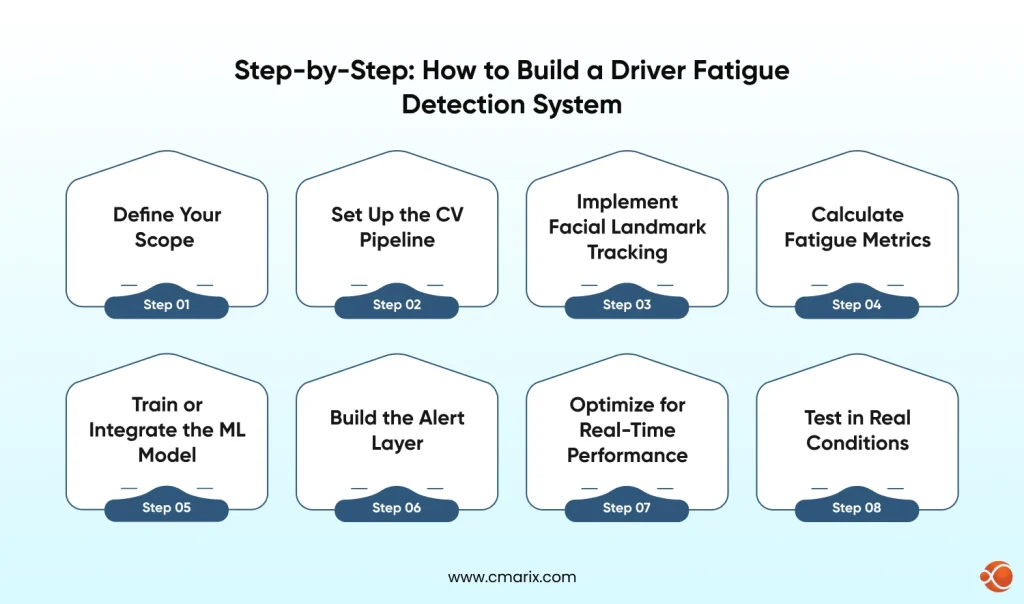
Step 1 — Define Your Scope
- Single vehicle vs. fleet: Prototype needs a USB webcam and a laptop. Fleet deployment needs embedded hardware, OTA model updates, and a centralized data platform.
- Edge vs. server-side: Edge = sub-100ms latency, no connectivity dependency. Server-side = heavier models but needs reliable in-vehicle internet.
- Alert types: Define supported mechanisms before building detection logic.
Step 2 — Set Up the CV Pipeline
import cv2
import dlib
cap = cv2.VideoCapture(0)
detector = dlib.get_frontal_face_detector()
predictor = dlib.shape_predictor('shape_predictor_68_face_landmarks.dat')
while True: ret, frame = cap.read() gray = cv2.cvtColor(frame, cv2.COLOR_BGR2GRAY) faces = detector(gray) for face in faces: landmarks = predictor(gray, face) # pass landmarks to EAR/MAR functions
Refer to the OpenCV documentation for cv2.VideoCapture parameters and preprocessing utilities. For IR cameras, replace the device index with the appropriate hardware path.
Step 3 — Implement Facial Landmark Tracking
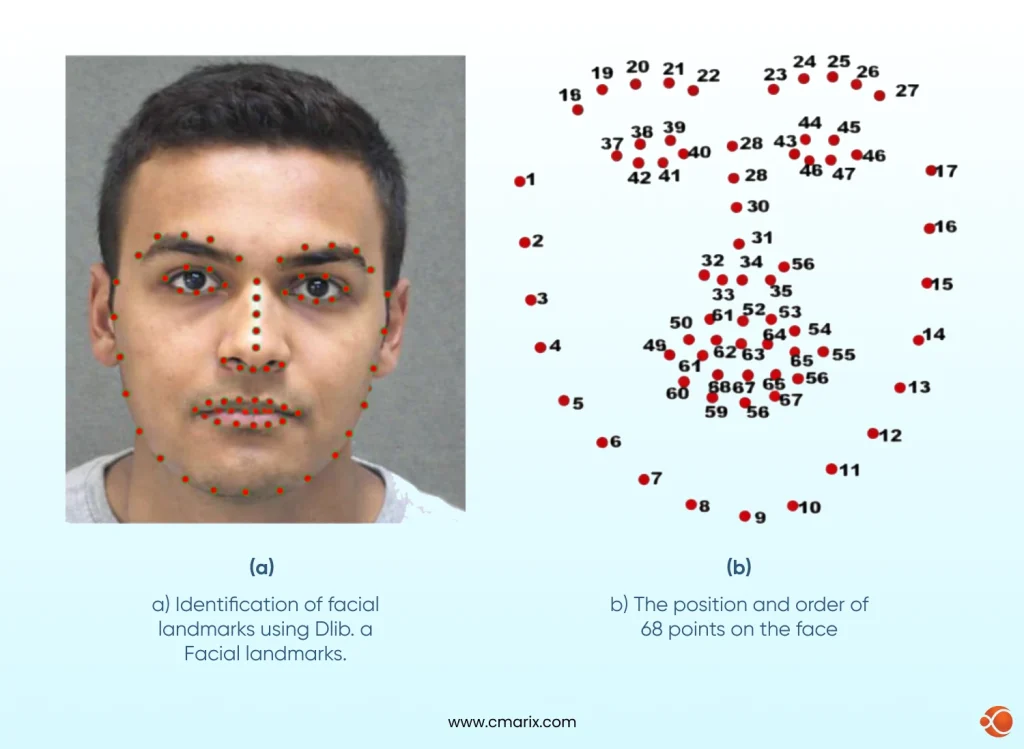
Dlib’s 68-point model assigns a fixed index number to every point on the face. The ranges below tell the code which indices map to which facial region; this is what makes EAR (Eye Aspect Ratio), MAR (Mouth Aspect Ratio), and head pose math possible:
- Points 37–42: Left eye — the six coordinates used to calculate left-eye EAR
- Points 43–48: Right eye — same calculation for the right side
- Points 49–68: Mouth region — used for MAR (yawn detection)
- Points 1, 8, 15, 17, 27: Anchor points across the face — used by the PnP solver to estimate head pose in 3D space
For MediaPipe, landmark indices are documented in the Face Landmarker documentation; see the correct eye and mouth indices in the 468-point mesh.
Step 4 — Calculate Fatigue Metrics
from scipy.spatial import distance
def eye_aspect_ratio(eye_pts): A = distance.euclidean(eye_pts[1], eye_pts[5]) B = distance.euclidean(eye_pts[2], eye_pts[4]) C = distance.euclidean(eye_pts[0], eye_pts[3]) return (A + B) / (2.0 * C)
The major signals used are EAR and PERCLOS. The research done by PMC on PERCLOS + RNNs validates the use of their combination as the strongest indicator of drowsiness. MAR detects yawning, and head pose provides the behavioral context.
Step 5 — Train or Integrate the ML Model
- Crop eye region patches in 32×32 or 64×64 pixels from the training dataset
- Label frames as: (0)alert, (1)low vigilance, (2)drowsy
- Fine-tuning a MobileNetV2 or ResNet50 model using Keras or Tensorflow
- Adding an LSTM layer for processing frame sequences in temporal fatigue scoring
- Validate against the UTA RealLife Drowsiness Dataset; its three-stage labeling catches subtle early-onset fatigue
If this step is where your team’s expertise runs thin, it’s worth knowing you can hire computer vision Engineers on a project basis rather than building an internal ML team from scratch.
Step 6 — Build the Alert Layer
if ear < EAR_THRESHOLD and consecutive_frames > 20: fatigue_score += 1 if fatigue_score > WARNING_THRESHOLD: trigger_audio_alert() if fatigue_score > INTERVENTION_THRESHOLD: trigger_haptic_alert() log_event(timestamp, gps_coords, fatigue_score, frame_snapshot)Step 7 — Optimize for Real-Time Performance
- Model Quantization: INT8 conversion using TFLite/ONNX, 2-4x speedup with minor degradation of accuracy
- Frame Skipping: Processing every 3rd or 5th frame (~10fps) is sufficient, speedup with minor degradation of accuracy
- ROI Cropping: Face detection on downsampled frame, landmark detection on full res crop
- Thread separation: Separate threads for camera capture, inference, and alert logic to avoid blocking the pipeline
This pipeline is a solid foundation for teams looking to build AI-powered driver monitoring systems, prototype or production.
Step 8 — Test in Real Conditions
- Lighting: Direct sunlight, tunnel darkness, oncoming headlights, dashboard glow at night
- Driver diversity: Different ethnicities, face shapes, glasses, beards, face masks
- Camera angle: Test with camera angles ±15° from the ideal mounting position, as camera angles change in real vehicles
Vibration: Vibration of the road affects the noise in the head pose estimation.
Building a real-time driver fatigue detection system requires more than models; it demands the right architecture and production-ready AI pipelines.
Talk to Experts6 Real Problems in Fatigue Detection (And How to Solve Each One)
- Low-light performance: RGB cameras fail in darkness. Use IR cameras as the primary fix. Fallback: OpenCV CLAHE + models trained on low-light datasets.
- Sunglasses and occlusion: Polarized lenses can block IR. Use training sets that have a lot of variation in eyewear. Use head pose and MAR when eye landmarks cannot be detected.
- Face masks: Mouth landmarks become unreliable. Redundancy should be developed into the signal set from the beginning, avoiding sole reliance on MAR for yawn detection.
- Driver diversity and EAR bias: Eye shapes change across ethnic groups. One EAR threshold does not fit all. Train on a different dataset or perform per-driver baseline calibration at first use.
- Real-time latency < 200ms: Profile all stages of the pipeline. For Jetson Nano with quantized MobileNet, 80-120ms end-to-end latency is possible. For a Raspberry Pi without an accelerator, model complexity reduction is necessary.
- False positive fatigue: Too many false positives render the system unusable. We use minimum duration gates and contextual weighting to remove false positives without compromising sensitivity.
This is where working with engineers experienced in integrating AI workflow automation into constrained hardware environments saves real development time.
Industry Use Cases and Applications
Driver fatigue detection is deployed at scale across multiple industries. Here’s where it’s generating the most impact:
| Industry | Primary Use Case | Key Benefit | Notable Integration |
| Commercial Trucking | Long-haul driver monitoring on multi-day routes | Reduces accident liability, lowers insurance premiums, supports ELD compliance | Fleet management dashboards, OBD telemetry |
| Automotive OEMs | Built-in ADAS driver attention monitoring | Standard safety feature in new vehicles; required for higher autonomy levels | Mercedes, Volvo, Volkswagen factory systems |
| Ride-Hailing & Taxi Fleets | Shift-length monitoring with automatic break prompts | Reduces platform liability; supports duty-of-care compliance | In-app integration with driver availability systems |
| Public Transit | Fatigue detection for bus and train operators | Protects large passenger volumes from single-driver fatigue risks | Integration with public transportation tracking apps |
| Mining & Construction | Monitoring heavy equipment operators on long shifts | Prevents high-risk equipment accidents; works in low/no connectivity environments | Edge deployment with offline capability |
| Defense & Emergency Services | Monitoring in military, ambulance, and police operations | Handles extreme fatigue risks in critical missions | Hardened hardware with strict certification standards |
Across sectors, systems built on enterprise-grade vision infrastructure like AnyVision AI driven enterprise Face Recognition platform demonstrate that the technology is production-ready when implemented with the right architecture.
Build vs. Buy Driver Fatigue System: What Makes Sense for Your Business
Once you understand what building a driver fatigue detection system actually involves, the build vs. buy question becomes concrete.
| Factor | Build Custom | Off-the-Shelf |
| Upfront Cost | Higher (development time + infrastructure) | Lower (licensing fee) |
| Ongoing Cost | Lower — full ownership of the stack | Higher — per-device or subscription-based |
| Customization | Full control over thresholds, alerts, and integrations | Limited to vendor-defined features |
| Time to First Deployment | 3–6 months for MVP | Days to weeks |
| Integration Flexibility | Can integrate with any backend or fleet platform | Depends on vendor APIs and limitations |
| Model Ownership | Full ownership of the model and training data | Vendor retains intellectual property |
| Scalability | Scales on your terms and infrastructure | Scales based on vendor pricing and limits |
The off-the-shelf path works when speed matters more. Custom makes sense when fatigue detection as a primary product feature is necessary, when scale economies favor owning the stack, or when deep system integration is needed. An AI PoC solutions with computer vision gives an opportunity to validate performance on your hardware when you are committed to either path.
For companies that want custom development without building an in-house team, the option to hire AI developers for computer vision on a project basis gives you experienced execution without full-time headcount.
How CMARIX Approaches Driver Fatigue Detection Projects
CMARIX has delivered computer vision and AI projects across logistics, automotive and enterprise verticals. Here’s what a typical fatigue detection engagement looks like:
Discovery and Scoping
Understanding your deployment context first: vehicle type, hardware constraints, existing fleet infrastructure, alert requirements, and regulatory environment. Most projects benefit from a structured discovery phase before architecture decisions get locked in.
Architecture and Technology Selection
Technology choices are determined by your constraints. For edge-constrained, it might be a lightweight EAR-based pipeline on Raspberry Pi with a Coral accelerator. For fleet scale, a hybrid edge/cloud architecture with automotive software development solutions for centralized analytics and model retraining.
Development and Iteration
Build, test on real hardware, measure accuracy and latency, iterate. The team includes AI developers for Computer Vision alongside embedded systems engineers — not just ML specialists.
Enterprise Integration and Ongoing Support
API development, event streaming, and dashboard integration are all handled for clients with existing fleet infrastructure. Post-launch, CMARIX structures ongoing engagements around model performance monitoring and retraining pipelines as real-world data accumulates.
Conclusion
A driver fatigue detection system built on computer vision and AI is a real, deployable solution, not a future concept. PERCLOS, EAR, MAR, and head pose estimation are validated methods. CNNs and LSTMs handle the classification. The challenges are in the details: lighting, driver diversity, latency, false positives, and each one is solvable with deliberate design.
The build sequence is clear, the tools are open-source, and the architecture scales from a single-vehicle prototype to an enterprise fleet deployment. If you want to move faster with a team that’s done this before, CMARIX’s enterprise AI consulting services are the starting point; scope first, then build.
Abbreviations Used in This Blog
| Abbreviation | Full Form |
| EAR | Eye Aspect Ratio |
| MAR | Mouth Aspect Ratio |
| PERCLOS | Percentage of Eye Closure |
| CNN | Convolutional Neural Network |
| LSTM | Long Short-Term Memory |
| RNN | Recurrent Neural Network |
| CV | Computer Vision |
| IR | Infrared |
| ADAS | Advanced Driver Assistance Systems |
| OBD | On-Board Diagnostics |
| PnP | Perspective-n-Point |
| ROI | Region of Interest |
| BAC | Blood Alcohol Concentration |
| ONNX | Open Neural Network Exchange |
| TFLite | TensorFlow Lite |
| FPS | Frames Per Second |
| HUD | Heads-Up Display |
| ELD | Electronic Logging Device |
| MVP | Minimum Viable Product |
| PoC | Proof of Concept |
FAQs About Building a Fatigue Detection System
How does a computer vision system detect driver fatigue in real time?
The system captures video frames continuously, extracts facial landmarks using MediaPipe or Dlib, calculates EAR, PERCLOS, and head pose per frame, and passes these features through a trained ML model that outputs a fatigue score. When the score crosses a threshold, an alert fires. On optimized edge hardware, end-to-end latency runs between 80-150ms.
What is the Eye Aspect Ratio (EAR) and why is it critical?
Eye aspect ratio is a ratio calculated from six eye landmark coordinates that measures how open or closed the eye is in any given frame. An open eye sits at ~0.3, and a closed eye approaches 0. Its value comes from speed and simplicity, which is computed in microseconds per frame, and when tracked over time as PERCLOS, it becomes one of the most clinically validated drowsiness indicators available.
Which AI models are best for deploying on edge devices like Raspberry Pi?
MobileNetV2 and EfficientNet-Lite are the top choices — designed for resource-constrained environments and efficient with TFLite INT8 quantization. A Coral USB Accelerator pushes Raspberry Pi inference to near-real-time. For simpler deployments, a rule-based EAR/PERCLOS system without a neural network can run at 15–30fps on a Pi 4 without any accelerator.
How do these systems maintain accuracy in low-light or night driving?
The first fix would be an IR camera, which works equally well at 3 am or 12 pm, regardless of visible light. As an alternative, OpenCV’s CLAHE can be used to improve low-light images that generalize better. Production systems would utilize IR cameras with adaptive preprocessing as an alternative fix.
What are the most effective alert mechanisms for drowsy drivers?
Audio alerts are the most effective. Haptic feedback(seat or steering wheel vibration) is a strong secondary mechanism in noisy environments. Multi-stage escalation prevents alert fatigue while making sure severity matches the risk level.
What are the primary technical challenges in building a fatigue detection system?
The major technical hurdles are: inaccuracy due to glasses or face coverings, inaccuracy in low-light conditions without IR support, EAR baseline differences due to ethnicity and face shapes, and achieving sub-200ms latency on embedded systems, as well as setting thresholds to ensure no false positives are detected, but real fatigue is not missed. All are solvable problems; however, they each demand design decisions.