Quick Summary: Migrating mission-critical applications into Azure without any kind of service disruption is not just about good intentions. It requires a structured strategy, tested architecture, and disciplined execution. This blog covers each phase of Azure cloud migration for mission-critical systems with zero downtime: from pre-migration assessment and dependency mapping to traffic switching, cutover, and post-migration optimization.
There’s a version of cloud migration that looks perfect on paper: lift the workloads, move them to Azure, flip the switch. But for teams running mission-critical systems, the stakes are different. A payment gateway going dark at 11 PM on a Friday isn’t a deployment hiccup. A healthcare platform losing access to patient records mid-shift isn’t a rollback scenario. These are business crises that happen when migrations treat continuity as an afterthought rather than a design requirement.
Downtime during migration isn’t a theoretical risk; it’s a near-certainty if the approach is wrong. Cockroach Labs’ State of Resilience 2025, which surveyed 1,000 senior tech executives globally, found that every single organization reported outage-related revenue losses in the past year. The average: 86 outages annually. What’s worse, only one in three had an organized plan to respond. That’s the environment your migration lands in. The question isn’t whether downtime is expensive. It’s whether your migration strategy is built to prevent it.
This guide will explore how to achieve that from initial assessment through final cutover, with the strategies, decision points, and frameworks that separate successful enterprise migrations from costly failures.
Why Migration Risk Is Higher Than Most Teams Expect
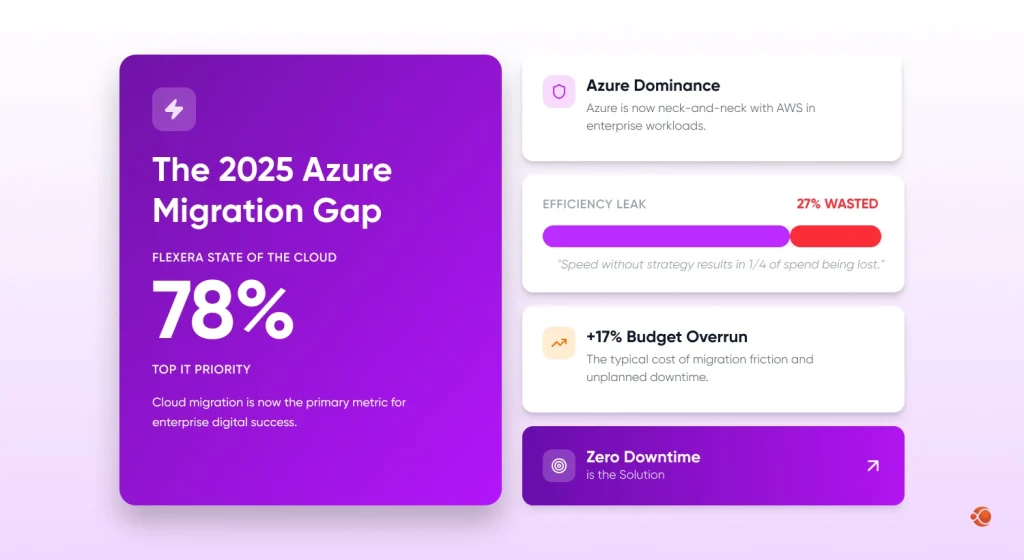
The enterprise landscape has changed. The numbers don’t lie. Flexera’s 2025 State of the Cloud Report surveyed 759 cloud decision-makers and found that over half of enterprise workloads now run in public clouds, AWS and Azure are neck and neck at the top, and cloud spend is set to grow 28% this year; while organizations already overshoot budgets by 17% and waste 27% of what they spend. Getting to the cloud is one problem. Staying in control once you’re there is another.
They’re distributed systems with interconnected dependencies like databases with cross-regional replication requirements, authentication services with legacy identity providers, microservices with strict latency tolerances, and compliance frameworks that mandate continuous audit logging.
When teams are planning a zero-downtime cloud migration without fully mapping these dependencies, they create a risk they can’t see until something breaks in production.
The three most common failure points in enterprise Azure migrations are:
- Incomplete dependency mapping — services that appear independent turn out to share state or session data
- Underestimated data synchronization lag — replication latency causes inconsistencies during cutover
- Inadequate rollback planning — teams move forward without a tested path back if something fails
Getting ahead of these is not optional; it’s the foundation of a credible Azure migration project plan, and any solid Azure migration project example starts with dependency discovery, not infrastructure provisioning.
Understanding the Mission-Critical Workloads
What Makes a System Mission-Critical
A mission-critical workload is any system whose failure directly impacts safety, revenue, regulatory compliance, or the main business operations. The definition matters because it determines your recovery targets and, by extension, your migration architecture.
Two metrics define the threshold:
- RTO (Recovery Time Objective) is the maximum acceptable time a system can be offline
- RPO (Recovery Point Objective) is the maximum acceptable data loss, measured in time
For a tier-1 financial platform, RTO might be measured in seconds. For a back-office reporting tool, hours might be acceptable. Your Azure cloud migration strategy has to plan each workload to its correct tier before architecture decisions are made.
Compliance, Security, and Performance Expectations
Healthcare workloads migrating to Azure must meet HIPAA requirements. Financial services firms operating in the EU face GDPR and many times P2D2 obligations.
Government contractors may require FedRAMP-compliant Azure government environments.
Azure security tools like Azure Policy, Microsoft Defender for cloud, and Azure Security Center provide the governance infrastructure, but they have to be configured correctly before migration begins, not bolted on afterward.
Industry Use Cases
- Fintech: Real-time payment processing systems require sub-millisecond failover. Azure’s availability zones, physically separated data centers within a single region, support active-active deployment architectures that keep transaction processing running even during infrastructure.
- Healthcare: EHR platforms carry both uptime and data integrity requirements. Azure’s HIPAA-compliant infrastructure, combined with Azure Site Recovery, provides the continuity layer that healthcare IT teams need.
- SaaS: Multi-tenant platforms present a unique challenge; one customer’s migration event cannot be allowed to affect another’s service. Development teams building or scaling SaaS app development services on Azure need tenant isolation baked into the migration architecture from the beginning, not treated as an afterthought.
- E-commerce: Seasonal traffic spikes mean e-commerce migration must avoid peak windows entirely. Blue-green deployment strategies allows developers teams to run parallel environments.
Pre-Migration Assessment and Planning
Good migrations are won or lost in the planning phase. The execution is actually the easier part.
Infrastructure and Application Discovery
Begin with a complete inventory. Azure Migrate provides automated discovery for on-premises VMware, Hyper-V, and physical server environments. It maps performance data and dependency relationships across your estate, and sits at the core of most professional Azure migration services engagements. But, for complex hybrid environments, using a combination of Azure Migrate and third-party tools such as CloudHealth and Movere can help bridge the gap.
What you need to produce: A dependency map showing all the communication paths between the services, the data flow between systems, and the latency requirements for each and every one of the connections.
Defining RTO and RPO Objectives
This is not a technical exercise; it is a business conversation. IT teams set overly conservative RTO/RPO levels without checking if the business needs that level of protection. It makes no sense to design an overly complex migration infrastructure for a low-criticality workload.
Map every workload to one of three tiers:
| Tier | RTO (Recovery Time Objective) | RPO (Recovery Point Objective) | Architecture Requirement |
| Tier 1 — Mission Critical | < 1 hour | Near-zero | Active-active, geo-redundant |
| Tier 2 — Business Important | 4–8 hours | 1–4 hours | Active-passive, single region |
| Tier 3 — Standard | 24+ hours | 24 hours | Standard backup/restore |
This tiering directly informs your architecture choices for each workload.
Move mission-critical workloads to Azure with zero operational disruption.
Explore Our ServicesThe Zero Downtime Azure Migration Process: Step by Step
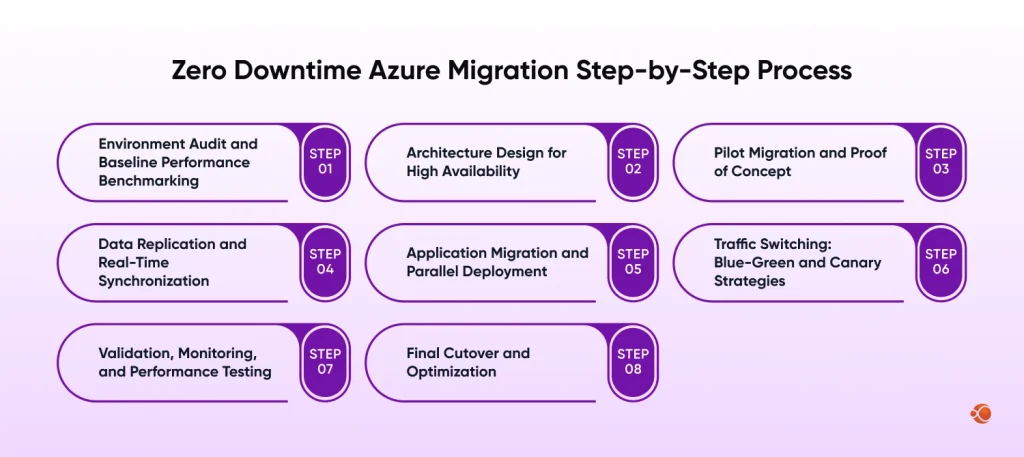
Step 1: Environment Audit and Baseline Performance Benchmarking
Before you put your hands on anything, look at your baseline performance.
You should document CPU utilization rates, network throughput, memory consumption, storage IOPS (Input/Output Operations Per Second), and application response times under normal and peak conditions. These are going to be your success metrics after migration.
Step 2: Architecture Design for High Availability
Azure’s high-availability architecture depends on three layers: availability sets, zones, and region pairs. For Tier 1 workloads, design for active-active across at least two availability zones. Azure Traffic Manager and Azure load balancer handle traffic distribution and failover routing.
Azure migration for enterprise applications at this tier demands geo-redundant database configurations and zone-redundant storage from day one. For cloud application development targeting cloud-native patterns, Azure Kubernetes Service with zone-aware node pools give the container orchestration layer.
Step 3: Pilot Migration and Proof of Concept
Never migrate production workloads with a validated proof of concept. Select a representative non-critical workload, one with similar architecture complexity to your Tier 1 systems, and run a full migration cycle. This surfaces integration problems, process failures, and performance gaps in a low-stakes environment.
Document everything. The pilot isn’t just a technical test; it’s producing the runbook your team will execute on production day. It also gives you a chance to validate your approach that aligns with Azure cloud migration best practices before you’re working against the production deadline.
Step 4: Data Replication and Real-Time Synchronization
This is where most zero-downtime migrations succeed or fail. The goal is to have your Azure environment running a fully synchronized copy of your production data before you switch a single byte of live traffic.
Azure database migration service supports online migrations for MySQL, SQL Server, PostgreSQL, and MongoDB with minimal downtime. For large-scale data estates, the Azure data migration strategy should account for initial bulk transfer often via Azure data box for multi-terabyte datasets, followed by continuous replication of change data until cutover.
Monitor replication lag continuously. Cutover should only happen when lag drops to near-zero and stays there.
Step 5: Application Migration and Parallel Deployment
Run source and target environments in parallel. Your Azure environment should have replication traffic and be fully operational before you start moving users. The time period ranges between one and four weeks, depending on the complexity of your workload, and is your validation period.
For teams evaluating DevOps best practices for cloud migration, this phase is where CI/CD pipelines become critical. Azure DevOps or GitHub Actions should be wired to deploy to both environments simultaneously, so any application changes made during migration aren’t lost.
CMARIX built a project tracking and communication platform integrating Salesforce, Stripe, Twilio, and analytics tools while using Azure DevOps for CI/CD pipelines and automated deployments. The architecture enabled controlled releases and stable cloud operations across integrated enterprise systems.
Step 6: Traffic Switching: Blue-Green and Canary Strategies
Two patterns dominate zero-downtime traffic switching:
- Blue-Green Deployment: Run two similar environments (blue= current production, green= new Azure environment). When green is validated, switch 100% of traffic via DNS or load balancer update. Rollback is instant; flip back to blue.
- Canary Deployment: Route a small percentage of traffic to the new environment first. Monitor error rates, business metrics, and latency. Slowly increase traffic in controlled increments. Only complete the cutover when metrics confirm the stability.
Azure Traffic Manager’s weighted routing profile handles canary traffic splits natively. For containerized workloads, Kubernetes Ingress controllers give the same capability at the service mesh level.
Step 7: Validation, Monitoring, and Performance Testing
Azure Monitor, Application Insights, and log analytics form the observability stack. Configure dashboards before cutover so you’re not developing alerting rules while under pressure. Define particular thresholds: error rate, latency, and throughput that would trigger an automatic rollback decision.
Load test the Azure environment at 150% of your peak historical load before considering the migration complete. Azure load testing (available since 2023) can generate this traffic programmatically using JMeter scripts or URL-based tests.
Step 8: Final Cutover and Optimization
While this is the shortest phase, it is also the one that requires the most precise execution. This should be scheduled in a window of your lowest traffic. Rollback should be documented and assigned to a specific team member, not “the team,” but a named individual who has the authority to call this.
Post-cutover, the optimization phase begins. Cloud cost optimization best practices on Azure start with right-sizing; Azure Advisor automatically identifies overprovisioned resources. Reserved Instances for predictable workloads can cut compute costs by 40–72% compared to pay-as-you-go pricing.
Choosing the Right Migration Strategy
The classic “five R’s” framework applies, though in practice, here we’ll focus on three paths that cover the vast majority of enterprise Azure migration solutions. Your choice of Azure migration strategy directly determines cost, complexity, and long-term cloud-native potential:
| Strategy | When to Use | Effort |
| Rehost (Lift & Shift) | Move applications quickly with minimal changes; ideal for legacy systems or urgent data-center exits. | Low |
| Replatform | Make small optimizations like moving databases to managed services without changing core architecture. | Medium |
| Re-architect / Refactor | Redesign the application to use cloud-native services for long-term scalability and modernization. | High |
- Rehost (Lift and Shift) involves moving applications to Azure VMs. This method requires fewer changes and is quick and low-risk. But it doesn’t take advantage of cloud efficiency. Suitable for legacy applications with modernization plans.
- Replatform makes targeted optimizations; moving from self-managed SQL Server to Azure SQL Managed Instance, for example, without a full refactoring. Captures meaningful cost and operational benefits at manageable complexity.
- Re-architect/Refactor rebuilds the applications to take full benefit of Azure-native services. Think containerization with AKS, Serverless web apps on Microsoft Azure functions, or event-driven architectures with Azure service bus. Highest complexity, highest long-term return.
For most enterprises, a portfolio method makes sense: replatform the ones with near-term operational pain, rehost the workloads you need to move quickly, and refactor strategically over 12-24 months.
Hybrid and Multi-Cloud Considerations
Pure migrations to a single cloud are increasingly rare. Most enterprises maintain on-premises infrastructure for latency, regulatory, or contractual reasons. Azure management, Azure Arc extends and security policies to on-premises, edge, and competing cloud environments.
In the context of AWS vs Azure vs Google Cloud comparison, the hybrid story of Azure, especially the level of interoperability between Azure Stack, Arc, and on-premise Active Directory, is a true differentiator for those who are already invested in the Microsoft ecosystem.
Common Pitfalls to Avoid in Zero-Downtime Migration
Developers, a team that has run dozens of enterprise migrations, consistently flags the same failure patterns:
- Skipping the dependency audit – Azure migration best practice consistently ranks dependency mapping as the single most pre-migration step. You cannot design a zero-downtime migration without understanding what talks to what. Budget time for this. It will take longer than expected.
- Treating migration as a one-time project – The migration window is actually the start of your cloud operations maturity journey. Teams that don’t invest in DevOps consulting services and cloud operational practices during migration end up managing a more expensive, less reliable version of what they had on-premises.
- Underestimating network latency changes – Applications that communicated over a local network suddenly face internet-scale latency when partially migrated. This breaks assumptions baked into application code — timeouts, retry logic, and session management.
- No rollback rehearsal – Rollback plans that aren’t practiced aren’t plans. Their hopes.
Get expert guidance to assess workloads, design architecture, and execute a reliable cloud migration.
Talk Experts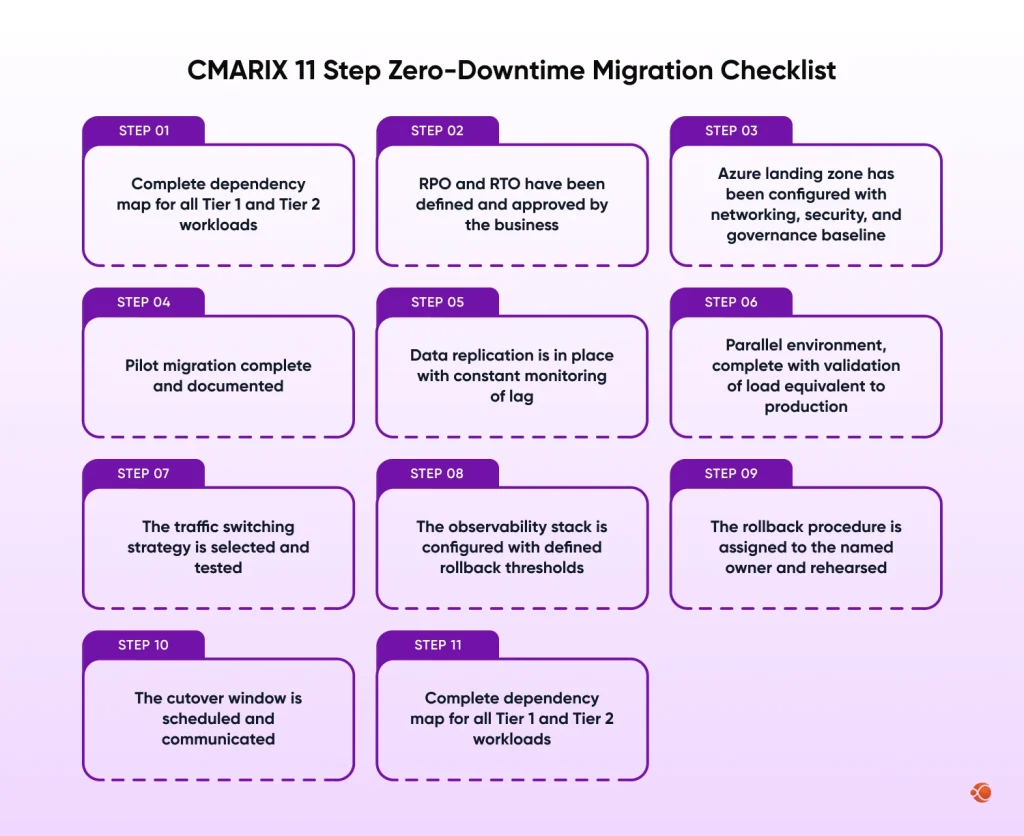
Why Choose CMARIX for Your Azure Migration
Executing a zero-downtime migration at enterprise scale needs more than a good checklist. It requires teams who have experience of real-world complexity, regulatory constraints, legacy dependencies, and data volumes that don’t fit migration timelines, and are delivered without breaking production.
CMARIX brings a structured methodology and hands-on Azure expertise with many years of experience. From pre-migration assessment to post-migration optimization, the development team gives end-to-end ownership of outcomes, not just deliverables.
Whether you wish to migrate a healthcare SaaS product, modernize a fintech platform, or develop new Microsoft development services capabilities on Azure, CMARIX has the technical depth and delivery rigor to get it done right.
If you’re evaluating whether to hire an AWS developer or build on Azure, CMARIX’s AWS team can walk you through a platform-neutral assessment; the goal is the right architecture for your business, not vendor preference.
Conclusion
Zero downtime Azure migration isn’t a luxury reserved for enterprises with unlimited engineering resources. It’s an achievable outcome for any company willing to invest in proper planning, execution, and tested rollback procedures.
The stakes for getting it wrong are high and well-documented. But so are the rewards for getting it right: higher reliability, lower infrastructure costs, and a cloud foundation that actually supports business growth rather than constraining it.
The organizations that succeed treat migration as an engineering discipline, not a one-time project, not a vendor-led deployment exercise, but a careful, methodical transfer of production responsibility to a better infrastructure. This is what cloud migration for modern enterprises actually looks like when done right. Every step in this guide exists because something went wrong for someone who skipped it.
Begin with the assessment. Map the dependencies. Define the recovery targets. Then, build the architecture around those constraints, not the other way around.
Abbreviations
- AKS — Azure Kubernetes Service
- API — Application Programming Interface
- CI/CD — Continuous Integration / Continuous Delivery
- DNS — Domain Name System
- EHR — Electronic Health Record
- FedRAMP — Federal Risk and Authorization Management Program
- GDPR — General Data Protection Regulation
- HIPAA — Health Insurance Portability and Accountability Act
- IOPS — Input/Output Operations Per Second
- RPO — Recovery Point Objective
- RTO — Recovery Time Objective
- SaaS — Software as a Service
- TCO — Total Cost of Ownership
- VM — Virtual Machine
Frequently Asked Questions on Zero Downtime Azure Migration
How do you migrate applications to Azure without downtime?
Run source and Azure environments in parallel with continuous data replication. Once the Azure environment is validated, switch traffic using a blue-green or canary strategy. Rollback stays available throughout. No users experience interruption because traffic only moves after the new environment is confirmed stable.
How much does it cost to migrate software to Azure?
A rehost migration for a mid-size enterprise typically runs $50,000–$250,000 in professional services. Full re-architecture projects can exceed $1M. Azure Migrate’s TCO calculator provides workload-specific estimates. Most enterprises recover migration costs within 12 months through infrastructure savings of 20–40% post-optimization.
What types of apps can be migrated to Azure?
Almost all .NET and Java web applications, containerized microservices, monolithic legacy systems, SAP systems, Oracle databases, and Linux-based systems. Most architectural patterns are supported in Azure’s managed services offering, so migration efforts rarely require a rebuild unless the migration effort is targeting a cloud-native approach.
Can Azure integrate with existing business systems?
Yes, Azure connects natively with on-premises Active Directory, SAP, Microsoft 365, and Dynamics 365. Azure integration services, service bus, logic apps, API management. Azure Arc extends Azure management across on-premises and multi-cloud environments from a single control plane.
Why hire a professional Azure development company for migration?
Most migrations fail because of planning gaps, not technical issues. An experienced Azure partner brings proven methodology and hard-won lessons that in-house development teams haven’t had time to accumulate. That expertise usually costs far less than a failed cutover.