

Quick Summary: A web application is an interactive software application that runs in the user’s browser and enables them to log in, collaborate, manage data, and take actions instantly. By 2026, web applications will be the foundation for most digital businesses due to their device compatibility, scalability, ease of AI integration, and fast product delivery. This article will discuss different web application examples, how they operate, and when to build a modern web application for your business.
Web applications are applications designed to be used on the Internet without requiring installation or updates; they are accessed through a web browser. This differs from the website, where the function is only for displaying information. With a Web application, one can log in and collaborate.
Think of Google Docs, Trello, or Figma. You open them in Chrome or Safari and start working immediately. That’s the web application experience at its simplest.
From an enterprise standpoint, web apps are the backbone of modern digital operations. They can support thousands of concurrent users, connect to backend databases and third-party APIs, enforce role-based access, and deliver real-time updates, all without any client-side installation.
With more companies moving towards remote work and cross-device availability, the importance of understanding the potential capabilities of web applications, as well as the knowledge required to build a robust one, has become increasingly significant beyond technical expertise.
Market at a Glance: By 2034, the global Software-as-a-Service (SaaS) market is projected to reach approximately USD 1,482.44 billion, growing at a CAGR of 11.7%. This underscores that web applications are no longer just an alternative to desktop software—they are the primary delivery model for enterprise logic
How Do Web Applications Work?
Web applications run on a client-server model. Here is the simplified version of what happens every time you use one:
1. You launch your browser and visit the URL of the web application.
2. The browser makes a request to the web server for a specific page, data, or an action.
3. The server then uses its server-side code (such as Node.js, Python, or PHP) to process the request.
4. Database and/or API provide information necessary for that action to occur.
5. The browser displays the output in front of you in the form of an interactive user interface.
This has been further complicated by modern web applications, which use methods such as caching, content delivery networks, WebSockets, authentication middleware, and microservices. However, regardless of these additions, the flow remains constant: browser → server → data → browser.
What makes 2026-era web apps more powerful than earlier generations is the sophistication happening at every step – smarter APIs, faster edge computing, better browser capabilities, and AI-assisted backend logic.
Web App vs Regular Website
This distinction matters for anyone planning a digital product.
| Factor | Regular Website | Web Application |
| Primary purpose | Display information | Enable user actions |
| User accounts | Rarely | Almost always |
| Interactivity | Minimal | Core functionality |
| Data processing | Static or limited | Real-time and complex |
| Examples | Company brochure, blog | Google Docs, Slack, Canva |
A regular website informs the user about your company. A web application performs a portion of the operations in your company. The distinction between the two has blurred in 2026 – marketing websites often contain applications for users, but the basic difference lies in whether users are consuming or performing actions.
If your users need to log in, collaborate, submit data, track progress, or interact with live information, you’re building a web application, not a website.
Main Types of Web Applications
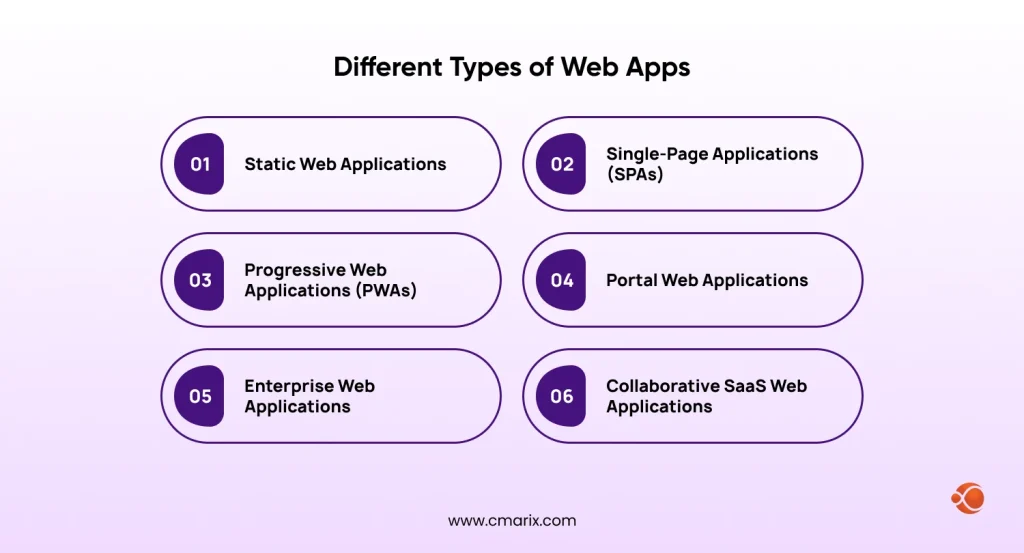
Not all web apps are designed and developed the same way. Choosing the right architecture depends on your use case, user base, and performance requirements.
Static Web Applications
They send HTML, CSS, and JavaScript files to the browser without requiring much processing on the server. They are cheap and quick; they work well for sites that are heavy on content or documentation. The modern static site generators make this technique much more effective than before.
Single-Page Applications (SPAs)
Single-page applications only need to be loaded once, then refresh themselves dynamically without reloading the entire page. Single-page applications can be built using popular web frameworks such as React, Angular, and Vue. It offers a very smooth, native feel, as Gmail and Google Maps demonstrate.
Progressive Web Applications (PWAs)
PWAs or Progressive Web Apps are types of apps created through browser technologies, which make PWAs similar to applications due to features like offline functionality, push notifications, the capability of installing on the user’s device home screen, and speedy load time despite slow internet connectivity. At CMARIX, progressive web app development is one of the most requested service lines for exactly this reason.
Portal Web Applications
They consist of multiple sections within an information hub that collect all information and applications used by a particular type of user. These types of dashboards require high-level authentication and role management, and at times, real-time data integration.
Enterprise Web Applications
Enterprise web applications are constructed for scalability, compliance, and workflow needs. ERP dashboards, CRM systems, project management systems, or even custom procurement systems are examples. Platforms like Rubble (a web-based enterprise project management platform) have been developed by companies like CMARIX to demonstrate what can be achieved with such software solutions.
Collaborative SaaS Web Applications
Web application model that will be most popular by 2026. They refer to subscription-based multi-tenant applications in which users from various firms share the same set of hardware resources. Examples of this include Notion, Figma, and Slack. SaaS web applications must consider data isolation, uptime, scalability, and UX design seriously.
Talk to our experts and walk away with a clear roadmap, zero obligation.
Why Web Apps Are So Popular in 2026
Web application adoption has accelerated significantly in the last few years. Several forces are driving this.
- No installation required. People will be able to use a web application directly within their browser without any installation. In doing so, problems related to the approval process, compatibility issues, and versioning are all avoided.
- True cross-device access. With web apps, users can access them on any device as long as an up-to-date browser is available. There is no longer a need for organizations to develop iOS, Android, and desktop apps separately.
- Faster release cycles. Updates happen on the server side. When you push a fix or a feature, every user gets it instantly, no app store review delays, no fragmented version distribution.
- Browser capabilities have matured. Modern browsers now support camera and microphone access, offline storage, push notifications, file system interaction, WebGL rendering, and WebAssembly execution. The browser has become a genuine application runtime.
- AI integration is simpler in the browser. The web application can easily use machine learning APIs or embed intelligence into its workflow, without the complications of native applications.
- Real-time collaboration is now expected. In 2026, distributed teams expect to co-edit, comment, and communicate within their tools. Web apps deliver this natively.
- Lower total cost of ownership. A single codebase, centralized hosting, and no platform-specific maintenance translate to real savings for growing businesses.
7 Top-Performing Web Application Examples in 2026
These examples were selected because they demonstrate what excellent web application development looks like in practice, not just what they do, but how they do it and what other builders can learn from them.
1. Google Docs

Google Docs is an online word processing tool that lets multiple people collaborate on documents.
Why it’s a standout web app
Google Docs has solved what has been regarded as one of the most complicated problems in collaboration applications: conflict resolution. Operational transformation enables user changes to be retained without data loss. This happens automatically – just how a good web application should be designed.
Standout features
- Real-time co-authoring with visible cursors
- Offline editing capability through PWA support
- Integration of deep APIs into the overall Google Workspace suite.
Business lesson
Elegance and smooth operation are winning traits. Users will stay loyal to applications that will never cause them to worry about losing their data or running into compatibility problems.
2. Slack

Slack is a real-time team communication platform delivered entirely through a web application — with organized channels, direct messaging, file sharing, search, and integrations with hundreds of third-party tools.
Why it’s a standout web app
Slack uses WebSockets, which maintain a persistent connection between the browser and the server, allowing messages to be sent instantly without polling. The user experience Slack offers in the web browser is almost identical to that of its desktop client.
Standout features
- Messaging based on threads
- Deep search through message history
- An ecosystem of apps that makes Slack a workflow platform instead of just a messaging application.
Business lesson
Integration is a feature. Web apps that connect well to the tools their users already use earn lasting adoption.
3. Canva

Canva is an online graphic design platform that helps non-designers create high-quality marketing materials, slideshows, social media graphics, and documents using a drag-and-drop interface.
Why it’s a standout web app
Canva makes professional designs for everyone. By developing their own powerful rendering engine within the web browser for layers, typography, image editing, and mass exporting, Canva enabled non-designers to create high-quality outputs. By 2026, Canva will offer AI-powered design recommendations, background removal, and video editing.
Standout features
- Real-time team collaboration on designs
- A massive template library
- AI tools like Magic Write and Magic Design.
Business lesson
Simplifying a complex task for a non-expert audience is a massive market opportunity. Reducing cognitive load is as important as adding features.
4. Notion

Notion is an all-in-one productivity platform, part document editor, part wiki, part database, part project manager, delivered as a web application that teams use to organize their entire knowledge base and workflow.
Why it’s a standout web app
Notion’s block-based architecture is what makes it so flexible. Every piece of content, a paragraph, a table, a task board, an embedded video, is a block that can be nested, linked, and shared. This modularity lets users build almost any workflow without code.
Standout features
Relationally connected databases on multiple pages, writing and summarization through AI (Notion AI), and extremely customizable page templates.
Business lesson
Flexible design in structure can be a very effective design approach. Users require systems that can bend according to their cognitive maps.
5. Trello

Trello is a visual project management web app built around a Kanban-style board, cards move through columns representing workflow stages, giving teams an at-a-glance view of project status..
Why it’s a standout web app
With Trello, it was demonstrated that good project management need not be overly complicated. The drag and drop feature of Trello is simple and straightforward even for beginners, while at the same time being sufficiently robust to handle more sophisticated team processes.
Standout features
- Power-Ups (integrations and add-ons),
- Butler automation for rule-based card actions
- Clean mobile web experience.
Business lesson
Immediacy of understanding matters. If a new user can grasp your app’s core concept in under 60 seconds, adoption rates climb dramatically.
6. Figma

Figma is a browser-based UI/UX design tool that allows designers and developers to collaborate on interface designs in real time: viewing, commenting, and editing from any device with a browser.
Why it’s a standout web app
Figma accomplished the seemingly impossible by shifting an entire class of professional software into a web-based solution without compromising its functionality. Vector drawing, prototyping, component libraries, and even developer handoffs work flawlessly in a tab. There’s no need for any desktop installation.
Standout features
- Multi-player design editing with live cursors
- Shared component libraries
- Prototype flows
- Developer Mode for engineering handoffs.
Business lesson
Don’t assume professional-grade software has to be a native application. With the right architecture and engineering investment, the browser can deliver the same experience – with collaboration built in by default.
7. Netflix

Netflix is a video streaming service that offers its customers video content through a web application. The web application provides features such as personalization, adaptive streaming, localization, parental controls, and real-time recommendations. Netflix scaled its video streaming platform past 200 million subscribers years ago and currently serves over 325 million paid global subscribers across 190 countries.
Why it’s a standout web app
The Netflix web application has shown that great performance can be achieved at scale. The adaptive streaming feature adjusts video quality based on the connection speed; hence, the streaming remains smooth regardless of the client’s bandwidth. The machine-learning-based recommendation system provides different content hierarchies to different clients.
Standout features
- Adaptive streaming via DASH/HLS protocols
- AI-driven recommendation rows
- Localized content delivered through a CDN spanning hundreds of edge nodes globally.
Business lesson
Performance is the output. Buffering even for one second on a streaming web application means bad performance experience. It is imperative to engineer performance across all layers, ranging from the CDN design to the browser rendering stage.
Advantages of Web Apps
Web applications offer a set of structural advantages that make them increasingly attractive as a primary software delivery model.
Lower Development and Maintenance Costs
One codebase serves all platforms. There is no need for separate iOS, Android, and desktop engineering teams maintaining parallel feature sets.
Instant Updates
Push a fix or a new feature to the server and every user gets it on their next request. No version fragmentation, no rollout delays, no app store approval queues.
Accessible From Any Device
A browser is available on virtually every connected device in 2026 — desktops, laptops, tablets, phones, and even smart TVs. Web apps meet users where they already are.
Scalability on Demand
Cloud-hosted web apps can scale horizontally to handle traffic spikes — adding server capacity during peak usage and reducing it when load drops. Paying for what you use.
Easier Collaboration
Shared URLs, in-app commenting, real-time co-editing, and centralized data make collaboration workflows dramatically simpler than traditional desktop software.
Simpler Distribution
No app store submission. No platform review. Share a URL and your users are in.
Better Integration
Web apps work well with external APIs, such as RESTful APIs, GraphQL, webhooks, OAuth, and SaaS applications, which are perfect for more complex business cases.Teams at CMARIX who advise on custom web application development consistently find that the businesses that benefit most from web apps are those that treat them as long-term infrastructure, not short-term projects.
Are Web Apps Safe to Use?
But there should never be a question of security, and it warrants a straightforward answer.
Are web applications able to provide any security? Yes, web applications are definitely secure. The applications that many people use daily for their online banking, healthcare, legal, and financial transactions are all examples of web applications.
A well-built web application includes:
| Security Practice | Description |
| HTTPS everywhere | Encrypting all data in transit between the browser and server |
| Secure authentication | Using industry standards like OAuth 2.0 and MFA (multi-factor authentication) |
| Data encryption at rest | Protecting stored records even if a database is accessed without authorization |
| Role-based access control (RBAC) | Ensuring users only see and interact with the data they are authorized for |
| Input validation and output encoding | Blocking injection attacks at the point of entry |
| Protection against XSS and CSRF | The two most common browser-based attack vectors in web applications |
| Regular security audits and dependency updates | Keeping the codebase current and patched against known vulnerabilities |
| Secure coding practices | Enforced through code review, static analysis tools, and developer training |
For any enterprise application dealing with critical information, such as monetary transactions, health-related records, legal papers, or user personal information, penetration testing, SOC 2, and GDPR compliant data handling become essential, and not just optional add-ons.
The risks in web application security typically stem not from the technology, but from the decisions made during development. Choosing an experienced development team that applies security-first practices from day one is the most important factor in building a safe web application.
How Do You Know When It’s Time to Build a Web Application?
Not every business need requires a web application, but some signals make the answer very clear.
- You require your users to log in and handle their information. Any requirement for accounts, profiles, user-generated content, or personalized dashboards makes your application a web application.
- There is a requirement for collaborative effort among your team members/users. If the application you are working on involves live document editing, scheduling, project tracking, etc., then web application architecture becomes necessary.
- You need cross-device reach without platform fragmentation. The need for multi-device access arises without fragmentation. If you need multi-device access without developing separate native applications for each device, a web application is your go-to solution.
- Your product needs to scale quickly. Web apps hosted on cloud infrastructure can scale on demand. If you are expecting rapid growth or unpredictable traffic patterns, a web application architecture gives you flexibility that boxed software cannot.
- You are replacing a legacy system or internal tool. There is a trend toward moving away from spreadsheet-based processes, on-premises solutions, or desktop applications that are no longer relevant. A web application would be a much better solution than any of these.
- Your competitors are already delivering browser-based experiences. In most B2B and B2C markets, browser-first is the default expectation. If your closest competitors are delivering web app experiences and you are not, the friction gap works against you.
If any of these scenarios apply to your situation, working with an experienced team, whether for enterprise web application development or a focused SaaS application development engagement, is the logical next step.

Conclusion
However, web apps go beyond being an affordable option to the mobile ones. These applications form a class of their own – native to the browser, cross-device enabled, instantly distributable, and developed for how things are done in 2026.
Some of the products mentioned in this article: Google Docs, Slack, Canva, Notion, Trello, Figma, and Netflix show what is possible when you blend great product design with solid web development. All these provide functionality that would not have been possible with regular desktop software.
When organizations consider developing a web application, it is not about whether to do so, but about the problem they want to address and how best to solve it. All this should be considered at the very beginning and make all the difference.
CMARIX has been building production-grade web applications across industries for years. If you’re ready to explore what a custom web application could look like for your business, reach out and let’s talk about what you’re building.
Ready to build a web application that performs at scale? CMARIX’s team has the experience to take you from concept to launch.
Frequently Asked Questions
What exactly is a web application?
A web application is interactive software that runs in a browser and lets users complete tasks, manage data, log in, collaborate, and interact with backend systems – without any installation required. Unlike static websites, web apps are dynamic and respond to user input in real time.
What are the top-performing web apps of 2026?
There are many popular and well-designed web apps available in 2026, including Google Docs, Slack, Canva, Notion, Trello, Figma, and Netflix. Each of them excels in its own particular strengths, such as real-time collaboration, high scalability, design accessibility, and flexible information architecture.
How do web apps differ from regular websites?
While websites display information or data, web apps allow users to perform actions such as logging in, modifying documents, transacting, and managing workflows.
What are the main types of web applications?
The most prominent varieties include Static Web App, SPA, PWA, Portal Web App, Enterprise Web Application, and Collaborative SaaS Web Application.
Why are web apps so popular in 2026?
These applications don’t need installation, work everywhere, update instantly, and utilize advanced features provided by today’s browsers, which now compete with native apps. Additionally, they make developing cheaper and easier, facilitate collaborative work, and are well-suited for AI integration.
Are web apps safe to use?
Certainly. As long as developers do their job right, secure web applications implement HTTPS protocol, user authentication, data encryption, access roles management, input validation, and security against typical attacks. The safety of web apps mainly relies on their proper implementation, not the technology.