

Quick Summary: Angular 22 is where years of experimentation finally pay off. Signal Forms, Zoneless architecture, and OnPush change detection are all production-stable now. Add faster testing with Vitest, better SSR, and MCP support for AI tools and you get a release that doesn’t just add features, it actually changes how you build.
Angular has always moved fast. But Angular 22 feels different, not because it adds more features, but because so many of the right ones finally land as stable and are all set to release around 16 May 2026 . Signal Forms, Selectorless Components, Zoneless architecture by default. These top-updatations aren’t experimental bets anymore.
They’re production-ready tools that change how you develop what’s actually new, what it means for your team, and why this release makes a strong case for upgrading, whether you’re running a mid-size SaaS or a large enterprise frontend.
What Is Angular 22?
Angular 22 is the latest major release in Google’s Angular framework, building on the reactive foundations introduced across Angular 17–21. It follows Angular’s twice-yearly release cadence and ships with several features graduating from experimental or developer preview to stable; most notably Signal Forms, the Signals API, Zoneless architecture, and the httpResource and rxResource APIs.
The release also marks a shift in Angular’s philosophy: less Zone.js dependency, more explicit reactivity, and stronger alignment with how modern JavaScript engines and AI tooling work.
According to the official Angular release documentation, Angular 22 is a Long-Term Support candidate, making it a safe bet for teams planning multi-year adoption.
New in Angular 22 — Quick Hits
- Signal Forms go stable: typed, signal-based form models replace the verbose Reactive Forms pattern, now production-ready
- OnPush is the new default: change detection is precise and signal-driven out of the box, no manual opt-in needed
- Selectorless Components: import components directly without managing a CSS selector namespace across your entire codebase
- httpResource & rxResource stable: signal-native data fetching that handles loading, error, and success states without manual subscription management
- injectAsync (Developer Preview): lazy-load services on demand, shrinking your initial bundle without workarounds
- Vitest is now the default test runner: significantly faster than Karma, with native ES Module support
- MCP support stable: AI coding tools like Claude and Copilot now understand your Angular component structure at a deeper level
- Incremental Hydration: Angular hydrates components as they enter the viewport, directly improving Time to Interactive scores
From Angular 21 to Angular 22: How the Framework Evolved
Angular 21 was the heavy lifter responsible for making Zoneless change detection work and also implementing Signals. Angular 22 is now where all of these advancements become the standard. What does this look like?
- Change Detection has evolved from Zoneless (preview in v20) -> Zoneless (default in v21) -> OnPush (default in v22)
- Signals Forms have evolved from nonexistent in v20 -> experimental in v21 -> production in v22
- AI tooling via MCP went from beta → stable and agentic-optimized in v22
- Testing went from Vitest as opt-in → Vitest as the high-speed default
This version-over-version progression matters because it tells you something: Angular 22 is a consolidation release. The experiments are over. You’re looking at the Angular team’s considered view of how production apps should be built in 2026.
Feature Stability at a Glance
| Feature | Status in Angular 22 |
| Signal Forms | Stable & Production Ready |
| Signals API | Stable |
| debounced() Signals | Experimental |
| Zoneless Architecture | Stable |
| OnPush Default Change Detection | Stable |
| Selectorless Components | Stable |
| Template Imports | Stable |
| httpResource & rxResource | Stable |
| injectAsync | Developer Preview |
| Angular Aria | Developer Preview |
| MCP Support for AI Tools | Stable |
| Incremental Hydration | Stable |
| Vitest Integration | Stable |
| SSR & Hydration Enhancements | Stable |
How Signals Work in the Latest Angular Version
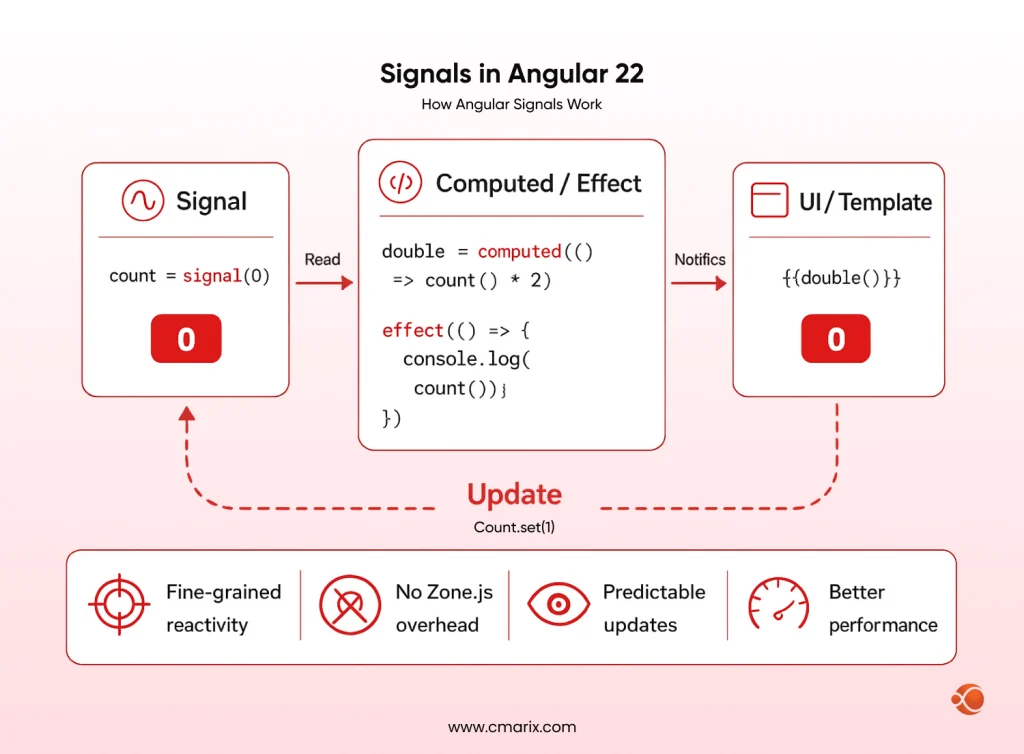
How Angular Signals Work
Signals are Angular’s answer to fine-grained reactivity. A signal holds a value and notifies dependents when that value changes — without Zone.js patching async APIs or triggering full component tree checks. The result: faster, more predictable updates.
The Signals API is now fully stable. That means you can build production features on it without worrying about breaking changes in the next release.
debounced() Signals (Experimental)
One new addition worth watching is debounced() signals — a utility that delays signal propagation by a specified time. The obvious use case is search inputs and form fields where you don’t want to fire a reactive chain on every keystroke. It’s still experimental, but the pattern it enables (reactive debouncing without RxJS) is genuinely useful.
import { signal, debounced } from '@angular/core';
const searchQuery = signal('');
const debouncedQuery = debounced(searchQuery, 300); // 300ms delay
// debouncedQuery only updates 300ms after the last keystroke
// No RxJS debounceTime() needed
effect(() => { fetchResults(debouncedQuery());
});
Side Effects for Non-Reactive APIs
Not everything in an Angular app is reactive. When you need to sync a signal’s value to a non-reactive system — say, a third-party DOM library or a WebSocket connection — Angular 22 gives you cleaner primitives for registering side effects without leaking subscriptions.
Signals vs RxJS: What’s Different Now
RxJS is going to stay for a longer period of time. Asynchronous orchestrations using streams, races, and retrying are still best handled by RxJS. However, when dealing with state within components, asynchronous data fetching, or derived values, Signals give an improved default solution. The two frameworks work seamlessly together, especially through Angular’s rxResource API.
Signal Forms: The Biggest Angular 22 Upgrade
What Are Signal Forms?
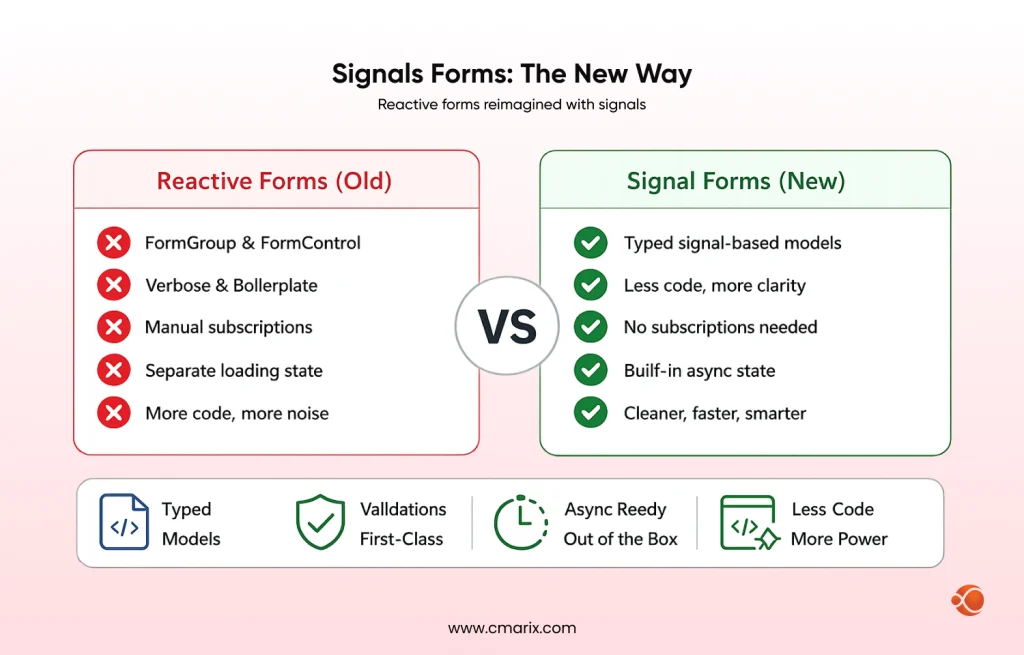
Signal Forms replace the classic Reactive Forms approach with a model that’s built natively on Angular Signals. Instead of FormGroup and FormControl wrapping observable streams, you work with typed signal-based form models that integrate directly into Angular’s change detection.
Why This Is a Big Deal
Reactive Forms were powerful but verbose. Validation, async state, cross-field logic — each needed boilerplate. Signal Forms bring the same power with significantly less noise, and they’re now stable in Angular 22.
Key Capabilities
import { signalForm, field, required, minLength, email } from '@angular/forms';
const loginForm = signalForm({ email: field('', [required(), email()]), password: field('', [required(), minLength(8)]),
});
// All state accessible as signals -- no subscriptions needed
loginForm.fields.email.value(); // current value
loginForm.fields.email.isValid(); // true/false
loginForm.fields.password.errors(); // null or ValidationErrors
loginForm.isSubmitting(); // async submission state, no manual flag needed- Form Models: Your typed form models are based on signals. The angular framework tracks field types, which means IDEs catch typing errors during authoring not execution.
- Validation: Both cross-field and field-level validation are first-class citizens. Validation logic can be expressed in terms of pure functions, which execute reactively whenever fields change.
- Asynchronous Operations: Asynchronous validators and asynchronous submission statuses work seamlessly without having to manage any manual loading indicators or unsubscribing.
- Schema-Based Forms: Your signal-based forms allow for schema driven form generation without compromising on type safety. That’s when your team generates forms from schemas or configurations.
- Custom Form Controls: Building reusable form controls (date pickers, multi-selects, rich text editors) is now simpler. The interface is leaner and integrates naturally with the signal graph.
Migrating from Reactive Forms
Migration isn’t a forced requirement in v22, but the path is well-documented at update.angular.io. The Angular team provides codemods for common patterns, and Reactive Forms continue to work. Most teams will want to migrate new forms first and backfill critical existing ones.
From legacy migrations to AI-optimized SaaS frontends, we deliver production-ready apps.
Angular 22 Dependency Injection: Lazy Loading Gets Smarter
injectAsync (Developer Preview)
The injectAsync method allows for the dynamic loading of a service only upon its necessity. The advantage of using such a method is that the size of the application starts to reduce.
import { injectAsync } from '@angular/core';
async function loadAnalytics() { const analyticsService = await injectAsync(HeavyAnalyticsService); analyticsService.track('page_view');
}
It’s still in developer preview, but the pattern it enables — service-based lazy loading — fills a gap that previously required workarounds.
Better Tree-Shakable Providers
Angular 22 makes it quite easier to write providers that get tree-shaken when unused. For large codebases and Angular micro frontend architecture, this directly minimize bundle size without any manual intervention.
Routing & Navigation Updates
Targeted Angular router enhancements in v22 include rendering strategies for each route. You are now able to define whether the view should be SSR, CSR, or incremental hydration. The above is important for applications with heavy content pages and interactive authenticated views.
Testing routing is also simpler in v22. The router testing utilities align better with the new component architecture, and testing lazy-loaded routes no longer requires extensive mock scaffolding.
Rendering & Performance Improvements
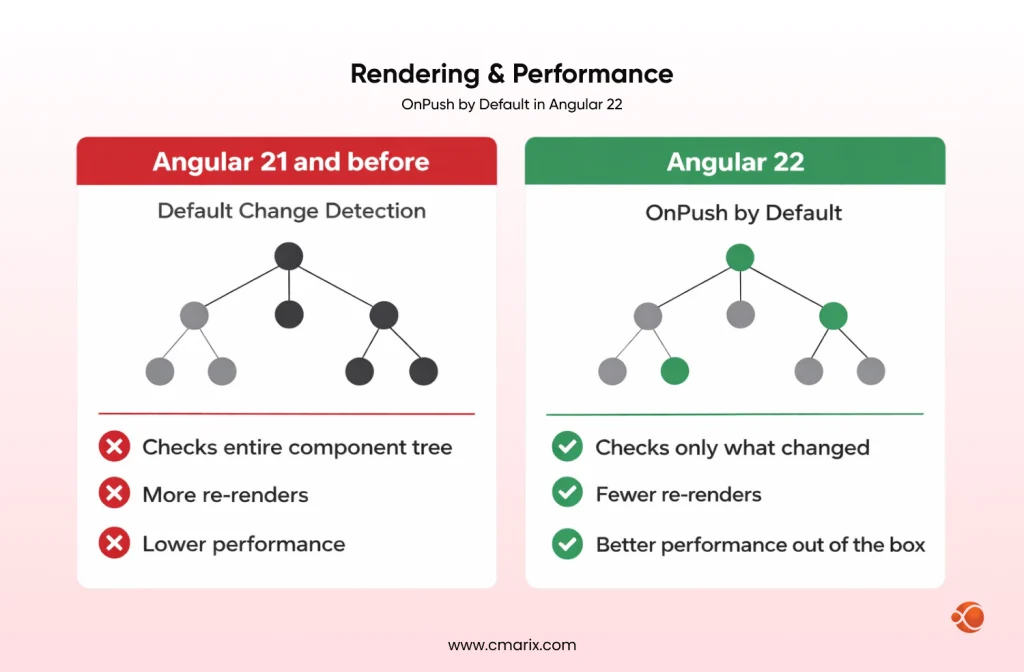
OnPush as the Default Strategy
This is an important change because, in the past, OnPush had to be explicitly used for each component. Now, in Angular 22, it is set as the default. It means that when developing your own components, they will automatically have precise and signal-based change detection.For teams focused on Angular performance optimization, this alone is a compelling reason to upgrade.
// Angular 21 -- required explicit opt-in
@Component({ selector: 'app-user-card', changeDetection: ChangeDetectionStrategy.OnPush, template: `<h2>{{ user().name }}</h2>`
})
// Angular 22 -- OnPush is the default, no annotation required
@Component({ template: `<h2>{{ user().name }}</h2>`
})
export class UserCardComponent { user = input.required<User>(); // only re-renders when input reference changes
}
Improved SSR and Incremental Hydration
Server-side rendering in Angular 22 is genuinely fast and production-reliable. Incremental Hydration means Angular can hydrate individual components as they enter the viewport rather than the entire application at once. This directly improves Time to Interactive and Core Web Vitals scores.
The combination of SSR + Incremental Hydration makes Angular competitive with frameworks like Next.js and Nuxt for content-heavy, SEO-critical applications.
Bundle Size & Bootstrapping
Optimized bootstrapping in v22 reduces the cost of application startup, particularly on mobile networks. Paired with better tree-shaking and selectorless components, Angular 22 apps can ship meaningfully smaller bundles than their Angular 18–19 equivalents.
Developer Experience Improvements That Ship with Angular 22
Vitest as the High-Speed Default
Instead of using Karma, which was previously the default framework for testing Angular applications, in Angular version 22 Vitest was introduced. Using Vitest, you get significant speed improvements compared to using Karma for unit testing, native ES Modules, and seamless integration with modern Angular testing techniques. If you have been postponing updating tests, now is a good time to do it.
AI Tooling and MCP Integration
Angular 22 ships with stable support for the Model Context Protocol (MCP); a standard for connecting AI coding tool to your codebase context. In practice, this means tools like Claude, GitHub Copilot and Cursor get better Angular-specific completions can understand your component structure and generate code that aglins with Angular 22 patterns rather than guessing.
For teams building AI-powered features or simply using AI tools in daily development, MCP support is a real productivity multiplier.
Error Messages and Debugging
Meaningful improvements in Angular 22 error messages, actionable and linked to documentation. It may seem like a small thing, but it is important for new developers and fast iteration cycles.
Selectorless Components: How Angular 22 Simplifies Component Architecture
What Are Selectorless Components?
Traditionally, every Angular component needed a CSS selector for use in templates. Selectorless Components drop that requirement — you import the component class directly in your template, and Angular resolves it without a selector.
The details and design rationale are documented in the Angular GitHub discussions and RFCs, where the Angular team worked through the implications for large codebases.
// Before: required a selector and string-based reference in templates
@Component({ selector: 'app-user-avatar', template: `...`
})
export class UserAvatarComponent {}
// Angular 22: no selector needed
@Component({ template: `...`
})
export class UserAvatarComponent {}
// In the parent template -- import directly, no selector string
@Component({ imports: [UserAvatarComponent], template: ``
})
export class ProfilePageComponent {}
Why It Matters
Selectorless components reduce the coordination overhead in large teams. You don’t have to maintain a unique selector namespace across hundreds of components, and tree-shaking gets more aggressive because Angular can statically analyze exactly which components are used where.
For teams working with Angular mobile app development, where bundle size directly affects performance, this is a meaningful improvement.
Stable Resource APIs: httpResource and rxResource
Signal-Native Data Fetching
httpResource is Angular’s signal-native replacement for the manual HttpClient + subscribe() pattern. You declare a resource, pass it a URL or request factory, and Angular manages loading/error/success states as signals — no subscription management required.
const user = httpResource(() => `/api/users/${userId()}`);
// user.value(), user.isLoading(), user.error() -- all signals
rxResource does the same for RxJS-based async sources, bridging the reactive and observable worlds cleanly.
What This Replaces
The old pattern involved HttpClient.get(), manual loading state variables, ngOnDestroy cleanup, and error handling scattered across the component. httpResource collapses that into a single declaration. It’s one of those APIs that makes you wonder why it took this long.
Angular 20 vs 21 vs 22: Feature Comparison
| Feature | Angular 20 | Angular 21 | Angular 22 |
| Signal Forms | N/A | Experimental | Stable |
| Selectorless Components | N/A | N/A | Full Support |
| Change Detection | Zoneless (Preview) | Zoneless (Default) | OnPush (Default) |
| AI Tooling | MCP (Beta) | MCP (Stable) | Agentic AI Optimized |
| Lazy Loading | Route-Based | Component-Based | Service-Based (injectAsync) |
| Testing | Vitest (Opt-In) | Vitest (Default) | Vitest (High-Speed) |
How to Migrate to the Latest Angular Version Without Breaking Your App
Should You Upgrade?
If you’re on Angular 20 or 21, yes — the upgrade path is well-maintained and the productivity gains are real. If you’re on anything older, the jump requires more planning, but the Angular update guide walks through each step with codemods for the most common breaking changes.
Common Migration Challenges
- Forms – Signal > Reactive – not important for now but think about it
- Zone.js – when working with external dependencies that use Zone.js, do an audit before proceeding
- Migration of Test Runner – Karma > Vitest works great but needs changes in test files
- Change Detection Strategy – OnPush is going to be used by default for most components
Best Practices for Adoption
Begin with greenfield features. Migrate high-traffic components next. Use Angular’s schematics for automated migration where available.
Our certified Angular team handles all the latest feature updates for enterprise apps.
Why Angular 22 Is Built for Enterprise-Scale Frontend Development
Large organizations have specific concerns: stability, migration cost, long-term support, and team adoption curve. Angular 22 addresses all of them. The feature stability table above shows most major features landing as Stable — not Developer Preview. That’s a deliberate signal from the Angular team: these APIs won’t change under you. For enterprise teams that can’t afford churn, that reliability is essential.
For teams working with a dedicated Angular development company, Angular 22’s architecture makes it easier to enforce consistency across large teams. Selectorless components reduce selector naming conflicts. Signal Forms create predictable, testable state. OnPush by default means performance is harder to accidentally break.
Angular 22 also makes a strong case for AI-powered application development, where MCP integration means AI coding assistants understand your Angular codebase at a structural level, not just syntactically.
Why Choose CMARIX for Angular Development
If your team needs to move fast on Angular 22 adoption, CMARIX brings deep Angular expertise from v8 through v22. Whether you’re migrating a legacy Angular app, building a new product on the latest Angular version, or need to hire Angular developers with Signal Forms and Zoneless architecture experience, CMARIX has dedicated teams for each of these paths.
The team handles enterprise-grade migrations with minimal disruption, including Karma-to-Vitest test migrations, Reactive-to-Signal Forms transitions, and Zone.js removal audits.
Conclusion: Is Angular 22 Worth Upgrading To?
Angular 22 isn’t a flashy release. It’s a mature one. The features it ships are things the community has been asking for — stable Signal Forms, Zoneless architecture, better SSR, faster testing — and they land well-designed and production-ready.
For most teams, the answer is yes. The upgrade path is clear, the gains in developer productivity and runtime performance are measurable, and the long-term support status means you won’t be redoing this work in 12 months.
The Angular team has spent three major versions building toward this architecture. Angular 22 is the payoff.
FAQs onLatest Angular Version
Can I upgrade an existing Angular project to Angular 22?
Yes, Angular maintains a migration guide at update.angular.io, which includes automated codemods for all the major breaking changes. Angular 21 projects can be upgraded easily without much manual intervention. For older projects (version 17 and below), there will be a gradual migration process required.
What are Signal Forms and why do they matter?
Signals Forms represent the next iteration of the form handling API that Angular introduces by way of the Signals API. Signals Forms use typed signals to represent the data used in forms, thus removing the need for verbose and error-prone use of FormControls and FormGroups.
What is Vitest and why is it now the default test runner?
Vitest is an advanced test framework for JavaScript powered by Vite. Vitest has much better performance than Karma, which was used previously and is natively compatible with ES modules. The new version of Angular includes Vitest as a default test runner, mainly due to its fast performance that is highly important in big projects.
How does Angular’s MCP (Model Context Protocol) support help in 2026?
The integration of MCP with Angular 22 is solid, hence allowing AI coding assistants such as GitHub Copilot and Claude to be able to know the structure of your Angular application in detail. Instead of proposing generic codes, AI assistants will propose relevant Signal Form code, import the right components into your app and follow the structure of your app.
What makes Angular 22 better for SEO and Core Web Vitals?
Two things primarily: Incremental Hydration and improved SSR. Incremental Hydration means Angular only hydrates components as they enter the viewport, which improves Time to Interactive — a direct Core Web Vitals signal. Combined with OnPush change detection by default and better SSR rendering, Angular 22 apps can achieve meaningfully better Lighthouse scores without custom optimization work.