Quick Summary: Angular 21 release marks a significant upgrade to the latest Angular version, bringing features that developers will actually enjoy using in real projects. This version of Angular brings updates like Signal-based forms, Angular ARIA, Vitest as default testing, zoneless change detection and refreshed documentation. Angular 21 focuses on simplicity, speed, accessibility and a far better development experience.
Angular 21 is the latest version of Angular, released on 19th November 2025. This is the much-awaited version of Angular, which is yet another exceptional version with the latest features, improved accessibility, and developer-friendly tools. Angular 21 has introduced key improvements in various areas. It will provide the best coding experience for developers, whether they code independently, use agents, or take AI assistance. With the latest Angular version improvements, the gap between Angular and other modern frameworks such as React, Vue.js and others are shrinking fast.
So, let’s slow down, walk through what’s new, why it matters and how Angular 21 actually helps developers build better client-side applications without overcomplicating life.
What’s new in Angular 21?
1. Experimental Signal Forms- A Big Step Toward Cleaner, Reactive Forms
Forms are an important part of many Angular apps. Until now, you mainly worked with either reactive or template-driven forms. They worked, but sometimes they felt heavy. You managed subscriptions, dealt with boilerplate and debugging wasn’t always fun.
With the Angular 21 release, Signal-based Forms come in as an experimental feature.
What this means in everyday work:
- You define the form state directly as a signal; the framework then binds and syncs it automatically.
- Form field values, validation, and submission logic become simpler and more predictable.
- This approach gives full type-safety and a single source of truth for form data.
- Centralized schema-based validation logic is part of the core APIs.
You’ll notice that instead of constantly wiring Observables and subscribing, Signal lets the framework react to the changes naturally. It’s like Angular saying, “ Let’s make forms smarter without making them complicated.”
Even though it’s experimental, it’s not a rough idea. It’s structured enough to explore safely in new or internal projects. Over time, this might slowly replace the old form system and will be a key talking point whenever there is a discussion on the Angular 21 features and benefits of Angular 21 for developers.
Simple Login Form using Signal Forms
app.component.ts
import { Component, signal } from '@angular/core';
import { FormControl, FormGroup, Validators } from '@angular/forms';
@Component({ selector: 'app-login', templateUrl: './app.component.html',
})
export class AppComponent { loginForm = new FormGroup({ email: new FormControl('', { nonNullable: true, validators: [Validators.required, Validators.email] }), password: new FormControl('', { nonNullable: true, validators: [Validators.required, Validators.minLength(6)] }), }); submit() { console.log(this.loginForm.value); }
}
app.component.html
<form [formGroup]="loginForm" (ngSubmit)="submit()"> <input type="email" formControlName="email" placeholder="Email" /> <input type="password" formControlName="password" placeholder="Password" /> <button type="submit"> Login </button>
</form>
<p>Email: {{ loginForm.controls.email.value }}</p>
<p>Valid: {{ loginForm.valid }}</p>
For more information, check out a YouTube video about single forms:
2. Angular ARIA (Developer Preview)- Accessibility Built Into Your Components
Accessibility isn’t optional; it’s a requirement for real users, not just a “nice to have.” Angular 21 updates, Angular introduces Angular ARIA in Developer Preview, a library of headless, accessible UI patterns that you can style yourself.
What it provides:
- A set of 8 UI patterns that include 13 accessible components such as Accordion, Combobox, Grid, Menu, Tabs, Tree, and more.
- Components are unstyled by default, so you get full control over look and feel.
- ARIA attributes, keyboard navigation, focus management, and accessibility logic are already built in.
Why this matters:
Instead of manually adding ARIA (Accessible Rich Internet Applications) roles or worrying about compliance later, Angular ARIA lets you focus on styling and functionality while accessibility is handled under the hood. This is especially helpful when businesses work with an Angular development company where accessibility compliance really matters from day one.
You can install it with a single npm command and start exploring headless components immediately.
npm i @angular/ariaIf you want more insights about Angular Aria, here is the official YouTube video about it:
3. Stable MCP Server- Smarter AI Support for Your Angular Projects
The Model Context Protocol (MCP) Server, first introduced in v20.2, is now stable in the Angular 21 release. It’s built into the Angular CLI and lets AI tools ( Language Models or Agent workflows) understand and work with your Angular project more intelligently.
What this really enables:
AI tools can do more than just code structure; they can:
- Understand your workspace context and list projects.
- Fetch best practices or official docs based on real Angular patterns
- Find up-to-date examples and relevant usage patterns.
- Suggests a migration plan.
- Offer an AI tutor that can help you learn Angular interactively.
Instead of treating AI like a generic assistant, the MCP server gives it a real understanding of your Angular projects, so that it can give smarter suggestions, better migrations, and less manual back-and-forth to interpret docs.
This becomes a real productivity boost for teams, especially on large codebases or while planning upgrades. This helps teams working on large projects, especially when they hire Angular developers who want intelligent tooling support while maintaining coding discipline. This aligns well with the growing focus on productivity and maintainability in modern Angular development.
Partner with CMARIX, trusted by global businesses for enterprise web development.
Contact Us4. Vitest Becomes the Default Test Runner — Faster, Smoother Testing
Angular 21 makes Vitest the default test runner for new projects that are created with Angular CLI. This reflects years of community feedback on test ergonomics and speed.
Why this change matters:
- Vitest is smart, faster and developer-friendly.
- Running ng test now launches Vitest automatically, no extra config needed.
- There’s even an experimental schematic to help migrate existing tests.
- You still have support for the older test runners like Karma and Jasmine while you migrate.
- There’s even an experimental schematic to help migrate existing tests.
So if you ever avoided tests because they ran slowly or felt painful to maintain, this change makes test writing itself less of a bottleneck. In the real-world development cycle, this directly supports better quality and confidence that teams appreciate during the latest Angular version as of September 2025 and continuing into the latest Angular version, October 2025 adoption.
Example Service to Test
example.service.ts
export class ExampleService { add(a: number, b: number) { return a + b; }
}
Vitest Test Example
example.service.spec.ts
import { describe, it, expect } from 'vitest';
import { ExampleService } from './example.service';
describe('ExampleService', () => { it('should add numbers correctly', () => { const service = new ExampleService(); const result = service.add(5, 7); expect(result).toBe(12); });
});
Why This Matters in Real Life
- Tests run fast (so devs actually run them)
- Syntax is clear and readable
- It feels closer to how modern JS testing works
- Less setup frustration
If a team previously avoided testing because it felt slow or painful, Vitest removes that excuse.
5. Zoneless Change Detection by Default- A Major Architectural Shift
For years, Angular has depended on Zone.js to watch asynchronous activity and automatically trigger UI updates. While that worked, it also introduced performance overhead and complexity. So, now Angular 21 makes zoneless change detection the default for new applications, meaning Angular no longer bundles Zone.js out of the box.
What zoneless means:
- Signals drive change detection, replacing Zone.js magic.
- You get smaller bundles because Zone.js isn’t included anymore.
- Performance improves because only components using the changed signals update.
- Debugging and async behavior feel more predictable.
Counter without Zone.js
counter.component.ts
import { Component, signal } from '@angular/core';
@Component({ selector: 'app-counter', templateUrl: './counter.component.html',
})
export class CounterComponent { // This is reactive state count = signal(0); increment() { this.count.update(value => value + 1); }
}
Counter.component.html
<h2>Counter Value: {{ count() }}</h2>
<button (click)="increment()"> Increase
</button>
If an older project still needs Zone.js, Angular provides migration support, but new apps move forward with a cleaner future-ready approach. This shift also improves workflows where companies use Angular in micro frontend architecture, as predictable state behavior becomes even more important.

6. Updated Documentation- Easier to Learn, Easier to Work With
Angular’s documentation has been refreshed with the Angular 21 release to reflect current workflows and modern patterns such as signals and zoneless change detection.
Updates include:
- A dedicated Angular+AI docs section.
- New Signal tutorials that cover core reactive concepts.
- Better search and examples turned to modern usage.
- Overhauled routing guides, theming and dependency injection.
Good documentation saves hours, reduces confusion, and improves development confidence. It also assists teams involved in Angular performance optimization because clearer guidance leads to smarter implementation decisions
Short Reminder of the Big Picture
Angular 21 isn’t just adding random features. It’s focused on making Angular:
- Easier to use and maintain
- Faster and more predictable
- More accessible by default
- Smoother to test and debug
- Future-ready with AI-assisted development
It represents not just progress, but thoughtful improvement. Many businesses now look at Angular for mobile app development as well, because Angular 21 pushes reliability, structure, and long-term readiness.
Angular’s New Mascot “Angie/Little Armor Guy”
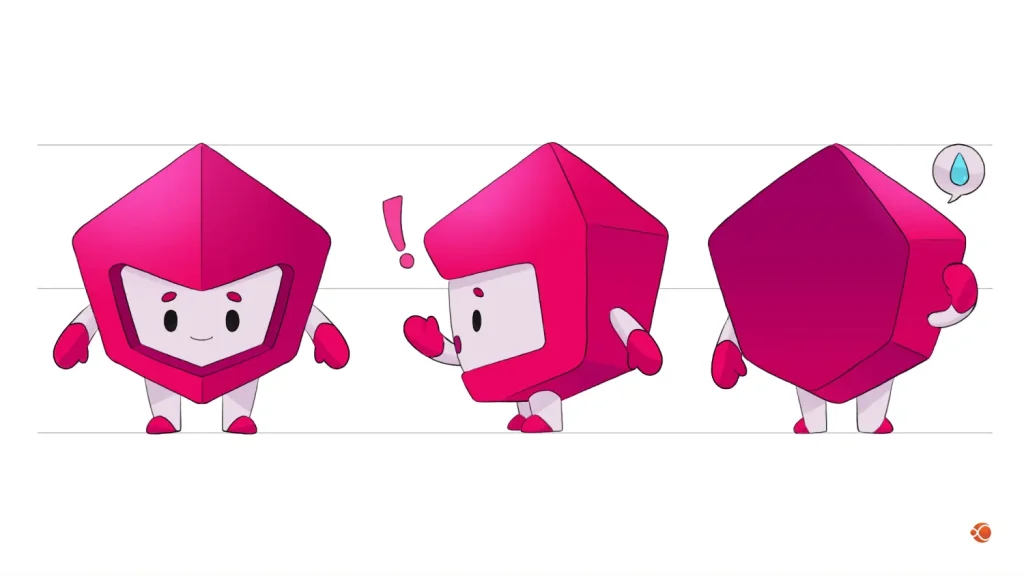
Along with new updates, Angular has also launched its new official mascot, “Angie,” also known as Little Armor Guy. The mascot was selected after discussions and a Request for Comments (RFC) in May 2025. Later, it was released with Angular version 21 in late 2025. It is a shield-shaped beam of Typescript. The mascot gives the framework personality and visual identity for social media, events and documentation, complementing the existing logo rather than replacing it.
Official release video of Mascot:
Comparative Table Of Angular Version 19, 20, and 21
| Feature / Capability | Angular 19 | Angular 20 | Angular 21 |
| Standalone Components as Default | Yes — further reinforced | Yes – continued support | Yes |
| Incremental SSR / Partial Hydration | Introduced in Angular 19 | Continued improvements | – |
| Route-Level Rendering Controls | Yes | Yes | – |
| Signals as Reactivity Base | – (early experimentation) | Stabilized core Signals | Core Signals with broader adoption |
| Zoneless Change Detection | – | Preview available | Default for new apps |
| Experimental Signal-based Forms | – | – | Experimental |
| Angular ARIA (Headless Accessible UI) | – | – | Developer Preview |
| Stable MCP Server (AI Support) | – | (introduced) | Stable |
| Vitest as Default Test Runner | – | – | Yes |
| Improved CLI Tooling | Yes | Yes | Yes |
| Improved Documentation Experience | – | – | Yes – Updated |
| Better SSR Diagnostics | – | Yes | – |
| Developer Feedback Improvements (Speed, Errors, UX) | Various enhancements | More diagnostics | Better tooling integration |
Short History of Angular 19, 20, and 21
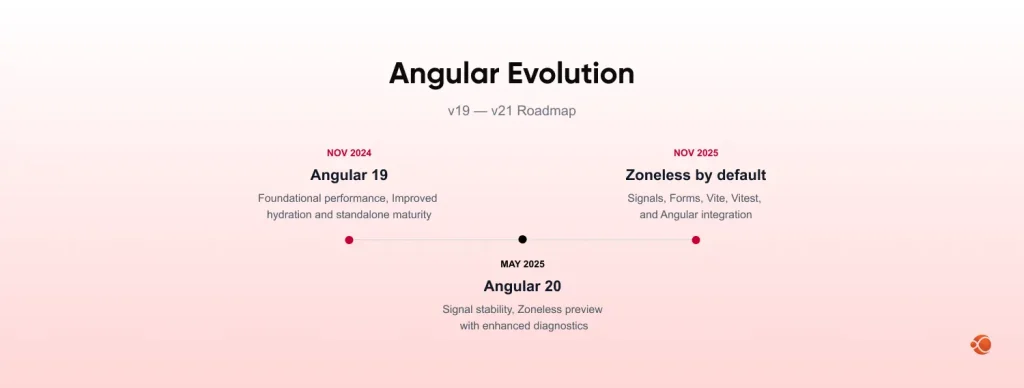
Angular evolves on a predictable six-month cadence, bringing new capabilities and improvements that help developers build faster, more maintainable applications. Looking at the official release schedule and key updates from each version, you can see how Angular has shifted focus over time, from strengthening performance and SSR, to modernizing reactivity, to improving real-world developer experience.
Angular 19
On November 19, 2024, Angular 19 was released, marking another step forward in developer ergonomics and performance. This release focused on improving server-side rendering and performance, making hydration smoother, efficient and continuing to refine the standalone component model. These were incremental but meaningful improvements under the hood, improving loading behavior and giving developers more control over SSR behavior without dramatic API shifts. Angular 19 was like a solid foundation upgrade, improving real-world performance while keeping the framework stable.
Angular 20
Continuing the six-month release rhythm, Angular 20 was officially released in May 2025. This version represented a stronger push toward modern reactivity and developer tooling. Signals became more stable and ready for broader use. Although zoneless change detection was still in preview, it showed Angular’s long-term intent to shift away from Zone.js for change tracking.
Angular 20 felt like preparation, solidifying the main reactive foundations and performance enhancements that would unlock even smoother experiences in the next major release.
Angular 21
Angular 21 was released on November 19, 2025, this version delivers updates that can be felt in everyday work. Rather than just laying groundwork, Angular 21 introduces changes that improve day-to-day developer experience and help teams ship reliable, accessible apps faster.
Angular 21 ties together modern reactivity, accessible UI support, AI-aware tooling, and developer ergonomics in a way that’s noticeable in everyday workflows.
Why CMARIX Is the Right Technology Partner for Your Angular Project
Deep Angular Expertise
CMARIX has hands-on experience with the latest Angular versions, modern reactivity patterns, zoneless applications, signals, and updated testing, making sure your project is built with current and reliable practices.
Stability, Performance and Scalability Focus
Every solution is engineered to load faster, run smoother and remain stable under real traffic, helping you build applications that perform well not just in demos but in real business environments.
Structured Development Approach
The team doesn’t just “build.” They analyze requirements, plan architecture carefully, ensure clarity in execution, and maintain coding standards so projects are easier to scale and maintain long-term.
User-first and Accessibility Ready
CMARIX pays the right amount of attention to usability and accessibility, helping businesses create products that are easier for real users while meeting their needs.
Reliable Partnership & Delivery Discipline
From communication to delivery timelines, CMARIX works as a true technology partner, accountable, clear and committed to outcomes that actually help your business move forward.
Choosing CMARIX means choosing experience, precision, and a team that treats your projects with the seriousness they deserve.
Conclusion
Angular 21 release isn’t just another upgrade; it actively improves daily development work with smoother testing, better accessibility support, faster performance and cleaner reactivity. Whether you’re developing new apps or upgrading an existing one, this release makes Angular feel lighter, more practical and ready for modern development expectations. Teams that adapt early gain better productivity, improved code clarity and nicer developer experience.
Frequently Asked Questions About Angular 21
Can I upgrade my existing Angular project to Angular 21?
Yes, you can upgrade using the Angular update guide and CLI tools. Review compatibility, test thoroughly and plan phased updates for larger projects.
What are the best practices while developing Angular 21?
Adopt signals and zoneless apps where they are suitable, keep tests active with Vitest and follow the updated Angular docs. CMARIX developers help teams follow reliable patterns to avoid technical debt.
What is Vitest and why is it used in Angular 21?
Vitest is a fast, modern test runner that provides quicker feedback and simpler test writing. It replaces older setups to make testing smoother and more reliable.
How to migrate to Angular 21?
Use Angular’s official migration guide, update dependencies stepwise, and run tests regularly. CMARIX helps plan structured upgrades so projects stay stable during transition.
How does Angular MCP help us practically?
MCP allows AI tools to understand your project context, giving smarter suggestions rather than generic guidance. For teams working with CMARIX, this improves productivity, code clarity, and upgrade efficiency.