Quick Summary: Azure DevOps Pipelines makes releases quicker and more reliable by automating builds, tests, and deployments. This guide explains its structure, YAML configuration, and safety steps, and provides tips for CI/CD to enable smoother, faster software releases.
If you are still stuck on manual deployments, you are not using your team’s full capacity and capabilities. Delivering code to users should not feel like disarming a bomb, yet many companies to date treat it that way, spending far too much time and resources doing so. High-level risk leads to broken environments, configuration drift, and missed steps. The result? Businesses are dreading every release because of late-night rollbacks.
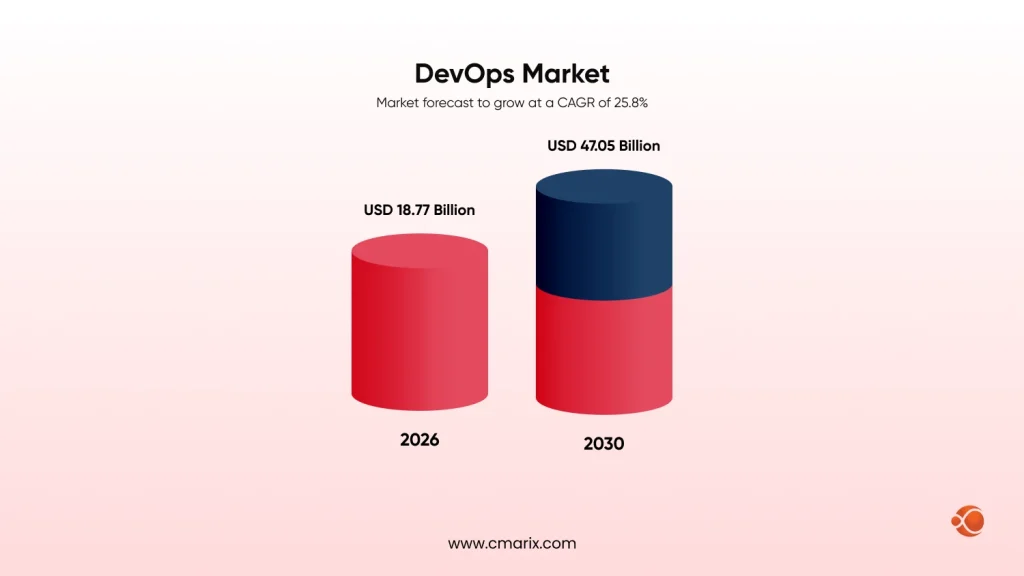
The global DevOps market is valued at around $18.77 billion in 2026 and is projected to reach $47.05 billion by 2030. DevOps represents around 22% of the total cloud migration services market. This growth reflects one thing. Businesses are replacing fragile, manual delivery workflows with automated pipeline infrastructure.
Azure DevOps Pipelines sit at the center of this transformation.
It is Microsoft’s enterprise-grade CI/CD platform. Azure DevOps Pipelines automates your entire build, test, and deployment workflow. It connects your source code to your production environment through a controlled, auditable process.
This guide covers everything you need to know. From core architecture to YAML configuration, from security controls to enterprise deployment patterns, you get a complete picture of Azure DevOps Pipelines
What Is Azure DevOps?
Azure DevOps is Microsoft’s all-in-one platform for software development and delivery.
It brings five core services under one roof:
| Azure DevOps Service | Purpose / Description |
| Azure Boards | Agile planning, backlog management, and sprint tracking |
| Azure Repos | Git and TFVC version control |
| Azure Pipelines | CI/CD automation for any language or platform |
| Azure Test Plans | Manual and automated testing management |
| Azure Artifacts | Package management and artifact feeds |
Teams can use all five services together or adopt individual ones. Azure DevOps Pipelines works as a standalone CI/CD tool. You do not need Azure Repos or Azure Boards alongside it. GitHub, Bitbucket, and GitLab all integrate directly.
What Are Azure Pipelines?
Azure Pipelines is the CI/CD automation engine inside Azure DevOps.
It handles three core functions.
- First, it builds your application after every code commit.
- Second, it runs automated tests against that build.
- Third, it deploys the result to your target environments.
Azure DevOps Pipelines work with virtually any programming language. Python, Java, JavaScript, Go, Ruby, PHP, and .NET are all first-class citizens. It connects to GitHub, Bitbucket, GitLab, Subversion, and Azure Repos out of the box.
You can run Azure DevOps Pipelines on Microsoft’s managed cloud infrastructure or on your own machines. The platform scales from a solo developer’s side project to a multinational enterprise’s release infrastructure.
What are the Core Components of Azure Pipelines
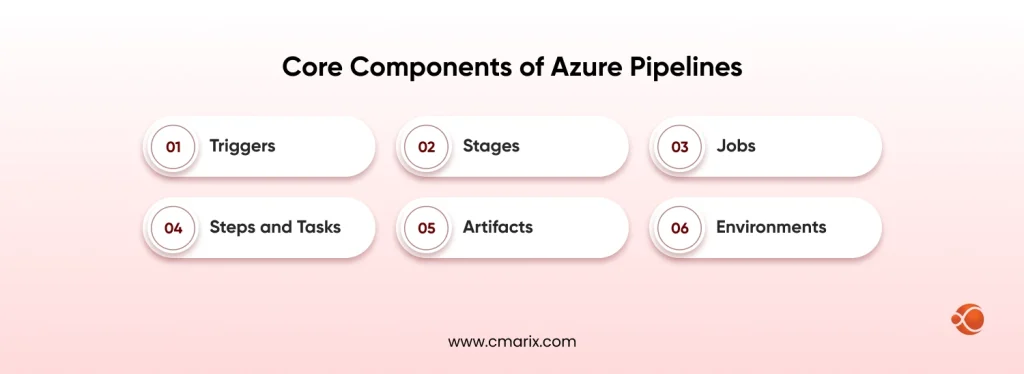
Understanding the building blocks of Azure DevOps Pipelines makes everything else click.
Before diving deeper, many engineers want to know what makes up the core architecture of Azure DevOps Pipelines. Here is a structured breakdown.
Triggers
A trigger defines what starts a pipeline run. Common trigger types include:
| Trigger Type | How It Works |
| CI triggers | When a developer commits code to a monitored branch, CI triggers kick off a build automatically. This integrates and tests new changes without any manual effort, so there’s no extra work needed. |
| PR triggers | When someone opens or updates a PR, automatic validation builds run to make sure the changes won’t mess up the codebase. So it catches problems early on. |
| Scheduled triggers | Pipelines run on fixed schedules, say nightly or weekly. This way, builds and tests occur regularly, even when no code changes. They do it automatically; there’s no need to trigger them manually every time. Thus, teams can make sure everything works correctly, without waiting for code updates. |
| Pipeline triggers | When one pipeline finishes, it triggers the next one, which starts the workflows. This links pipelines together for those multi-stage processes. So ending one pipe kicks off another relying on it, creating connected chains or multiple stages. |
Triggers remove human bottlenecks. Developers push code. The pipeline responds immediately.
Stages
A stage is a big phase in your pipeline. Common examples are Build, Test, Staging, and Production. By default, they run one after the other, but you can set some to run in parallel when it makes sense. Each stage has one or more jobs.
Jobs
A job is a collection of steps that execute on a single agent. All steps in a job share the same compute environment. Jobs can run in parallel within a stage. You can also define explicit dependencies between jobs.
Steps and Tasks
In Azure DevOps Pipelines, a step is the smallest unit of work and can be an inline script or a task. Inline scripts execute shell, PowerShell, or batch commands, while tasks – which handle more complex work – are prebuilt, reusable actions available on the Azure Marketplace. They cover building Docker images, publishing NuGet packages, doing security scans, and even deploying to Kubernetes.
Artifacts
Artifacts are the outputs of your build stage.
They include compiled binaries, Docker images, test reports, and deployment packages. Artifacts pass between stages. You build once and deploy the exact same artifact across every environment. This guarantees consistency. Which QA tests exactly reach production??
Environments
In Azure DevOps, the use of “environments” to indicate where to deploy something (like a Kubernetes namespace, a fleet of virtual machines, or a cloud-based application service) helps keep track of every deployment history, and requires all deployments into the production environment to have someone give their approval prior to deployment going live in production.
Understanding the Differences: YAML Pipelines vs. Classic Pipelines
Azure DevOps Pipelines gives you two methods to define your CI/CD workflow.
YAML pipelines store the pipeline definition as a code file inside your repository.
The file lives alongside your application code. Changes go through pull request review. Every modification has a full git history. Microsoft recommends YAML pipelines as the modern standard for all new projects.
Key advantages of YAML pipelines:
- Version-controlled setups: Teams can monitor and manage their pipeline definitions by storing them in source control.
- Pull request reviews: Teams can review pull requests and approve changes to the pipeline configuration before they are merged into the repo.
- Easy reusability: YAML files can be easily copied and adapted for different projects and environments.
- Support for multi-stage workflows: Enables the creation of build, test, and deployment stages within a single pipeline.
- Conditional logic: Allows pipelines to carry out specific tasks or stages based on defined conditions.
- Reusable templates: Common pipeline configurations can be stored as templates and reused across multiple pipelines.
- Pipeline as Code: Fully supports the Pipeline as Code approach by defining pipeline behavior in YAML files.
- Basic YAML Example: The following is a simple Azure DevOps Pipeline defined in YAML.
A minimal YAML configuration for Azure DevOps Pipelines looks like this:
yaml
trigger:
- main
pool:
vmImage: 'ubuntu-latest'
steps:
- script: echo "Azure DevOps Pipelines running"
displayName: 'Initial build step'
Classic Pipelines
Visual editors that allow you to build pipelines on projects inside the Azure DevOps portal (no yaml knowledge required); stages, jobs, and task definitions use drag and drop to configure the pipeline; classic pipelines can be used by teams new to CI/CD automation, using the drag and drop interface.
Limitations of Classic pipelines:
- Not version-controlled by default
- Harder to audit and maintain over time
- Microsoft invests most new features in YAML going forward
For teams committed to DevOps best practices, YAML is the correct path for any new project. Classic pipelines serve as a stepping stone for teams still learning the basics of CI/CD automation.
Build Pipelines and Release Pipelines Explained
Azure DevOps Pipelines covers two primary pipeline types. Both are essential to a complete CI/CD strategy.
Build Pipelines (Continuous Integration)
A build pipeline runs automatically on every code commit.
It compiles source code, runs unit and integration tests, and produces deployment artifacts. The pipeline reports pass or fail status back to developers within minutes. This rapid feedback loop prevents broken code from spreading through your codebase.
Release Pipelines (Continuous Delivery)
A release pipeline picks up where the build pipeline ends.
It takes the build artifact and deploys it through a series of environments. A typical deployment flow looks like this:
Build Artifact -> Dev -> QA Testing -> Staging -> Approval Gate -> Production
Within a release or delivery pipeline, we can use manual approval gates to separate different sections of the process execution. Enterprises that operate within regulated industries must use manual approval gates to obtain explicit human consent before deploying any change to Production. They do this because federal compliance mandates that they obtain explicit human consent before making any change to Production.
To successfully implement an enterprise-scale DevOps workflow, it is critical for teams to separate their build and release pipelines. Separating these two deployment processes will improve accountability and make it easier to roll back in the event of an issue with the production deployment.
Microsoft-Hosted Agents vs. Self-Hosted Agents
An agent is the compute machine that runs your pipeline jobs. Azure DevOps Pipelines provides two agent types. Each serves different needs.
Microsoft-Hosted Agents
Microsoft fully manages and provisions these agents.
Each job runs on a fresh virtual machine. You select from Ubuntu, Windows Server, or macOS images. Fresh VMs eliminate environment drift between pipeline runs.
When to use Microsoft-hosted agents:
- Your pipeline does not depend on any custom software being available.
- You want to avoid managing any infrastructure at all (worry-free).
- You require a quick start-up and minimal installation.
Limitations to consider:
- Each job can run for up to 6 hours max
- Limited CPU and memory on the free tier
- No persistent disk storage between jobs
The free tier includes one parallel job with 1,800 minutes per month for public repositories.
Self-Hosted Agents
Self-hosted agents run on machines you control.
You install the Azure Pipelines agent software on your own virtual machines, physical servers, or cloud instances. You then register the agent with your Azure DevOps organization.
When to use self-hosted agents:
- You need custom-installed tools or specific hardware.
- Your builds also benefit from persistent dependency caching between runs.
- The builds comply with restrictions on where compute can execute.
- Jobs require runtimes longer than what Microsoft-hosted limits allow.
Teams building AI-driven enterprise apps using Microsoft Azure frequently choose self-hosted agents. Large ML frameworks, GPU drivers, and pre-loaded model datasets can be installed permanently on the agent. This saves significant build time on every pipeline run.
Pipeline Parameters vs. Pipeline Variables
These two features look similar on the surface. They serve distinct purposes in practice.
Pipeline Variables
Variables keep changing values that your pipeline needs during runs. These include connection strings, build config names, version numbers, and region IDs for deploying apps. Plus, you can set them at the pipeline, stage, or job level, and they change as necessary.
yaml
variables:
- main
buildConfiguration: 'Release'
deploymentRegion: 'eastus'
Secret variables receive automatic encryption inside Azure DevOps Pipelines. They never appear in build logs.
Pipeline Parameters
Parameters define typed, validated inputs that must be provided before a pipeline run starts.
yaml
parameters:
- name: targetEnvironmentdefault: 'staging'
values: - staging - production
Parameters set the rules for typed and validated inputs needed at the start of a pipeline run. This keeps things restricted and prevents accidental wrong environment deployments. They also make Azure DevOps Pipelines YAML self-explanatory – you can see right in the definition what the pipeline needs.
The key distinction: Use parameters to restrict and validate pipeline inputs. Use variables for flexible runtime configuration that can change during execution.
How Does Security in Azure DevOps Pipelines Work?
Security is built into every layer of Azure DevOps Pipelines by design.
Secret Management
Secret variables are automatically encrypted by Azure DevOps Pipelines. They never appear in logs or output. Variable groups connect directly to Azure Key Vault. Secrets can be rotated without changing a single line of pipeline code.
Service Connections
Service connections allow you to configure how your pipeline communicates with third-party services. You can use either Azure Managed Identities or Service Principals to authenticate against those services. Pipeline permissions are scoped by pipeline. For example, if your pipeline is currently deployed to a staging environment, it cannot access any Production credentials.
Environment Approvals and Gates
In order for any pipeline to run in a production environment, it needs explicit approval from a human. You will determine which users/groups have the ability to approve. There is also the option to use automated quality gates, which will block you from deploying at all. If a security scan fails or test coverage drops, the pipeline will also automatically stop.
Branch Protection Policies
Establish restrictions against pushing code directly to protected branches. Configure pipelines so they don’t get triggered by changes to pull request branches without prior review and approval of their pull request. These will help ensure that your source code is at the highest possible quality prior to execution of your builds.
YAML Template Checks
Centralized security teams have created base templates that pipeline authors can extend upon. Then, the required template checks throughout each project across the organization will ensure that every project meets security baseline requirements.
By incorporating Azure security tools into your pipeline stages, you will automatically add static code analysis, container vulnerability scanning, and dependency auditing at every commit cycle.
Azure Pipelines and Non-Microsoft Integrations
Platform lock-in is a common concern when adopting Azure DevOps Pipelines. The concern is understandable. But Azure Pipelines is built for openness.
Source Control Support
Azure DevOps Pipelines works with GitHub, GitHub Enterprise, Bitbucket Cloud, Bitbucket Server, GitLab, Subversion, and any external Git repository. Your choice of source control does not limit your CI/CD tool choice.
Cloud and Deployment Targets
You can select a cloud (AWS – ECS, Lambda, E.B.), Google Cloud Platform, or Heroku, or you can deploy to your on-premises servers via SSH. Azure is not the only cloud provider supported.
Container and Orchestration
Containers can be built and pushed to any container registry using Azure DevOps Pipelines, which allow you to build Docker images and deploy Helm charts to public and private Kubernetes clusters (including GKE, EKS, and on-premises).
Testing and Security Tools
Azure DevOps offers direct integrations with Selenium, Playwright, Cypress, JUnit, NUnit, pytest, SonarQube, and Snyk. Test results and scan reports are automatically fed into the Azure DevOps dashboards.Teams building serverless web apps in Azure tend to deploy to a mix of Azure Functions and third-party services. Azure DevOps Pipelines orchestrates these deployments without requiring custom integration scripts.
Connect Azure DevOps with GitHub, Kubernetes, AWS, and enterprise toolchains without complexity.
Azure DevOps Pipeline Best Practices
Here is what experienced teams do differently when operating Azure DevOps Pipelines in production.
- Treat pipeline configuration as code. Use YAML. Commit it to your repository. Review pipeline changes through pull requests. You get the same traceability for your pipeline that you expect from your application code.
- Build reusable templates. Define common steps as YAML template files. Share them across pipelines and projects. Update once. Propagate changes everywhere automatically.
- Run tests in parallel. Split your test suite across multiple agents. A 40-minute sequential run can complete in under 10 minutes with parallel execution. This is one of the fastest ways to speed up Azure DevOps Pipelines output.
- Cache your dependencies. Use the Cache task for npm, pip, Maven, or NuGet packages. Caching saves minutes on every run. Across hundreds of builds per week, the time savings compound significantly.
- Build once, deploy the same artifact everywhere. Never rebuild from source at each environment stage. The artifact your QA team validates must be identical to what reaches production.
- Gate every production deployment. Require human approval before any production push. Add automated quality gates alongside manual approvals. Let failed tests and security scans stop bad releases before they reach users.
Track your CI/CD health over time. Monitor CI/CD pipeline metrics and deployment frequency benchmarks consistently. Lead time, deployment frequency, change failure rate, and mean time to recovery are your delivery health indicators. Ignoring them means losing visibility into the real state of your software pipeline.
Why Enterprises Trust Azure DevOps Pipelines
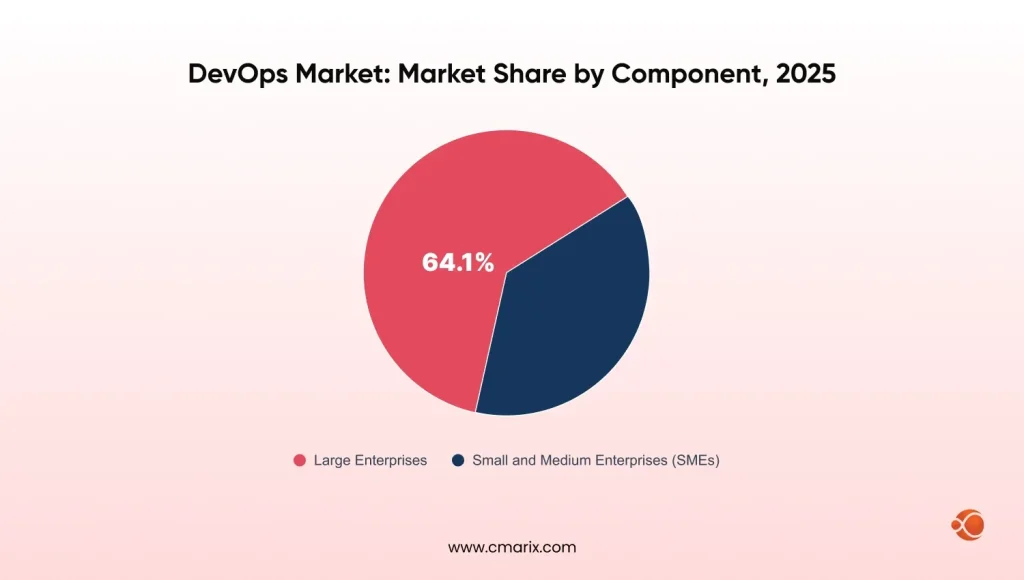
Large enterprises account for more than 64% of total DevOps market revenue. Having many different tools (e.g., continuous integration, continuous delivery, artifact storage, and release tracking) results in overhead costs, a skills gap, and numerous compliance issues that become harder to manage as an organization scales.
Azure DevOps Pipelines delivers what enterprise engineering organizations need at every layer:
- View all pipelines and deployments in one location.
- Control access to all resources and environments by role
- Audit logs to meet compliance regulations
- Parallel execution of jobs that can scale to thousands of engineers
- Microsoft Azure infrastructure with United States-based enterprise service level agreements
Moving from old build tools to Azure DevOps Pipeline could allow an organization to run 49% fewer releases per year. This represents an enormous improvement in the amount of time required to deliver value to customers.
The CMARIX engineering team has guided multiple enterprise clients in setting up DevOps for enterprise. Moving from fragmented CI/CD setups to unified Azure DevOps Pipelines environments delivers measurable results. Release speed and deployment reliability improve within the first few sprints.
Teams managing enterprise software solutions at scale need pipelines that hold up under real pressure. Azure DevOps Pipelines delivers that consistency at every stage from commit to production.
YAML Pipeline Configuration: Key Concepts
If you are configuring YAML pipelines for the first time, these are the core concepts to master first.
Agent Pool Configuration
yaml
pool: vmImage: 'ubuntu-latest' # Microsoft-hosted agent
or
yaml
pool: name: 'MyOnPremPool' # Self-hosted agent pool name
Conditional Execution
Run stages or jobs only when specific conditions are met.
yaml
condition: and(succeeded(), eq(variables['Build.SourceBranch'], 'refs/heads/main'))
This stage runs only if the previous stage passed and the source branch is main.
Environment Approval Gates
Configure approval requirements directly in your Azure DevOps environment settings. Authorized approvers must confirm before the pipeline proceeds to each environment.
Secure Variable Groups
Link variable groups from the Azure DevOps library to share secrets across pipelines.
yaml
variables: - group: 'ProductionSecrets'
Teams integrating Azure AI services into their applications store model API keys, endpoints, and subscription identifiers in secure variable groups. This keeps all sensitive configuration entirely out of source code.
Why Trust CMARIX for Azure DevOps Integration and Implementation
CMARIX offers professional DevOps consulting services for enterprise teams. Our engineers design, build, and operate CI/CD pipelines that scale too. We cover everything from YAML template architecture to self-hosted agent strategies, with the aim of applying effective patterns for each client meeting.
We have a talent pool of skilled, dedicated QA engineers who embed automated testing directly into your Azure DevOps Pipelines. Shift-left testing, coverage enforcement, and regression automation become a standard part of your delivery process.
Our team also brings deep expertise as an experienced .NET development company. Azure DevOps Pipelines integrates natively with the .NET ecosystem. We know exactly how to configure and optimize it for .NET workloads at any scale.
If your pipeline is still your biggest bottleneck, now is the time to fix that. Reach out to the CMARIX team today and let’s build something reliable.
Quick Recap: Azure DevOps at a Glance
| Key Questions | Overview |
| What are Azure DevOps Pipelines? | Microsoft’s enterprise-grade CI/CD platform for software delivery automation.Automates application build, testing, and deployment workflows.Supports virtually any programming language, framework, or cloud platform. Integrates with Azure, AWS, Google Cloud, Kubernetes, Docker, GitHub, GitLab, and Bitbucket. |
| Why Use Azure DevOps Pipelines? | Eliminates manual deployment errors and configuration drift.Accelerates release cycles through automated CI/CD workflows.Improves software quality with continuous testing and validation.Strengthens security, compliance, and deployment governance.Enables scalable DevOps practices across teams and environments. |
| Who Should Use Azure DevOps Pipelines? | Software development teams implementing DevOps practices.Enterprise engineering organizations managing large-scale applications.DevOps engineers, platform engineers, and cloud architects.Organizations adopting cloud-native, containerized, or microservices architectures.Businesses require secure and repeatable deployment processes. |
| When Should Organizations Implement It? | When software deployments rely on manual processes.When release cycles become slow, risky, or difficult to manage.When multiple environments require standardized deployment workflows.When compliance, approvals, and audit trails become critical business requirements.When scaling engineering teams and modernizing software delivery practices. |
| How Does Azure DevOps Pipelines Work? | Monitors source code repositories for changes and pull requests.Automatically triggers build, testing, and validation workflows.Generates version-controlled deployment artifacts.Promotes artifacts through development, staging, and production environments.Uses approvals, security checks, and quality gates to ensure safe releases. |
| Key Takeaway | Azure DevOps Pipelines is a unified CI/CD framework that connects source control, testing, deployment, security, and production delivery, enabling faster releases, better reliability, and enterprise governance. |
Final Words: Take the Next Step with Azure DevOps Pipelines
Azure DevOps Pipelines make things smoother for both developers and users. They give instant feedback on each commit through build pipelines, and their release pipelines keep deployments neat and under control in any situation. Plus, YAML config adds total transparency and traceability. Every phase from code push to final release is secured, too.
Whether you are starting from scratch or replacing a fragmented legacy toolchain, getting Azure DevOps Pipelines right requires both platform knowledge and architectural experience.
FAQs on Azure DevOps Pipelines
What are the core components of Azure Pipelines?
Azure DevOps Pipelines is made up of six parts: triggers, stages, jobs, steps, tasks, artifacts, and environments. Triggers kick off the pipeline, while stages group the main phases like build, test, and deploy. Each job runs on an agent and includes the steps that actually get things done. There are also tasks that offer pre-made actions from the Azure Marketplace. Artifacts then move build results around between stages. Lastly, environments define where deployments occur, help you get comfortable with changes, and track deployment history.
What is the difference between YAML and Classic pipelines?
YAML pipelines store the pipeline definition as a code file inside your repository. Classic pipelines use a visual drag-and-drop editor inside the Azure DevOps portal. YAML pipelines support version control, pull request review, multi-stage workflows, and reusable templates. Classic pipelines require no YAML knowledge but become harder to audit and maintain as your deployment complexity grows. Microsoft recommends YAML pipelines for all new Azure DevOps Pipelines projects.
When should I choose Microsoft-hosted agents vs. Self-hosted agents?
Pick Microsoft-hosted agents for builds with standard needs if you want no hassle with managing infrastructure. They’re ready to go without any setup.
Go for self-hosted agents if you need special tools, persistent dependency caches, or longer runtime. Also, pick them if you must follow certain rules or keep data residency requirements.
How do Pipeline Parameters differ from Pipeline Variables?
Pipeline parameters help you get started with your Azure DevOps pipeline correctly. They stop wrong or accidental setup changes. Variables store config info while the pipeline’s running and can be tweaked on the go. So, use params for reliable, managed starts, and variables for greater flexibility while the pipeline is active.
How does Azure Pipelines ensure continuous security during deployment?
Azure DevOps Pipelines safeguard each deployment with multiple security layers. They use features such as encrypted secret variables and Azure Key Vault integration. Plus, there are service connections with restricted permissions and environment approval steps. Also, branch protection policies and checks on YAML templates controlled by central security groups come into play. Tools such as Snyk and SonarQube run right in the pipeline to find issues. Lastly, quality gates stop deployments if tests fail or don’t meet coverage needs.
Can Azure Pipelines integrate with non-Microsoft source repos and clouds?
Yes. Azure DevOps Pipelines connect to GitHub, Bitbucket, GitLab, Subversion, and any external Git repository. It deploys to AWS, Google Cloud Platform, Heroku, and on-premises servers over SSH. It supports Docker, Kubernetes on any cloud provider, Helm, and dozens of third-party testing and security tools available through the Azure Marketplace extension ecosystem.