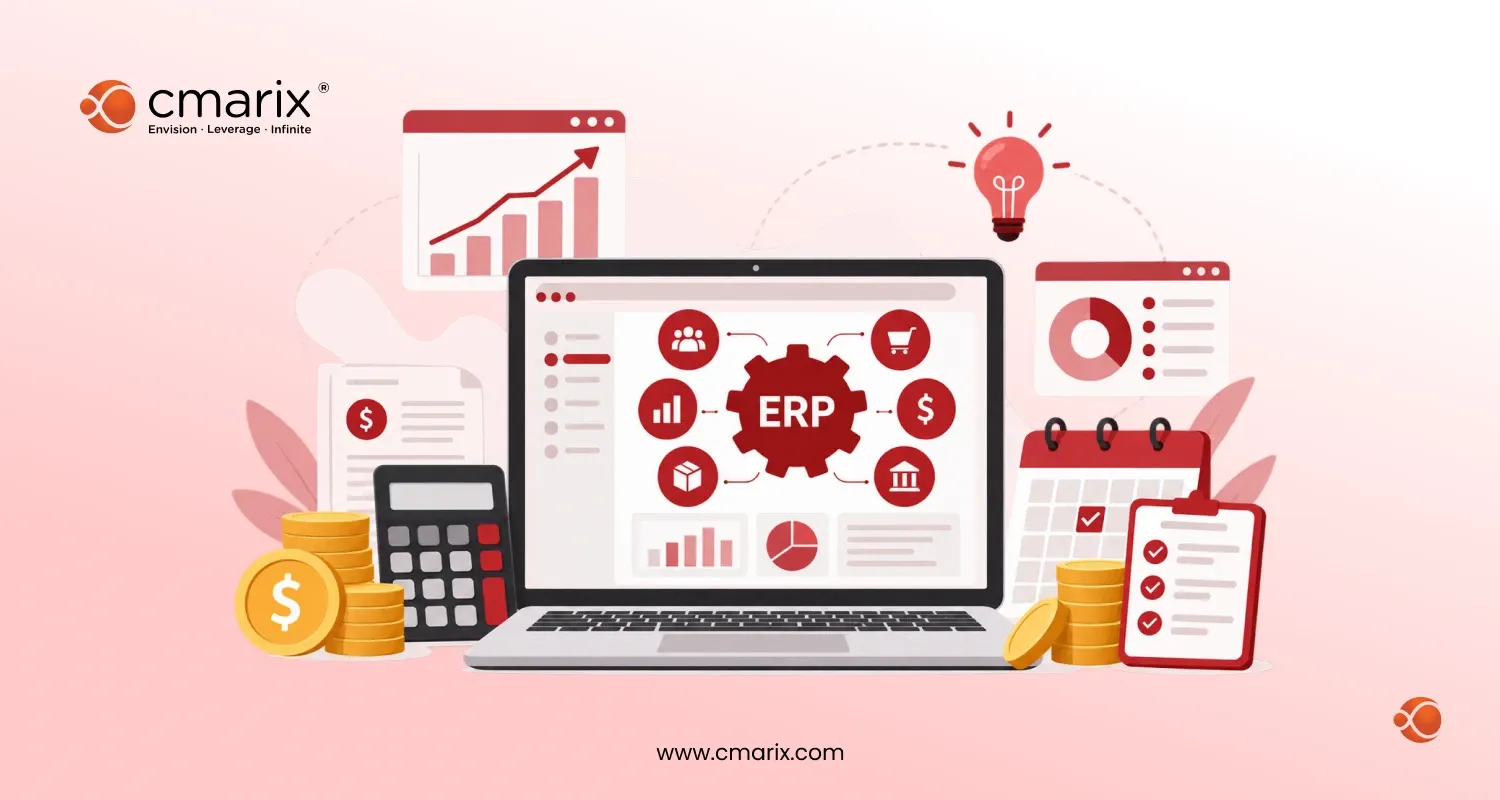
Quick Summary: Custom ERP software development allows organizations to move from disparate applications to an integrated solution that manages finance, inventory, HR, CRM, and other operational aspects of the business. This ERP software development guide provides technology options, pricing, timeframes, and explains when a custom ERP is preferable to cloud solutions.
Most companies experiencing growth don’t simply wake up one morning and make an impulsive decision to create custom ERP software. They reach this point after several months of tracking data across five spreadsheets, three different logins, and one accounting software that none of them trust.
That is the gap ERP software fills. The ERP software market reflects how seriously businesses now take this problem. Analysts at Grand View Research estimate that the market will top $77 billion in 2025. They expect it to nearly double by 2033 as more companies move their core operations onto a single connected platform. For a deeper breakdown of how ERP works under the hood, TechTarget’s guide to enterprise resource planning is a solid starting point.
This guide walks through what custom ERP software development actually involves: the build phases, the tech stack choices, realistic costs, and how to decide between a custom build and a SaaS platform. CMARIX has built and integrated ERP systems for manufacturing, finance, and real estate clients for over 16 years, so this guide leans on what works in practice, not just theory.
What Is Custom ERP Software Development?
Custom ERP software development is the process of designing and building an enterprise resource planning system around how your business actually operates, rather than forcing your operations into a prebuilt template.
In a custom ERP system, all departments, such as finance, stock, sales, human resources, and procurement, share a common database. All the departments use the same figures in real time. The single database eliminates the need to reconcile five different spreadsheets monthly.
Unlike off-the-shelf ERP software, a custom build only includes the modules your business needs. You are not paying for warehouse features if you run a service business, and you are not stuck waiting on a vendor’s roadmap for a feature your team needs today.
Why Businesses Choose Custom ERP Over Off-the-Shelf Systems
Most companies do not replace their systems for fun. They usually hit one of a few common walls first.
Their current setup cannot keep up with new compliance rules. Their reporting takes days instead of minutes. Or their team has simply outgrown the licensing model they signed years ago. We covered the specific reasons to upgrade your ERP system in more detail, but the short version is this: legacy systems get expensive in ways that never show up on an invoice.
A custom build also gives you room to grow. Instead of bolting together five separate tools, you get one set of enterprise software solutions built specifically around your workflows, your industry, and your reporting needs.
Get custom ERP solutions built around your workflows, integrations, and growth goals.
Key Phases of ERP Software Development
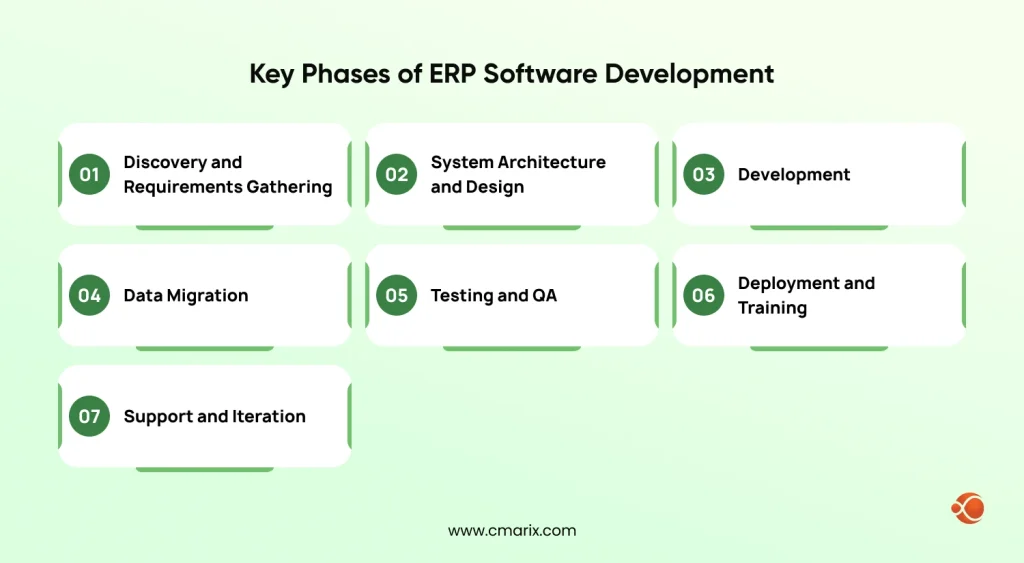
Every serious ERP project follows the same broad ERP implementation lifecycle phases, even when the names differ between vendors.
- Discovery and requirements gathering. A map of which departments need what data, and where current systems are failing today.
- System architecture and design. Define the database structure, integrations, and modules before any code gets written.
- Development. Build each module: finance, inventory, CRM, HR, or whatever the business needs.
- Data migration. Move records out of legacy systems and spreadsheets without losing history or accuracy. This step quietly causes more schedule overruns than any other, so it deserves real planning time.
- Testing and QA. Stress-test workflows, permissions, and integrations before anyone touches live data.
- Deployment and training. Roll the system out, either all at once or in phases, and get the team comfortable using it.
- Support and iteration. ERP software is never really “done.” Expect ongoing tweaks as the business changes.
Most teams choose between a “big bang” launch, where everything goes live at once, or a phased rollout, where modules go live one at a time. A phased rollout usually takes longer on the calendar but causes less day-to-day disruption.
Businesses with extensive financial recordkeeping often start by getting one piece right. If you need to develop an accounting software module before tackling the rest, that is a smart sequencing call, since finance data feeds nearly every other module.
ERP Software Architecture Design and Tech Stack
The architecture you choose shapes how your ERP performs for the next decade, not just the next year.
Most modern ERP builds run on a modular, API-first architecture. Each business function, such as finance, inventory, or HR, lives in its own module, and every module communicates with the others through a shared set of APIs. This setup makes enterprise application integration with your existing CRM, eCommerce platform, or third-party tools far easier than with a rigid, monolithic system.
A typical enterprise resource planning tech stack includes:
- A relational database (PostgreSQL, MySQL, or SQL Server) for transactional data
- A backend framework like .NET, Node.js, or Laravel for business logic
- A frontend framework, such as React or Angular, for the dashboard
- Cloud infrastructure (AWS, Azure, or GCP) for hosting and scaling
- REST API or GraphQL for integration with other tools and internal systems
The adoption of cloud computing has been almost universal for ERP systems as well, largely due to the absence of upfront hardware costs and the ease of access from remote locations. If your organization uses internal dashboard software or customer portals, good enterprise web application development, along with ERP, becomes critical.
Essential Modules Every ERP System Needs
Not every business needs every module, but a few show up in almost every serious ERP software development project:
| Module | Key Functions | Purpose |
| Finance & Accounting | General ledger, invoicing, budgeting, financial reporting | Manages financial transactions, tracks expenses and revenue, and generates financial statements. |
| Inventory & Supply Chain | Stock level monitoring, purchase orders, supplier tracking | Controls inventory, manages procurement processes, and maintains supplier relationships. |
| Human Resources (HR) | Payroll processing, attendance tracking, employee records | Handles employee information, compensation, leave management, and workforce administration. |
| Customer Relationship Management (CRM) | Sales pipelines, support tickets, customer history | Manages customer interactions, sales opportunities, and customer support activities. |
| Reporting & Analytics | Real-time dashboards, cross-module reporting, performance metrics | Provides insights by consolidating data from all modules for decision-making and business monitoring. |
CRM deserves special attention here. Many ERP projects treat it as an afterthought and bolt it on later, which usually causes integration headaches. Building enterprise CRM solutions into the ERP from day one keeps sales and operations data in sync.
It is also worth saying plainly: a feature-complete ERP nobody wants to open is a wasted investment. Solid enterprise UX design is what actually gets employees to use the system daily, instead of falling back on spreadsheets out of habit.
How Much Does Custom ERP Software Cost?
Custom ERP development costs vary widely based on scope, but most mid-sized projects land between $50,000 and $250,000. Large, multi-entity deployments with heavy customization can run well past $500,000.
A few factors push that range up or down:
- Number of modules and how deeply each one is customized
- Data migration complexity from legacy systems
- Integration requirements with existing tools
- Team location and engagement model (in-house, offshore, or hybrid)
Budget for more than the build itself. NetSuite’s research on ERP implementation outcomes points to a pattern across the industry: a large share of ERP projects end up costing several times their original estimate, largely due to underestimated data migration effort and scope that grows mid-project. Locking down requirements early is the single biggest lever for staying on budget.
How Long Does ERP Implementation Take?
The time taken will depend greatly on the size of the project. A single-department implementation may take 3-6 months, while an entire-organization solution will take 9-18 months.
SaaS platforms tend to deploy faster out of the box, which is exactly why a lot of teams ask how long does NetSuite ERP implementation take before comparing it against a custom build. A custom system takes longer upfront, but avoids the licensing ceiling that SaaS platforms eventually hit as a business scales.
Custom ERP vs SaaS ERP: Which Should You Choose?
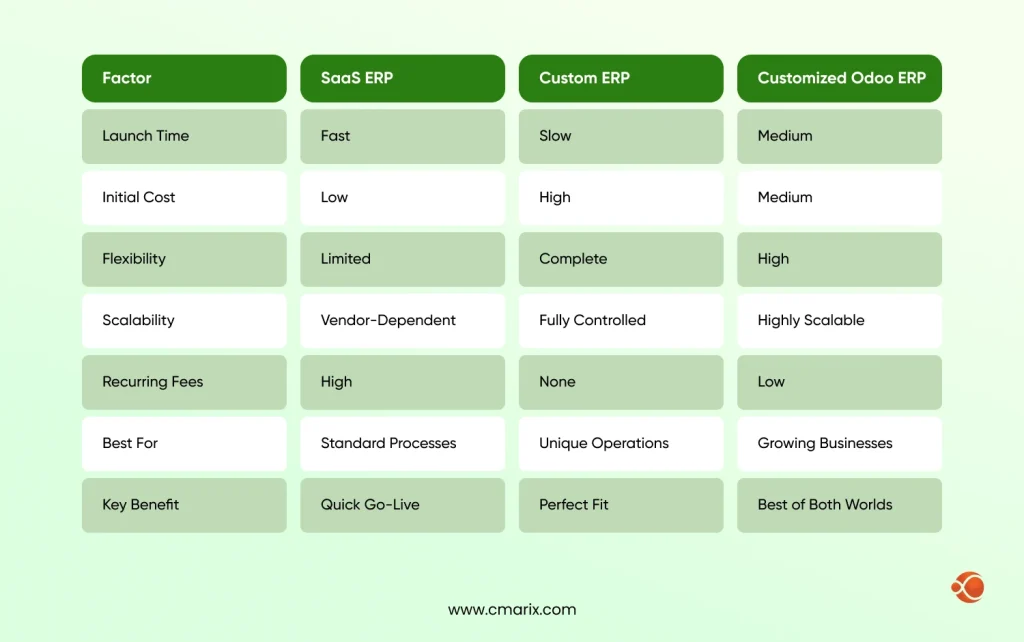
This question decides almost everything else about the project.
A SaaS ERP, like NetSuite or a standard Odoo deployment, makes sense if your processes are fairly standard and you need to move fast. You trade some flexibility for a faster launch and lower upfront cost.
A custom ERP makes more sense once your processes are too specific for a template, or when licensing and per-user fees start adding up faster than the value you get. Manufacturers, healthcare providers, and businesses with unusual compliance needs are the most common candidates for a fully custom approach.
There is also an alternative to this. Many companies use Odoo as their foundation and then heavily customize it, as this is more cost-effective than starting from scratch.
We have expertise in Odoo customization to build a tailored ERP solution.
Can an ERP System Scale as Your Business Grows?
Yes, as long as it was built with scaling in mind from the start.
A well-architected ERP scales in three directions: more users, more transaction volume, and more business locations or entities. Cloud infrastructure handles most of the technical scaling automatically. The bigger risk is usually architectural, not infrastructural. A system built with rigid, hardcoded workflows will need expensive rework later, even if the servers behind it can handle the load fine.
Here is yet another reason why early design choices are so important. A system designed with APIs from the start is better able to accommodate new modules and acquisitions than one cobbled together at the last minute.
Why Partner With CMARIX for ERP Software Development
CMARIX has spent more than 16 years building enterprise software for manufacturing, finance, real estate, and logistics businesses, so we have seen most of the ways ERP projects go sideways and how to avoid them.
If you are running on Odoo or considering it, our team builds and customizes a custom Odoo ERP solution around your actual workflows instead of forcing you into default modules.
Manufacturers get particular attention from us. We build custom ERP and MRP solutions that integrate production planning, inventory, and procurement into a single system, rather than leaving shop floor data disconnected from the front office.
And if your project goes beyond ERP into broader internal tools, dashboards, or customer-facing platforms, our team works as a full enterprise app development company, so your ERP investment connects cleanly with everything else your business runs on.
Final Thoughts
ERP software development is not a one-size-fits-all project. The businesses that get the most value usually start with a clear picture of their actual workflows before they touch a single line of code.
Whether you need a custom build from the ground up, a heavily customized Odoo deployment, or an ERP and MRP system built for manufacturing, the team at CMARIX can help you map the right path and build it properly the first time.
FAQs About ERP Software Development Services
What are the key phases of ERP software development?
Discovery, architecture and design, development, data migration, testing, deployment, and ongoing support. Most projects underestimate the time data migration and testing actually take.
How much does custom ERP software cost?
Most mid-sized custom ERP projects cost between $50,000 and $250,000. Larger, multi-entity deployments can exceed $500,000, depending on the depth of customization.
How long does it take to develop a custom ERP?
A focused, single-department build typically takes three to six months. Full enterprise-wide systems usually take nine to eighteen months.
Should I build a custom ERP or buy a SaaS solution?
Use SaaS if you have relatively typical procedures, and speed of deployment is the priority. Use custom development if your processes are so unique that using a template will force you to make sacrifices, or if the cost per user for SaaS is increasing faster than your staff size.
What are the essential modules to include?
The five modules that should definitely be there are finance, supply chain management, HR, CRM, and reporting. Add additional modules according to your field.
Can an ERP system scale as my business grows?
Yes, provided it is built on a modular, API-first architecture from the start. Cloud infrastructure handles most of the technical scaling; the architecture decisions handle the rest.