Quick Summary:
Block-enabled WordPress themes let you visually edit a site’s headers, footers, sidebars, and templates with the same block editor used for posts and pages. Built on HTML template files and a theme.json configuration file rather than PHP templating, they power WordPress’s Full Site Editing (FSE) system. Since WordPress 5.9, block themes have become the default direction for new WordPress theme development.
WordPress powers over 41% of all websites, according to W3Techs’ CMS market share data, so any change to how its themes are built affects a huge share of the web. Block-enabled WordPress themes are that shift: moving away from PHP-templated themes toward themes built entirely from blocks, as documented officially in the WordPress Block Editor Handbook.
The first technical groundwork for block-based WordPress themes was released in the Gutenberg project’s GitHub repo near the end of 2019. The release of WordPress 5.9 in January 2022 brought FSE into the WordPress core and made block themes a core-supported theme format, rather than an experiment.
This is important for anyone assessing the theme today. “Twenty Twenty-Two” was the first default WordPress theme to use only the block theme template system, and all default themes after “Twenty Twenty-Three” were developed using the same pattern. “Twenty Twenty-Five,” which is the current default theme as of WordPress 6.7, released in November 2024, comes with over 70 block patterns and nine style variations, demonstrating the development of block theme tooling since its experimentation phase in 2020.
A classic PHP theme still works and is still actively maintained across the ecosystem, but it is no longer the reference implementation WordPress core ships by default.
Choosing a block-enabled WordPress theme comes down to three checks: confirm the theme ships an index.html template, review its theme.json for the color, typography, and spacing controls you need, and test the Site Editor experience before activating it on a production site.
What Exactly is a Block-Based Theme?
The block-based themes are WordPress themes built with blocks. Such use of blocks helps the website editor edit all visual areas of a website, such as footers, sidebars, and headers. Apart from posting content across post types, the website editor can now make fundamental changes to the theme’s look and feel by adjusting blocks such as headers, footers, and sidebars as needed.
In this respect, one must remember the key differences between existing theme templates and the block-based ones. For regular themes, the entire template, its elements, and the hierarchy or positioning are based on PHP code. In contrast, in block-based themes, the parts are block templates.
A block theme or block template consists of blocks that allow the WordPress website designer to create the website’s look and feel by placing blocks for the header, footer, sidebar, and other elements as required.
The Performance Problem with Legacy PHP Themes
Theme architecture comes with its own performance price. The CMS section of the 2024 Web Almanac, produced by HTTP Archive, reports that 40% of WordPress-powered websites met Google’s Core Web Vitals criteria in 2024, up from 28% the previous year.

That gap is not evenly distributed. Heavier, PHP-templated themes packed with page-builder plugins tend to ship far more render-blocking styles and scripts than a lean block theme that relies on core block markup and a single theme.json file.
A block-enabled WordPress theme cannot single-handedly fix a slow host or bloated plugin stack, but it removes an entire category of legacy PHP template overhead and unnecessary custom CSS that classic themes tend to accumulate over time.
Theme selection is just one of many variables, but it is the variable that a website owner has the most direct control over. Factors like hosting performance, image optimization, and the number of plugins will all contribute to the final Core Web Vitals score, which is why the table below compares their structures.
Lastly, there is also an increasing need for porting the default WordPress themes. This will help theme developers compare how features and key components are handled in a block-based approach with those in older themes.
How To Create and Edit The Block-Based Themes?
The workflow for managing block themes has evolved significantly. While visual drag-and-drop editing remains standard, the manual process of switching to “Code Editor” mode and copying and pasting HTML into directory files is obsolete. Today, the official and streamlined way to create, edit, and export block themes is to use the WordPress Site Editor paired with the official Create Block Theme Plugin.
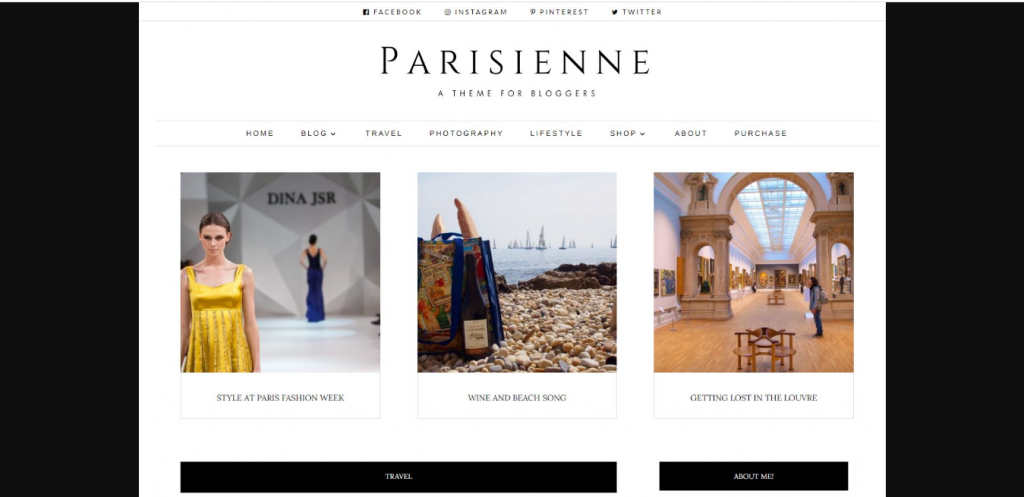
An Example of a Block-Based Theme: Parisienne Theme
Block themes in WordPress have come a long way from being experimental design ideas to becoming a fully fledged, stable core feature for website construction. The idea, which began as an experiment with basic themes such as Parisienne, has now progressed to Full Site Editing (FSE), a built-in system incorporated into the core of WordPress since version 5.9. The need for experimental plugins is a thing of the past, as designers can control header, footer, global style settings, and layouts via the unified Site Editor using drag-and-drop functionality without ever coding in PHP.
All issues related to the “missing blocks” have been resolved through core improvements. With the development and improvement of dynamic layout blocks, including the Query Loop block, it has become possible to conveniently display posts, archives, and custom post types while configuring query parameters. Likewise, with the development of advanced structure blocks such as Group, Row, Stack, and Columns, creators can create pixel-perfect layouts natively without relying on external tools.
There has also been a significant shift in the visual and architectural construction of themes, driven by the introduction of the theme.json file. Rather than using fragmented CSS sheets and complex PHP templates, block themes use an organized system of static HTML files with Gutenberg block markup and code comments. This makes the theme structure much more efficient, and page load speeds are much faster because CSS resources are loaded only when needed by specific blocks on the page.
By 2026, the process of theme creation has become fully democratized through tools such as the WordPress Create Block Theme Plugin, which enables users to create, duplicate, and export personalized themes directly in the browser without coding. Even though old-school PHP themes continue to be used extensively on legacy sites, around 44.2% of newly created themes submitted to the directory are block themes. This indicates an irreversible trend within the industry towards a modular, block-first web design approach.
Twenty Nineteen and Twenty Twenty Themes
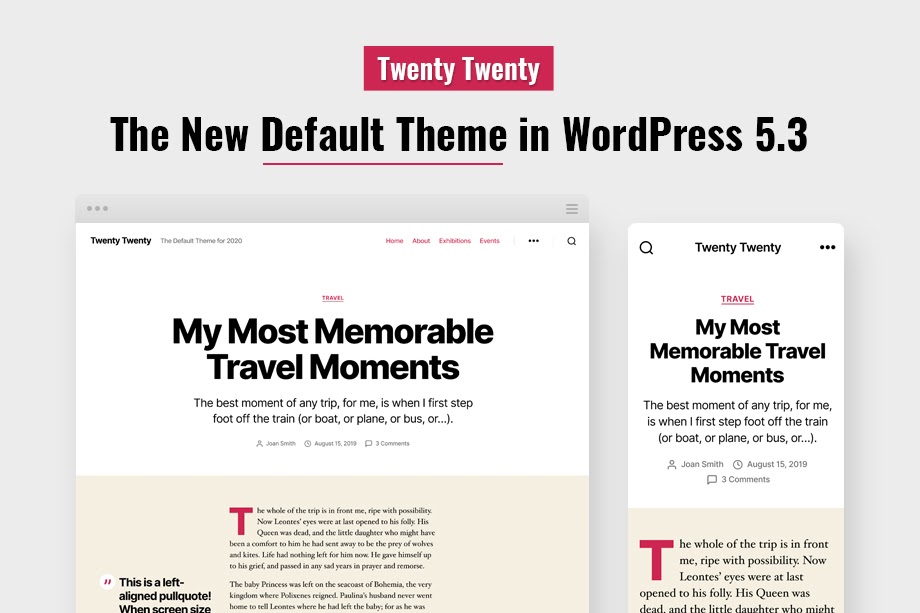
The block-based repository of Gutenberg includes two pools of requests to tweak the default themes in the Twenty Nineteen and Twenty Twenty categories. According to the expert findings, after the approach is implemented, the blocks under the Twenty Nineteen themes look tidier and more cohesive than those under the Twenty Twenty theme.
Classic Themes vs. Block Themes at a Glance
The table below summarizes the core architectural differences between the two theme types referenced throughout this guide, so you can compare them at a glance.
| Aspect | Classic Theme | Hybrid Theme | Block Theme |
| Primary Templating | PHP files (e.g., header.php, index.php) | PHP files with selective block-based sections | HTML block templates (e.g., templates/index.html) |
| Styling & Config | functions.php + style.css + Customizer | functions.php + theme.json + style.css | Mostly consolidated into theme.json |
| Editing Interface | Classic Page/Post Editor or Page Builders | Block Editor (for content) + Customizer / Widgets | Site Editor (Appearance > Editor) |
| Header / Footer Editing | Hardcoded in PHP files; customized via Customizer/widgets | Hybrid PHP files containing block template parts | Visually edited as block-based Template Parts |
| Widgets & Menus | Appearance > Widgets and Appearance > Menus | Classic menus/widgets or basic block-based widgets | Replaced by block-based Template Parts and Navigation Blocks |
| Front-end Style Performance | Usually loads one massive, monolithic stylesheet | Monolithic stylesheet + block-specific CSS | High performance; enqueues CSS only for blocks used on the page |
| Minimum Required Files | style.css + index.php | style.css + index.php + theme.json | style.css + templates/index.html |
How Full Site Editing Actually Works
Full Site Editing (FSE) is the feature that all of these themes provide. Rather than just editing post and page content within the block editor, FSE allows for block editing of everything from headers and footers to sidebars.
Under the hood, a classic theme defines its header.php and footer.php using PHP template tags and hooks. A block theme instead defines a templates/index.html file made of block markup, with reusable pieces stored separately as template parts.
This modification also changes who can safely make structural changes to a site. Under the PHP model, editing a header meant directly editing template files, which is risky for a non-developer and is typically gated behind a child theme or developer involvement. Under FSE, the same header edit occurs in wp-admin with instant visual feedback, reducing the need for dedicated WordPress developers for minor updates. This shift is the single biggest practical difference site owners notice when they switch.
Minimum File Structure for a Block Theme
According to the Official WordPress Theme Handbook, the minimum required files for a block theme are style.css and an index.html file in the templates folder; the PHP template file is not required.
my-block-theme/ |
theme.json: The Configuration Layer
The theme.json reference is, according to the official “WordPress Themes Handbook”, “the critical part that feeds down into all of the others.” It is responsible for controlling colors, typography, spacing, and available configuration options in the editor.
{ |
The templateParts declaration lets WordPress render header.html and footer.html as the correct Header and Footer blocks in the Site Editor, rather than generic template-part placeholders.
Beyond color and typography, theme.json also controls layout constraints, spacing scales, custom CSS properties, and whether block features such as duotone filters, background gradients, and border radius controls appear in the editor UI at all. A theme author can hide a setting entirely rather than just leave it at a default, which helps the theme maintain an integrated design system even when users have full editing access.
Key Building Blocks of a Block-Enabled WordPress Theme
theme.json and template parts are the foundation, but four other components determine how flexible and maintainable a block theme is in practice.
Block Patterns
Patterns are predefined groupings of blocks that may include hero sections, price tables, or testimonials, among others, and are supported by the theme. As a result, there is no need to construct them manually with separate blocks, because the user will just have to click to insert the pattern they need. There are more than 70 patterns available in the Twenty 25 theme across categories such as Services, Events, and Calls to Action.
Style Variations
A style variation refers to another form of the theme.json file located in the /styles directory of the theme. It enables changes to the entire color scheme and font settings without affecting the design or template layout. There are nine style variations in the Total Twenty Five theme, including Default, Evening, Noon, and Dusk styles.
The Block Bindings API
Introduced to connect block attributes to dynamic data sources, the Block Bindings API lets a block theme pull a value from a custom field, post meta, or a plugin-registered source directly into a block’s content without custom PHP template code. This increasingly lets no-code and low-code site builders pull dynamic data that used to require a custom template tag.
Navigation and Query Loop Blocks
The Navigation block is an alternative to wp_nav_menu(), which displays menu options as blocks within the header-template.php file. The Query Loop block is a substitute for the WP_Query loops used in PHP templates, allowing a theme developer or site administrator to configure post queries by category or taxonomy without any code.
Popular Block-Enabled WordPress Themes to Explore
The clearest reference examples are WordPress’s own default themes, each of which advanced the block theme system in a specific way.
- Twenty Twenty-Two: the first default block theme, establishing the baseline template-part and theme.json structure.
- Twenty Twenty-Three: included styles as a key feature, enabling a single theme to ship multiple styles.
- Twenty Twenty-Four: expanded the pattern library significantly and refined business-site templates.
- Twenty Twenty-Five: the current version, which features 70+ patterns, 9 styles, and integration with the Block Bindings API.
Beyond the defaults, the WordPress.org theme directory filters for block themes, and the Gutenberg GitHub repository hosts additional working examples maintained alongside core development.
Common Pitfalls When Adopting Block Themes
Teams moving to a block-enabled WordPress theme for the first time tend to hit the same handful of issues, and the patterns below show where those transitions usually break down.
- Potential problems with plugin compatibility. Plugins developed for the Customizer or widgets.php may have issues working with the Site Editor and should be checked for compatibility before launch.
- Edits made only through the Site Editor are live in the database; a theme update won’t overwrite them, but they also won’t carry over if you migrate the site without exporting templates first.
- A block theme technically works without one, but skipping theme.json means losing most of the design-system consistency that makes block themes worth adopting in the first place.
Editing a Block Theme Without Writing Code
Website administrators can edit any theme that uses the blocks feature in WordPress, and they can add, move, or remove elements of the site’s header, footer, or sidebar using drag-and-drop block editing in the wp-admin Site Editor.
- Open Appearance → Editor from wp-admin
- Select a template or template part to edit visually.
- Switch to the Code Editor view to inspect or copy the generated block markup.
- Export the template and drop the HTML into your theme’s /templates or /parts folder.
It’s worth considering in advance of development. Since the default behavior of the Site Editor is to save all changes to the database, visual changes won’t be reflected in your theme’s files before exporting, which becomes an issue when working with a team that uses the Git workflow or a deployment process.
Theme authors distributing a block theme publicly should treat the exported HTML as the source of truth and commit it back into the theme folder, rather than leaving customizations to live only in a site’s database, where they won’t travel with the theme package.
Conclusion
Block-enabled WordPress themes are no longer an experimental side branch of theme development; they’re the direction WordPress core itself has been building toward since version 5.9, and every default theme since Twenty Twenty-Two has shipped as one.
FAQs about a block-enabled WordPress theme.
What is a block-enabled WordPress theme?
A block-enabled WordPress theme is a theme built from HTML block templates and a theme.json configuration file instead of PHP template files, allowing every part of the site, not just posts and pages, to be edited with the block editor through Full Site Editing.
Do these themes require coding knowledge?
Basic customizations such as colors, design, header, and footer placement do not require coding, thanks to the Site Editor. Creating a theme from scratch or customizing theme.json requires some HTML/CSS/JSON knowledge, though.
What WordPress version do I need for block themes?
Full Site Editing and block theme support shipped in WordPress 5.9, released January 2022. Any WordPress installation on 5.9 or later can run a block-enabled WordPress theme without a plugin.
Can I convert a classic PHP theme into a block theme?
No automatic conversion is available; themes will have to go back to the drawing board to create new HTML block templates and implement style changes in theme.json. It can hardly be considered a migration process by most companies, given the differences among them.
Are block-enabled WordPress themes better for performance?
They remove one layer of legacy PHP templating overhead and could use fewer custom CSS files, but data from the HTTP Archive on Core Web Vitals suggests that hosting, images, and plugins are even more important than theme structure.
Where can I find official examples of block-enabled WordPress themes?
WordPress.org’s default themes from Twenty Twenty-Two onward are all block themes and are the most reliable reference examples, alongside the working examples maintained in the Gutenberg GitHub repository.