

Quick Summary: Companies are moving away from Salesforce CRM and toward Laravel PHP to reduce costs, own their data, and make the system more flexible. Custom CRMs allow for flexible system architectures and AI integrations, making them a better fit for the modern enterprise, especially in 2026. The blog is meant to discuss the move, its viability for your business, and other relevant information, providing a true comparison of custom CRM vs Salesforce 2026.
A quiet revolution is happening in the world of enterprise software development in 2026. Budget holders who have in the past committed to six-figure Salesforce contracts are now planning architecture reviews. CTOs who have in the past been evangelists for the “buy, don’t build” approach are rethinking these principles on a line-by-line, license-by-license level.
This shift is not happening in isolation. It is part of broader enterprise software trends in 2026, where organizations are prioritizing ownership, flexibility, and AI-readiness over vendor dependency.
Enterprises are spending 15% more on software in 2026, driven largely by demand for AI infrastructure. Yet somehow, the growing share of this spending is shifting away from monolithic SaaS applications and towards custom-built, framework-native applications, including CRMs built with the Laravel framework.
At the core of this transition is the growing reliance on modern database migration tools, which enable enterprises to systematically move from proprietary data models to fully controlled, relational architectures without compromising data integrity or continuity.
This is not a phenomenon driven by sentiment towards custom code. Rather, it is a rational business response to the convergence of several factors:
- Runaway Salesforce licensing costs
- Emergent data geopatriation regulations
- Headless CRM architecture demands
- The arrival of agentic AI workflows that SaaS platforms simply cannot accommodate without friction highlights the critical need for specialized AI workflow automation services.
This article breaks down the Custom CRM vs Salesforce decision matrix for enterprise teams in 2026, covering technical, financial, and strategic considerations.
Start Your Migration Plan
Should Enterprises Replace Salesforce in 2026? Key Answers & Insights
Should enterprises replace Salesforce with a custom CRM in 2026?
If the organization is already large with over 75 users, if data control is paramount, or if the organization is considering the full power of AI, it is likely to receive greater long-term benefits with a custom CRM, such as one built on the Laravel platform.
Is Laravel the best choice for custom enterprise software solutions?
Yes. With modern PHP versions, Laravel Octane, queue systems, and cloud-native deployment patterns, Laravel supports high-scale, secure, and performant enterprise applications.
How much can companies save by moving away from Salesforce?
A mid-to-large enterprise can save 40-70 percent of CRM-related software costs in 5 years.
What is the biggest advantage of a custom CRM over Salesforce?
The main advantage is that data, logic, integrations, and AI workflows are owned by you and not by a vendor.
How long does it take to migrate from Salesforce to Laravel?
A migration from Salesforce to Laravel can take 6-8 months when approached in a structured manner.
The Salesforce Licensing Reality in 2026: What the Renewal Actually Costs
Salesforce’s current enterprise licensing tiers extend well beyond the per-seat sticker price. The full TCO (Total Cost of Ownership) optimization equation for a mid-to-large enterprise typically includes:
| Cost Component | Details |
| Base Licenses | Sales Cloud Enterprise or Unlimited: $165–$330 per user per month |
| Add-on Clouds | Service Cloud, Marketing Cloud, Revenue Intelligence, each with separate pricing |
| API Call Overages | Additional charges when monthly API limits are exceeded |
| AppExchange Integrations | Third-party apps often require separate subscription fees |
| Admin / Developer Costs | Ongoing need for certified Salesforce Admins or Developers for configuration and updates |
| Implementation Partner Fees | Costs for external partners when workflows exceed native declarative capabilities |
| Annual Price Escalation | Multi-year contracts typically include yearly price increase clauses |
The Number Most CFOs Miss
For a 200-seat enterprise deployment with multi-cloud requirements, total annual spend typically ranges from $800,000 to $2.5M. That figure does not account for the hidden cost most finance teams overlook: the opportunity cost of not owning your own data architecture.
This is precisely where the calculus of custom CRM vs. Salesforce shifts decisively in favor of forward-thinking enterprises.
What Is Driving Enterprises to Rebuild on Laravel in 2026?
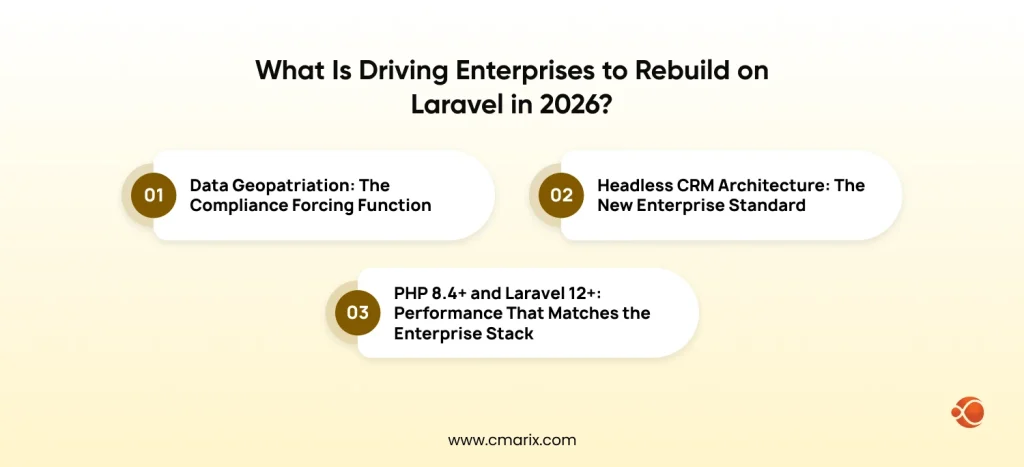
1. Data Geopatriation: The Compliance Forcing Function
Gartner’s strategic technology trends for 2026 include data sovereignty and geopatriation as board-level considerations, as does Forrester’s 2026 enterprise data sovereignty research for regulated markets worldwide. Organizations in the EU, Australia, Canada, India, and the Gulf region are subject to increasingly prescriptive legislation on:
- Where customer data physically resides
- Who can access it and under what conditions
- How it must be encrypted at rest and in transit
- How long can it be retained, and how is deletion enforced
Australia’s strict regional data privacy guidelines under the Privacy Act are a good example of this increased compliance burden. Organizations must demonstrate precision in their control over data residency, access, and retention periods. As a multi-tenant SaaS provider, Salesforce offers limited data locality, especially for organizations outside North America.
The Laravel Advantage
With a custom-built CRM solution on dedicated cloud infrastructure (AWS, Azure, GCP in a specific region), you have full data sovereignty. Your data remains in your jurisdiction, under your control. For industries such as financial services, healthcare, legal, and government, data sovereignty is not a “nice to have”; it is a “must have”.
2. Headless CRM Architecture: The New Enterprise Standard
The idea of a monolithic CRM system, a single interface to serve every department, every workflow, every interaction, is architecturally obsolete in complex enterprises.
The dominant pattern in 2026 will be a headless CRM architecture, where a backend API will serve multiple frontends at once, where the frontend could be:
- A sales rep’s desktop dashboard
- A customer-facing self-service portal
- A partner extranet
- An AI agent’s function-calling interface
- An IoT-connected field device
While they can approximate a headless approach through their Experience Cloud and API offerings, it is neither trivial nor inexpensive and is subject to their own API governance model. Laravel, on the other hand, is a true headless solution. All routes, resources, and relationships are API first.
Teams that have built modern SaaS portals with custom frameworks have found that Laravel’s resource-based structure allows them to plug in new front ends in days, not months. This can truly be a competitive advantage when your CRM must support multiple interface types simultaneously.
3. PHP 8.4+ and Laravel 12+: Performance That Matches the Enterprise Stack
One of the biggest complaints about PHP-based custom enterprise software solutions is poor performance and scalability. That concern was no longer relevant several version cycles ago.
What changed the conversation:
- PHP 8.4 with JIT compilation delivers asynchronous request handling and response throughput that competes directly with Node.js and Go for most enterprise CRM workloads.
- Laravel Octane, running on Swoole or RoadRunner, enables connection pooling and can serve thousands of concurrent requests per second with a modest infrastructure footprint.
- Horizon, Redis caching, and read replicas provide the observability and throughput that enterprise-grade CRM operations demand.
Teams following enterprise-grade Laravel deployment standards with proper queue workers, cache drivers, and zero-downtime deployment pipelines routinely run multi-million-record CRM deployments without performance degradation. Laravel is no longer a “startup choice.” It is a legitimate enterprise-grade foundation.
The TCO Comparison: Custom Laravel CRM vs Salesforce at 5 Years
The cost justification for a custom Laravel CRM solution becomes attractive when viewed over a meaningful enterprise time span. The following model reflects conservative estimates for a 150-user deployment:
| Cost Component | Salesforce (5-Year) | Custom Laravel CRM (5-Year) |
| Licensing / Hosting | $1.8M – $3.5M | $120K – $280K (cloud infra) |
| Implementation / Config | $200K – $600K | $180K – $350K (build) |
| Ongoing Admin / Dev | $300K – $500K | $200K – $320K |
| Integration Costs | $150K – $400K | $80K – $180K |
| Total 5-Year TCO | $2.45M – $5M | $580K – $1.13M |
🚀 Build an AI-Ready CRM Without Vendor Lock-In
CMARIX engineers custom Laravel CRMs with agentic AI workflows, real-time data pipelines, and API-first architecture.
Why The Gap Is Structural, Not Circumstantial
The delta between these two numbers is not marginal. The delta between these two numbers is not marginal. The cost curve for enterprises with a stable or growing number of users flattens after year one for a custom software product development solution. Salesforce’s cost curve, on the other hand, takes on a slope due to:
- Per-seat pricing that increases with every new employee
- Cloud storage overages as data volume grows
- Annual escalation clauses embedded in multi-year contracts
- Add-on feature costs that increase as business needs evolve
Organizations working with experienced partners who can implement enterprise CRM solutions on Laravel, built on a tested architectural foundation, can compress both the timeline and build costs, making the financial case even more favorable.
Agentic AI in CRMs: Why Laravel Wins This Round
The most technically decisive dimension of the Custom CRM vs Salesforce comparison in 2026 is agentic AI integration. This is where the architectural gap between SaaS CRMs and custom frameworks is widest, and widening.
What Agentic AI Actually Means in a CRM Context
Agentic AI systems are those that not only react to questions posed but also act independently by performing multiple workflows. In a CRM environment, this may include:
- Prospect research and information enrichment from external sources
- Crafting a personalized proposal based on deal history and communication patterns
- Initiating follow-up sequences based on prospect engagement patterns without any direct intervention
- Updating records based on structured data outputs derived from unstructured inputs
- Escalating exceptions to human agents with context already assembled.
Salesforce has also developed AI capabilities through its Einstein and Agentforce products. However, these are only delivered in a closed environment. The capabilities of your AI agents are limited to what Salesforce makes available via its APIs. This restriction creates a strategic liability for Salesforce, pushing enterprises to seek open AI agent development solutions.
What Laravel Unlocks for AI-Driven CRM Teams
A custom Laravel CRM helps enterprises directly integrate an LLM API, enabling connection of OpenAI, Anthropic, or Other models to the CRM’s data layer without the cost of another platform, the waitlist for the feature flag, or vendor approval. This means that:
- Custom tool definitions that let AI agents interact with your specific CRM workflows
- Direct database access for real-time context retrieval (RAG over your own customer data)
- Multimodal AI processing architectures that handle document ingestion, voice note summarization, and image-based data extraction natively.
- Autonomous workflow agents that trigger Laravel jobs, dispatch queued tasks, and write back structured results without a human in the loop.
Teams that build AI SaaS products on Laravel consistently find that the framework’s event-driven architecture and policy-based authorization layer make it a clean substrate for agentic AI. The result is CRM intelligence genuinely embedded in business processes, not bolted on through a third-party marketplace.
Salesforce’s Hidden Lock-In: What Enterprises Do Not See Until It Is Too Late
Aside from the license cost, other lock-ins with Salesforce seldom come up during the procurement phase. By the time you realize these constraints, your team is already well into the project.
The Four Lock-In Categories
1. Data model lock-in
Salesforce provides proprietary objects, relationships, and formula fields. As a result, your data model is tailored to Salesforce’s way of thinking, not yours. Leaving the platform means costly data transformation efforts.
2. Apex lock-in
Custom logic written in Salesforce’s proprietary Java-like language, known as Apex, is not portable at all. Thus, every single line of Apex code is instantly worthless the minute you need to leave Salesforce.
3. Process Builder and Flow lock-in
Automation built in Salesforce declarative tools cannot be exported. All workflow rules, approval processes, and Flows must be re-created from scratch in a new system.
4. Ecosystem dependency
Third-party AppExchange apps that your team relies on may not have independent equivalents elsewhere, creating secondary migration challenges that compound the primary ones.
What Owning Your Stack Looks Like
A custom Laravel CRM eliminates all of these categories in a single architectural decision:
- Your codebase is portable and written in standard PHP
- Your schema belongs to you and lives in a standard relational database.
- Your business logic is readable and maintainable by any competent PHP developer.
- Your migrations are standard SQL with built-in rollback support.
Nothing is stranded. Nothing requires a vendor’s permission to access, modify, or export.
This is not a theoretical discussion. At CMARIX, we have successfully implemented enterprise CRM systems for SaaS companies, migrating from a proprietary system to a custom Laravel solution that has cut software costs by more than 60 percent each year while maintaining all the custom business logic rules we’ve developed over the years.
This is not theoretical. CMARIX has delivered enterprise CRM implementations for SaaS businesses where migrating from a proprietary platform to a custom Laravel stack reduced annual software overhead by over 60% while preserving every custom business logic rule the team had accumulated over the years.
Laravel’s Enterprise-Grade Security Architecture
The security concerns with building a custom CRM solution are valid, but they are quickly becoming a relic of the past. Laravel’s security model in 2026 is robust, auditable, and transparent, unlike those of closed SaaS environments.
Core Security Capabilities
Key security foundations in a well-architected Laravel CRM include:
| Security Aspect | Custom Laravel CRM Approach |
| Authentication | Utilization of Laravel Sanctum or Passport for token-based authentication, with support for enterprise SSO (Okta, Azure) via Socialite or SAML |
| Authorization | Policy-based authorization supporting row-level, object-level, and role-based access with full audit trails |
| Encryption | Field-level encryption for sensitive data (PII, financial records) using built-in encryption facades with KMS-managed keys |
| Audit Logging | Logs every data mutation with actor, timestamp, and change delta to meet SOC 2, ISO 27001, and GDPR requirements |
| Penetration Testing | Full codebase access allows comprehensive security testing by internal or external security teams |
Why Auditability Beats Assumption
With Salesforce, you are trusting a vendor’s published security posture. With a custom Laravel CRM built alongside the right cloud security solutions, you can verify the security posture at every layer. For regulated industries, that distinction is material and increasingly required by auditors.
The Migration Path: From Salesforce to Laravel CRM
| Phase | Timeline | Focus | Outcome |
| Audit & Mapping | 1–4 Weeks | Data audit, schema design using Laravel migrations | Migration-ready data blueprint |
| Core CRM Build | 2–5 Months | Contacts, deals, activities, reporting, RBAC | Modular CRM foundation |
| Integration Layer | 4–6 Months | APIs + integrations (ERP, marketing, payments, BI) | Connected ecosystem |
| Parallel Run | 6–8 Months | Validation + user training alongside Salesforce | Smooth, low-risk transition |
| Optimization & AI | 8+ Months | AI scoring, automation, forecasting | Intelligent, high-ROI CRM |
Phase 1: Audit and Schema Mapping (Weeks 1-4)
The primary step is a comprehensive audit of your current Salesforce configuration. This covers:
- All standard and custom objects, fields, and relationships
- Apex classes and triggers
- Process Builder flows and workflow rules.
- Third-party AppExchange integrations and their data dependencies
The output is a data migration blueprint that translates Salesforce’s proprietary model into a normalized relational schema. Laravel’s schema migration system, which is a core strength of professional Laravel web application development makes this translation systematic, with rollback capabilities at every stage.
Phase 2: Core CRM Build (Months 2-5)
With the schema defined, the build phase constructs the core CRM modules:
- Contact and account management
- Pipeline and deal tracking
- Activity and communication logging
- Reporting and dashboard layer
- Role-based access and permission structure
Our approach to Laravel web application development at CMARIX is based on a modular architecture pattern. This means that each domain in a CRM system, such as sales, support, or marketing operations, is created as a separate service. This approach allows for a module-by-module approach to deployment, reducing the risk of a single cutover event.
Phase 3: Integration Layer (Months 4-6)
A custom CRM system is not in a vacuum; rather, it should integrate smoothly with Email and calendar platforms.
- Marketing automation systems
- ERP and finance software
- Payment gateways and billing systems
- Data warehouses and BI tools
This is where the custom API integration solutions offered by the Laravel stack can be useful, which provides a clean way to resolve this issue. An HTTP client, a webhook, and an event broadcasting client provide a clean way to resolve this issue. REST, GraphQL, and gRPC integrations are natively available with this stack. When we consider the term ‘enterprise businesses with ecommerce,’ this is the natural extension of the integrations. Developers working with this stack are already using CRM data alongside the ecommerce application layer, which provides a unified view of the customer through a single data model.
Phase 4: Parallel Run and Cutover (Months 6-8)
Before decommissioning the Salesforce instance, a parallel run is conducted to keep both systems operational. The purpose of this phase is two-fold:
- Validation: Here, your team will validate data integrity and workflow/reporting equivalence between the old and new systems
- Training: End users transition gradually rather than experiencing a hard cutover, which reduces adoption friction significantly
Organizations that hire dedicated Laravel developers with experience in CRM migration can reduce the time spent across the entire process. This is because experience gained in the process cannot be documented.
Phase 5: Optimization and AI Augmentation (Months 8+)
With the core CRM live, the optimization phase introduces the capabilities that drove the migration decision in the first place:
- AI-powered lead scoring and prioritization
- Automated outreach agents with personalized messaging
- Intelligent pipeline forecasting
- Multimodal data ingestion (voice, document, image inputs)
This is where Laravel AI integration delivers the highest return. The AI operates directly on your proprietary data in real time, not on a sanitized export or through a platform intermediary.
When Should You NOT Build a Custom Laravel CRM?
Intellectual honesty requires acknowledging that not every enterprise should migrate off Salesforce. The custom build path is not the right choice in these scenarios:
- Your team has fewer than 50 seats, and CRM usage is genuinely vanilla. Standard pipeline, standard contacts, no custom data model. Salesforce’s out-of-the-box functionality may deliver adequate value at this scale.
- Your organization lacks technical leadership to own and maintain a custom codebase in the long term. A custom CRM is a software asset that requires stewardship. Without an engineering owner, maintenance debt accumulates quickly.
- Your Salesforce investment is deeply embedded in adjacent platforms such as Marketing Cloud, Tableau, and MuleSoft. Unpicking those dependencies may create more disruption than the licensing savings justify.
- Your implementation window is less than 6 months. Custom builds need sufficient time for architecture, development, testing, and data migration. Hasty migrations can cause reliability and data integrity issues.
For everyone else, particularly mid-market and enterprise organizations with unique data models, compliance requirements, or AI transformation roadmaps, the calculus in 2026 favors building.
Why Enterprises Choose Laravel Specifically (Not Just “Custom”)
It is worth addressing why Laravel is the framework of choice for custom enterprise CRM builds rather than Node.js, Django, or Ruby on Rails. Several factors converge to make it the most defensible choice for 2026.
Ecosystem Maturity
The Laravel ecosystem in 2026 is remarkably mature. All operational concerns are addressed by a first-party or a well-maintained community package in the Laravel ecosystem tools such as:
- Horizon: Queue monitoring and management
- Telescope: Application debugging and request inspection
- Vapor: Serverless deployment on AWS Lambda
- Octane: High-performance asynchronous request handling
- Pulse: Real-time application health monitoring
Developer Availability
The most widely used programming language in the world is PHP. The number of Laravel developers far exceeds that of Salesforce Apex and SOQL developers. The cost of hiring a developer is also significantly lower than hiring a Salesforce developer. This is one of the factors that affect the cost of ownership over 5 years.
Deployment Flexibility
Laravel cloud deployment is cloud-agnostic, meaning the application can be deployed cleanly to any cloud provider, containerized with Docker, orchestrated with Kubernetes, or deployed serverlessly with Laravel Vapor. This, in itself, becomes a strategic advantage in an ever-changing multi-cloud and sovereign cloud world.
Rapid Iteration Speed
Laravel’s expressive syntax, Eloquent ORM, and Artisan CLI allow development teams to iterate on CRM features at a pace that SaaS configuration workflows cannot match. A new pipeline stage, a custom field, a new workflow automation: in a custom Laravel CRM, these are hours of developer work, not AppExchange searches or Salesforce consultant engagements.
Teams looking to learn how to develop SaaS applications using Laravel framework have found that its architectural constraints support good coding practices and will pay off in the future.
The Decision Framework: Custom CRM vs Salesforce 2026
| Dimension | Stay with Salesforce | Build Custom Laravel CRM |
| Seat Count | Under 75 users | 75+ users |
| Data Residency Requirements | Minimal | Strict (regional compliance) |
| Custom Data Model | Low complexity | High complexity |
| AI Integration Roadmap | Standard (Einstein) | Custom agentic workflows |
| Integration Surface Area | Primarily Salesforce ecosystem | Multi-system, multi-protocol |
| Technical Ownership Appetite | Low | High |
| 5-Year Cost Sensitivity | Willing to pay premium | TCO-optimized |
If your organization identifies three or more criteria in the right-hand column, your custom Laravel CRM migration effort should be given serious architectural scoping consideration, not as a future consideration, but as a 2026 initiative.
Conclusion
In a situation where the business has a complex data model, regional compliance, and an agent-based approach to artificial intelligence, the need for a custom CRM in Laravel is not only a risk but a necessity. And at CMARIX, we are here to support you through the entire process, including the use of artificial intelligence to augment the CRM. So, let’s get in touch with you to get the conversation started.
FAQs: When Comparing Custom CRM vs Salesforce 2026
Why are enterprises switching from Salesforce to Custom Laravel CRMs in 2026?
Salesforce’s $150–$300 per-user/month licensing costs are hard to justify when custom Laravel CRMs offer the same functionality with no per-user fees, full data ownership, and complete architectural control. Laravel’s modular design lets businesses automate sales procedures, aggregate customer data, and track interactions across touchpoints on their own terms.
Is Laravel secure enough for enterprise-grade CRM data?
Yes. Laravel includes CSRF protection, AES-256 encryption, and role-based access control out of the box. It can be further hardened to meet GDPR, HIPAA, and SOC2 compliance requirements, making it fully viable for enterprise-grade CRM data.
How does the ROI of a custom Laravel CRM compare to Salesforce?
Salesforce Enterprise for 50 users costs $90,000–$180,000 per year. A custom Laravel CRM typically costs $40,000–$120,000 as a one-time build, breaking even within 12–18 months with no vendor lock-in.
Can Laravel handle the same scale as Salesforce?
Yes. Laravel scales horizontally using Horizon queues, Redis caching, and cloud-native deployment. Its microservices-based architecture supports millions of records and concurrent users without depending on a SaaS vendor’s shared infrastructure.
What is the biggest challenge when migrating from Salesforce to Laravel?
The greatest challenge is data migration. This is because mapping the Salesforce object schema to a custom relational schema can result in data loss if not well planned. Also, to duplicate native Salesforce automation with Laravel queues and event listeners can be challenging and requires a clear understanding and definition from the outset.
How does Laravel facilitate “Agentic AI” in CRMs better than SaaS?
Laravel’s event system, job queues, and API-first design allow LLM agents to read and write CRM data in real time without rate limits or permission walls. This makes it far easier to build agentic AI workflows into a CRM than it is in Salesforce, which gates such capabilities behind premium tiers and closed tooling.