

Quick Summary: Apple Vision Pro enterprise apps are making a monumental shift in how teams work, train, and cooperate. If you’re wondering what spatial computing actually means for your business, this guide provides the clarity, use cases, strategy, and real ROI you need to move confidently into the next era of enterprise technology.
Apple Vision Pro is no longer just a headset. It is evolving into an entirely new computing paradigm. Organizations are now exploring spatial computing as a concept to achieve deeper engagement, faster workflows, and immersive training environments.
Teams can now visualize their data in 3D, work together in immersive workspaces, simulate real scenarios, and interact with digital workflows in real environments.
Apple Vision Pro enterprise apps are now reshaping how teams collect data, collaborate on it, and visualize information.
Today, we are going to address how enterprises can use VisionOS, what development entails, and the key opportunities for Apple Vision Pro apps across different industries, including why they are needed, what their use cases are, and much more.
What is Apple Vision Pro?
We have all seen the product on big Apple billboards, on YouTube, or on other platforms. Apple Vision Pro, founded in the US on February 2, 2024, has been in the news ever since, with plenty of speculation, possibilities, and excitement around the tech.
So, what does Apple Vision Pro do? Isn’t it just another VR headset? No, instead, it is Apple’s first spatial computing device that doesn’t replace the world; it enhances it. The idea behind Vision Pro is to blend digital content into real-time environments using advanced passthrough video and spatial sensors.
Spatial computing on Vision Pro enables users to interact with enterprise software through physical movements such as eye movements, hand gestures, and even voice.
Key VersionOS Features for Enterprise
- Accurate eye-tracking that enables precision navigation
- Natural gesture controls, no controllers required
- High-resolution passthrough for spatial awareness
- Enterprise-grade data protection inside Apple’s ecosystem
- Support for multi-tasking, spatial workflows, and 3D UI
- Integration with iOS, macOS, and enterprise apps
Apple Vision Pro enterprise apps represent the next step beyond mobile, where screens become immersive environments.
Why Spatial Computing Matters for Enterprises in 2026
Spatial computing bridges real-world execution and digital precision. Instead of having to look at processes on screens, employees can work within them, breaking down the divide between the real and the virtual.
This is important because:
- Remote teams require real-time hands-on collaboration
- Enterprise workflows are increasingly digital.
- Personalization and immersion are two useful enhancements in workforce training.
- Data visualization requires more than static dashboards.
- It should include faster knowledge transfer and be more scalable.
The Rising Interest in Spatial Computing
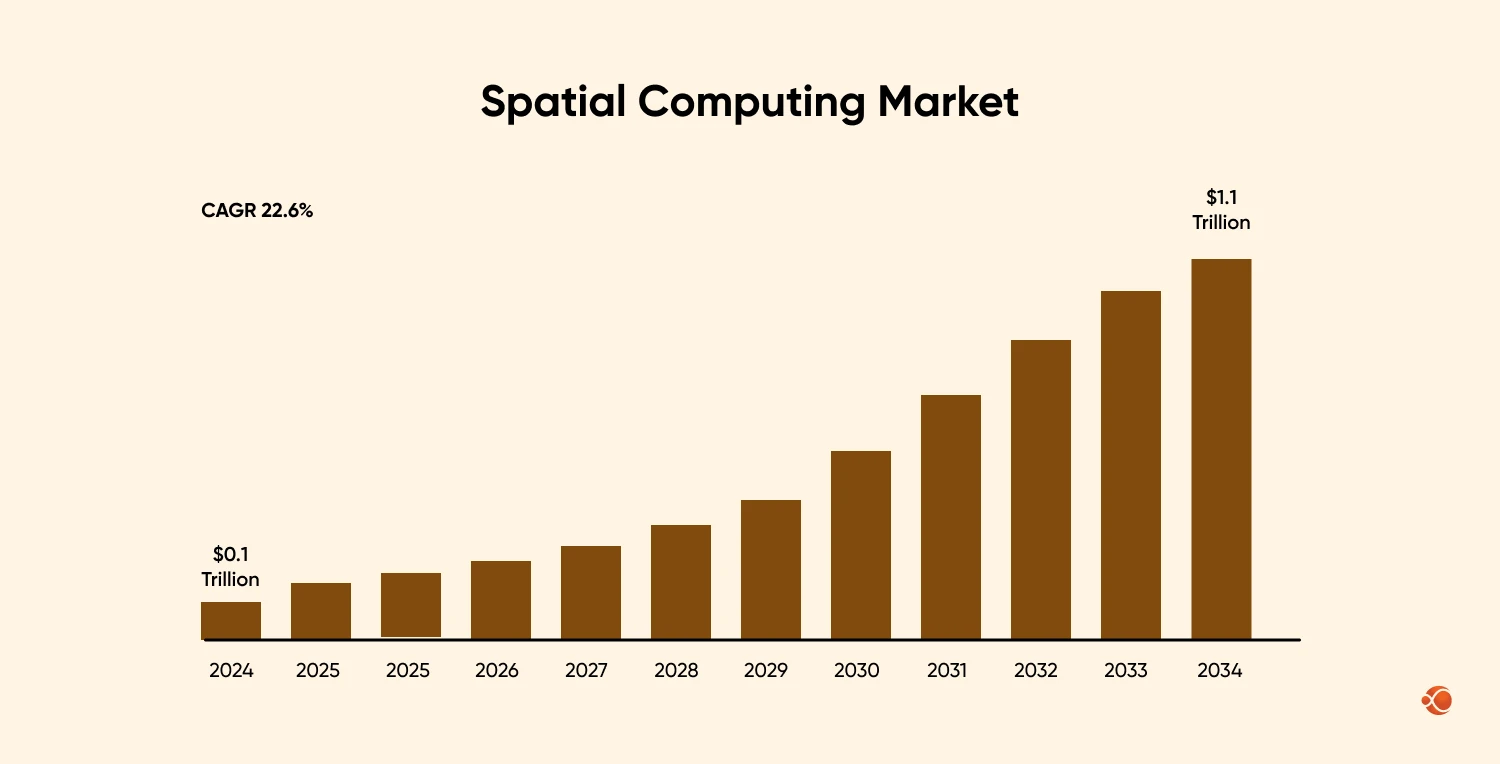
The global spatial marketing insights have recorded a market value of $135.4 billion in 2024, forecasted to reach $1061 billion by 2034. The trend is moving from companies that want to build an iOS app, to explore more futuristic options like spatial computing.
Key Technologies Used in Spatial Computing
Before we move forward, it is important to know the key technologies that drive Spatial Computing and make it worth all the hype. This will also help understand the capabilities and working of spatial computing better.
Extended Reality: AR, VR, MR
Spatial computing is built on immersive technologies that can merge digital and physical environments.
- AR: overlays information
- VR: creates virtual spaces
- MR: blends both in real-time
We specialize in developing high-performance virtual reality apps with precise motion tracking, lifelike graphics, and seamless user interaction to transform your ideas into a fully immersive digital world.
Know MoreSpatial Mapping and 3D Geometry
With the help of technologies like LiDAR, SLAM(Simultaneous Localization and Mapping), and depth sensing, devices understand surfaces, room layouts, and distance. This allows digital elements to stay anchored and interact naturally within the physical space.
Computer Vision
Computer vision helps devices understand what they see through IoT sensors and cameras. It is able to detect movement, identify objects, and provide an intuitive interaction experience.
Sensor Fusion
Spatial systems that combine data from IMU (Inertial Measurement Unit), IR sensors, eye tracking, and cameras. Helps create accurate live models for both: user movement and the surrounding environment.
Hand and Eye Tracking
Users can interact with natural input instead of needing controllers. Eye tracking can be used for gaze-based selection, and hand tracking reads and interprets gestures and spatial actions.
Spatial Audio
Spatial audio positions sound based on the direction, distance, and object placement in a 3D space. It improves immersion, realism, and user awareness during the virtual experience.
Real-Time 3D Graphics
To implement spatial computing for enterprise applications or gaming applications, engines like Unity, Unreal, and Metal provide high-rendering environments instantly.
AI and Machine Learning
Apple Vision Pro developers are often well-versed in AI and machine learning, and implement it into spatial engineering to improve scene understanding and gesture prediction. It also helps improve contextual responses, semantic mapping, and adaptive environments.
Cloud and Edge Computing
Cloud and edge systems can sync spatial environments and data in real-time. This is helpful for multi-user collaboration, low-latency processing, and 3D asset streaming.
Spatial Operating Systems
Systems such as visionOS are built for 3D interfaces and not flat screens. They provide an interactive experience with digital content placed freely in physical space, using gestures, voice, and gaze.

What Is Apple Vision Pro & Why It Matters for Enterprises
Spatial computing brings a fundamental change in how digital workflows will be created, accessed, and executed. Apple Vision Pro introduces the world’s truly commercial spatial computer, a device that blends the physical and digital worlds through precise sensor fusion, gesture control, eye tracking, and more.
Apple Vision Pro as the First True Spatial Computer
Vision Pro is not an evolution of AR glasses or VR headsets. It is the first enterprise-ready device that:
- Tracks user intent through eye movement
- Understands environment depth in real time
- Places enterprise apps inside physical spaces
- Supports fully immersive, hybrid, or layered digital experiences
How Apple Vision Pro Transforms Enterprise Workflows
Apple Vision Pro enterprise apps unlock deeper learning, faster execution, and hands-free productivity. It is no longer about chasing “cool experiences” but solving actual operational gaps.
1. Remote Training and Knowledge Transfer
- Technicians learn by doing, not reading manuals.
- Spatial workflows simulate real environments.
- Healthcare teams can train on virtual autonomy with real-time narration.
2. Digital Twin Visualization
- Engineers can walk inside 3D models.
- Managers can then inspect factories across continents.
- Teams iterate on product changes instantly.
3. Immersive Collaboration Rooms
- Remote work becomes shared space instead of shared screens.
- Teams get to brainstorm in 3D environments from anywhere.
4. Field Service & Repair Guidance
- Workers can see the instructions spatially overlaid on actual machinery.
- It helps improve onboard times and reduces errors.
5. Architecture & BIM Immersion
- Full-scale projects can be inspected before starting construction.
- It becomes way easier to convey the vision to the clients.
Industry-Specific Use Cases of Apple Vision Pro for Enterprises
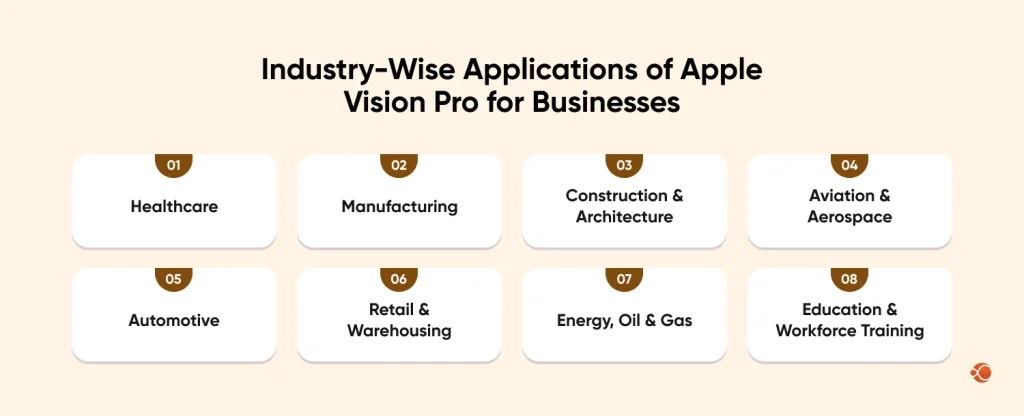
Different industries have different requirements that can be fulfilled with Vision Pro’s spatial capabilities, especially for workforces that value precision, real-time visibility, hands-free operation, and immersive simulations. Here are the top sectors where you can hire dedicated Swift developers and gain the benefit of Apple Vision Pro app development:
1. Healthcare
Hospitals and medical teams use Vision Pro for surgical planning, immersive training, remote guidance, patient education, and 3D anatomy visualization. VisionOS enables surgeons to interact with real-time imaging, overlay critical data in the operating room, and rehearse complex procedures using spatial simulations.
2. Manufacturing
Factory workers, supervisors, and maintenance teams rely on Vision Pro for step-by-step assembly guidance, equipment diagnostics, digital twins of machinery, safety instructions, and remote troubleshooting. This reduces errors, accelerates uptime, and supports faster onboarding on the production floor.
3. Construction & Architecture
Project teams use Vision Pro for BIM model walkthroughs, site planning, virtual inspections, clash detection, real-time project coordination, and overlaying 3D models onto physical job sites. This improves accuracy, shortens design cycles, and reduces costly rework during execution.
4. Aviation & Aerospace
Pilot training teams, maintenance engineers, and inspection crews utilize Vision Pro for immersive simulations, aircraft systems visualization, real-time procedural training, and guided maintenance. Spatial computing improves safety and helps aviation teams comply with strict regulatory standards.
5. Automotive
From design studios to manufacturing lines, Vision Pro supports full-scale car prototyping, design reviews, assembly workflows, and technician repair guidance using spatial overlays. OEMs use Vision Pro to cut prototyping costs and boost efficiency across engineering and service operations.
6. Retail & Warehousing
Retail chains use Vision Pro for store layout planning, inventory visualization, employee training, merchandising simulations, and backroom workflow guidance. In warehouses, Vision Pro improves picking accuracy, packaging workflows, and equipment operation training.
7. Energy, Oil & Gas
Field engineers and technicians benefit from spatial overlays, hazard detection guidance, remote operations support, digital twins of rigs or plants, and hands-free inspections. These applications significantly enhance safety and reduce downtime in high-risk environments.
8. Education & Workforce Training
Institutions and enterprises use Vision Pro to build immersive learning environments, simulation-based training, virtual labs, and hands-on skill-building modules. Spatial learning accelerates comprehension, improves knowledge retention, and supports complex technical training.
We build immersive, scalable Vision Pro and iOS apps with predictable delivery, transparent costs, and enterprise-grade architecture. Let’s bring your idea to life.
Contact UsVisionOS Development: What Changes for Product Teams?
Developing an app for VisionOS is not the same as building an iOS or iPadOS app. Product teams can now design experiences that exist in space and not just on screens. It demands rethinking the entire UI, user interaction, and how workflows are delivered.
Here is what changes:
UI Becomes 3D & Spatial, Not Flat
Developers used to think in terms of height and width; they now have to factor in the third dimension: “depth” in terms of environment, distance, and object placement, instead of pixels and frames.
Natural Interface is the New Navigation
Remember how physical keys got swiped away with “touchscreen smartphones”? Well, this is the next line of evolution where, instead of taps and swipes, users will interact with the app using:
- Hand Controls
- Voice Commands
- Gaze Control
Real-time Spatial Anchoring
Apps need to work dynamically within real-world contexts, where users can anchor information to walls, desks, machines, or any environment.
Workflows Become Environment-Aware
Instead of having to navigate apps, users are able to move through different digital experiences placed around them.
VisionOS Design Guidelines for Enterprise Spatial Apps
| Guideline | Subpoints |
| Prioritize Spatial Hierarchy |
|
| Design for User Comfort |
|
| Keep Spatial Layouts Minimal |
|
| Use Real-World Anchors |
|
| Optimize Gaze and Gesture Interaction |
|
| Ensure Smooth Depth Transitions |
|
| Support Spatial Multitasking |
|
| Build with Accessibility in Mind |
|
How Enterprises Should Approach Vision Pro App Development
Enterprises cannot treat Apple Pro app development like another iOS app project. Spatial computing is not just a design overhaul; it is a transformation of the entire digital workflow process, experience, and scaling. For any enterprise app development services using Apple Vision Pro, here is a strategy you can use to ensure an efficient output:
1. Start with High-Impact, Spatial-First Use Cases
One of the biggest mistakes is to replicate an existing mobile workflow into a spatial app. That might seem like the most obvious way to go forward, but a better practice is to focus on scenarios where spatial computing adds value that traditional screens can’t.
For instance:
- Inspecting 3D digital twins
- Hands-free field maintenance
- Immersive medical training
- Remote collaboration in 3D spaces
2. Define Operational Goals, and Not Just Features
VisionOS apps should answer real business questions like:
- Does this reduce time-to-train?
- Can it eliminate recurring errors in complex workflows?
- Does it actually make insights easier to understand instead of digging through dashboards?
- Will teams finally communicate the way video calls never really allowed them to?
- Can it cut down on those pricey prototypes or the constant need to fly out to job sites?
3. Adapt Design Thinking for 3D Interaction
The shift from flat screens to spatial environments calls for new design rules:
Design in Space, Not Surface
Interfaces need to be lightweight, context-aware, and spatially arranged.
Replace buttons with intent-based actions
It’s no longer about placing buttons to click. It’s about designing natural movements for every action. Look at something to highlight it, pinch to select, use hand gestures to interact, and rely on voice commands when you want things to flow effortlessly.
Pay attention to user comfort and ergonomics
The environment-based UI should not float off in space or crowd the user. Therefore, iOS developers with a grasp of these ergonomics should be hired in order to ensure smoothness and intuitiveness.
4. Invest in the Right Development Stack
| Technology | Role in VisionOS Development | How It’s Used for Apple Vision Pro Enterprise Apps |
| Swift & SwiftUI | Core language & UI framework for VisionOS apps | Used to build native spatial interfaces, manage app logic, and create fluid interactions using gaze, gesture, and voice inputs |
| RealityKit | Apple’s 3D engine for rendering content in real environments | Powers spatial scenes, object placement, animations, and real-world-aware UI in Vision Pro experiences |
| ARKit | Foundation for tracking, depth, and real-world mapping | Enables plane detection, hand tracking, eye tracking, and environment understanding that Vision Pro relies on |
| Metal | Low-level graphics API for high-performance rendering | Used for heavy rendering workloads like digital twins, volumetric data, and high-fidelity 3D visualizations |
| Unity / Unreal Engine (optional) | Advanced 3D and simulation engines for complex environments | Ideal for enterprise apps involving training simulations, architectural walkthroughs, spatial digital twins, and design prototypes |
| Enterprise Apple APIs | Secure integration layers for business systems | Used to connect Vision Pro apps with CRM, ERP, PLM, IoT systems, identity access, and enterprise cloud services |
| AI & Machine Learning Models | Adds intelligence, prediction, personalization, and context | Used for gesture recognition, object detection, predictive instructions, voice interpretation, and adaptive training |
| Scene Understanding Frameworks | Allow the headset to understand space, geometry & depth | Critical for anchoring spatial interfaces to walls, machines, tables, and industrial environments in real time |
5. Prioritize Integration with Existing Systems
Spatial apps don’t succeed as standalone tools. Apple Vision Pro should add a layer of interaction to the user’s ecosystem and not be a disconnected experience. Enterprises have already invested heavily in data pipelines, operational systems, and cloud platforms, so you need the expertise of a dedicated iOS app development company to connect VisionOS features for enterprises to their existing ecosystem.
The purpose of Vision Pro apps should be to: visualize, extend, and activate apps in 3D Space.
6. Test in Real Environments, Not Just Simulators
Vision Pro enterprise apps need to be validated outside stimulators to ensure they work as intended and not just perform well in development labs. Spatial experiences can differ across environments, lighting conditions, and physical layouts.
Testing should include:
- On-site field testing for industrial and engineering apps
- Real hospital or training environments for medical use cases
- On-the-job validation for maintenance or inspection workflows
- Multi-user testing for remote collaboration scenarios
7. Plan for Scale: From Pilot to Enterprise Rollout
Vision Pro development should also begin with controlled pilots, but be planned for growth. Spatial apps need to expand across departments, devices, locations, and roles, without performance loss.
Key scaling considerations:
- MDM-based device provisioning
- Cloud sync for multi-headset data and sessions
- Support for global teams and distributed environments
- Load handling for heavy 3D assets and training simulations
- Automated updates and enterprise deployment pipelines
From concept to deployment, we create user-centric, high-performance Vision Pro apps tailored to your business needs. Start your project with us.
Contact UsKey Business Systems Vision Pro Apps Must Connect With
Field Data Systems
Technicians should see live machine status, alerts, and instructions as spatial overlays and not flip between screens and manuals.
ERP, MES, and CRM Platforms
Instead of dashboards, teams will be able to walk through the data on inventory, supply chains, customer insights, and production workflows.
Cloud and Enterprise Dashboards
Everything viewed in a browser today can be experienced in 3D space, where metrics are interactive and contextual.
IoT Device Streams
Spatial computing becomes far more useful when connected to live sensor data, including equipment health, asset temperature, environmental feedback, and real-time anomaly detection.
Spatial Computing: What’s better, Meta Quest 3 or Pro?
To fully understand the opportunity of Apple Vision Pro in enterprises, it is useful to compare it with a close competitor, the Meta Quest 3, which targets a different set of use cases. So the right spatial computing product for your enterprise needs will depend on where your priorities are.
Meta Quest 3 vs Apple Vision Pro Development Scope Comparison
| Development Factor | Apple Vision Pro | Meta Quest 3 |
| Platform & SDKs | visionOS SDK, Swift, RealityKit, Unity (partial), tight Apple policies | Unity, Unreal, OpenXR, flexible App Lab/test builds, fewer restrictions |
| Distribution | Apple App Store, Enterprise deployment (strict review) | Meta Store or App Lab, fast sideloading, more open/rapid deployment |
| Integration Strength | Best if your org uses Mac/iOS devices; deep continuity (handoff, iCloud, etc.) | Flexible cross-platform, not tied to any ecosystem, works with Android, Windows, Mac, etc. |
| Hardware Access | Full access to advanced spatial sensors (eye tracking, LiDAR); advanced diagnostics | Access to core sensors; lacks eye-tracking/LiDAR, but robust for mixed reality/game logic |
| App UX Complexity | High visual polish, advanced spatial anchoring, longer dev timelines | Rapid prototyping, easier MVP rollout, ideal for iterative deployment |
| Best Use Cases | High-fidelity simulations, executive demos, healthcare/architecture, precise interaction apps | Education, training, public demos, scalable field/support tools, cross-platform XR apps |
| Approval/Testing | Slower, strict, Apple review focused on polish and security | Quicker, open to experimental/beta releases via App Lab |
Developer Insights: How to Choose Between Apple Vision Pro and Meta Quest 3
Apple Vision Pro is ideal when you need premium spatial computing that matches the highest hardware integration requirements, connects with the Apple workflow, and follows the strictest security standards. Development is slower, but leads to experiences that are richer, detailed spatial UX, and C-suite grade presentations.
Meta Quest 3: excels in speed and flexibility, and is the more cost-effective option. Developers can make use of Unity/OpenXR to quickly test and deploy applications on a broader device range or larger audiences, making it ideal for MVPs, field use, or training.
Business Insights: Meta Quest 3 vs Apple Vision Pro
Apple Vision Pro:
- Premium Enterprise Applications: Enables high-stakes scenarios like architectural visualization, client presentations, design approvals, medical training, and more. It has one of the most premium resolution displays, eye tracking mechanisms, and seamless Apple integration.
- Collaboration and Productivity: If your team works remotely and needs proper tools for collaboration, Apple Vision Pro apps are optimized for spatial computing with SAP Analytics Cloud, Microsoft 365, and other important integrations, all of which add up to the client having a robust and capable platform for making data-driven environments.
- ROI Considerations: It is priced higher than the Meta Quest 3; however, with the right Apple Vision Pro enterprise adoption 2026 strategy, users can expect clear returns for roles that value precision, immersiveness, and executive productivity.
Meta Quest 3:
- Scalable Training and Education: Excels in large-scale employee training, immersive onboarding, safety walkthroughs, and education. Affordable pricing enables deployment across all teams, reducing the per-user cost and supporting mass adoption.
- Remote Support and Field Work: Ideal for digital twins, virtual meetings, remote support, and on-site stimulation.
- Cross-Platform Flexibility: Open development stack and business device management make it ideal for mixed Windows/Android environments or companies that need device-agnostic solutions.
Cost of Apple Vision Pro Enterprise App Development
The cost of creating an Apple Vision Pro enterprise app depends on the complexity of the spatial interactions, 3D asset systems, system integrations, and the level of immersion needed. Unlike traditional iOS apps, VisionOS development works on many layers of engineering, including spatial UI, real-world mapping, gesture processing, AI-driven overlays, and high-performance rendering.
Average Cost of Vision Pro Enterprise App Development Breakdown (2025-2026 Estimates):
| Type of Enterprise app development for Vision Pro | Estimated Cost Range |
| Basic Spatial App (2D screens in 3D space, minimal interactions) | $40,000 – $75,000 |
| Mid-Level Spatial App (3D UI, anchoring, hand & eye tracking, basic scene understanding) | $80,000 – $150,000 |
| Advanced Enterprise App (digital twins, immersive training, custom 3D assets, real-time data systems) | $150,000 – $300,000 |
| High-End Simulation or AI-Driven Spatial Platform (complex physics, volumetric rendering, multi-user sync, cloud connectivity) | $300,000 – $650,000+ |
Cost Factors That Influence Vision Pro Development
- Level of Spatial Immersion: Apps that need advanced 3D Scenes, physics-heavy environments, digital twins, and more renderings will attract higher overall app development time and costs.
- Integration with Enterprise Systems: Connecting Vision Pro to your ERPs, PLM, MES, IoT, or even cloud dashboards requires secure APIs, data pipelines, and real-time synchronization.
- Use of AI and Machine Learning: Features such as predictive instructions, objection detection, intelligent spatial overlays, or scene understanding will add additional engineering hours.
- Custom 3D Asset Creation: For industries that need a more hands-on on-site experience, such as construction, aerospace, and healthcare, custom 3D model development is a must. The cost would depend on the fidelity and polygon count of the asset.
- Regulatory & Compliance Needs: Industries such as healthcare, aviation, automotive, and government sectors will need additional layers of compliance, data security, and documentation.
- Hardware Testing and On-Site Validation: Apple Vision Pro apps should be tested in real environments like hospitals, factories, workshops, or warehouses, to ensure they work as intended. This adds QA cost and on-location engineering hours.
ROI of Vision Pro Adoption
Enterprises investing in Vision Pro should be aware of the possible returns and benefits before making such an investment. Here is how Apple Vision Pro adoption provides return on investment in different areas:
- Reduced Training Costs: Spatial training environments lower onboarding time by 20–40% and eliminate the need for physical prototypes.
- Fewer Operational Errors: Real-time guidance, overlays, and AI-driven instructions reduce mistakes in high-risk environments.
- Faster Decision Cycles: Teams can visualize data, models, and workflows in 3D, enabling rapid approvals and shorter project timelines.
- Improved Safety: On-site hazard visualization, step-by-step guidance, and simulation-driven rehearsal decrease workplace incidents.
- Lower Travel & Inspection Costs: Remote collaboration and immersive digital workspaces minimize the need for in-person field visits.
- Streamlined Enterprise Workflows: Vision Pro becomes a hands-free interface for interacting with IoT sensors, ERP/CRM data, machine dashboards, and operational insights.
Final Words
Spatial computing is no longer experimental; it is becoming the new enterprise interface. Apple Vision Pro stands at the intersection of hardware fidelity, software intelligence, and business-grade integration. As more industries shift from flat-screen to 3D workflows, VisionOS will play a central role in redefining how teams manage data, build products, and deliver services. Hire iOS developers and get started with Apple Vision Pro enterprise apps today!
FAQs on Apple Vision Pro Enterprise Apps
How does Apple Vision Pro affect business?
Apple Vision Pro brings spatial computing into daily operations, enabling immersive training, faster decision-making, and interactive 3D collaboration. It strengthens workflows that depend on visualization, field guidance, or complex data review.
How can enterprises use Apple Vision Pro in real-world scenarios?
Teams can train in simulated spaces, explore digital twins, collaborate in shared 3D rooms, and guide field workers with spatial overlays. It replaces manuals, static dashboards, and screen-sharing with more intuitive, interactive environments.
What is VisionOS, and how is it different from iOS?
VisionOS is Apple’s spatial computing operating system built for 3D interfaces, gesture control, and environment-aware apps. Unlike iOS, it focuses on spatial windows, passthrough environments, and mixed-reality interaction instead of flat screens.
Can existing iOS enterprise apps run on Apple Vision Pro?
Many iPhone and iPad apps run on Vision Pro as 2D windows, but they are not spatial by default. Enterprises often extend or rebuild apps using VisionOS APIs to unlock true mixed-reality functionality.
How much does it cost to build an Apple Vision Pro enterprise app?
Costs depend heavily on scope, 3D assets, integrations, and complexity. For an accurate estimate, contact our team.
Is Apple Vision Pro ready for enterprise adoption today?
Yes, especially for training, collaboration, field service, and digital twin workflows. VisionOS 2 and the updated enterprise SDKs make it stable for pilots and structured rollouts.