Quick Overview: Looking to add voice to your app? This guide covers ElevenLabs API integration across JavaScript, Python, React Native, and Flutter with production-ready code for streaming, voice cloning, and secure API handling.
Voice is no longer an optional feature layer. According to the Gartner 2025 Emerging Technology Hype Cycle, conversational AI and voice interfaces are entering the Slope of Enlightenment, indicating that enterprise adoption is accelerating well beyond early experimentation.
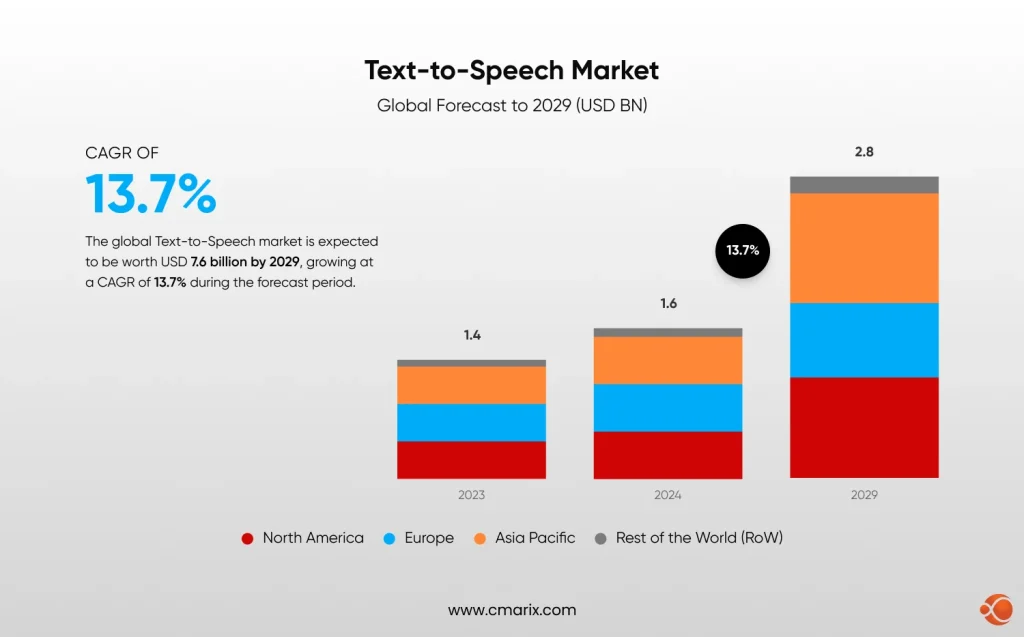
The global text-to-speech market hit the valuation of USD 4 billion in 2024, and is expected to reach USD 7.6 billion by 2029, recording a CAGR of 13.7%.
The challenge for development teams is not finding a TTS provider. It is choosing and integrating one correctly.
Enter ElevanLabs API integration – an emerging, leading platform for production-grade voice synthesis.
- It uses the Flash v2.5 model that enables ultra-low latency at approximately 75 ms
- Comes with 32 + language support
- Has features like Instant Voice Cloning (IVC) for brand-consistent voice at scale.
This guide will take you through each and every layer of integrating the ElevenLabs text-to-speech API with web and mobile applications, starting with the API key and then moving on to the streaming of the audio with WebSockets, and finally the platform-specific code with JavaScript, Python, React Native, and Flutter. CMARIX has been delivering voice-enabled solutions in the healthcare, Saas, and enterprise industries with the same technology, and the code patterns shown here are real-world examples.
What You Will Build: A fully functional, streaming TTS integration callable from a React web app, a Node.js backend, a Python service, a React Native mobile app, and a Flutter application, with production-ready authentication and error handling at every layer.
What Is the ElevenLabs Text-to-Speech API?
The ElevenLabs TTS API is a REST and WebSocket API that converts text into high-fidelity, emotionally aware speech audio, giving developers full control over voice selection, emotional tone, latency profile, and output format.
It is an ideal foundation for teams focused on AI voice bot development for support, e-learning narration, and enterprise voice agents. The ElevenLabs official API documentation is the authoritative reference for endpoint schemas and model updates.
The base URL for all requests is https://api.elevenlabs.io/v1. All requests require the header xi-api-key: YOUR_API_KEY, and the default response format is MP3. Key capabilities include standard and streaming TTS endpoints, Instant Voice Cloning from a short audio sample, WebSocket Streaming for near-instant conversational playback, 32-language multilingual support, and a Voice Design API to generate a voice entirely from a text prompt.
ElevenLabs Text-to-Speech Models at a Glance
| Model | Latency | Languages | Best For | Model ID |
| Eleven Flash v2.5 | ~75ms | 32 | Real-time agents, chatbots | eleven_flash_v2_5 |
| Eleven Flash v2 | ~75ms | 29 | Interactive apps, fast processing | eleven_flash_v2 |
| Eleven Multilingual v2 | Standard | 29 | Audiobooks, premium narration | eleven_multilingual_v2 |
| Eleven v3 | Standard | 32 | Highest expressiveness, complex emotion | eleven_v3 |
Choosing a Model: For real-time conversational use cases, use eleven_flash_v2_5. For audiobooks, e-learning narration, or any application where voice quality matters more than latency, use eleven_multilingual_v2 or eleven_v3.
ElevenLabs API Integration for Text-to-Speech – Tutorial for Web and Mobile Apps
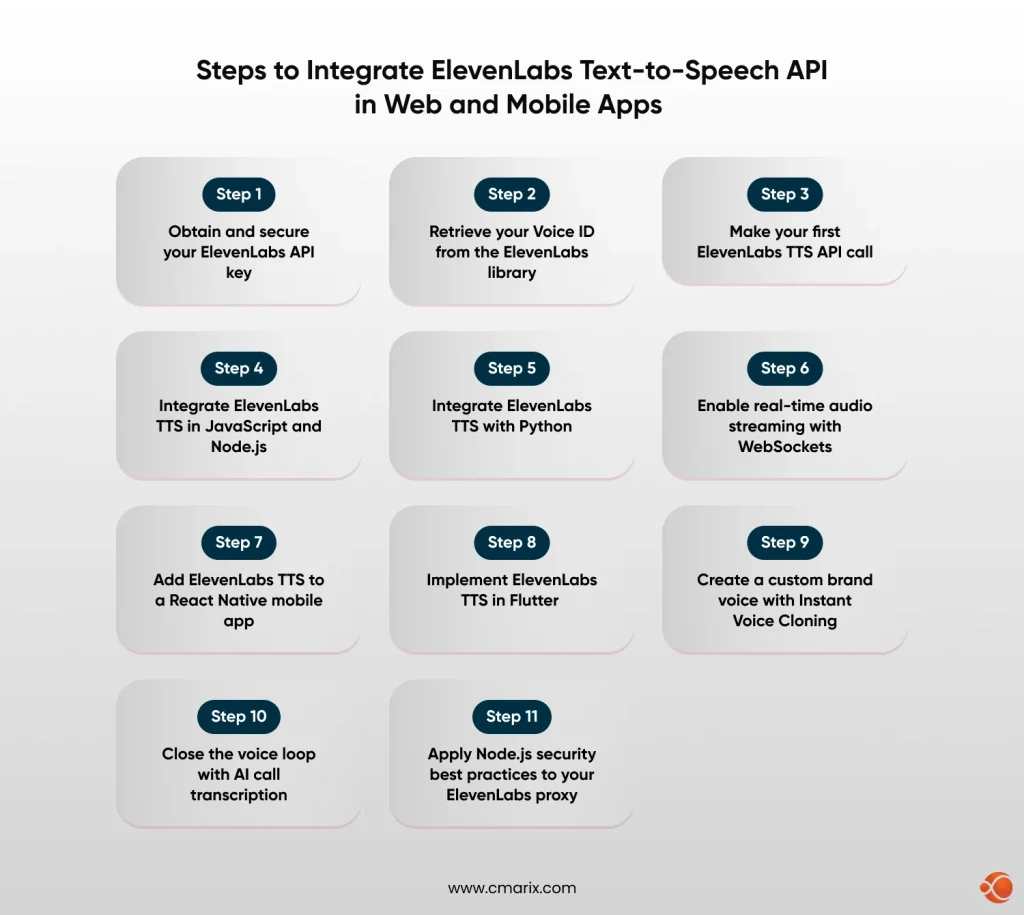
Step 1: Obtain and Secure Your ElevenLabs API Key
Before writing a single line of code, you need an API key. Per the ElevenLabs API quickstart guide, all plans, including the free tier, provide full API access. Go to elevenlabs.io, create an account, click your profile avatar, select Profile + API Key, then click Generate API Key. Copy it immediately, as it will not be shown in full again.
Store the key using environment variables or a secrets manager such as AWS Secrets Manager or HashiCorp Vault. Never hardcode it into source files or commit it to version control. Route all ElevenLabs API calls through your backend server and never expose the key in any client-side bundle.
Step 2: Retrieve Your Voice ID from the ElevenLabs Library
Every TTS request requires a voice_id, a unique identifier for the voice you want to use. ElevenLabs maintains a library of over 10,000 voices retrievable via the GET /v1/voices endpoint. This is a foundational step in any AI integration into apps that use voice output. Each voice object contains a voice_id, name, category (premade, cloned, or generated), and labels for accent, age, gender, and use case.
Step 3: Make Your First ElevenLabs TTS API Call
With your API key and voice ID in hand, the cURL request below is the simplest possible TTS call. It validates your credentials and voice ID before moving to SDK-based implementations. stability (0 to 1) controls voice consistency; lower values introduce more emotional variation. similarity_boost (0 to 1) controls how closely the output matches the original voice. style (0 to 1, optional) amplifies stylistic traits and should be used sparingly.
Step 4: Integrate ElevenLabs TTS in JavaScript and Node.js
Node.js is the most common backend for web applications that integrate third-party APIs. This is the recommended architecture for teams that want to build AI-powered web app with MERN Stack where Node.js handles backend API orchestration while React manages the voice-enabled frontend. Per the MDN Web Docs guide on server-side web frameworks, keeping API credentials on the server side is a non-negotiable security baseline.
For web apps, stream audio directly to the browser through an Express.js proxy rather than saving it server-side. According to OWASP’s API Security Top 10, improper API key exposure is one of the leading causes of API compromise. Routing all ElevenLabs calls through a server-side proxy, covered in depth in our guide on securing RESTful API integrations in production, directly mitigates that risk.
Step 5: Integrate ElevenLabs TTS with Python
Python is the language of choice for backend AI services, data pipelines, and microservices. The ElevenLabs Python SDK makes it straightforward to embed TTS into any Python application, whether you are building a FastAPI service, a Django app, or an AI workflow automation pipeline. Part of a well-structured AI software development process is choosing the right integration layer for each service, and Python excels as the backend for voice processing workloads. Install the SDK with: pip install elevenlabs.
Step 6: Enable Real-Time Audio Streaming with WebSockets
For truly conversational applications, including AI customer support bots and interactive conversational AI voice agents, HTTP requests introduce too much perceived latency even at 75ms model inference time. The ElevenLabs WebSocket endpoint streams bidirectional text and audio, enabling playback to begin before the full text has been processed. Time-to-first-audio-chunk (TTFA) is typically 150 to 300ms end-to-end, fast enough for conversational interfaces where sub-500ms feels real-time.
CMARIX builds production-hardened ElevenLabs integrations with proxy, streaming, and rate limiting included.
Contact UsStep 7: Add ElevenLabs TTS to a React Native Mobile App
Mobile apps present unique TTS integration challenges: audio playback APIs differ from those on the web, network conditions are less predictable, and exposing API keys is a critical security risk. The recommended architecture is to never call the ElevenLabs API directly from a React Native app. Always proxy through your backend. Teams looking to hire skilled Flutter developers for voice-enabled mobile apps can engage CMARIX for end-to-end delivery, including backend TTS proxy setup.
Step 8: Implement ElevenLabs TTS in Flutter
Flutter’s cross-platform architecture is an excellent foundation for AI voice features. Our Flutter AI integration with ElevenLabs covers the broader ecosystem context, while this section focuses on the ElevenLabs-specific backend-proxy implementation. CMARIX has deployed Flutter-based voice interfaces in healthcare and enterprise verticals where the same architectural discipline underpins our generative AI development solutions practice.
Step 9: Create a Custom Brand Voice with Instant Voice Cloning
Instant Voice Cloning allows you to create a voice clone from a short audio sample, referenced by voice_id in every subsequent TTS call. This is central to building a custom AI assistant with a consistent brand voice and is used extensively in healthcare SaaS where a familiar voice improves patient compliance. The NIH National Library of Medicine has published research showing familiar voice interfaces improve accessibility compliance rates by up to 34% for users with visual impairments.
Use clean audio with minimal background noise and two to five minutes of varied speech for the most natural clone. Create the voice once and store the voice_id in your environment config for reuse across all future TTS requests.
Step 10: Close the Voice Loop with AI Call Transcription
In many SaaS and support applications, TTS is only one side of the voice loop. ElevenLabs’ Scribe v2 model provides AI call transcription for SaaS apps across 90-plus languages with speaker diarization. Combined with TTS output, it creates a full conversational AI loop. According to Opus Research’s 2025 Conversational AI Report, enterprises deploying full-loop voice AI report a 28% reduction in average handle time compared to text-only AI channels.
Step 11: Apply Node.js Security Best Practices to Your ElevenLabs Proxy
Securing your ElevenLabs integration is a production requirement. Exposed API keys lead to runaway costs and account compromise. The following patterns align with the OWASP API Security Top 10 guidelines and are part of every third-party API integration service CMARIX delivers. Four rules apply while following node.js security best practices: never commit API keys to version control; route all ElevenLabs calls through your server only; validate all input text length and voice ID format; and enforce HTTPS with HSTS headers on every proxy endpoint.
Troubleshooting Common ElevenLabs API Errors
The table below shows the six most common errors encountered while using the ElevenLabs API, along with their causes and solutions.
| Error Code | Cause | Fix |
| 401 Unauthorized | Missing or invalid API key | Check xi-api-key header. Verify key in ElevenLabs dashboard. |
| 400 Bad Request | Malformed JSON or invalid voice_id | Validate request body. Ensure voice_id is valid from your voice library. |
| 422 Unprocessable | Text too long or unsupported model | Split text into segments. Verify model_id spelling. |
| 429 Rate Limited | Too many concurrent requests | Implement exponential backoff. Upgrade plan for higher concurrency. |
| Audio Distortion | Poor voice clone training data | Re-clone with cleaner audio (no music, minimal echo, varied sentences). |
| High Latency | Using multilingual_v2 for real-time | Switch to eleven_flash_v2_5 for latency-sensitive use cases. |
Real-World Use Cases: Where ElevenLabs TTS Delivers Results
AI Voice Bots for Customer Support
Organizations utilizing AI voice bot development for support workflows, as mentioned in the ElevenLabs report, are seeing significant gains in terms of first contact resolution rates. A Conversational AI Voice Agent, such as reading the status of the ticket, giving updates on the orders, or assisting the user with troubleshooting, makes the interaction more natural compared to text-based chatbots. As mentioned in the Gartner report on customer service technology, organizations adopting conversational AI in their customer support processes will benefit from an average 25% reduction in cost per contact by 2025.
Healthcare: AI Voice for Clinical Workflows
For healthcare SaaS, voice output has obvious clinical benefit, including “read back” of post-visit summaries, medication reminders, and accessibility features for visually impaired users. CMARIX has developed voice-enabled applications that combine AI integration into clinical apps workflows with data handling requirements.
SaaS Platforms and E-Learning
The combination of ElevenLabs TTS and Scribe V2 transcription results in a Voice-In, Voice-Out AI Cycle, suitable for SaaS Meeting Summarization and interactive AI assistants, at the heart of any new enterprise application integration project. Educational applications utilize Multilingual V2 and V3 for high-quality narration in any language, while IVC delivers a single instructor voice for educational applications. TTS has been integrated into e-Learning solutions by CMARIX, where AI in UX design principles have been followed to use Voice as the primary content delivery method.
ElevenLabs vs Alternatives: Choosing the Right TTS API
| Feature | ElevenLabs | Amazon Polly | Google TTS |
| Voice Realism | Best-in-class | Adequate | Very Good |
| Latency (Flash) | ~75ms | ~300ms | ~200ms |
| Voice Cloning | Yes (IVC and Pro) | No | No |
| Multilingual | 32 languages | 29 languages | 40+ languages |
| Emotional Range | High, text-driven | Low | Medium |
| SDK Coverage | JS, Python, Flutter, Swift, Kotlin | AWS SDK (all) | Google Cloud SDK |
| Free Tier | Yes, API included | 5M chars/mo Neural | 1M chars/mo WaveNet |
For use cases where voice naturalness, cloning, and real-time latency are important, ElevenLabs stands out as the best choice. For bulk processing within the AWS ecosystem, Amazon Polly remains competitive. For use cases with high linguistic diversity, Google TTS has the best language support.
Why Choose CMARIX for Your ElevenLabs Integration
Reading a technical guide is one thing. Shipping a production-grade AI voice product on time and at scale is another. CMARIX is a custom AI software development services company with 17 + years of delivery experience, 250 + engineers, and a track record of building AI-powered applications across 46 countries. The team has deep experience delivering third-party API integration services at enterprise scale, including the Idomoo engagement where CMARIX implemented a next-generation personalized video platform with AI-driven dynamic personalization, real-time video rendering, and seamless CRM integrations.
We are also a top mobile app development company, providing iOS, Android, React Native, and Flutter apps. We deliver generative AI development solutions for healthcare, SaaS, retail, and enterprise segments with capabilities in model fine-tuning, RAG pipeline development, conversational AI agent design, and voice interface development.
In case you need to hire expert AI developers for a fixed-scope ElevenLabs integration, a broader AI voice solution for healthcare, or a fully custom multi-platform voice agent, CMARIX offers flexible engagement models, including dedicated teams, project-based, and consulting, for US, UK, and IST time zones.
Final Words
ElevenLabs is the clearest path to production-grade voice in 2026. With sub-100ms latency, 32-language support, Instant Voice Cloning, and official SDKs across every major platform, it covers the full spectrum from prototype to enterprise scale. Whether you are building a customer support bot, a healthcare assistant, or a multilingual e-learning platform, the patterns in this guide give you a working foundation. CMARIX is ready to take it to production.
FAQs on ElevenLabs Text-to-Speech API
How do I reduce latency for real-time conversational AI using ElevenLabs?
Use the eleven_flash_v2_5 model via the WebSocket endpoint. It delivers approximately 75ms of model inference latency, with a time-to-first-audio-chunk of 150-300ms end-to-end. Send text in small chunks as they are generated rather than waiting for the full response.
How do I handle long text input that exceeds the API character limit?
Split text into logical segments at sentence or paragraph boundaries before sending. Each request supports up to 5,000 characters. For sequential narration, queue segments and stream them consecutively. Avoid mid-word splits as these introduce audible artefacts in the output audio.
REST vs. WebSockets: Which ElevenLabs endpoint should I use?
Use REST for non-interactive use cases like audiobooks, notifications, and pre-rendered narration where latency is not critical. Use WebSockets for conversational applications, voice agents, and any interface where audio must begin playing before the full text is available.
How can I optimize API costs without sacrificing audio quality?
Cache frequently repeated phrases server-side and serve the stored audio instead of regenerating it. Use eleven_flash_v2_5 for interactive features and reserve the higher-quality Multilingual v2 or v3 models only for premium narration where the quality difference is perceptible to users.
Can I use a cloned voice via the API immediately after creation?
Yes. Once the cloning request returns a voice_id, it is immediately usable in any TTS call. No additional activation step is required. Store the voice_id in your environment config and reference it across all future requests without re-uploading the source audio.
How do I handle API authentication securely in a mobile app (React Native/Flutter)?
Never embed the API key in your mobile app bundle. Always route ElevenLabs calls through your own backend server. Your mobile app calls your authenticated endpoint, which calls ElevenLabs server-side, keeping the key entirely out of client-side code and app store binaries.