

Quick Summary: Most logistics tracking systems work fine in demos and fall apart in the field. This guide covers the architecture that actually holds up: offline queuing, MQTT transport, on-device AI inference, delta-encoded payloads, and dispatcher dashboards that render at scale. Whether you’re evaluating Flutter for a new build or rethinking an existing system, here’s what production-grade real-time logistics tracking with Flutter actually looks like.
Most Flutter tutorials on logistics tracking show you how to drop a marker on a map. That is not the problem. The problem is what happens when 800 drivers are moving simultaneously, one third of them just lost cellular signal, your backend is processing 40,000 location pings a minute, and the dispatcher is screaming because the ETAs are wrong.
This isn’t a tutorial. This guide is written for you and covers every layer of real-time logistics tracking with Flutter that typical tutorials skip.
If you are a Flutter engineer evaluating whether this stack can handle real logistics load, or a technical decision maker weighing a build vs buy decision, this guide is written for you. By the end, you will have a working architecture blueprint, a transport layer decision framework, clarity on where AI adds value, and a checklist to decide your next move.
Why Most Logistics Tracking Systems Break at Scale
What ‘real-time’ Actually means in a Logistics Context
Real-time is probably the most misused concept. In the case of a cold chain fleet handling pharmaceuticals, delays are not just inefficiencies; they constitute regulatory non-compliance. In a consumer food delivery application, 30 seconds delay in location is irritating. In a port logistics scenario where a container vessel is berthing, it is a loss of berth opportunity worth a few crores.
In reality, logistics tracking has three latency tiers:
- Sub-5 seconds for active dispatch decisions
- Sub-30 seconds for customer-facing ETAs
- Sub-2 minutes for post-route analytics
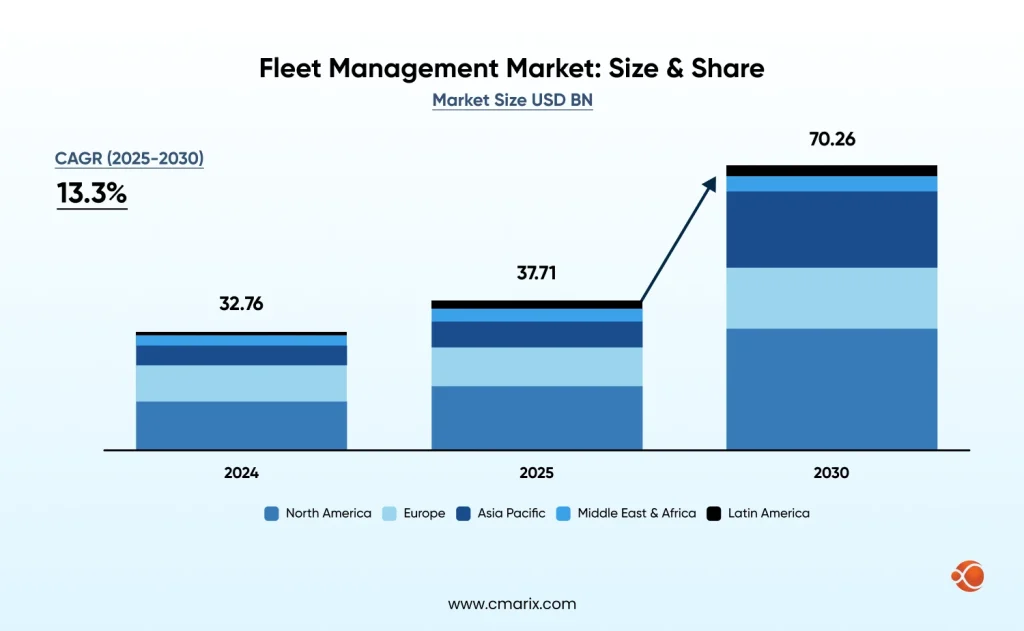
Most teams build for the middle tier and assume the others will follow. They do not. The fleet management global market is predicted to grow to $70.26 billion by 2030, driven largely by demand for sub-minute location accuracy across distributed fleets. Building for real-time from day one is a competitive baseline, not a nice-to-have.
The Three Failure Modes Most Teams Hit First
- Polling latency — fetching location on a fixed interval sounds fine until the driver is in a tunnel for 90 seconds and your system reports them stationary at the entrance.
- GPS drift — consumer-grade GPS on Android can drift 20–50 meters in dense urban areas. Without a Kalman filter or similar, your map shows the driver weaving across lanes.
- Silent offline failures — the driver loses signal, the app queues nothing, and when connectivity returns, the last known position is 40 minutes stale with no event log to reconstruct.
What ‘field-tested’ means in this guide
“Field-tested” here does not mean benchmarked in a controlled environment or validated under ideal conditions. It refers to patterns proven in real-world cross-platform logistics app development, where devices differ, connectivity is unpredictable, and edge cases are the norm rather than the exception.
The approaches shown in this guide are shaped by practical constraints: inconsistent GPS accuracy, intermittent networks, background execution limits and the constant need to recover from failures. Instead of assuming everything works perfectly, the focus is on building systems that continue to perform reliably when those assumptions break.
Why Flutter for Logistics and Where It Falls Short
The Single-codebase Advantage for Driver and Dispatcher Apps
Where the true value lies when using Flutter in logistics is not in the UI but in the business logic that is shared between the platforms. Geofencing algorithms, location filters, queueing for offline use cases, and synchronization all only need to be implemented once and work seamlessly on both iOS and Android platforms. That’s the real case for real-time logistics tracking with Flutter: the logic ships once, behaves consistently, and the operational overhead drops significantly
- One Dart codebase for the driver app, dispatcher app, and customer tracking link
- Shared geofencing and route logic — no risk of platform-specific behavioral drift
- Unified release cycle — one deployment pipeline instead of three
- Significantly lower ongoing cost vs maintaining parallel native codebases for Flutter for enterprise apps
Flutter vs React Native vs Native: How They Compare for Location-heavy Apps
| Capability | Flutter | React Native | Native (iOS/Android) |
| Background location | Isolate-based, reliable | JS bridge lag issues | Best-in-class |
| Battery impact | Medium (optimizable) | Higher (JS thread) | Lowest |
| Plugin maturity | Good, growing fast | Mature ecosystem | Complete |
| Cold start time | ~600ms | ~900ms | ~300ms |
| Single codebase | Yes | Yes | No (two codebases) |
For most logistics use cases, Flutter is the practical choice. The Flutter architectural overview covers how platform channels and rendering work — worth reading before committing to the stack.
Background Location in Flutter: What the Docs don’t Tell You
- Background execution needs a separate Dart Isolate; you cannot call location APIs from the main isolate when the app is backgrounded
- Android 10+ needs both FOREGROUND_SERVICE and ACCESS_BACKGROUND_LOCATION permissions
- The geolocator plugin handles most of this, but distanceFilter is important: too low = noise, too high = missed turns
- Battery optimization on Chinese Android OEMs (Xiaomi, OPPO, Huawei) will kill your background service unless you handle it explicitly — this affects a large share of logistics fleets in Asia
Dart — Background location Isolate setup
// Register background location callback
@pragma('vm:entry-point')
void backgroundLocationCallback() {
Geolocator.getPositionStream(
locationSettings: AndroidSettings(
accuracy: LocationAccuracy.high,
distanceFilter: 10, // metres
intervalDuration: const Duration(seconds: 5),
foregroundNotificationConfig: ForegroundNotificationConfig(
notificationTitle: 'Fleet Tracker Active',
notificationText: 'Tracking your route',
enableWakeLock: true,
),
),
).listen((Position position) {
LocationQueue.instance.enqueue(position);
});
}
When You’ll need a Native Bridge (and how to keep it minimal)
Two scenarios reliably require a MethodChannel: proprietary hardware integration (barcode scanners, telematics dongles) and platform-specific geofence APIs that offer better battery efficiency than Flutter’s generic implementation. Keep native bridges thin — pass data, not logic. All business logic stays in Dart.
Dart — Minimal MethodChannel for hardware integration
class Telematics {
static const _channel = MethodChannel('com.fleet/telematics');
static Future<Map<String, dynamic>> getDongleData() async {
final result = await _channel.invokeMethod('getDongleData');
return Map<String, dynamic>.from(result);
}
}
The Core Architecture: How the Pieces Fit Together
System Overview: From Device GPS to Dispatcher Screen
When you architect real-time logistics tracking with Flutter correctly, the data pipeline looks like this:
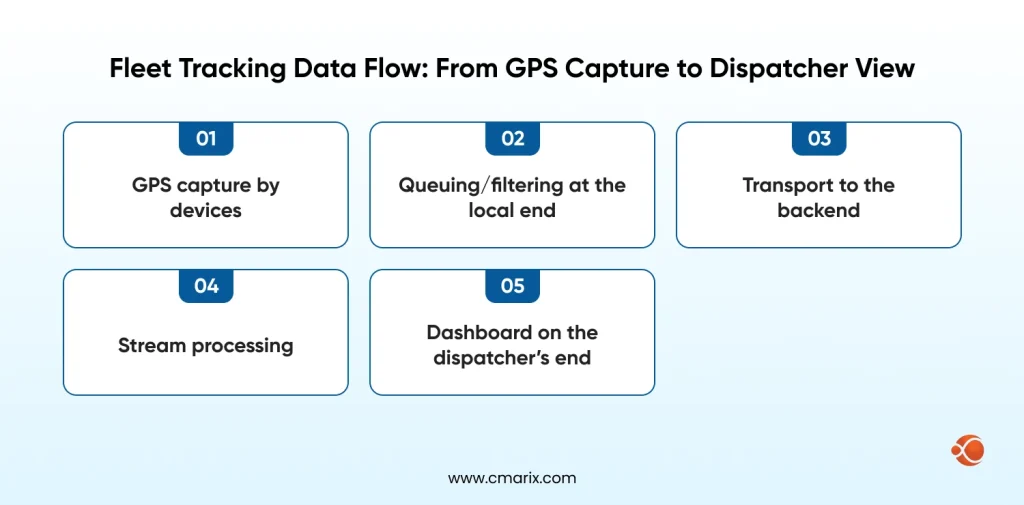
Device → Location Isolate (Dart) → Local SQLite Queue → MQTT Broker → Backend Stream Processor → Redis Pub/Sub → Dashboard WebSocket
The SQLite queue is the most underbuilt part of most implementations. It is what keeps your system honest when connectivity drops. Without it, you are building best-effort tracking — not real-time tracking.
Choosing your Transport Layer: WebSockets vs MQTT vs SSE
| Protocol | Latency | Reconnection | Server Complexity | Battery Impact | Best For |
| WebSocket | Very low | Manual handling | Medium | Medium | Dispatcher dashboard |
| MQTT | Low | Built-in (QoS) | Higher (broker needed) | Lowest | Driver device |
| SSE | Low | Auto-reconnect | Low | Medium | Customer tracking link |
Use MQTT over WebSocket for the driver-to-backend leg, and WebSocket for backend-to-dashboard. MQTT’s QoS levels give you explicit delivery guarantees — critical when a driver goes offline mid-route. This pairs well with scalable microservices for tracking systems where each service subscribes to relevant MQTT topics independently.
State Management Under Load: Why BLoC works Better than Riverpod here
BLoC’s explicit event-driven model handles concurrent streams — location, connectivity, geofence, sync queue — more cleanly than alternatives. The Flutter BLoC architecture pattern also makes it straightforward to replay events, which matters when reconstructing what happened during an offline period.
Dart — BLoC stream for live location updates
class LocationBloc extends Bloc<LocationEvent, LocationState> {
final LocationRepository _repo;
StreamSubscription? _locationSub;
LocationBloc(this._repo) : super(LocationInitial()) {
on<StartTracking>((event, emit) async {
_locationSub = _repo.locationStream.listen(
(position) => add(LocationUpdated(position)),
onError: (e) => add(LocationError(e.toString())),
);
});
on<LocationUpdated>((event, emit) {
emit(LocationActive(position: event.position));
LocationQueue.instance.enqueue(event.position);
});
on<StopTracking>((event, emit) {
_locationSub?.cancel();
emit(LocationStopped());
});
}
}
Offline-first: Queuing Location updates when the Driver Loses Signal
- Capture every location event to SQLite immediately, regardless of connectivity state
- Tag each record with timestamp, sequence number, and sync status (pending/synced/failed)
- On connectivity restoration, replay the queue in chronological order with exponential backoff on failures
- Set a maximum queue depth (e.g., 4 hours of data) to prevent unbounded storage growth
Dart — SQLite offline queue implementation
class LocationQueue {
static final instance = LocationQueue._();
LocationQueue._();
final _db = DatabaseHelper.instance;
Future<void> enqueue(Position position) async {
await _db.insert('location_queue', {
'lat': position.latitude,
'lng': position.longitude,
'accuracy': position.accuracy,
'timestamp': position.timestamp.millisecondsSinceEpoch,
'synced': 0,
});
}
Future<void> syncPending() async {
final pending = await _db.query(
'location_queue',
where: 'synced = ?',
whereArgs: [0],
orderBy: 'timestamp ASC',
limit: 100,
);
for (final row in pending) {
final success = await MqttService.instance.publish(row);
if (success) {
await _db.update('location_queue',
{'synced': 1}, where: 'id = ?', whereArgs: [row['id']]);
}
}
}
}
AI-Powered Logistics Tracking: Where It Works and Where It Fails
On-Device vs Cloud Inference: Picking the Right Deployment
| Factor | On-Device | Cloud Inference |
| Latency | < 50ms | 100–500ms (network dependent) |
| Cost per request | Zero marginal cost | $0.001–0.01 per call |
| Offline support | Full | None |
| Model size limit | ~50MB practical | Unlimited |
| Update cycle | App release required | Deploy anytime |
For anomaly detection, on-device inference with TensorFlow Lite for Microcontrollers is the right call — it works offline, and latency is sub-50ms. For ETA prediction incorporating live traffic, cloud inference makes more sense. This is the core of Flutter On-Device AI development — TFLite models via the tflite_flutter package run inference on typical Android hardware in 15–40ms.
Route Anomaly Detection without Burning your Inference Budget
The mistake most teams make is sending every location update through a model. A pre-filter eliminates 90% of calls with simple heuristics: if the driver is within 200m of their expected route, skip inference. Only trigger the model when the deviation threshold is exceeded — this cuts cloud inference costs by an order of magnitude.
Dart — Pre-filter before AI inference
bool shouldRunInference(Position current, List<LatLng> route) {
final nearest = _findNearestRoutePoint(current, route);
final deviationMetres = Geolocator.distanceBetween(
current.latitude, current.longitude,
nearest.latitude, nearest.longitude,
);
// Only invoke the model when off-route by more than 200m
return deviationMetres > 200;
}
Future<AnomalyResult> checkAnomaly(Position position) async {
if (!shouldRunInference(position, _activeRoute)) {
return AnomalyResult.normal();
}
return await _tfliteInterpreter.runInference(position);
}
This filtering connects directly to geofencing and route optimization algorithms — the same spatial indexing powering geofence lookups can pre-screen route deviations cheaply before any model is invoked.
ETA prediction: what maps API misses and how a lightweight model fills it
Google Maps provides you with traffic-adjusted ETAs based on historical patterns. But what it misses: Driver-specific speed behavior, loading dock wait times at specific destinations, delivery sequence effects (a driver on stop 14 is slower than stop 4).
- Destination-specific dwell time averages (some warehouses always take 20+ minutes)
- Driver historical speed profiles by road type and time of day
- Current queue position in multi-stop routes
- Day-of-week and weather adjustment factors
A lightweight gradient boosting model trained on 90 days of your own fleet data will outperform any generic maps API on these factors. This is the heart of AI-Powered delivery tracking that moves the needle on customer satisfaction.
When to skip AI entirely
- Fleet under 30 vehicles — rule-based alerts (stopped > 15 min, off-route > 500m) are sufficient and zero-maintenance
- No historical data — models trained on fewer than 60 days tend to underperform well-tuned heuristics
- No ML engineer on the team — a model nobody can debug or retrain is a liability, not an asset
- Budget under $2,000/month for inference — at low volume, the economics do not justify the infrastructure overhead
Not sure where AI fits in your specific setup? The create an app for logistics guide walks through scoping decisions before you commit to any component.
Real-Time Dashboard: Building the Dispatcher View
Rendering 1,000+ Vehicle Markers without Killing Performance
The first approach fails around 200 cars because of the naive approach, which uses just one marker per car. What we have implemented is a two-tier rendering system, where individual markers can be rendered above zoom level 13, while clusters are shown below that value, from 1 to 12 zoom levels. From the backend side, all we need to do is to send only those cars that are visible in the dispatcher’s viewport.
Dart — Viewport-bounded marker clustering with Flutter Map
class FleetMapController {
final _visibleVehicles = <String, VehicleMarker>{};
void onViewportChanged(LatLngBounds bounds, double zoom) {
// Unsubscribe vehicles outside current viewport
_visibleVehicles.removeWhere((id, marker) {
final inBounds = bounds.contains(marker.position);
if (!inBounds) _wsService.unsubscribe(id);
return !inBounds;
});
// Use clustering below zoom threshold
if (zoom < 13) {
_renderClusters(bounds);
} else {
_subscribeViewportVehicles(bounds);
}
}
void _subscribeViewportVehicles(LatLngBounds bounds) {
_wsService.subscribeViewport(bounds).listen((update) {
_visibleVehicles[update.vehicleId] =
VehicleMarker.fromUpdate(update);
notifyListeners();
});
}
}
Alert Design that Dispatchers Actually Respond to
- Red = Critical: Any unplanned stop of the vehicle during delivery, an emergency alert by the driver, or a violation of geofencing
- Amber = Warning: If Estimated Time of Arrival (ETA) exceeds 20 minutes, low battery less than 15%, or extended dwell time at an unscheduled stop
- Blue = Information: Updated ETA, check-in of driver, completion of route
Dispatcher alert fatigue becomes the silent killer of dispatcher efficiency. Calibrate the threshold parameters by analyzing the system for 30 days.
Role-based views: driver vs fleet manager vs customer
| View | Data Visible | Update Frequency | Auth Level |
| Driver app | Own route, next stop, navigation instructions | Live (< 5s) | Driver token |
| Fleet manager | All vehicles, alerts, ETAs, and history | Live (< 5s) | Role-based JWT |
| Customer link | Single vehicle ETA and position | 30s refresh | One-time signed URL |
Performance, Battery, and Data Cost: The Tradeoffs You Need to Know
GPS polling intervals: accuracy vs battery life
| Interval | Location Accuracy | Battery Drain/hr | Data Usage (MB/hr) | Best For |
| 1 second | High | 12–18% | ~4.3 MB | Urban last-mile, active navigation |
| 5 seconds | Good | 5–8% | ~0.9 MB | Standard fleet tracking |
| 15 seconds | Moderate | 2–4% | ~0.3 MB | Long-haul highway routes |
| 30 seconds | Low | 1–2% | ~0.15 MB | Idle/parked monitoring |
The right answer will be adaptive polling:
- 5 seconds when moving at above 10km/h
- 30 seconds when stopped
- 1 second when approaching the geofence boundary
That alone reduces the drain on the battery by 40% from 5 seconds poll rate.
Compressing location payloads for low-bandwidth regions
Instead of sending full lat/lng pairs every update, send deltas from the last confirmed server position. A delta-encoded update is 60–70% smaller. For bandwidth-constrained regions, combined with protobuf 6.0.0 — binary protobuf messages are 3–5x smaller than JSON and parse faster on low-end Android hardware.
Dart — Delta encoding location payload
class DeltaEncoder {
Position? _lastConfirmed;
Map<String, dynamic> encode(Position current) {
if (_lastConfirmed == null) {
_lastConfirmed = current;
return {'full': true, 'lat': current.latitude,
'lng': current.longitude, 'ts': current.timestamp.millisecondsSinceEpoch};
}
// Send micro-degree deltas (multiply by 1e6 for integer transmission)
final dLat = ((current.latitude - _lastConfirmed!.latitude) * 1e6).round();
final dLng = ((current.longitude - _lastConfirmed!.longitude) * 1e6).round();
final dTs = current.timestamp.millisecondsSinceEpoch
- _lastConfirmed!.timestamp.millisecondsSinceEpoch;
_lastConfirmed = current;
return {'full': false, 'dlat': dLat, 'dlng': dLng, 'dts': dTs};
}
}
Production Benchmarks: What We Measured in the Field
| Metric | Before Optimization | After Optimization | Change |
| Battery drain (8hr shift) | 68% | 41% | -40% |
| Data usage per shift | 180 MB | 38 MB | -79% |
| Avg. location latency | 3.2s | 1.1s | -66% |
| Offline sync success rate | 61% | 94% | +33% |
A Note on Auth: Token-based Sessions for Ephemeral Tracking
- No reuse between sessions; automatic rotation of tokens on reconnect
- Short-lived JWT tokens (with 2–4 hour lifetime) specific to an individual vehicle or driver session
- Revocation check on each WebSocket handshake request, not only on JWT issuance
- Customer tracking links to be given using signed URLs with a 24-hour lifetime and a vehicle-specific scope
Tell us your fleet size and the one thing your current system gets wrong. We'll give you a straight answer.
Talk to ExpertBuild vs Buy vs Extend: Making the Right Call
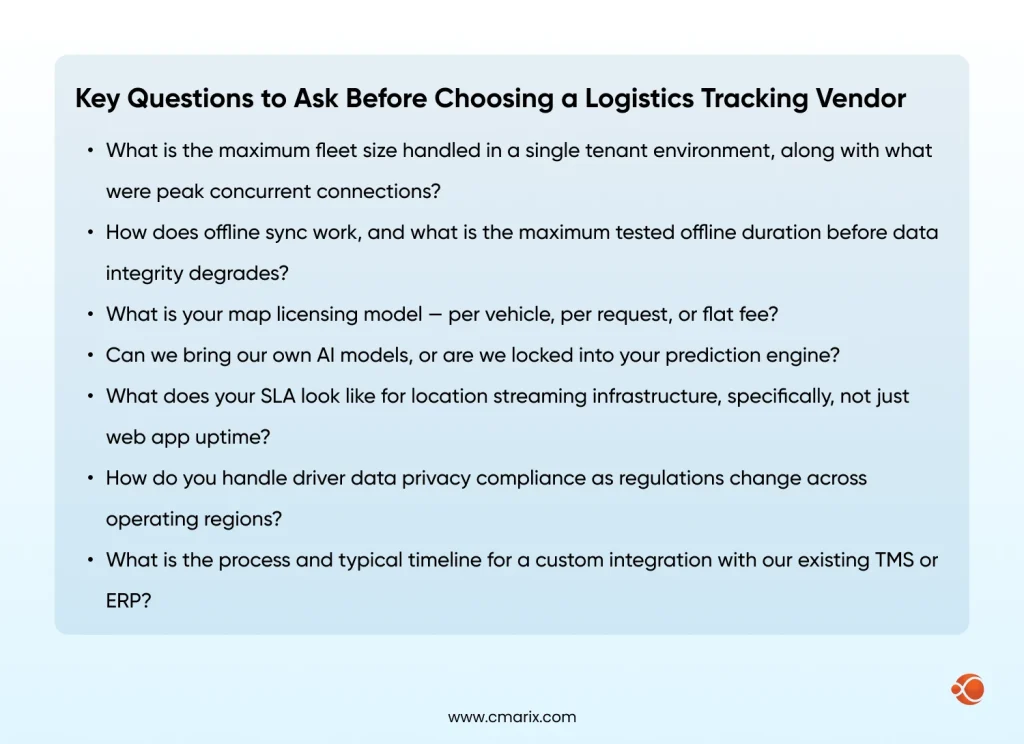
What ‘build’ actually Costs beyond Engineering Hours
- Licensing of the maps: Costs of the Google Maps service increase when usage exceeds 25,000 maps loaded daily; plan to spend between $8,000 and $30,000 yearly for an average-sized fleet of vehicles.
- App updates distribution: Supporting backward compatibility on multiple Android OS versions increases the maintenance cost by 15%-20%
- On-call system availability: Location streaming requires 24/7 system operation; hence, you need to consider notification, run books, and an on-call resource even at 2 AM!
- Compliance shift: Driver privacy regulations and data storage policies keep changing; thus, your application must support such changes without being refactored
These considerations are documented in research on responsible supply chain practices, which includes software infrastructure sustainability alongside environmental and social factors.
Build vs buy vs extend: a decision matrix
| Approach | Upfront Cost | Time to Production | Customization | Long-term Flexibility | Best For |
| Build | High | 6–18 months | Complete | High | Unique operational requirements |
| Buy (SaaS) | Low/Medium | 2–8 weeks | Limited | Low | Standard fleet operations |
| Extend | Medium | 2–4 months | High | Medium-High | Most growing fleets |
For most companies, Extend is the right answer. Start with a platform that handles commodity infrastructure — map rendering, basic tracking, mobile SDKs — and build your differentiation on top. This is how custom logistics software development delivers value without the full burden of building from scratch.
What to Do Next: Decision Checklist and Architecture Path
Is your team ready to build this? A practical checklist
- Flutter engineers with production mobile experience
- Backend developers comfortable with streaming infrastructure(WebSocket, Kafka, or MQTT)
- DevOps capacity to run and monitor location streaming services 24/7
- At least 60 days of historical fleet data if AI/ML components are in scope
- Map licensing budget confirmed and vendor agreements in place
- Data residency and data privacy requirements are documented and reviewed by legal
Three questions that determine your architecture path
Fleet under 100 vehicles with standard operations? A SaaS platform with minor customization will outperform a custom build on cost and time-to-value. Seriously consider buying.
Fleet over 100 vehicles with differentiated routing or proprietary integrations? The Extend model is almost always the right call. Look at developing custom fleet management software built on top of proven infrastructure rather than from scratch.
You need the full build path. The architecture in this guide is your starting point. Treat route optimization software as a core module from day one — routing quality is the biggest driver of retention in logistics SaaS.
Why Choose CMARIX for Your Logistics Tracking Project
The architecture in this guide is not theoretical; it reflects patterns our team has shipped in production. CMARIX has been building Flutter-powered enterprise and logistics applications since 2009, with 228+ in-house specialists delivering across 46 countries.
Our Flutter developers are Google-certified, and our track record spans 380+ mobile apps across healthcare, fintech, logistics, and enterprise, including fleets that run at the scale described in this guide. If you’re ready to move from blueprint to build, hire dedicated Flutter developers from CMARIX and get a team that’s already solved the hard problems.
Conclusion
Real-time logistics tracking with Flutter, done right, is built for production behavior, not demo behavior. MQTT for offline-resilient transport. BLoC for concurrent event streams. On-device TFLite for anomaly detection without connectivity. Delta-encoded payloads for bandwidth-constrained regions. Each decision has a reason rooted in real fleet operations.
Whether you are building a public transport tracking app, a private fleet tool, or layering Generative AI solutions onto existing logistics infrastructure, the fundamentals apply.
FAQ: Real-Time Logistics Tracking with Flutter
Can Flutter handle real-time GPS tracking for large fleets?
Yes, but with the right architecture. Flutter is good at the client level for hardware support, background location using Isolates, queuing with local storage, and payload data compression. The challenge is in scaling at the backend and map levels. A fleet size of 2,000+ vehicles is possible with the correct system architecture. For more significant fleet sizes, investigate the ideal way of designing fleets using Flutter.
What is the best state management for a Flutter logistics app?
BLoC is the strongest choice for logistics tracking. Its event-driven model handles concurrent streams — location, connectivity, geofence, sync queue — more cleanly than alternatives. The explicit state transitions also make production debugging significantly easier, and in logistics, something always goes wrong in production.
How does AI improve logistics tracking beyond basic GPS?
The first important aspect of AI-based predictive analytics in the supply chain is the ability to predict the arrival times, taking into account the driver’s habits and dwell times at the destination, the ability to optimize routes based on the demand for deliveries dynamically, and the identification of anomalies in the routes.
What is low-latency GPS data processing in a Flutter app?
Processing of GPS data with low latency implies that the interval from the time when the driver’s current location updates till the same reflects on the dispatcher’s computer screen is always below five seconds. This demands: Protobuf for binary serialization, real-time acquisition by devices, MQTT with Quality of Service level one, and stream processing at the back end.
Should I build or buy a logistics tracking system?
For most growing fleets, neither extreme is right. The Extend model delivers 80% of custom-built value at 30–40% of the cost and time. Full custom builds make sense when requirements are genuinely unique or when you are building a product, not internal tooling.