

Quick Summary: SaaS companies adopt MCP to connect AI agents to their entire tech stack via a single protocol, reducing integration complexity by 60-80%. MCP transforms how your AI interacts with databases, services, and APIs, giving you the speed advantage competitors lack. Discover how to implement MCP in your SaaS platform with our step-by-step guide.
The tech stack keeps getting complex, not simpler. And you must be juggling APIs, AI models, third-party tools, customer data platforms, and about fifteen different microservices just to make your app do what users expect.
And now there’s a new player in town called MCP or Model Context Protocol.
If you are running a SaaS business or building one, you’ve probably heard about MCP. Maybe you’ve seen it mentioned in developer communities or somewhere else. But what exactly is it? And more importantly, should you care? MCP is quietly becoming one of the most practical ways to connect AI systems, automate workflows, and build smarter SaaS products without reinventing every time.
This blog breaks down everything you need to know about SaaS companies adopting MCP, what it can do for your products, how it works, and whether it makes sense for your team to start using it.
What is MCP? A Simple Explanation
Let’s begin with the basics.
MCP stands for Model Context Protocol. It’s an open standard designed to allow AI models to communicate with external tools, services, and data sources consistently.
Think of it like this: If APIs are the language used by your software to talk to other software, MCP is the language your AI agents use to talk to everything else, like your CRM, database, and analytics dashboard, calendar, etc.
Before MCP, every time you wanted to connect an AI model to a new service or tool, you had to develop a custom integration. That meant writing specific code for each connection, managing data formats differently, and handling authentication separately each time.
MCP changes that; it gives developers a standardized way to let AI agents interact with external systems. One protocol, many connections.
How MCP Actually Works?
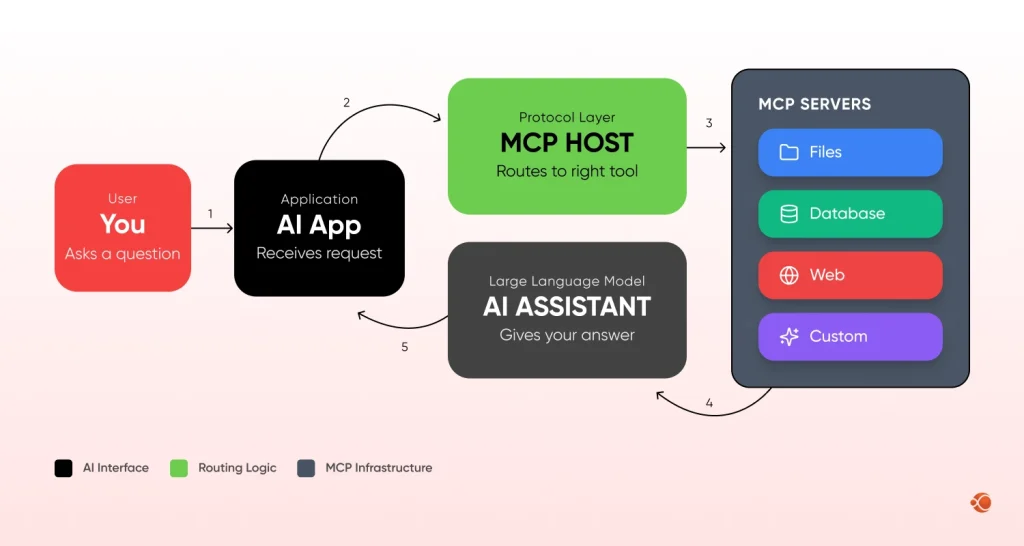
The diagram below shows the basic flow:
- Your AI sits at the top
- The MCP server acts as the middle layer
- All your services connect through it.
Rather than building 5 different integrations, you build one connection to MCP, and suddenly your AI can talk to everything.
How MCP Differs From Traditional Protocols or Frameworks
The traditional approaches typically include:
- REST APIs: Perfect for web services, but each integration is bespoke
- Custom SDKs: Vendor-specific, hard to maintain
- Webhooks: Good for events, not two-way conversations
- GraphQL: Flexible, but still requires custom setup per service
MCP is different as it is particularly built for AI agents. When an AI model wants to perform an action, like checking a calendar or pulling customer data, it needs to understand what’s available, what format to use, and what permissions it has. The Model Context Protocol API handles all of that through a single interface.
Why is MCP Gaining Attention in SaaS?
The sudden interest in MCP isn’t random; it’s a direct response to the evolution of SaaS products. Here’s what’s driving the momentum:
- AI is no longer optional: Over 70% of SaaS companies incorporate AI into their products. Recommendation engines, Chatbots, Predictive Analytics, and AI features are becoming a cost-of-entry, not differentiators.
- Integration complexity is killing velocity: In most cases, previous approaches meant developing individual custom integrations for each service your AI needs to interact with. Each new feature means weeks of development, integration, and testing.
- Data silos are blocking AI potential: Your chatbot can’t access billing data. Your analytics AI can’t pull from your CRM without custom code. Your automation tool doesn’t know about support tickets. The AI exists, but it’s blind to most of your data.
- Developer Time Is Too Expensive to Waste: Developers dedicate 30-40% of their development time to integration tasks rather than implementing core functionality. Such a practice is not feasible when development speed is crucial to stay competitive.
- Security and Compliance are Tightening: Managing different keys and credentials within your project can be a nightmare. Enterprises need to have central controls over what AI systems have access to and understand all the actions taken by AI systems.
For SaaS companies racing to ship AI features while managing technical debt and security requirements, that’s not just convenient, it’s transformative. Companies adopting MCP now are seeing 60-80% reductions in integration complexity, which translates directly into faster shipping cycles and lower engineering costs.
Collaborate with our AI experts to implement scalable, context-aware, and performance-driven MCP architecture for your SaaS platform.
Contact UsHow MCP Works in a SaaS Environment
MCP Architecture and Key Components
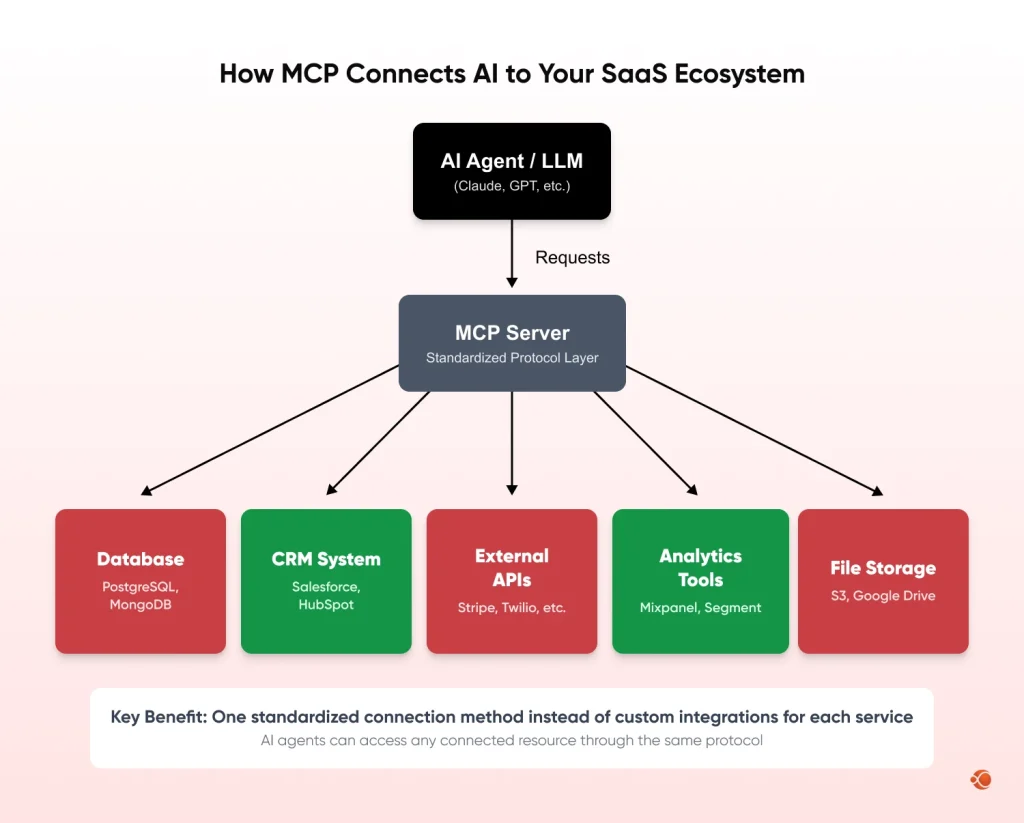
An MCP server SaaS setup usually includes three main components:
- The Client- Your AI model or agent (Ex, Claude, GPT-4, or your own LLM)
- The MCP Server- The middleware handling communication between AI and external resources
- The Resources- Your databases, APIs, file systems, or any services the AI needs
When your AI wants to, say, “pull up a customer’s order history”, it would send a request to the MCP server. The server would know which resources to hit, handle authentication, format the request properly, and send back the data in a format understood by the AI.
How MCP Connects Services, APIs, and AI agents
Setting up MCP looks like this:
- You install an MCP server (open-source options available).
- You configure it to connect with your services, that is, maybe a PostgreSQL database, Stripe APIs, or Slack workspace. Each connection is called a ‘Resource’.
- Once configured, your AI agent can call these resources without knowing the specifics of how Stripe’s API works versus Postgres’s query language. The MCP server abstracts all that complexity.
Role of MCP in Real-Time Communication and Orchestration
One area where MCP shines is real-time workflows.
For instance, you’re building an AI-powered customer support platform. A customer messages your chatbot asking about their subscription.
With MCP:
- The AI receives the message
- It queries your billing system through MCP
- It checks your CRM for recent interactions
- It pulls the support ticket history
- It drafts a response with all that context
- It needed, it triggers actions, like issuing a refund, all through the same protocol
All of this happens in seconds, without custom integration code for each step. That’s the power of SaaS AI integration with MCP.
Key Benefits of MCP for SaaS Businesses
Improved Scalability
When you’re building a SaaS product, you’re always adding features. With traditional approaches, each addition means more custom code, more maintenance, more potential breaking points.
MCP flips that, once your MCP server is set up, adding capabilities is way easier. Need to connect a new analytics tool? Just add it as a resource. This is especially helpful if you’re working with artificial intelligence software development services. Instead of spending weeks on each integration, you ship faster.
Reduced Operation Cost
MCP helps in maintaining one protocol layer instead of dozens of point-to-point connections. When a third-party API changes, you update the MCP resource config, not your entire application.
For smaller teams, this can mean spending 10% of engineering time on integration versus 40%. That’s huge.
Better Data Security
MCP can actually improve your security posture by centralizing authentication and access control. Instead of scattering API keys across your codebase, you manage them in one place-the MCP server.
In case of the requirement to remove access rights to any particular service, it is done just one time in the MCP setup, not by modifying fifteen different files. For enterprise SaaS solutions, this is important. Data governance consulting and compliance become much easier when using the centralized protocol for managing AI interactions.
Faster Product Development
One of the biggest MCP benefits for SaaS teams is development velocity. When your engineers don’t have to spend time building custom integration, they can focus on actual product logic.
Companies that hire AI developers often find that MCP dramatically reduces the time from idea to production.
MCP vs Traditional SaaS Architectures: Comparative Table
The comparison table shows how MCP shifts your architecture from “custom everything” to “configure once, use everywhere.” That’s a game-changer for teams trying to move fast
| Aspect | Traditional SaaS Architecture | MCP-Based Architecture |
| Integration Approach |
|
|
| Development Time | Each new integration requires dedicated development effort, testing, and documentation. Timelines increase as more services are added. | New services can be added primarily through configuration. Minimal custom code is required, reducing development cycles significantly. |
| Maintenance Burden |
|
|
| Scalability |
|
|
| Security & Access Control | Credentials and API keys are often scattered throughout the codebase, making audits and centralized access management more challenging. | Centralized authentication and permission management allow better governance, clearer audit trails, and improved compliance control. |
| AI Agent Flexibility |
|
|
| Error Handling | Different integrations return different error formats, creating inconsistent debugging and slower issue resolution. |
|
| Team Onboarding |
|
|
| Cost |
|
|
| Real-Time Orchestration |
| Built specifically for AI workflows, enabling seamless coordination between multiple resources in real time. |
| Vendor Lock-In |
|
|
| Best For | Simple applications with limited integrations, especially when teams prefer managing custom integration logic directly. | AI-driven SaaS platforms that rely on multiple external services and prioritize speed, flexibility, and scalability. |
What are the MCP Use Cases for SaaS Products
AI-powered Customer Support Platforms
Modern support platforms need to pull customer data from your CRM, access previous tickets, check order history, send notifications, and update records in real-time. Companies building SaaS app development services are using MCP to power intelligent support bots. The AI can do everything it needs, make informed decisions, and take actions, all through one protocol.
Workflow Automation Tools
You can build an MCP agentic AI system that doesn’t just follow predefined rules; it makes decisions based on context. For instance: Instead of “when a payment fails, send an email,” you have “when a payment fails, check the customer’s history, if they’re high-value and either retry automatically, send a personalized email, or alert the sales team.”
Developer Tools and Integrations
An AI-powered code review tool using MCP could access your Git repository, check past comments, pull relevant documentation, query your issue tracker, and suggest improvements, all without custom connectors for GitHub, Jira, GitLab, and Confluence.
Analytics and Data Processing Platforms
Modern analytics platforms answer questions in natural language. Your analytics AI can query your data warehouse, check CRM data, pull metrics from your product analytics tool, and synthesize everything. This is what teams working on build AI SaaS products are doing right now.
How SaaS Companies Can Get Started with MCP
When you’re ready to explore this technology, the path forward is more straightforward than you might think. Here’s how SaaS companies adopt MCP in practice.
Assessing Readiness and Use Cases
Ask yourself:
- Do you have AI features that need to interact with multiple services?
- Do you want your AI to perform actions, not just answer questions?
- Are you spending significant time on custom integrations?
If your answer is yes to at least two, MCP is worth exploring.
Start by identifying one or two high-impact use cases. Pick something specific, maybe your customer support bot.
Choosing the Right MCP Tools or Platforms
There are open-source MCP implementations you can use. And if you’re working with a team that provides generative AI integration services, they can help you evaluate which MCP setup fits your architecture.
You’ll want to consider:
- What programming language is your team comfortable with
- Which services do you need to connect
- Whether you need on-premise or cloud hosting
- What are your security and compliance requirements are
- Implementation Steps and Best Practices
Here’s a practical path forward:
- Step-1: Set Up a Test Environment- Don’t experiment in production. Spin up a dev environment where you can safely test MCP connections.
- Step-2: Connect One Service- Start simple. Maybe connect your PostgreSQL database or a simple REST API. Get the basic MCP flow working.
- Step-3: Build a Proof of Concept- Create a minimal AI feature that uses MCP. This could be as simple as an AI that can query your customer database and return results. If you’re considering AI proof of concept development services, they can help you validate the approach quickly.
- Step-4: Add More Resources – Once the POC works, gradually add more connections. Your CRM, your analytics tool, your notifications system.
- Step-5: Monitor and Optimize- Watch how your MCP server performs. Look for bottlenecks, errors, or slow connections. Optimize as needed.
Best Practices:
- Use environment variables for sensitive credentials
- Document your MCP resource configurations clearly
- Implement proper error logging
- Set up monitoring and alerts
- Version control your MCP configs just like your code
Testing, Deployment, and Monitoring
Before going live, test thoroughly:
- Load testing: Can your MCP server handle production traffic?
- Security testing: Are credentials properly protected?
- Failure scenarios: What happens if a connected service goes down?
Monitor everything. You want to know:
- Response times for MCP requests
- Which resources are being used most
- Error rates for different resources
- Any security or access issues
Most importantly, get feedback from your team. Are developers finding MCP easier to work with? Are they shipping features faster?
Common Challenges and How to Overcome Them
Learning Curve and Skill Gaps
MCP is relatively new, so your team might not be familiar with it yet.
Solution: Start with documentation, schedule team learning sessions. Work with a team that hire SaaS developers with MCP experience.
Integration with Existing Systems
You probably already have a bunch of custom integrations. Migrating everything to MCP at once isn’t realistic.
Solution: Run MCP alongside existing integrations. Use MCP for new features while keeping legacy integrations running.
Performance and Reliability Concerns
Adding a protocol layer means adding another potential point of failure. What if the MCP server goes down?
Solution: Treat your MCP server like critical infrastructure. Use load balancing, health checks, redundancy, caching, and circuit breakers.
Governance and Security Risks
Giving an AI agent access to various systems sounds risky, right?
Solution: Implement proper access controls. Use the principle of least privilege, audit AI actions, and implement rate limiting. Teams specializing in build an agentic SaaS platform understand these concerns deeply.
Future of MCP in SaaS Platforms
- Growing Role of AI Agents and Automation: We’re moving from “AI as a feature” to “AI as infrastructure.” Most SaaS products will have AI agents helping users get work done. These agents will need to take action and coordinate across multiple systems. MCP is positioned to be the standard. Understanding why SaaS companies adopt MCP at an earlier stage gives competitive advantage.
- MCP’s Impact on SaaS Architecture Trends: Instead of monolithic applications, might see modular architecture where AI agents orchestrate between specialized services.
- Expected Industry Adoption and Innovation: As more model context protocol SaaS benefits become obvious, adoption will accelerate. Within a few years, having MCP support might become standard, as REST APIs are today.
Why Choose CMARIX for MCP Adoption
If you’re serious about implementing MCP in your SaaS product, you’ll want a partner who gets both the technical and the details and the business implications. CMARIX has worked with SaaS companies on AI integration, automation, and developing intelligent platforms. We understand what it takes to actually ship these features, not just talk about them.
CMARIX can meet you where you are. We’ve helped companies go from “we’re curious about how MCP works” to “we’re shipping AI-powered features faster than ever.” The development team knows how to balance moving fast with developing things right. We won’t over-engineer your solution, but we also won’t cut corners that’ll bite you later.
Final Thoughts
If you’re building AI features into a SaaS product, MCP deserves your attention. It won’t solve every problem. But it can dramatically improve how your AI agents interact with the rest of your tech stack. In SaaS, simpler usually means faster, cheaper, and more maintainable.
Should every SaaS company adopt MCP tomorrow? No. But should you have it on your roadmap? Probably yes. The companies that will win are the ones that can ship AI features quickly and reliably. MCP for SaaS might be one of the tools that help you do that.
FAQs on Why SaaS Companies Should Adopt MCP
What is MCP, and why does SaaS need it?
Model context protocol is a standardized way for AI models to interact with external services and data sources. SaaS businesses need it because it simplifies how AI agents connect to APIs, databases, and tools, reducing development time and maintenance overhead while allowing smarter AI features.
How does MCP improve AI interactions in SaaS products?
MCP gives a consistent interface for AI agents to access different services, meaning your artificial intelligence can query databases, pull any information from multiple sources, and trigger actions. This makes AI interactions more reliable and easier to expand without custom code for each integration.
What are the key benefits of adopting MCP for SaaS companies?
The key benefits include reduced integration costs, better scalability, faster development time, centralized security and access control, and the ability to ship AI-powered features without developing custom connectors for every service.
Is MCP secure for enterprise-level SaaS applications?
Yes, when implemented properly. MCP supports centralized authentication, audit logging, and fine-grained permissions. By consolidating access control in one place, MCP can improve security posture compared to traditional approaches.
Can MCP adoption reduce development time and costs?
Yes, companies report a 60-80% reduction in integration complexity after adopting MCP. Instead of spending weeks developing custom connections, developers configure resources once and reuse them across features, translating directly to lower engineering costs and faster time-to-market.